
Inside fx: How Vercel’s Zig-Based Coding Agent Operates in the CLI
🚀 Key Takeaways
- Native Sub-8 MiB Footprint: Engineered in Zig,
fxcompiles ahead-of-time into a standalone binary that bypasses heavy virtual machines and runtime dependencies. - Unix-First CLI Integration: Avoids full-screen terminal takeovers by streaming directly into standard shell scrollback while preserving native multiplexer bindings and shell environments.
- Provider Independence: Interfaces seamlessly with cloud backends through the Vercel AI Gateway alongside zero-proxy local authentication for proprietary models and custom local endpoints.
- Deterministic State and Compaction: Manages session lifecycles on disk with resilient recovery tools and automatic context window compaction during extended coding workflows.
- Standardized Tool Interoperability: Ingests modular markdown skills on demand and implements Model Context Protocol clients for local and remote server interactions.
- Cross-Platform Embeddability: Extends beyond terminal shells through
libfx, delivering native Node.js addons and experimental WebAssembly harnesses for browser environments.
Developer tooling has steadily drifted toward heavyweight runtimes, leaving terminal workflows encumbered by resource-intensive electron shells and sluggish startup latencies. Vercel Labs introduced
Rather than treating the terminal as an interactive canvas to dominate,
As AI assisted workflows shift from isolated web chats toward integrated systems programming and browser-embedded sandboxes, understanding how
fx to fundamentally challenge that bloat, applying systems-level compilation in Zig to construct a fast, minimalist agent harness designed to fit neatly inside modern command-line and embedded developer environments.Rather than treating the terminal as an interactive canvas to dominate,
fx adheres strictly to traditional Unix sensibilities by printing outputs directly into standard scrollback and inheriting user shell semantics. Underneath this lean exterior sits a capable architecture that reconciles high-speed inference, rigorous context compaction, dynamic tool execution, and local-first session checkpoints without demanding heavy system overhead.As AI assisted workflows shift from isolated web chats toward integrated systems programming and browser-embedded sandboxes, understanding how
fx balances native execution with cross-runtime portability has become essential for engineers seeking lean, resilient developer tooling.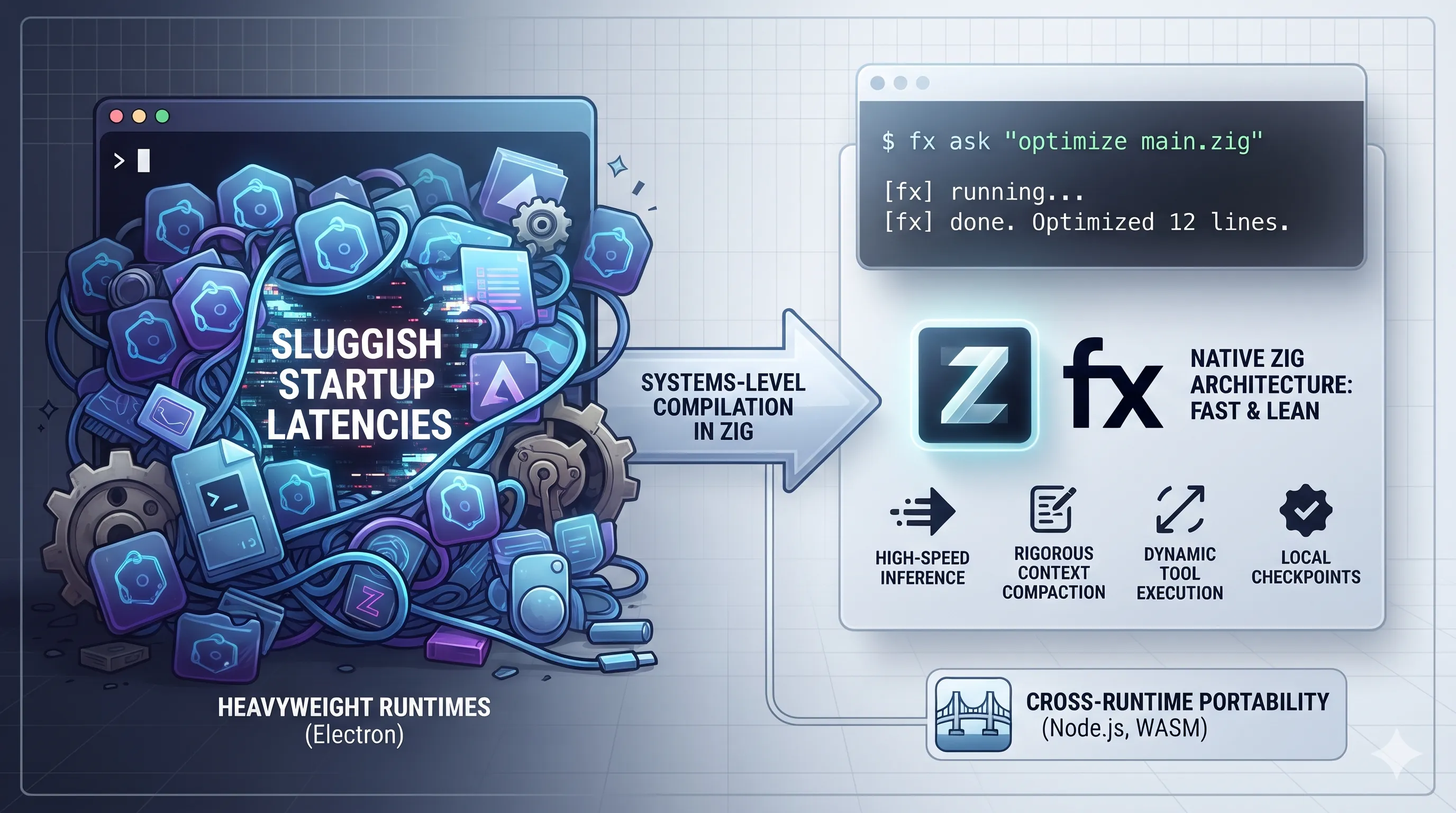
1. Native Zig Architecture and Binary Performance Benchmarks
Understanding the foundational runtime of fx is essential to grasping how a Zig-based coding agent operates reliably within high-throughput CLI and resource-constrained embedded environments.Rather than relying on heavy interpreted runtimes or virtual machines, fx functions as a standalone, native tool developed by Vercel Labs and open-sourced on August 17, 2026, under the Apache-2.0 license.
Built as an experimental coding agent harness within the v0.0.x project series, breaking changes remain expected prior to a 1.0 milestone.
The architectural foundation of fx is guided directly by three core product principles defined by Vercel Labs: fast, light, and open.
To satisfy these tenets, the agent uses ahead-of-time (AOT) compilation to achieve minimal system overhead without requiring any external language runtime or dependencies.
The distribution model relies on a single native binary compiled for macOS and Linux systems across both x86_64 and arm64 CPU architectures.
By default, the standard installer deploys this standalone executable directly into
~/.local/bin.A notable platform limitation is that fx provides no native Windows CLI release, focusing engineering efforts strictly on Unix-like POSIX-compliant environments.
Single-Binary Footprint and CI Size Qualification Gates
Because embedded deployments and responsive CLI utilities demand strict storage boundaries, the fx engineering pipeline tightly controls binary bloat.During its initial public release, the single compiled binary shipped with an uncompressed footprint between 6.3 MiB and 6.39 MiB.
As the tool expanded its harness capabilities, the project repository README tracked the binary footprint at approximately 7.8 MiB.
To guarantee that the executable does not inadvertently expand during iterative development, the automated CI pipeline applies aggressive size qualification gates.
The continuous integration test suite enforces a hard production ceiling of 7.800 MiB on macOS arm64 Profile-Guided Size Optimization (PGSO) release qualifications.
Furthermore, automated alerts flag pull requests whenever an incoming change introduces a binary-size growth of 0.05 MiB or greater.
| Architectural Parameter | Specification / Metric | Enforcement & Environment Details |
|---|---|---|
| Source Language Requirements | Zig 0.16+ (Zig 0.17.0 in contributing docs) | Source-level builds without external dependencies |
| Initial Launch Binary Size | 6.3 MiB to 6.39 MiB | Single native binary release |
| Current Binary Footprint | Approximately 7.8 MiB | Reported in official repository documentation |
| CI Production Ceiling | 7.800 MiB limit | Hard gate on macOS arm64 PGSO release qualification |
| CI Growth Warning Threshold | 0.05 MiB increase | Triggers automated size regression warnings on pull requests |
| CLI Latency Benchmark Gate | Sub-2 ms execution threshold | Fails Linux PRs if commands (e.g., fx help, fx status --json) exceed limit |
| Target Execution Latency | ~10 microseconds | Cold start time to accept input prior to terminal initialization |
| Runtime Memory Baseline | Single-digit megabytes | Minimal operating baseline for CLI and embedded tasks |
| Platform Support Tier | macOS & Linux (x86_64, arm64) | Installs to ~/.local/bin; no native Windows CLI release |
Microsecond Cold Starts and Memory Efficiency in Zig
The structural choice of Zig directly eliminates runtime garbage collection pauses and JIT compilation overhead, ensuring deterministic responsiveness.fx achieves a cold start latency of approximately 10 microseconds, measured as the elapsed time required to accept input prior to complete terminal initialization.
This near-instant startup allows the agent to be embedded transparently into command prompts, hooks, and automated scripts without introducing perceptible lag.
Alongside instant initialization, fx maintains a single-digit-megabyte baseline memory footprint during active execution.
To maintain this performance standard across every commit, automated Linux CI pipelines benchmark routine operations against strict execution time budgets.
Pull requests fail automated verification on Linux if core non-interactive commands—such as
fx help or fx status --json—exceed an execution duration of 2 ms.Source Compilation and Maintenance via Zig Toolchain
Engineers compiling the harness directly from source must use the native Zig toolchain, requiring Zig version 0.16 or higher.The project repository contributing guidelines specifically reference Zig 0.17.0 for development workflows.
When validating source modifications, developers run the embedded unit test suite across the codebase.
To run unit tests during a source build with Zig, execute the standard build command:
zig build testFor engineers deploying the pre-compiled binary, fx includes automated background update checking to maintain parity with ongoing experimental updates.
When an update is flagged or an operational refresh is required, the CLI can be updated without reinstalling the harness from scratch.
To upgrade the fx CLI to the latest release, issue the native maintenance command:
fx upgrade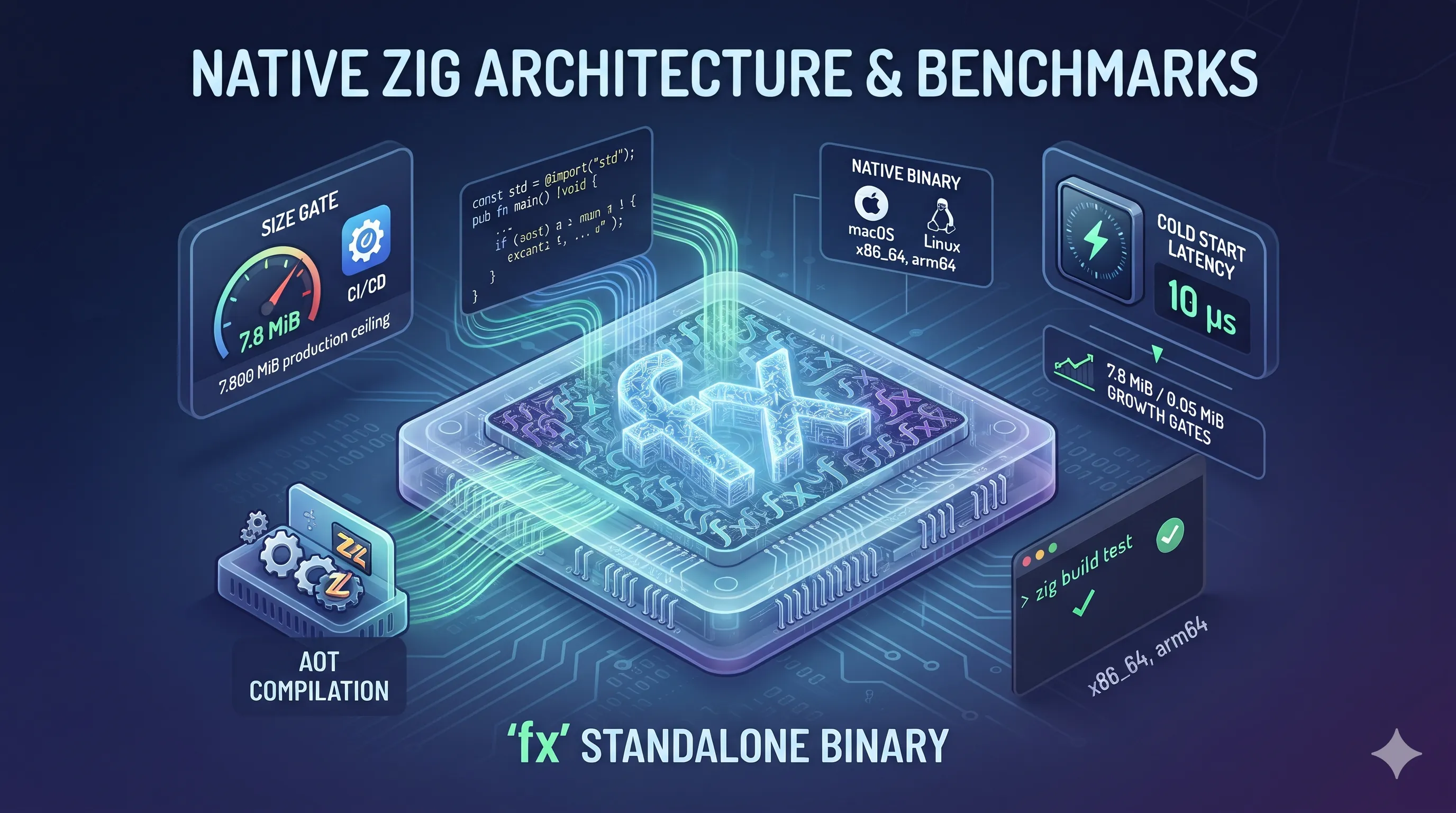
2. Terminal Scrollback Integration and Execution Tool Surface
Within the broader architecture of fx—a lightweight, Zig-based coding agent tailored for resource-conscious command-line interface (CLI) and embedded environments—the interface layer directly determines how non-intrusively the agent operates inside existing developer workflows.Rather than erecting an abstracted, full-screen graphical wrapper or terminal user interface (TUI) that hijacks the session, fx embeds itself cleanly into existing Unix command-line routines.
Inline Terminal Mechanics and Shell Environment Caching
As the fx GitHub README notes: "Its output is closer to a Unix shell than an IDE, because the conversation prints into your terminal's scrollback instead of filling the screen."By printing conversation output inline directly into the standard terminal scrollback rather than initializing an alternate screen buffer, the agent preserves essential terminal capabilities.
Users maintain unhindered access to native terminal scrollback buffers, text search, custom copy modes, and multiplexer keybindings such as those in tmux.
To keep terminal emulators synchronized with background activities, fx supports the Program Status Protocol, signaling busy or waiting states directly to compatible terminal multiplexers and windows.
When executing automation steps, fx runs commands directly within the user's configured login shell.
This guarantees full inheritance of the user's environment, including custom
PATH entries, shell aliases, and user-defined shell functions.To eliminate startup latency caused by heavy initialization scripts (such as complex
.zshrc routines), fx runs shell startup files once and caches the resulting environment.This cached snapshot is maintained until the underlying shell startup files change, avoiding repetitive environment-evaluation lag across sequential command calls.
Furthermore, fx injects the environment variable
AI_AGENT=fx into each spawned execution context, enabling external developer toolchains, wrappers, and build scripts to detect when fx is orchestrating execution.However, operators should note a naming collision: the name
fx collides with a pre-existing terminal JSON viewer of the same name and its corresponding Homebrew formula, an issue currently undergoing coexistence review.Tool Execution Lifecycle: Run, Interact, and Output Spillover
The tool surface exposed by fx contains built-in facilities to inspect files, edit files, search the web, fetch URLs, and manage shell commands.Instead of running commands as unmonitored fire-and-forget subprocesses, fx establishes a deterministic three-stage lifecycle for shell orchestration:
| Tool Stage / Primitive | Functional Role | Context & Resource Impact |
|---|---|---|
| run | Initiates the specified shell command inside the inherited login environment. | Launches execution with AI_AGENT=fx injected. |
| interact | Reads streaming command output and sends input signals or data to the active process. | Allows conversational control over interactive CLI prompts and processes. |
| stop | Terminates the executing command subprocess. | Ensures clean process teardown when targets complete or become unresponsive. |
| read_tool_result | Retrieves spilled tool outputs on demand. | Prevents long command outputs from overflowing the immediate prompt context. |
fx resolves this by keeping long tool outputs outside the immediate active model prompt context.
The agent runtime stages this data separately, using the
read_tool_result mechanism to page in sections of the captured output strictly when necessary.Multimodal Asset Ingestion and Headless CLI Operations
For multimodal workflows, fx incorporates image attachment support for PNG, JPEG, GIF, and WebP formats, supporting assets up to 20 MiB each.When running against vision-capable models, fx passes image inputs natively.
If the selected target model lacks native visual capabilities, fx invokes a built-in vision fallback mechanism to parse and describe visual content before ingestion.
For continuous integration (CI) workflows, system bootstrapping, or automated shell scripts, fx provides structured headless operation.
Engineers can execute headless one-off prompts with structured JSON output for use in automated pipelines:
fx ask --json "explain the main function in main.zig"final_output directly to stdout while routing diagnostic telemetry and logs to stderr.This separation allows automation scripts to parse standard output with tools like
jq without corrupting streams with diagnostic messages.To inspect local system health, configuration settings, and runtime readiness without triggering environment state changes, administrators use the diagnostic command:
fx doctor --json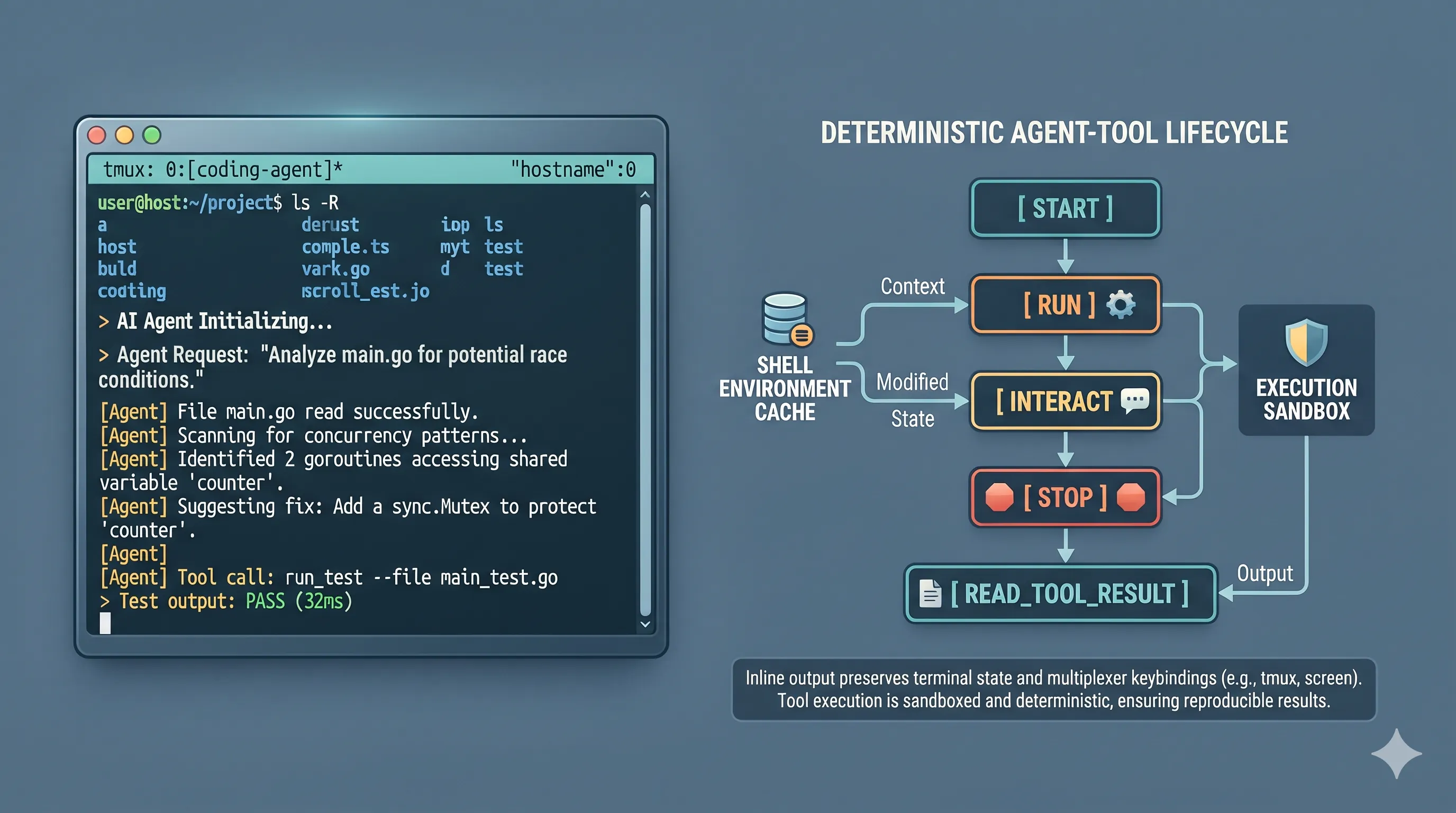
3. Model Agnostic Routing, Direct Subscriptions, and Configuration Schema
In the context of fx: How a Zig-Based Coding Agent Works in CLI and Embedded Environments, inference dispatch and configuration handling must remain exceptionally lean and strictly partitioned.Because fx operates within resource-constrained CLI terminals and embedded environments, its backend routing architecture abstracts external LLM services without burdening the host runtime with heavy dependency overhead.
Vercel AI Gateway and Direct Provider Subscription Auth
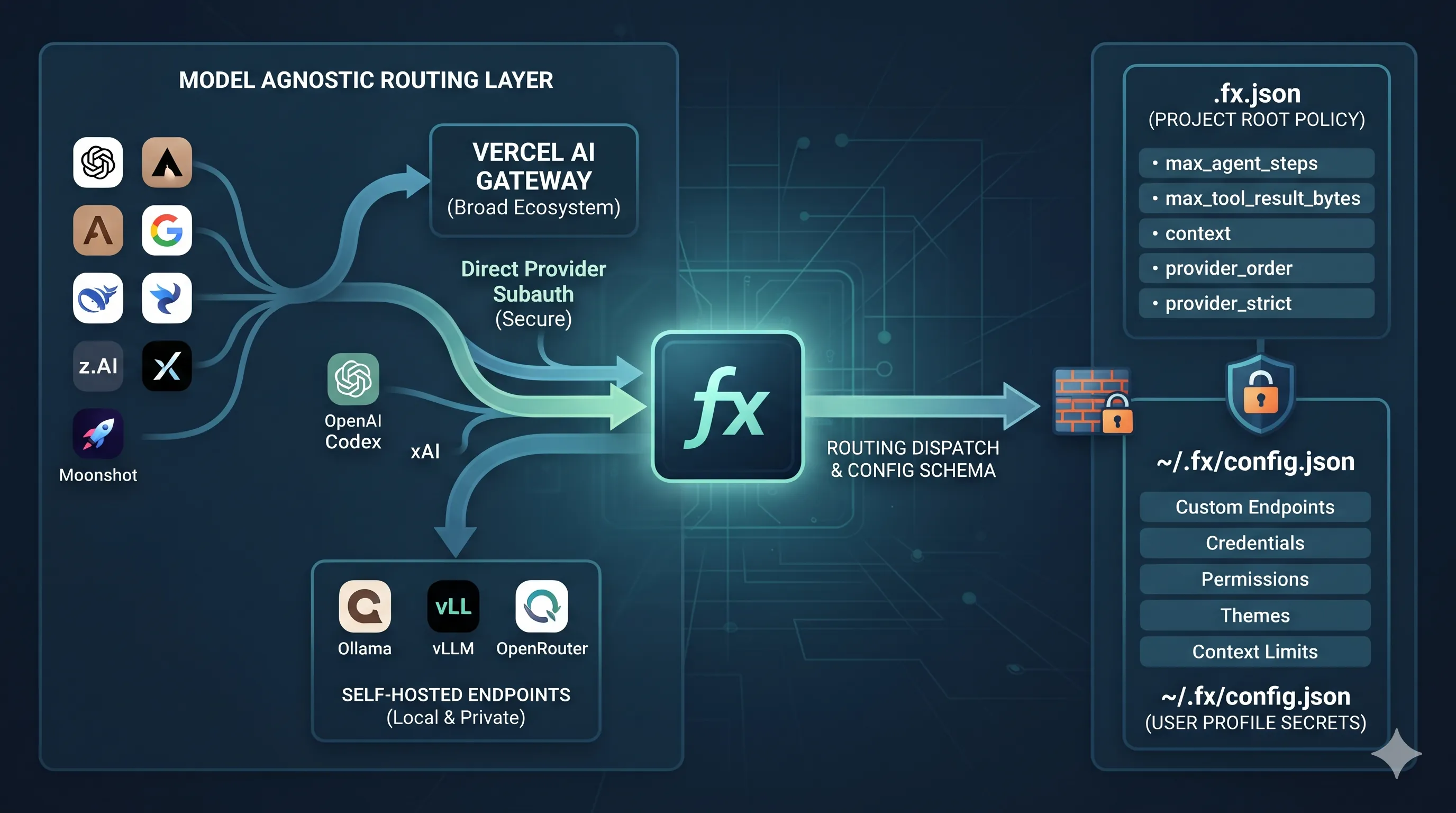
At its core, fx implements model-agnostic backend routing powered by the Vercel AI Gateway.This routing layer offers broad ecosystem reach out of the box, supporting models from OpenAI, Anthropic, Google, DeepSeek, z.AI, Moonshot, and others.
During the agent's initial rollout, early user reports noted that first-run setup initially guided inference workflows directly through the Vercel AI Gateway.
Early feedback also noted that GLM 5.2 was available for free through a free Vercel account when interacting via fx.
Subsequent updates extended inference performance, such as Release 0.0.13, which introduced Ultrafast mode on supported OpenAI models on October 4.
Crucially for security-conscious enterprise environments and local CLI workflows, the engine also provides direct local subscription authentication support for OpenAI Codex and xAI Grok.
This mechanism bypasses intermediary proxies entirely, preventing credentials from being routed or proxied through Vercel servers.
Developers with existing provider seats can authenticate directly from the machine, keeping API tokens and direct requests localized entirely to provider-owned infrastructure.
Self-Hosted Endpoints and Named Connection Profiles
To accommodate offline setups, private VPCs, and specialized local setups, Release 0.0.11 added named OpenAI-compatible connection configurations.This update allows fx to interface with custom local and self-hosted OpenAI-compatible Chat Completions endpoints, including Ollama, vLLM, and OpenRouter.
Engineers working in air-gapped or embedded developer environments can target local instances of inference runtimes without modifying upstream source code.
These custom endpoint connections are explicitly classified and treated as preview features.
To prevent infrastructure leakage, these connections are stored exclusively in the global user profile on the machine rather than inside repository-level configuration files.
Telemetry and budgeting run locally as well: local usage tracking records request counts, tokens, estimated spend, and granular model breakdowns directly on the host machine without external reporting mandates.
Project Configuration Boundaries via .fx.json
Project-level policy within fx is enforced strictly through the.fx.json file located at the repository root.To ensure security isolation and prevent untrusted codebases from hijacking local execution, repository-level configuration is deliberately constrained.
Project
.fx.json files accept exactly five public fields: max_agent_steps, max_tool_result_bytes, context, provider_order, and provider_strict.Under this boundary, project
.fx.json files cannot define custom model endpoints, credentials, permission settings, themes, or context limits.Such parameters are strictly delegated to local user profiles, shielding teams from credential theft or unintended endpoint overrides when checking out public or shared repositories.
| Configuration Key | Configuration Scope | Engine Behavior and Boundary Enforcement |
|---|---|---|
| max_agent_steps | Project (.fx.json) |
Sets the maximum execution steps the agent loop can execute per task run. |
| max_tool_result_bytes | Project (.fx.json) |
Limits the byte size of tool outputs returned to the context buffer. |
| context | Project (.fx.json) |
Defines project-specific context parameters permissible for repository tasks. |
| provider_order | Project (.fx.json) |
Specifies the priority fallback order across supported model backends. |
| provider_strict | Project (.fx.json) |
Enforces strict adherence to defined providers without unapproved fallback. |
| Custom Endpoints & Credentials | User Profile Only | Restricted from .fx.json; handles Ollama, vLLM, OpenRouter, and API keys locally. |
| Permissions, Themes & Context Limits | User Profile Only | Restricted from .fx.json; prevents repositories from altering runtime security or styling. |
4. Session Persistence, Context Compaction, and Safety Engines
In the architecture of fx, executing complex coding tasks across resource-constrained CLI and embedded environments depends on reliable session state, memory efficiency, and rigorous security boundaries.Operating directly in local repositories requires that the agent maintain continuity across crashes, manage finite context windows without losing history, and enforce strict execution guardrails against untrusted input.
Disk-Based Checkpoints and Transcript Compaction
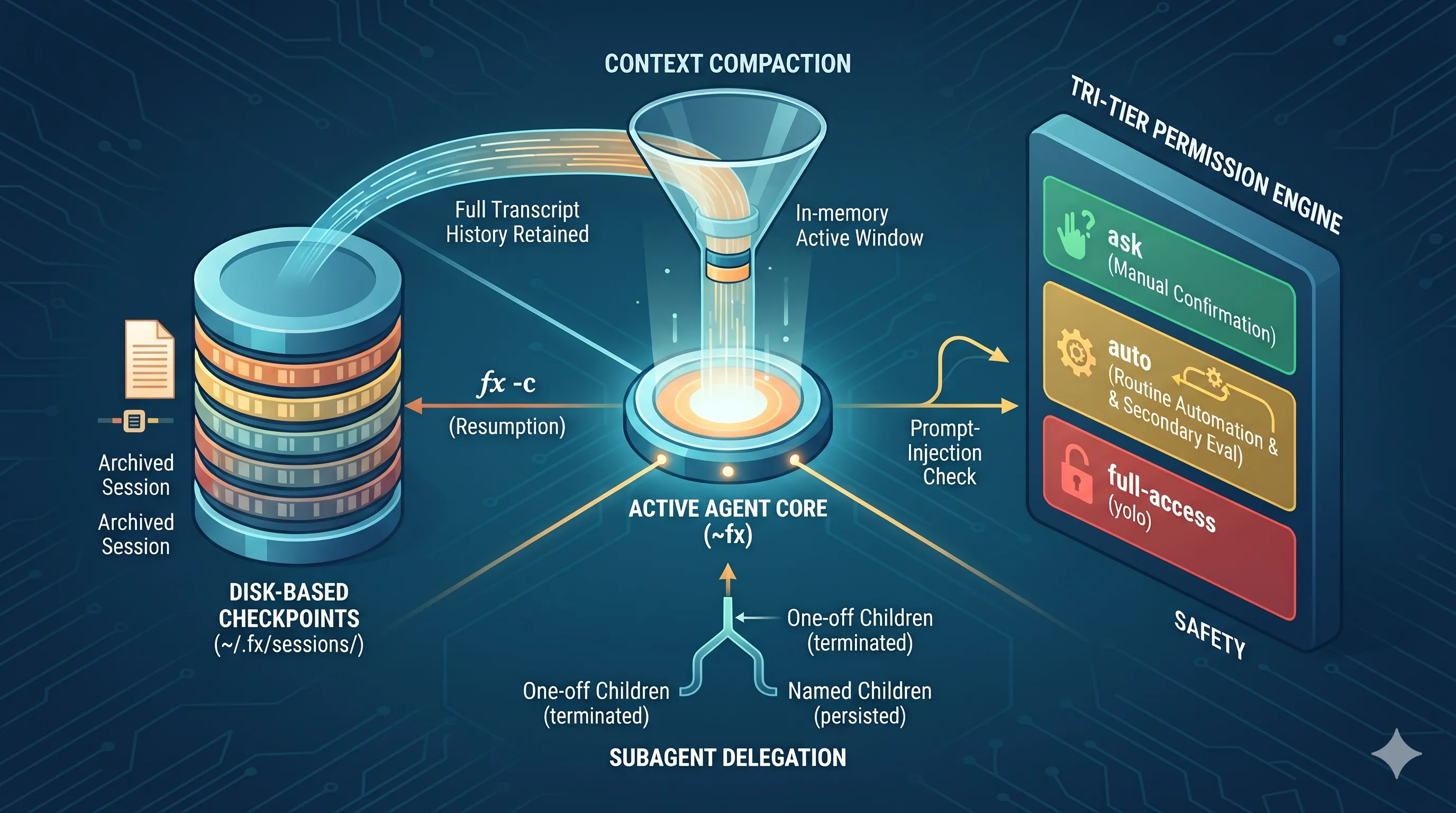
Every conversation turn and operational state in fx is persisted locally on disk under the directory~/.fx/sessions/.By storing session artifacts in this centralized directory, fx ensures that state persistence remains independent of volatile memory spaces.
Starting in release 0.0.13, the underlying libfx checkpoint serialization format was updated, meaning newly written libfx checkpoints created in release 0.0.13 cannot be restored by earlier versions.
When managing active development sessions within a working tree, engineers frequently need to restore their previous context after closing a terminal or pausing development.
To resume an existing conversation session within the active repository, the
-c flag allows the user to re-attach to the saved session history without re-initializing the workspace.fx -cfx -c picks up where the user left off in the project's saved session history.Beyond using
fx -c to resume active project sessions, users can also resume work by targeting a specific session ID.To handle system disruptions and API timeouts, the session recovery engine retries transient model failures automatically.
If a session file becomes corrupted or unreadable, the command
fx session recover copies damaged sessions into recoverable states, ensuring that historical context can be salvaged without manually parsing damaged files.As conversations expand, token limits impose strict boundaries on the language model's active window.
The context compaction algorithm monitors token growth and reduces older interaction turns when approaching window limits.
Crucially, while in-memory prompts are trimmed to prevent context-length overflow, fx retains the full transcript history on disk under
~/.fx/sessions/, allowing deep forensic review and full auditability.Tri-Tier Permission Engine and Prompt-Injection Verification
Because fx performs filesystem operations and shell executions directly on the host system, it implements a tri-tier permission engine configured through three primary modes: ask, auto, and full-access (for which the legacy alias yolo remains compatible).| Permission Mode | Execution Mechanics | Security & Token Trade-offs |
|---|---|---|
| ask | Prompts user confirmation before executing actions. | Provides complete interactive control over tool invocations. |
| auto | Executes routine actions automatically; submits sensitive tasks to secondary model evaluation. | Protects against prompt injections, but automatic permission reviews can trigger additional model calls and consume extra tokens. |
| full-access (alias: yolo) | Invoked via process flag --full-access; bypasses confirmation and security checks. |
Completely disables safety reviews and permission gates for trusted environments. |
However, whenever sensitive or high-risk actions are initiated, fx subjects the proposed command to a secondary model evaluation designed specifically to detect prompt injections and malicious instructions embedded in codebase content.
While this dual-check mechanism prevents hijacked workflows, automatic permission reviews in auto mode can trigger additional model calls and consume extra tokens.
In sandboxed, automated, or fully trusted developer setups, passing the process flag
--full-access completely disables safety reviews and permission gates.Subagent Task Delegation and Permission Inheritance
To prevent complex sub-tasks from cluttering primary context windows, fx isolates distinct operations by delegating them to subagents.Subagents run tasks inside child conversations, which diverge into two distinct behavioral patterns based on task scope:
One-off children execute a single assigned task and terminate immediately upon completion, whereas named children retain their execution context over time for multi-step interactions.
Security boundaries across these child processes are strictly hierarchical.
Subagents strictly inherit parent permissions and cannot elevate system access beyond the security constraints established by the root process.
If the primary session operates under standard security bounds, no child process can bypass permission gates or access resources blocked at the parent level.
5. Extensibility Mechanisms: Skills, Model Context Protocol, and AGENTS.md
In understanding how fx operates as a lightweight, native Zig-based coding agent across both terminal CLI sessions and constrained embedded environments, extensible tool and context orchestration forms a central architectural pillar.Rather than bundling bloated static runtimes or forcing monolithic instruction prompts into working memory, the engine decouples contextual rules, task skills, and protocol integrations across dedicated configuration boundaries.
This design ensures that foreign tooling and ecosystem integrations fit neatly within constrained execution parameters without compromising agentic autonomy.
Lazy Skill Loading Across Directory Standards
Extending the agent's functional capabilities relies on modular skill directories containing dedicated SKILL.md definition files.To maintain compatibility across modern workspace patterns, fx discovers skills across local and user-level paths, scanning
.fx/skills and ~/.fx/skills alongside existing industry structures including .claude/skills and .agents/skills.Under embedded and low-resource terminal environments, eager loading of extensive instructional prompts would rapidly consume bounded context windows.
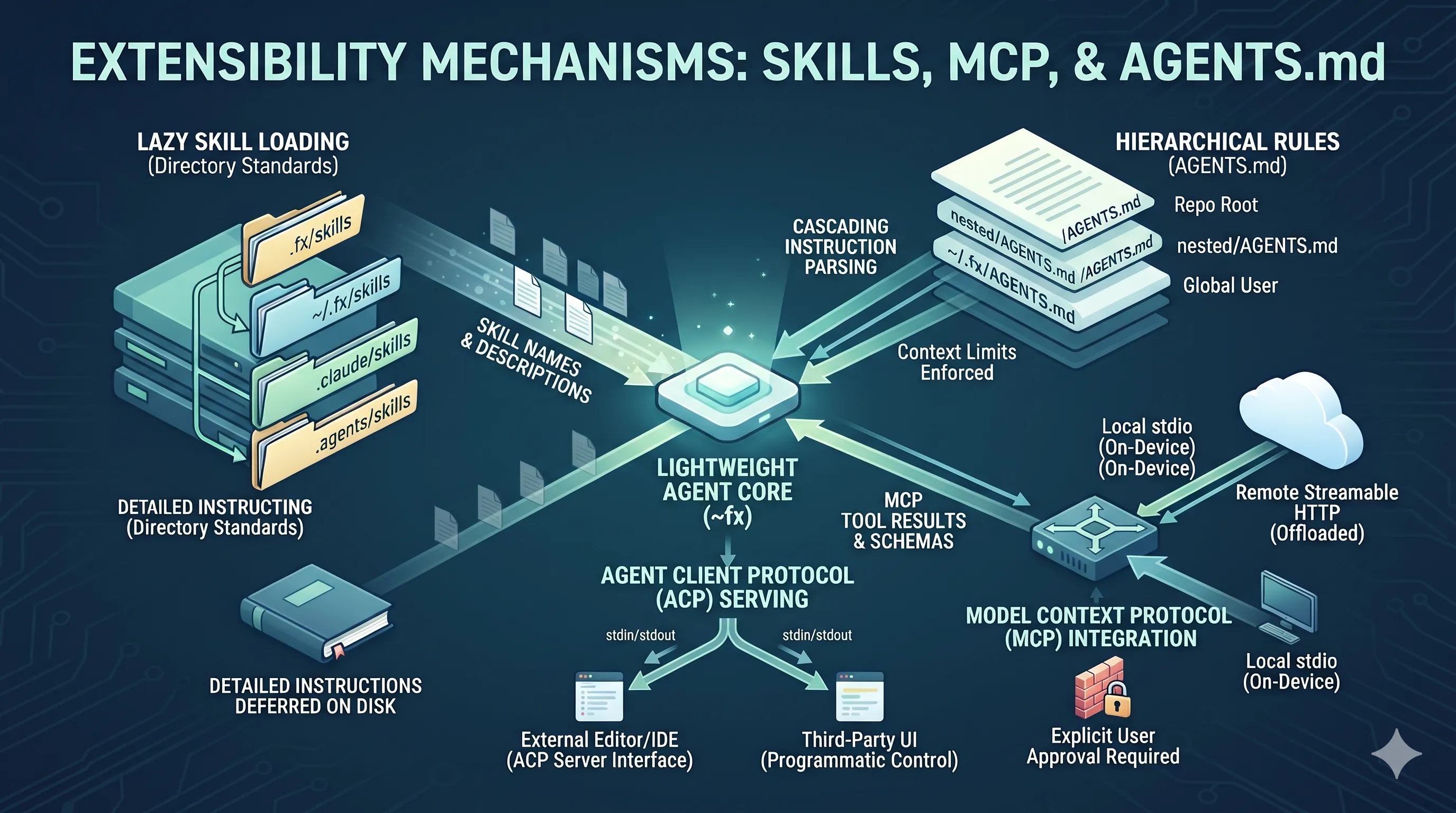
To counteract token exhaustion, fx handles skill discovery via a lazy resolution model: only skill names and brief descriptions enter the active context window during initial agent boot.
The full instructional bodies defined inside each SKILL.md remain deferred on disk, loading dynamically into context only when specific tasks explicitly invoke that skill.
Context limits strictly bound skill bodies, project instructions, external metadata, and tool execution outputs before constructing the final prompt payload for dispatch.
Local and Remote Model Context Protocol (MCP) Integration
To interface with external tools and external environment sources, the native engine incorporates client support for the Model Context Protocol (MCP).This integration supports two communication transports: local stdio child processes for fast on-device interaction, and remote Streamable HTTP servers for offloaded network capabilities.
Project-specific protocol connections are defined through a root-level
.mcp.json manifest.Because unvetted local and network tooling introduces security hazards inside automated agent loops, fx enforces security boundaries by requiring explicit user approval before establishing any connection defined within
.mcp.json.All MCP metadata, schemas, and runtime tool responses are constrained by internal context limits alongside other prompt components prior to payload transmission.
| Extension Mechanism | Configuration Source / Protocol Format | Runtime Scope & Context Behavior |
|---|---|---|
| Workspace & Global Skills | SKILL.md inside .fx/skills, ~/.fx/skills, .claude/skills, and .agents/skills |
Names and descriptions loaded initially; detailed instructions deferred lazily until invocation to conserve token context. |
| Model Context Protocol (MCP) | .mcp.json specifying local stdio or remote Streamable HTTP servers |
External tool integration requiring explicit user approval before connection; payloads governed by context limits. |
| Hierarchical Rules | AGENTS.md at repository root, nested directories, and ~/.fx/AGENTS.md |
Cascading instruction parsing with directory-level overrides, subject to strict pre-dispatch bounds. |
| Agent Client Protocol (ACP) | Standard I/O (stdin/stdout) stream via fx acp |
Bi-directional interface allowing external editors and IDEs to drive the native engine directly. |
Hierarchical AGENTS.md Rules and Agent Client Protocol Serving
Workspace behavior and code generation constraints are dictated through a hierarchical chain of AGENTS.md instruction files.The engine reads baseline repository instructions from an AGENTS.md file residing at the root of the project, while simultaneously loading system-wide user preferences from
~/.fx/AGENTS.md.When operating inside complex submodules or monorepos, nested directory-level AGENTS.md files provide localized overrides that refine or redirect engine behavior within specific subtrees.
All assembled instruction layers are systematically evaluated against context limits prior to payload dispatch, preventing prompt overflows in constrained environments.
Beyond terminal CLI usage, the engine can be controlled directly by external development environments through the Agent Client Protocol (ACP).
When developers need to embed the native binary into editors and IDEs as a background process, the engine provides a dedicated ACP server interface.
To launch fx as a server for external editors using the Agent Client Protocol, execute the following command in the terminal:
fx acpExternal editors and tools communicate bidirectionally across the standard input and output streams, allowing third-party user interfaces to programmatically steer the underlying native engine without wrapping it in separate network proxies or heavyweight runtime dependencies.
6. Embedded Agent Harnesses: libfx, WebAssembly, and AI SDK Adapters
While fx primarily operates as an ultra-fast CLI tool implemented in Zig, its architecture extends directly into embedded execution environments.By decoupling its core logic into embeddable packages, fx operates beyond standalone terminal sessions and directly powers programmatic runtimes.
Through libfx and dedicated adapter ecosystems, developers integrate the native agent engine into JavaScript runtimes, web browsers, and broader multi-agent harness workflows.
libfx Embedded Engine and In-Memory Conversation Lifecycles
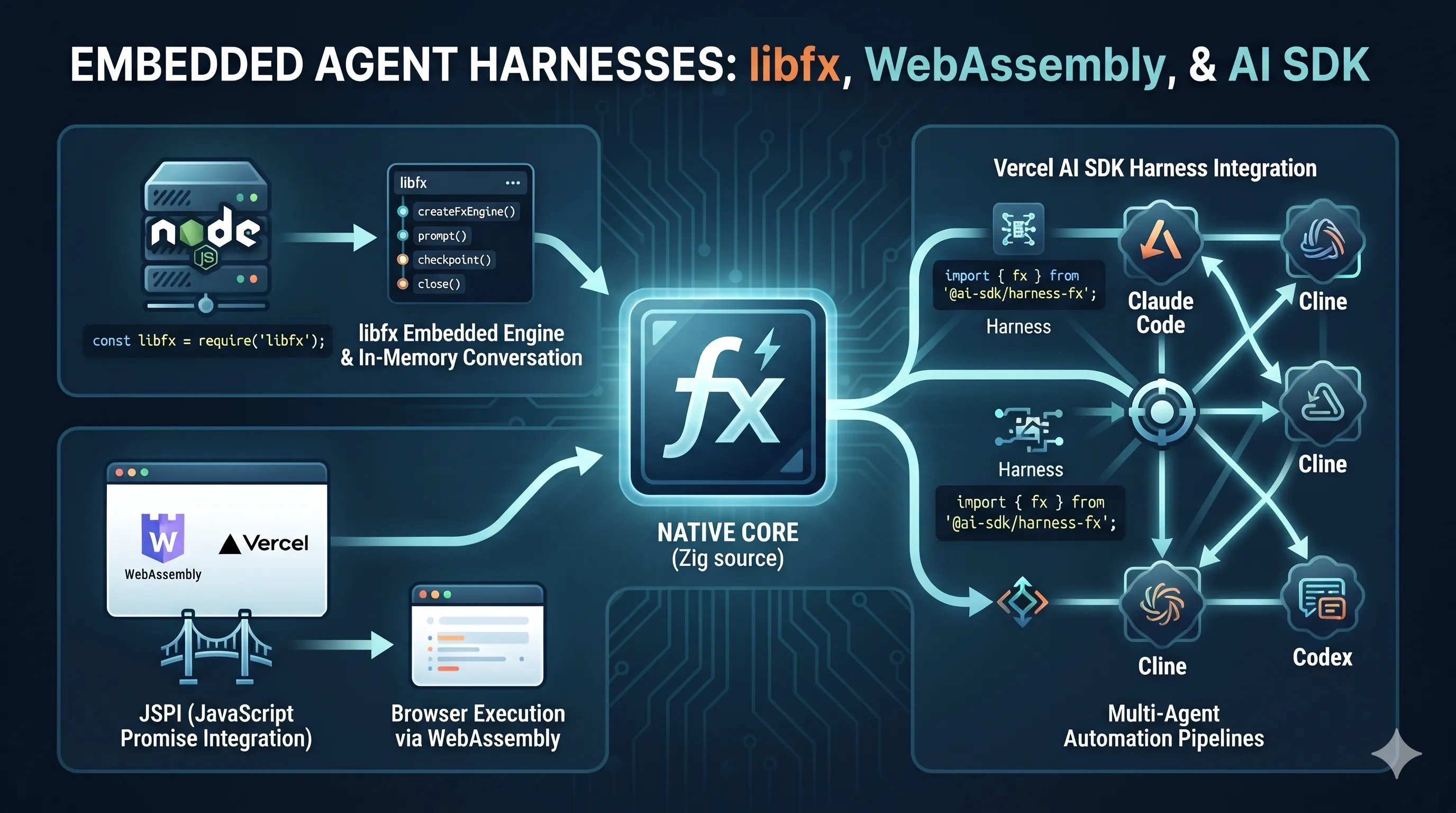
The native core of fx is exposed to JavaScript, Node.js, and browser runtimes through the libfx library.In Node.js environments, libfx prioritizes performance by loading a packaged native C/Zig addon directly.
When the native addon is unavailable or unsupported on the host architecture, the runtime gracefully falls back to a WebAssembly compilation.
The programmatic interface centers around the agent engine initialization.
In updated libfx documentation, the initialization method createFxAgent() was migrated to createFxEngine() to reflect the underlying engine architecture.
An Agent instance instantiated via libfx directly manages an in-memory conversation lifecycle through three primary API operations:
- prompt(): Dispatches user instructions or task context to the active in-memory conversation session.
- checkpoint(): Captures the conversation state and working snapshot in memory to enable rollbacks or safe branching.
- close(): Safely terminates the agent session, releasing native memory allocations and active resource handles.
Browser Execution via WebAssembly and JSPI
Running a coding agent directly inside a client-side browser presents unique constraints for asynchronous system interactions.Browser deployments of fx run via dedicated WebAssembly builds compiled from the core Zig source.
Because standard browser runtimes require coordinated blocking and non-blocking I/O execution, libfx relies on JavaScript Promise Integration (JSPI).
JSPI bridges WebAssembly stack switching with native JavaScript Promises, allowing the compiled engine to suspend and resume execution seamlessly during asynchronous agent operations.
WebAssembly compilation and client-side browser runtime support are designated as experimental.
Vercel AI SDK Harness Integration with @ai-sdk/harness-fx
To embed fx into wider multi-agent automation pipelines, the official @ai-sdk/harness-fx adapter integration was released on August 31, 2026.This package links fx into modern Vercel AI SDK workflows, allowing teams to orchestrate fx alongside other supported harnesses such as Claude Code, Cline, and Codex.
Under the hood, the adapter connects to the fx engine over the Agent Client Protocol (ACP) via @ai-sdk/harness-acp.
To connect fx into the Vercel AI SDK harness infrastructure, developers configure the client using the dedicated harness modules.
import { HarnessAgent } from '@ai-sdk/harness';
import { fx } from '@ai-sdk/harness-fx';It configures an agent interface using the official @ai-sdk/harness-fx adapter connecting over ACP, allowing the underlying Zig-powered fx engine to participate directly in standardized agent evaluation and task execution pipelines.
Related Posts
OpenAI Codex v0.173.0-alpha.5 Brings Terminal Links and Lazy MCP LoadingExplore OpenAI Codex v0.173.0-alpha.5 updates, featuring terminal thread linking, lazy MCP server...
How .NET 11 Unifies MAUI and Boosts CLI Speed with Native AOTDiscover what's new in .NET 11, featuring CoreCLR by default in MAUI, a Native AOT CLI host, C# 15...

Securing Autonomous AI Agents with BlueField-4 DPUs and OpenShell RuntimeLearn how BlueField-4 DPUs and the OpenShell runtime provide out-of-band security for autonomous AI...
Generative AI may have assisted with research or drafting for this article. Topic selection, fact-checking, final wording, and publication remain the responsibility of DragonStone74. AI use disclosure