
Deploying NVIDIA Cosmos 3 Locally with Hugging Face Diffusers
🚀 Key Takeaways
- Accessible Local Execution: Native Diffusers CPU offloading streams transformer blocks over PCIe, enabling the 16-billion-parameter Cosmos 3 Nano model to run on consumer GPUs with as little as 12 GB of VRAM.
- Hybrid FP8 Precision Scheduling: A dynamic schedule toggles between W8A16 on boundary steps and W8A8 during middle steps, cutting memory usage while preventing visual flickering in generated video.
- Unified Multimodal Pipeline: Official Diffusers modular pipelines orchestrate seven generative modalities—including text-to-video, synchronized stereo audio, and multi-tier robotic action conditioning—under a single API.
- Throughput-for-Footprint Tradeoff: Running multi-gigabyte foundation models on entry-tier GeForce RTX hardware shifts bottlenecks to host RAM capacity and PCIe bandwidth, exchanging real-time latency for complete local hardware feasibility.
- Built-In Safety and Automated Profiling: Automated memory profiling tunes prefetching and tiling out of the box, while integrated multimodal guardrails inspect prompts and visual outputs to maintain operational compliance.
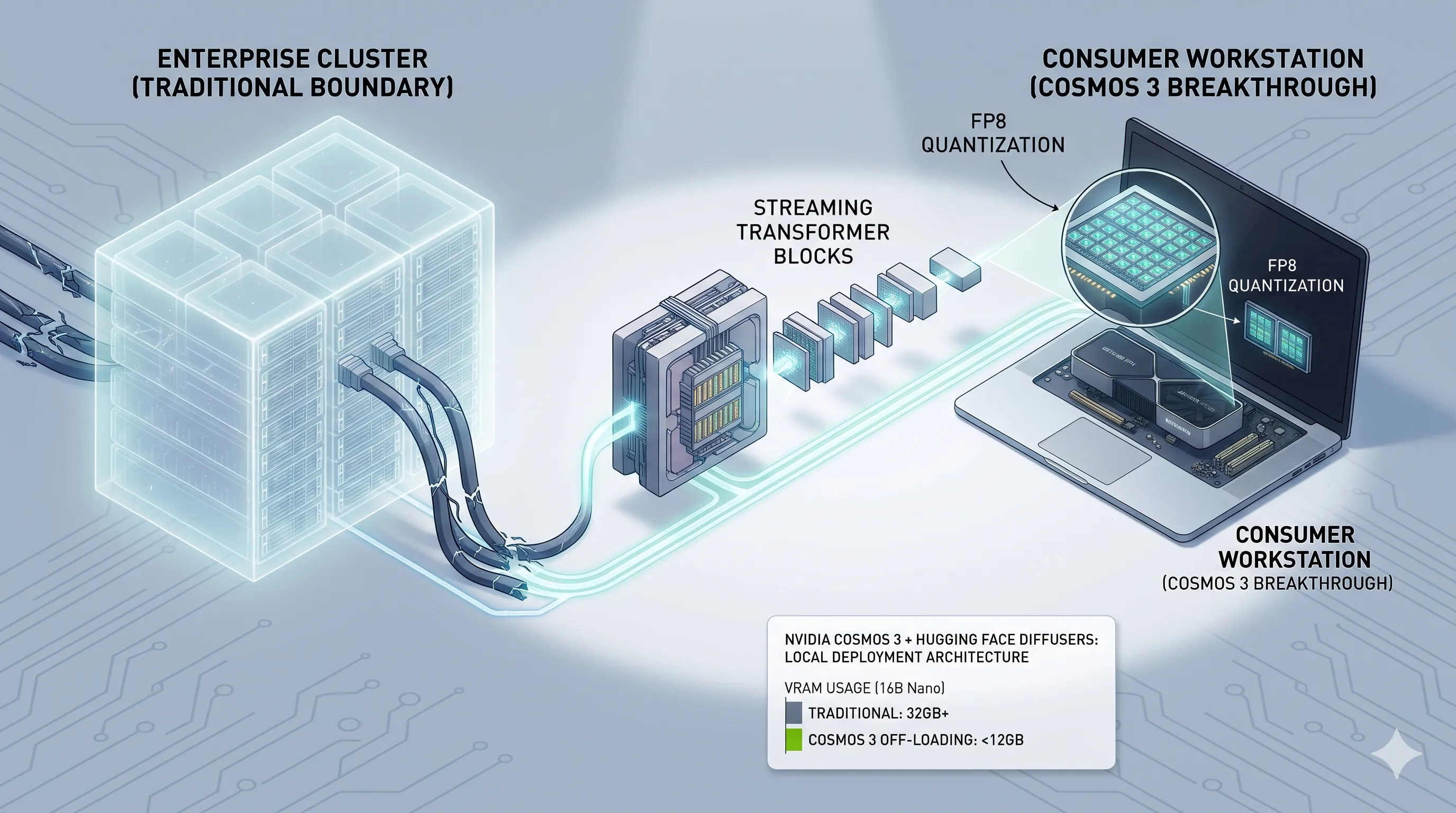
Generating physical-AI representations and photorealistic temporal media has traditionally demanded enterprise-tier compute clusters equipped with high-bandwidth enterprise GPUs. The arrival of NVIDIA Cosmos 3 and its seamless integration into the Hugging Face Diffusers library redefines these computational boundaries. By unifying modular pipeline abstractions with intelligent offloading architectures, developers can now deploy sophisticated foundation models locally on consumer workstations.
At the core of this breakthrough is an execution pathway that decouples parameter scale from physical video memory constraints. Rather than retaining the entire model graph in VRAM, the runtime dynamically streams individual transformer blocks from system RAM over high-speed PCIe interfaces directly into CUDA attention kernels. Combined with adaptive 8-bit floating-point quantization, the framework allows 16-billion-parameter architectures to execute smoothly within modest hardware envelopes without altering installed library code.
This guide explores how Hugging Face Diffusers operationalizes NVIDIA Cosmos 3 for local deployment. From transformer weight offloading mechanics and mixed-precision step scheduling to real-world GeForce RTX benchmark latencies and guardrail integration, here is everything you need to know to harness physical world generation directly on local silicon.
1. Cosmos-Framework Offloading Architecture: Running 16B Parameters on 12 GB VRAM
This section directly underpins the overarching objective of enabling local execution of NVIDIA Cosmos 3 via Hugging Face Diffusers by detailing the underlying weight offloading and streaming mechanisms.As documented in the NVIDIA technical post by Atharva Joshi and Jibin Varghese published November 24, 2026, running a massive 16-billion parameter model like Cosmos 3 Nano on desktop hardware requires bypassing conventional VRAM capacity constraints.
By integrating the
cosmos-framework weight streaming adapter directly with the Hugging Face Diffusers ecosystem, users can run Cosmos 3 Nano on local GPUs equipped with as little as 12 GB of VRAM.Crucially, this architecture builds upon native group-level offloading from the Hugging Face library without modifying installed Diffusers source files, ensuring that all general matrix multiplication (GEMM) and attention operations remain fully accelerated on CUDA.
System RAM Storage and Sequential PCIe Block Streaming
To execute a 16B model within a 12 GB VRAM footprint, the runtime reallocates the bulk of the parameter weight memory footprint to host memory.During initialization, the framework stores model weights in system RAM rather than attempting to fit the entire parameter structure into device memory.
Tested consumer-GPU benchmark hosts were configured with approximately 128 GB of system RAM to ensure comfortable residency for the complete checkpoint.
The adapter does not stream weights directly from disk during inference; instead, all weights reside entirely in host system RAM after the initial load phase completes.
During the active denoising phase, transformer blocks are transferred sequentially to the GPU via the PCIe bus strictly as needed.
In a standard 35-step generation request, each denoising step traverses 36 distinct transformer blocks indexed sequentially from 0 through 35.
When GPU memory headroom permits, the runtime pre-fetches the subsequent transformer block over the PCIe bus while CUDA computes the active block, and defaults to an automatic low-memory mode during heavier system workloads.
This mechanism trades off raw generation speed, introducing PCIe transfer overhead and increased system RAM usage rather than achieving interactive latency.
Consequently, calls on a single pipeline instance must remain strictly sequential rather than concurrent, and the approach is engineered specifically for inference workloads on Cosmos3-Nano rather than training or Cosmos3-Super.
| Architectural Parameter | Specification / Operational Behavior |
|---|---|
| Target Model | Cosmos 3 Nano (16B parameters; validated for inference) |
| Minimum GPU VRAM | 12 GB VRAM (all GEMM and attention executed on CUDA) |
| Host Memory Residency | ~128 GB system RAM (weights reside in RAM, not streamed from disk) |
| Denoising Block Structure | 36 transformer blocks (indexed 0 through 35) per step in a 35-step request |
| Transfer Bus & Concurrency | Sequential PCIe block streaming; single pipeline calls must be sequential |
Dual-Pathway Execution and Classifier-Free Guidance Block Reuse
The offloading engine organizes its compute graph into two discrete stages: an understanding pathway and a generation pathway.The understanding pathway executes once upfront to compute and cache fixed conditioning representations, avoiding redundant computational passes over static prompt inputs.
Once fixed conditioning is established, the model enters the iterative generation pathway to perform the iterative denoising operations across the generation loop.
Generating high-fidelity diffusion outputs typically requires classifier-free guidance (CFG), which evaluates both a conditional branch and an unconditional negative branch.
Under naive offloading, evaluating these two branches separately would double the PCIe transfer volume by forcing each transformer block to be fetched twice per denoising step.
The
cosmos-framework streaming adapter eliminates this redundant bus traffic by reusing active transformer blocks across both classifier-free guidance conditional and unconditional branches simultaneously while that specific block resides in GPU memory.Once CUDA completes matrix multiplications for both branches on the active block, the block is vacated or overwritten by the pre-fetched incoming block, maintaining strict compliance with the 12 GB VRAM envelope.
Pipeline Code Walkthrough: Loading Cosmos 3 Nano in Diffusers
The following walkthrough demonstrates a basic text-to-video generation pipeline setup using Diffusers with offloading, showing how standard Hugging Face components initialize and run the offloaded model.pip install -U diffusers transformers accelerate
import torch
from diffusers import DiffusionPipeline
pipe = DiffusionPipeline.from_pretrained("nvidia/Cosmos3-Nano", dtype=torch.bfloat16, device_map="cuda")
prompt = "Astronaut in a jungle, cold color palette, muted colors, detailed, 8k"
image = pipe(prompt).images[0]diffusers, transformers, and accelerate—to ensure compatible offloading primitives are available.The code loads the
nvidia/Cosmos3-Nano checkpoint in BF16 precision (torch.bfloat16) directly onto the target CUDA device using the standard Hugging Face DiffusionPipeline class.By pairing
device_map="cuda" with the underlying offloading framework, the pipeline exposes standard Diffusers calling semantics while coordinating host RAM weight streaming and block-by-block CUDA execution behind the scenes.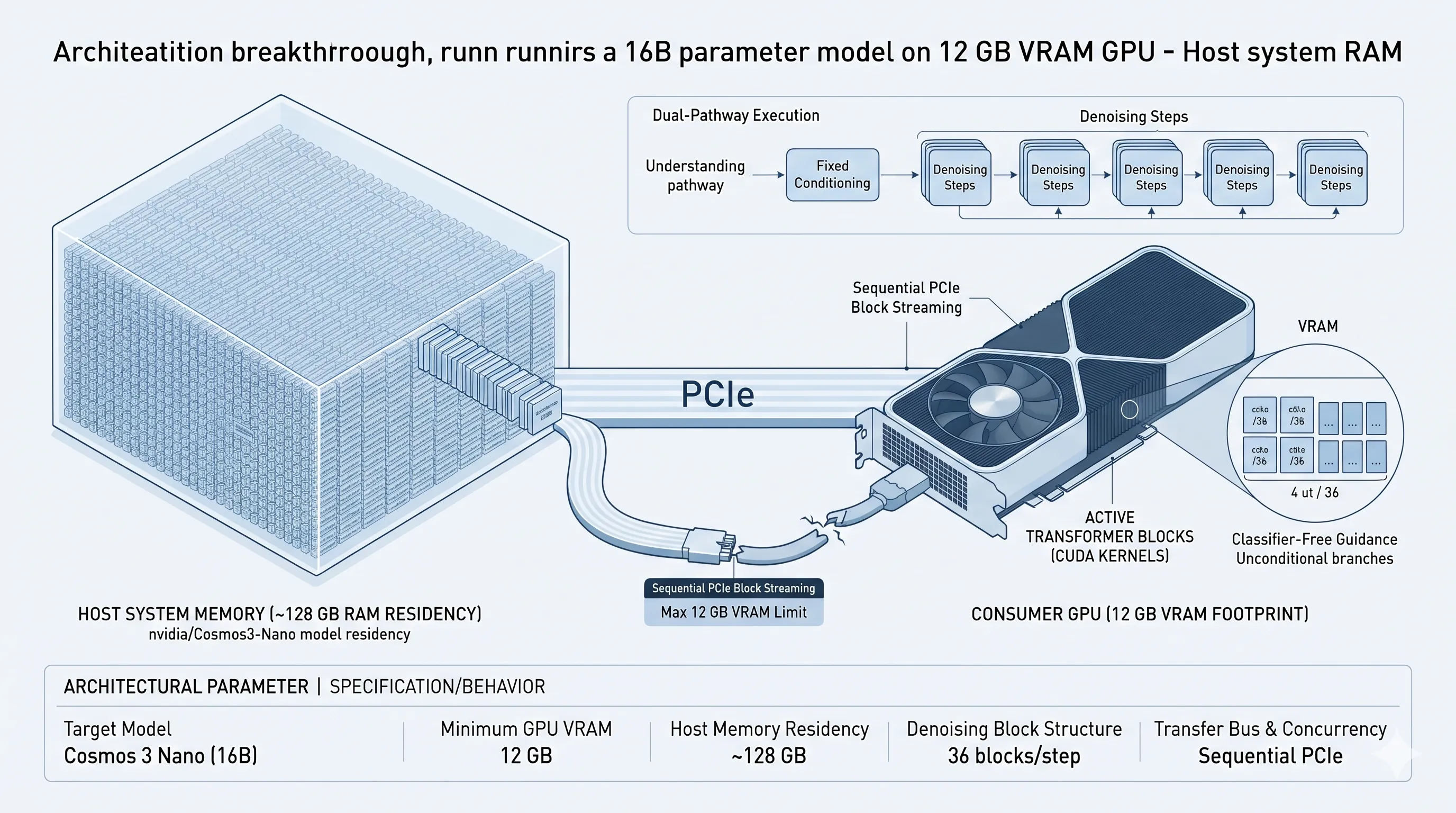
2. FP8 Quantization and Precision Scheduling: Balancing Speed and Video Stability
Integrating NVIDIA Cosmos 3 into Hugging Face Diffusers relies on efficient memory compression to make local execution viable on consumer and workstation hardware.Quantizing transformer backbones to 8-bit floating point offers the necessary reduction in VRAM, yet naive low-precision quantization introduces temporal instability into generative video pipelines.
To resolve this tension, Diffusers utilizes dynamic precision scheduling within the nvidia/Cosmos3-Nano-FP8 checkpoint to preserve visual consistency while maintaining high computational throughput.
Mixed W8A16 and W8A8 Diffusion Step Scheduling
The nvidia/Cosmos3-Nano-FP8 checkpoint is available on Hugging Face via dedicated repositories and the specialized fp8 branch.Executing generative diffusion exclusively in 8-bit weight and 8-bit activation (W8A8) modes across an entire pipeline introduces severe degradations.
Specifically, running pure W8A8 on every step produces visible flickering in multi-step video generation due to accumulated quantization errors in structural high-frequency trajectories.
To eliminate these artifacts, Diffusers applies a hybrid precision schedule.
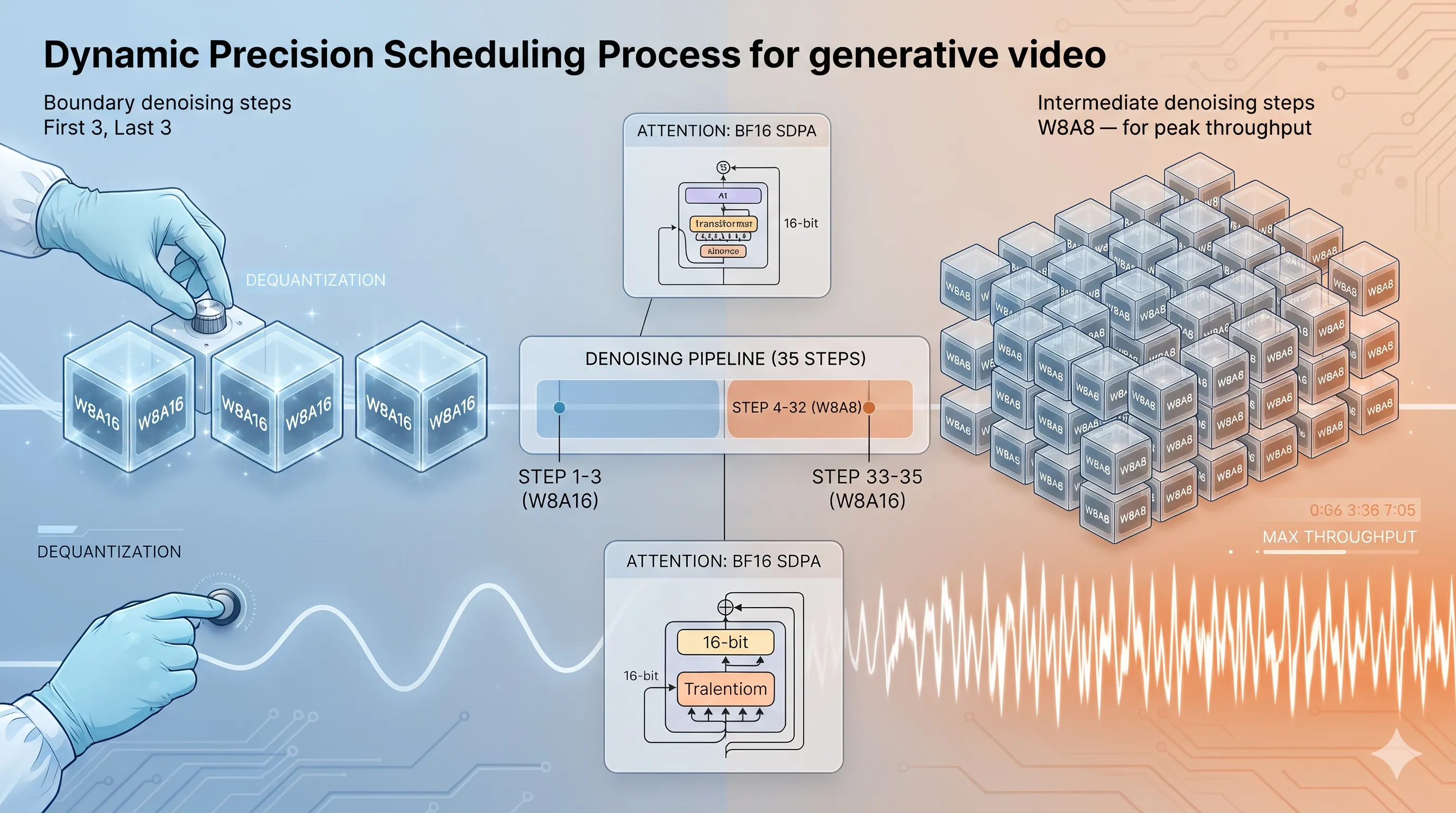
The checkpoint implements W8A16 precision during the initial 3 and final 3 denoising steps, while leveraging pure W8A8 for all intermediate steps.
In W8A8 mode, linear layers compute directly with 8-bit weights and 8-bit activations for maximum matrix multiplication throughput.
In W8A16 mode, the pipeline dynamically dequantizes 8-bit weights to run standard linear operations against higher-precision 16-bit activations.
Diffusers eliminates manual pipeline intervention by parsing this dynamic step schedule directly from the model's transformer/config.json configuration file upon initialization.
| Pipeline Phase | Execution Precision | Operational Mechanism and Function |
|---|---|---|
| First 3 and Last 3 Denoising Steps | W8A16 | Dequantizes 8-bit weights to run standard linear operations on 16-bit activations to eliminate video flickering. |
| Intermediate Denoising Steps | W8A8 | Processes 8-bit weights and 8-bit activations directly to achieve peak mathematical throughput. |
| Attention Mechanisms | BF16 SDPA | Maintains standard PyTorch scaled dot-product attention in 16-bit floating point instead of full-graph FP8. |
Maintaining BF16 SDPA Attention and KV Context Refreshing
The precision architecture avoids full-graph FP8 execution in order to safeguard sensitive self-attention and cross-attention representations.Attention layers bypass low-precision tensor operations entirely, maintaining standard PyTorch scaled dot-product attention (SDPA) executed in BF16.
Isolating attention mechanisms within 16-bit precision ensures that spatial coherence and cross-frame alignment remain intact across extended diffusion trajectories.
Because linear layers alternate between W8A16 and W8A8 modes across different diffusion phases, precision boundaries emerge within the execution graph.
The runtime adapter actively monitors these operational switches.
Whenever native precision shifts between W8A16 and W8A8, the adapter refreshes cached understanding key/value (KV) context representations.
Flushing and recomputing KV context across precision boundaries prevents numeric mismatches from propagating between the dequantized 16-bit boundary steps and the accelerated 8-bit middle steps.
Installing ModelOpt Dependencies and Blackwell Workstation Trade-offs
Enabling FP8 execution requires specialized quantization components provided by the NVIDIA Model Optimizer framework.To install the standalone diffusers-cpu-offloading adapter package along with benchmark utilities and ModelOpt FP8 dependencies, execute the package installer with the designated extras flags:
uv pip install '.[benchmarks,fp8]'While the dynamic schedule resolves video temporal flickering, the alternating precision boundaries introduce measurable compute overhead compared to unconstrained low-precision baselines.
On a Blackwell workstation executing Cosmos3-Nano-FP8 at 720x1280 resolution across 35 inference steps, the default mixed schedule was approximately 27% slower for text-to-image (T2I) generation compared to running pure W8A8.
For a 49-frame text-to-video (T2V) sequence under identical resolution and step constraints, the mixed schedule proved approximately 13% slower than all-W8A8 execution.
This measured latency penalty represents the deliberate design compromise required to ensure artifact-free frame transitions while containing video diffusion within local memory limits.
3. Multi-Modal Execution: Unified Diffusers Pipelines for Video, Audio, and Action
Hugging Face Diffusers enables the local execution of NVIDIA Cosmos 3 by consolidating diverse foundation model capabilities into modular, accessible runtime interfaces.Rather than deploying fragmented codebases for distinct tasks, developers can instantiate unified pipelines that natively manage visual, acoustic, and physical action spaces.
This section details how Diffusers orchestrates these multi-modal flows across local hardware setups.
Unified Video Modalities and 189-Frame Audio-Visual Synthesis
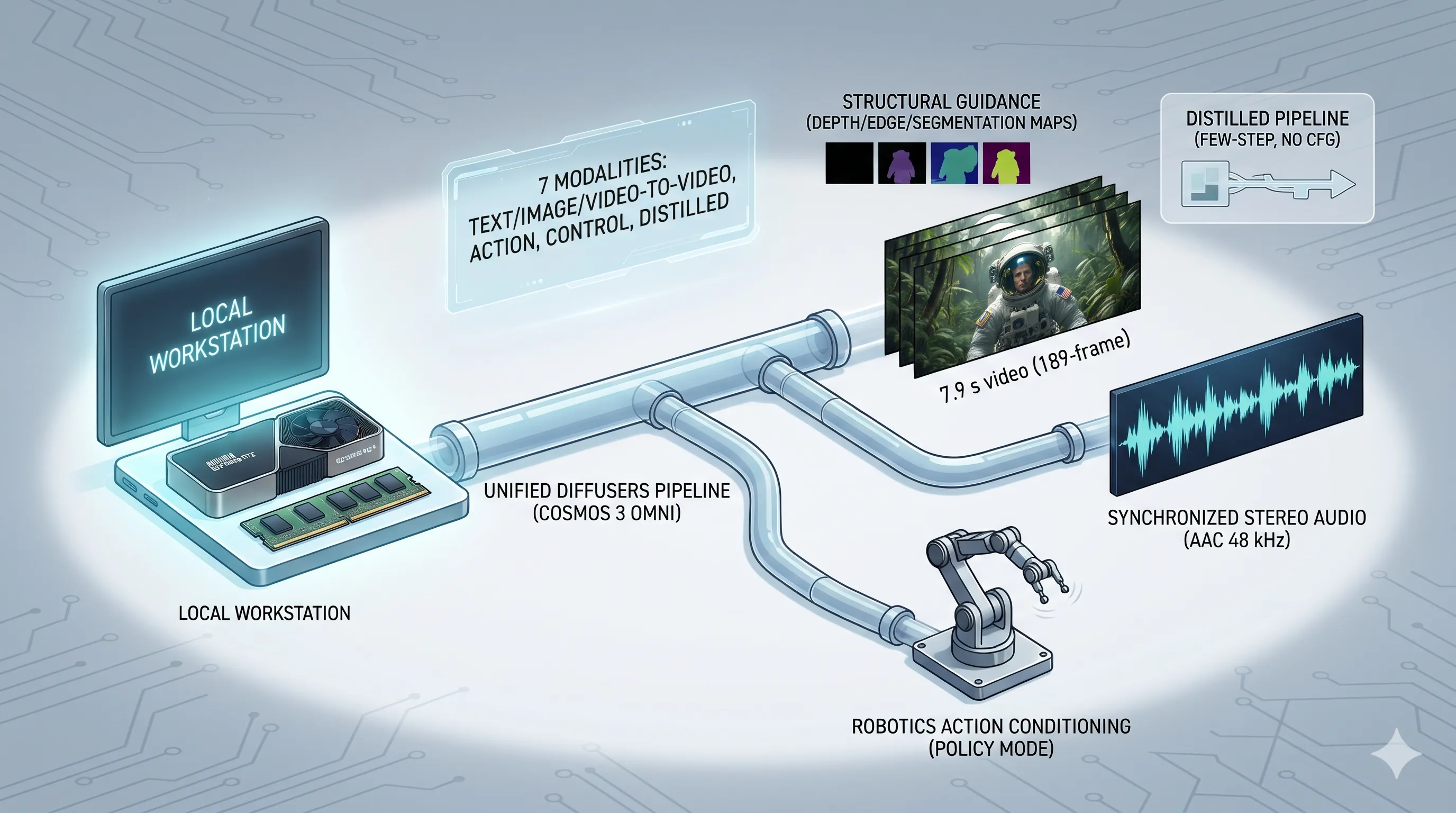
Diffusers provides native integration for NVIDIA Cosmos 3 through two primary pipeline abstractions: Cosmos3OmniModularPipeline and Cosmos3OmniPipeline.Through these interfaces, the architecture supports a total of 7 generation modalities under a consolidated local execution workflow.
These modalities include text-to-video, image-to-video, video-to-video, text-to-video with sound, image-to-video with sound, action generation, and control-guided transfer.
When synthesizing temporal sequences, the pipelines operate with a standardized temporal footprint.
The default video generation duration is set to 189 frames, which corresponds to approximately 7.9 seconds of continuous motion at 24 FPS.
For audio-enabled synthesis—specifically text-to-video with sound and image-to-video with sound—the system generates synchronized audio tracks utilizing the Cosmos3AVAEAudioTokenizer.
The resulting audio stream is muxed directly into the container as stereo AAC encoded at 48 kHz, producing a cohesive audio-visual asset directly from local pipeline calls.
| Pipeline Domain | Diffusers Interface / Tokenizer | Technical Specifications & Supported Modes |
|---|---|---|
| Audio-Visual Video Synthesis | Cosmos3OmniModularPipeline, Cosmos3OmniPipeline, and Cosmos3AVAEAudioTokenizer | 189 frames (approx. 7.9 seconds at 24 FPS); stereo AAC audio muxed at 48 kHz; covers text-to-video, image-to-video, video-to-video, and sound-enabled variants. |
| Robotics & Physical Embodiment | CosmosActionCondition | 4 resolution tiers: 256, 480, 704, and 720; operational modes include policy, forward_dynamics, and inverse_dynamics. |
| Structural Guidance | control_videos mapping | Direct conditioning via structural hints: edge, blur, depth, segmentation, or world-scenario maps. |
| Few-Step Distillation | Cosmos3DistilledModularPipeline | Accelerated inference execution; negative prompts and classifier-free guidance are disabled. |
Robotics Action Conditioning and Structural Video Control Transfers
Beyond conventional media rendering, Diffusers integrates physical interaction and robotics control workflows into NVIDIA Cosmos 3 execution.Action conditioning is handled through the dedicated CosmosActionCondition class, bridging visual foundation representations directly to robotic control environments.
To accommodate varying visual sensor feeds and compute allocations, action conditioning supports 4 resolution tiers: 256, 480, 704, and 720.
The action pipeline operates across registered robot embodiments under three distinct operational modes: policy, forward_dynamics, and inverse_dynamics.
Under these modes, the pipeline can predict motor trajectories, forecast future environment states, or infer required actions based on state transitions.
For scenarios requiring deterministic composition, Cosmos 3 incorporates structural control transfer mechanisms.
The pipeline exposes this capability via control_videos mappings.
Local practitioners can guide generative diffusion by passing structural guidance hints, which include edge, blur, depth, segmentation, or world-scenario maps.
This grants fine-grained control over camera geometry, physical boundaries, and scene layouts throughout the 189-frame generation window.
Pipeline Distillation Trade-offs and Classifier-Free Guidance Limits
Executing multi-billion-parameter foundation models locally often necessitates the deployment of distilled, few-step variants to achieve real-time throughput.Diffusers supports these optimized weights through a dedicated interface: the Cosmos3DistilledModularPipeline.
Deploying few-step distilled checkpoints introduces specific architectural trade-offs compared to full-step diffusion passes.
Specifically, checkpoints executing within Cosmos3DistilledModularPipeline do not support classifier-free guidance (CFG).
In tandem with the absence of classifier-free guidance, negative prompts are also unsupported in these distilled execution paths.
Engineers relying on few-step distilled Cosmos 3 checkpoints must therefore tune base prompt conditioning and structural guidance maps directly, adapting their input conditioning to respect the boundaries of distilled model inference.
4. Consumer RTX Hardware Benchmarks: Latency, Resolution Tiers, and Peak Memory
Evaluating local execution latency and memory constraints is critical to understanding how Hugging Face Diffusers enable local execution of NVIDIA Cosmos 3 on consumer workstation hardware.Deploying Cosmos models outside cloud clusters requires mapping pipeline resource usage directly against consumer GeForce RTX memory limits and interconnect throughput.
RTX 50-Series and 40-Series 720p Generation Benchmarks
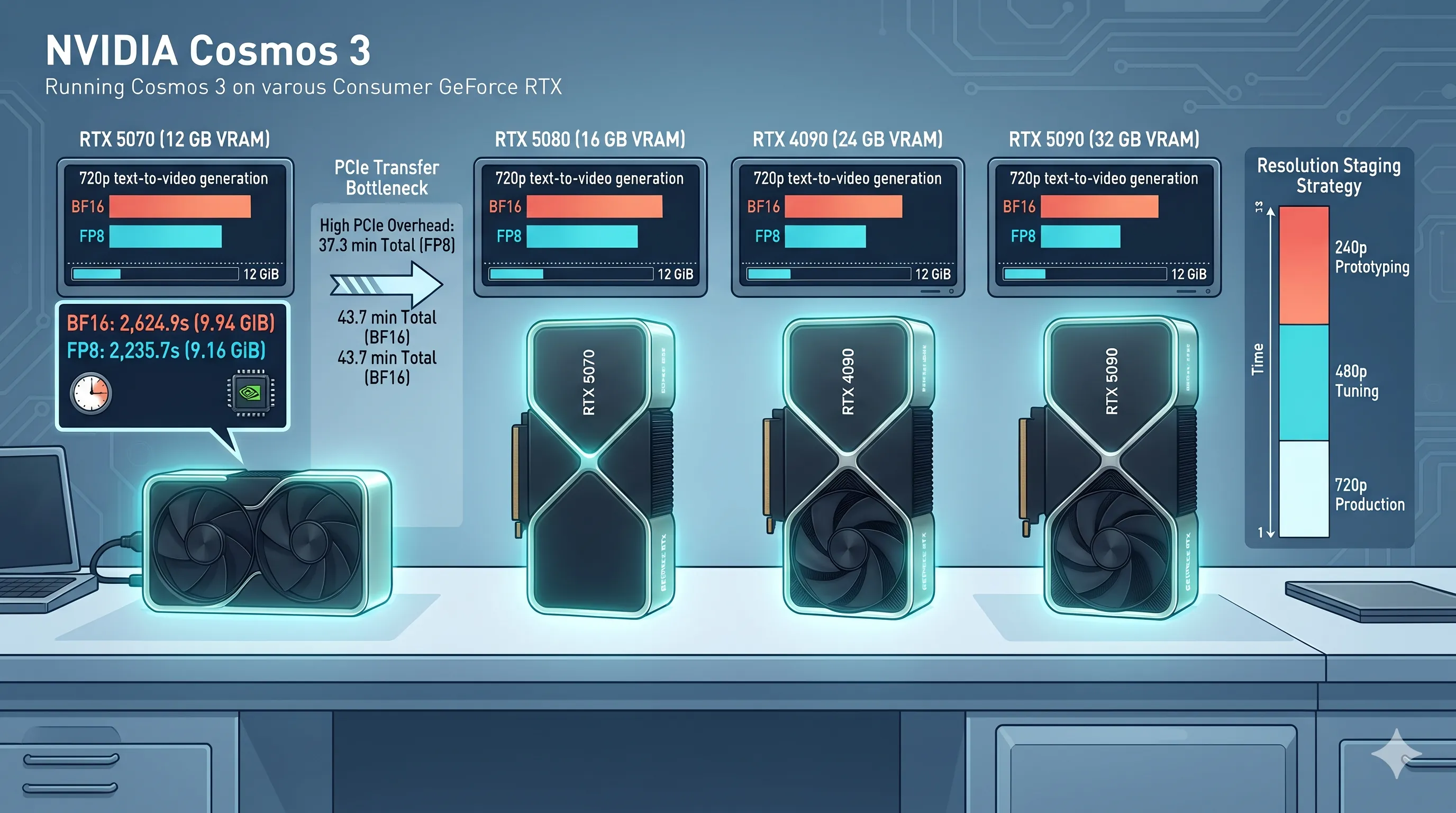
Standardized benchmarks for 720p text-to-video generation illustrate clear performance gradations across the RTX 5070, 5080, 4090, and 5090 under both BF16 and FP8 precisions.Measured pipeline latency encompasses prompt processing, understanding, denoising, VAE decode, and safety checking, while excluding initial checkpoint loading and final MP4 encoding steps.
Across all tested hardware, running in FP8 consistently reduces both pipeline duration and peak memory footprint relative to BF16.
On flagship consumer hardware, the GeForce RTX 5090 completes 720p text-to-video generation in 1,012.3 seconds with 12.33 GiB peak memory in BF16, dropping to 853.5 seconds with 11.23 GiB peak memory under native FP8.
The previous-generation GeForce RTX 4090 posts competitive figures, recording 1,061.0 seconds at 11.45 GiB peak memory in BF16 and 949.0 seconds at 10.51 GiB peak memory in FP8.
Moving down the tier, the GeForce RTX 5080 executes 720p generation in 1,607.7 seconds at 11.24 GiB peak in BF16, and improves to 1,371.3 seconds at 10.36 GiB peak in FP8.
The entry-level GeForce RTX 5070 requires 2,624.9 seconds with a 9.94 GiB peak memory footprint under BF16, reducing to 2,235.7 seconds at 9.16 GiB peak memory when executed in FP8.
| GPU Model | Precision | 720p Latency (Seconds) | Peak Memory (GiB) |
|---|---|---|---|
| GeForce RTX 5090 | BF16 | 1,012.3 | 12.33 |
| GeForce RTX 5090 | FP8 | 853.5 | 11.23 |
| GeForce RTX 4090 | BF16 | 1,061.0 | 11.45 |
| GeForce RTX 4090 | FP8 | 949.0 | 10.51 |
| GeForce RTX 5080 | BF16 | 1,607.7 | 11.24 |
| GeForce RTX 5080 | FP8 | 1,371.3 | 10.36 |
| GeForce RTX 5070 | BF16 | 2,624.9 | 9.94 |
| GeForce RTX 5070 | FP8 | 2,235.7 | 9.16 |
PCIe Transfer Overhead vs. Dedicated VRAM Limits
Running complex video generation pipelines on 12 GB hardware introduces substantial wall-time overhead.On the 12 GB GeForce RTX 5070, generating a 720p text-to-video clip requires approximately 43.7 minutes (2,624.9 seconds) under BF16 and 37.3 minutes (2,235.7 seconds) under FP8.
This high pipeline wall time is largely driven by PCIe transfer overhead as tensors are continuously shuttled across the bus.
These published benchmarks represent single-run vendor timings that depend heavily on host RAM capacity and system PCIe generation.
Despite the latency penalty imposed by PCIe communication, native FP8 demonstrates robust stability on limited memory budgets.
Testing confirms that native FP8 successfully completes all 21 modality and resolution permutations on the RTX 5070 card without failing from out-of-memory errors.
Resolution Staging Strategy: From 240p Prototyping to 720p Output
Given the extended duration of 720p rendering on constrained hardware, a phased resolution approach is practical for iterative development.Developers targeting 12 GB GPUs should adopt a recommended starting tier of 240p (432x240) or 480p (848x480) before initiating full 720p (1280x720) synthesis.
Prototyping at 240p and 480p allows prompt validation, motion verification, and parameter tuning without incurring the high PCIe transfer overhead of multi-minute 720p runs.
Once generation targets are confirmed at lower tiers, jobs can be promoted to 1280x720 production passes.
5. Environment Setup, Automated Memory Profiling, and Safety Guardrails
Achieving reliable local execution of NVIDIA Cosmos 3 within Hugging Face Diffusers requires precise alignment between host system hardware, automated runtime memory allocation, and mandatory governance layers.Establishing a verified software stack and memory architecture ensures that large-scale physical foundation models operate without operating system thrashing, while built-in safety filters enforce compliance directly during the inference lifecycle.
Host RAM and CUDA Environment Specifications
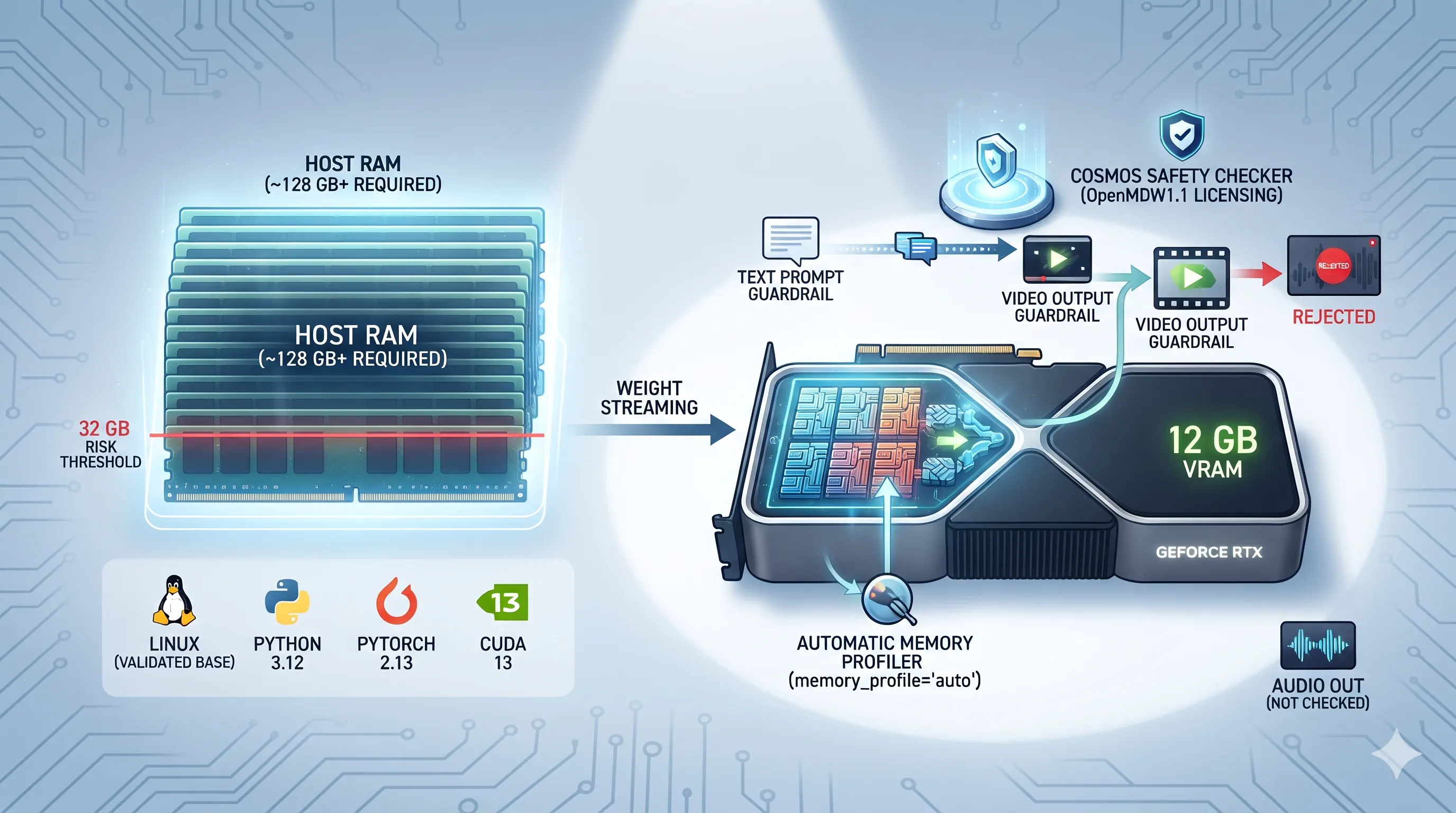
Local deployment of the Cosmos architecture is validated against a modern software environment consisting of Linux, Python 3.12, PyTorch 2.13, and CUDA 13.Deploying weights such as Cosmos 3 Nano, which contains 16 billion trainable parameters, places substantial demands on host-level memory hierarchies.
During weight streaming between host system memory and GPU devices, hosts with insufficient system RAM, such as systems equipped with 32 GB of RAM, may experience severe OS paging and thrashing.
Maintaining host system RAM well above this 32 GB threshold is necessary to prevent pipeline stalls and operating system memory saturation.
| System Dimension | Specification / Setting | Operational Role and Constraints |
|---|---|---|
| Operating System | Linux | Tested baseline platform for local execution. |
| Python Runtime | Python 3.12 | Verified execution environment for pipeline orchestration. |
| Framework Runtime | PyTorch 2.13 | Core deep learning engine for tensor execution. |
| Compute Platform | CUDA 13 | Accelerated hardware backend driver and library stack. |
| Model Scale | 16 billion trainable parameters | Cosmos 3 Nano parameter capacity managed by runtime offloading. |
| Host Memory Limit | 32 GB RAM (Risk Threshold) | Hosts with 32 GB may encounter severe OS paging/thrashing during weight streaming. |
Automatic Memory Profiling and VAE Tiling Optimization
To streamline memory management when executing Cosmos 3 models via Hugging Face Diffusers, the framework provides an automated runtime allocation mechanism.Under the default configuration, setting memory_profile='auto' automatically selects prefetch routines, VAE tiling patterns, and low-memory transfer strategies.
This automatic selection bypasses the need for manual tile tuning, calculating optimal dimensions to prevent video autoencoder out-of-memory errors while preserving pipeline execution efficiency.
By managing prefetching and low-memory transfer sequences dynamically, the pipeline handles heavy weight movements across available memory channels without manual intervention.
CosmosSafetyChecker Enforcement and OpenMDW1.1 Licensing
Inference execution with Cosmos 3 operates under strict governance dictated by the NVIDIA Open Model License Agreement (OpenMDW1.1).Under this license agreement, the integration of the safety checker is mandatory, though the pipeline allows it to be bypassed for specific testing workflows.
By default, Cosmos 3 integrates the cosmos_guardrail module alongside CosmosSafetyChecker to actively inspect both text prompts and generated output video frames.
The text guardrail acts as an initial gatekeeper, halting unsafe prompts with a ValueError prior to the start of generation.
For the visual generation stage, the video guardrail actively monitors the synthesis pipeline to detect faces or reject outputs that violate governance policies.
System operators must note that audio output is not evaluated by the safety guardrail, leaving downstream audio streams outside the direct verification scope of the CosmosSafetyChecker framework.
Related Posts

NVIDIA's 4-Bit Revolution: The 2026 Definitive Guide to 'Lossless' AI CompressionNVIDIA's 4-bit Quantization Unprecedented Compression: NVIDIA's new AQFB technique achieves...
How Nemotron 3.5 Parse Accelerates Vision-Language Document ExtractionDiscover how NVIDIA's Nemotron 3.5 Parse boosts inference speed and document extraction efficiency...
Microsoft Ignite 2026: Copilot Work OS and Agent 365 GovernanceDiscover how Microsoft Ignite 2026 redefines enterprise AI with Copilot as the Work OS, centralized...
Generative AI may have assisted with research or drafting for this article. Topic selection, fact-checking, final wording, and publication remain the responsibility of DragonStone74. AI use disclosure