
OpenAI Dots: A Guide to Persistent Autonomous AI Agents and Cloud-Hosted Virtual Desktops
🚀 Key Takeaways
- Persistent Cloud Environment: OpenAI Dots operates inside a dedicated, always-on virtual PC that continues executing complex workflows even after powering down your physical machine.
- Cross-Platform Context: The agent unifies active memory and conversational state across ChatGPT, Slack, Microsoft Teams, and optional bridges to a single local desktop.
- Read-Only Safety Defaults: Background investigations remain strictly read-only, requiring explicit human authorization before modifying application data or triggering sensitive account actions.
- Tiered Subscription Access: A primary Dot is integrated into ChatGPT Pro, Business Premium, and Enterprise plans with an introductory deeper-work allowance during launch month.
- Practical Operational Limits: Persistent agents face real-world hurdles, including third-party browser anti-bot verifications, an unalterable closed runtime, and all-or-nothing memory reset controls.
Rather than halting execution whenever a browser tab closes or a laptop sleeps, an agent with an independent virtual computer can proactively investigate data, coordinate asynchronous communications, and execute background tasks around the clock. Users can observe real-time desktop actions, inspect progress logs, and seize manual control at any point during active workflows.
Yet granting autonomous software direct access to virtual workstations introduces intricate questions regarding security governance, memory permanence, and reliability in dynamic web environments. Evaluating early hands-on results against competing platforms like Meta Muse and Claude Cowork highlights both the remarkable efficiency of persistent agents and the strict architectural boundaries that still constrain them.
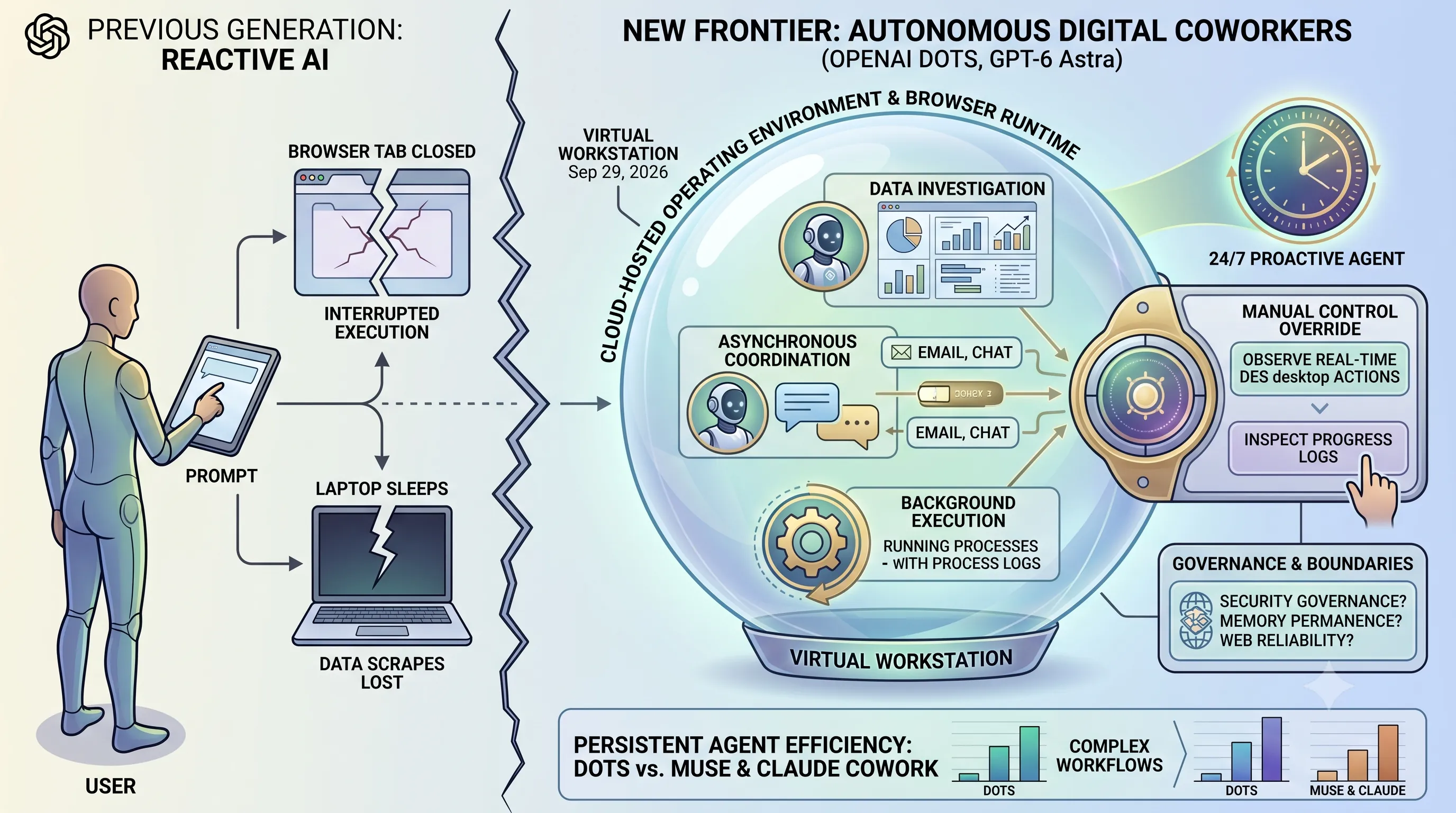
1. Autonomous Cloud Architecture: How OpenAI Dots Operates a Persistent Virtual PC
OpenAI officially launched Dots on September 29, 2026, marking a significant architectural shift toward giving autonomous agents dedicated virtual operating environments.As stated in the official announcement, "A dot is a named, persistent AI assistant inside ChatGPT, powered by GPT-6 Astra."
Instead of relying on ephemeral session memory or local client resources, each Dot is instantiated inside an isolated, cloud-hosted computer and browser environment designed to run continuously without user intervention.
Persistent Cloud Runtime and User Takeover Controls
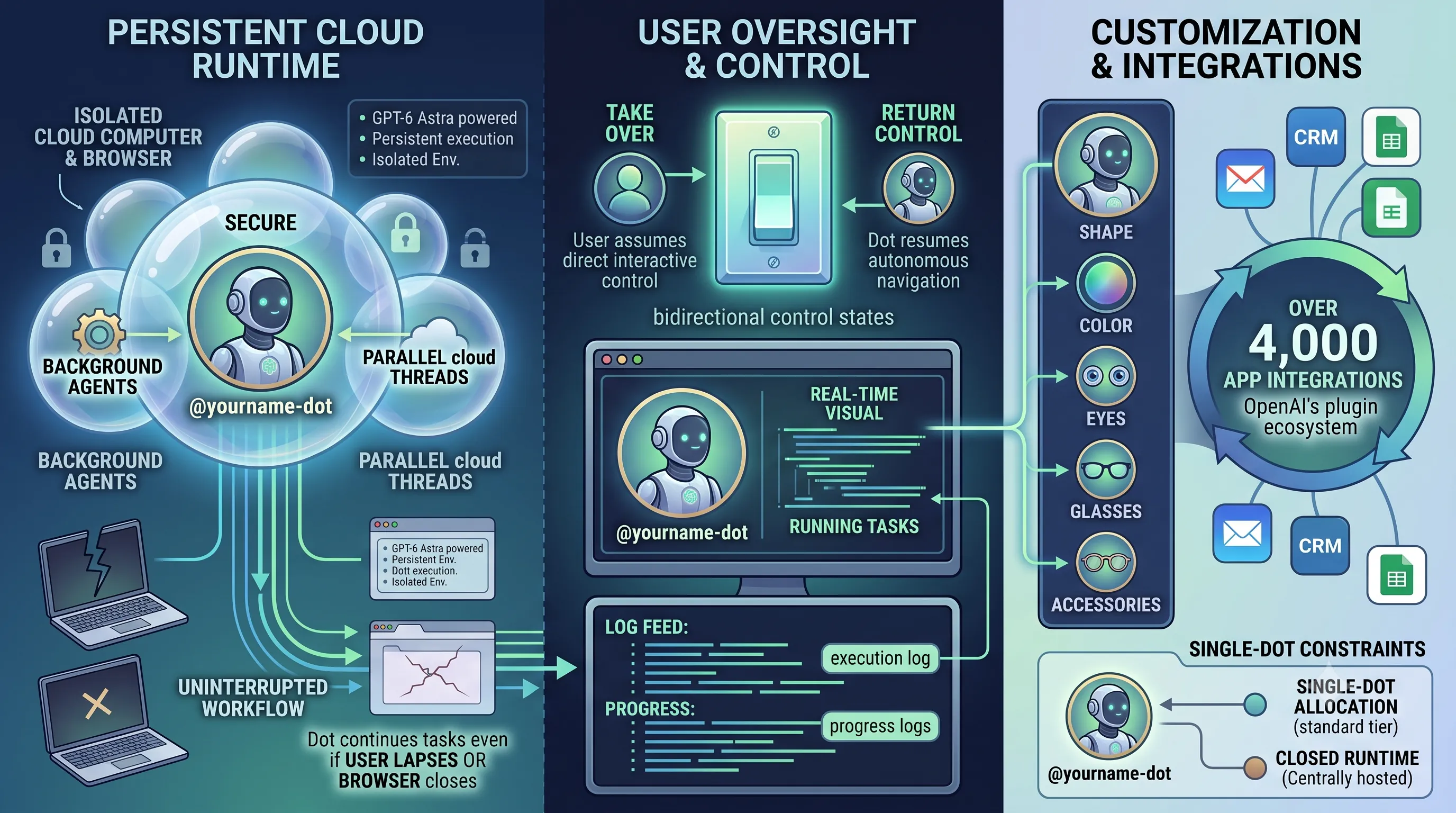
The core of the Dots architecture is its persistent cloud runtime.Each Dot operates in an independent cloud computing environment equipped with a dedicated browser.
Because the execution loop resides entirely on remote infrastructure, a Dot continues ongoing tasks uninterrupted even when the user shuts down their laptop, closes their browser, or loses network connectivity.
To maintain full visibility over autonomous operations, users can open the Dot's virtual computer interface to inspect execution in real time.
If an automated workflow requires manual intervention, the interface provides bidirectional control states:
- Take over: Allows the user to assume direct interactive control of the virtual desktop and browser session.
- Return control: Hands execution authority back to the agent to resume autonomous navigation and processing.
Astra-Powered Background Threading and Custom Visual Handles
Dots leverage the reasoning capabilities of the GPT-6 Astra model to orchestrate multi-threaded operations.When faced with asynchronous or compute-heavy workloads, a Dot can utilize background agents and spawn new cloud threads to execute multiple tasks in parallel.
This processing capacity is integrated across external platforms, connecting to over 4,000 apps via OpenAI's plugin ecosystem.
Each assistant is assigned a unique identifier upon creation, structured as an individual handle such as
@yourname-dot.Users can configure the visual identity of their Dot through built-in customization settings, tailoring distinct aesthetic parameters including shape, color, eyes, glasses, and accessories.
| Architectural Component | Specification & Implementation Detail |
|---|---|
| Launch Date | September 29, 2026 |
| Foundational Model | GPT-6 Astra |
| Environment Infrastructure | Isolated cloud-hosted computer and browser environment with persistent execution |
| App Integrations | Over 4,000 apps accessible via OpenAI's plugin ecosystem |
| Concurrency Mechanism | Spawns parallel cloud threads and background agents |
| Session Control | Real-time observation with 'Take over' and 'Return control' switching |
| Identity & Customization | Custom handle (e.g., @yourname-dot) with configurable shape, color, eyes, glasses, and accessories |
Single-Dot Constraints and Closed Runtime Boundaries
Despite the expanded autonomy provided by dedicated cloud environments, the architecture maintains explicit infrastructural boundaries.Under standard subscription tiers, users are allocated a single primary Dot.
The ability to deploy specialized multi-Dot teams is currently restricted to select enterprise pilots or slated for future product roadmaps.
Furthermore, the execution environment remains entirely closed and centrally hosted by OpenAI.
Users and system administrators cannot self-host a primary Dot on private infrastructure, nor is there support for selecting external third-party models outside the native GPT-6 Astra runtime.
2. Bridging Local Hardware and Communication Channels: Desktop Access and Messaging Integrations
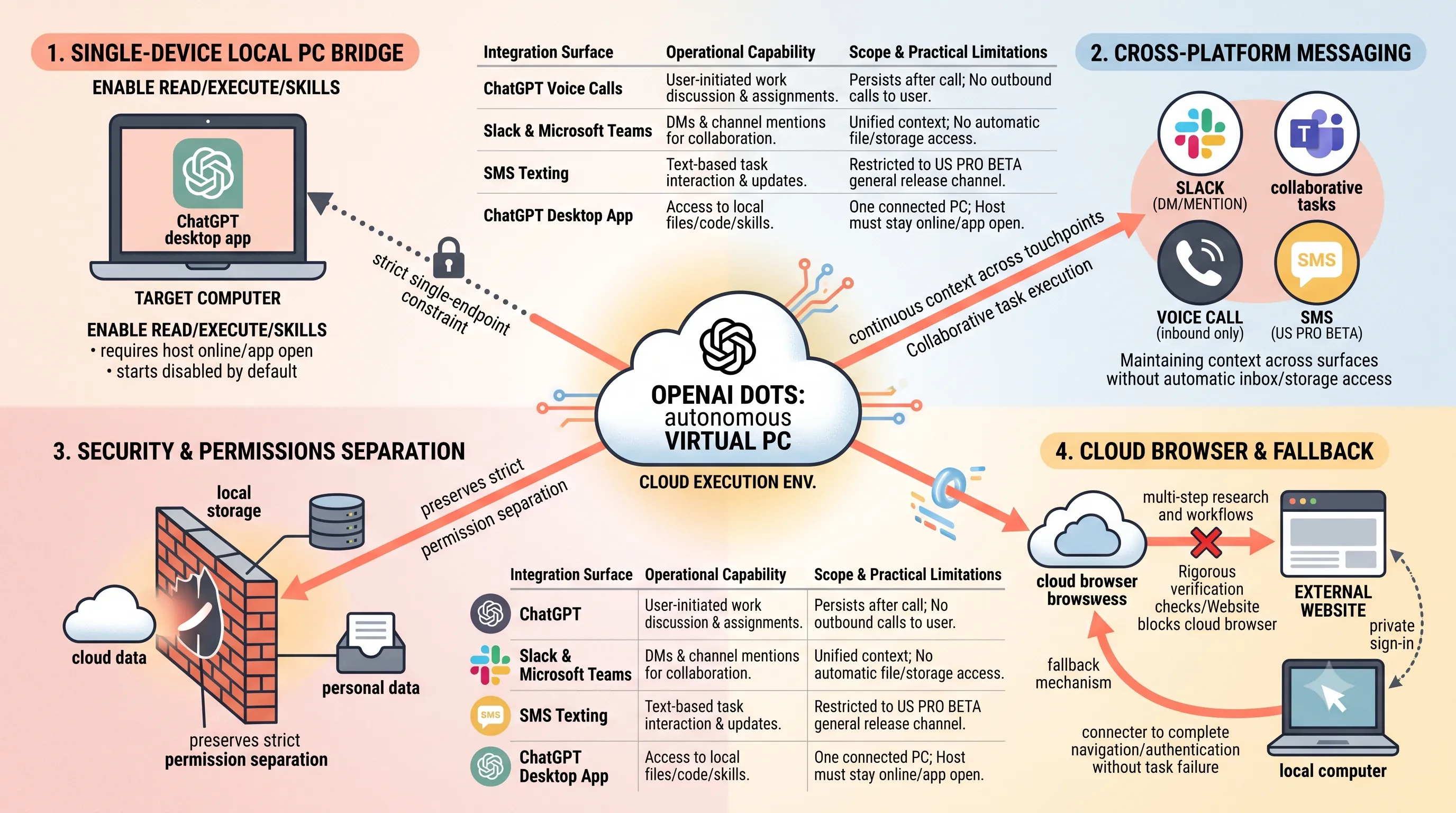
Connecting an autonomous virtual machine to real-world workflows requires reliable bridges between cloud execution environments, personal endpoints, and communication surfaces.In evaluating OpenAI Dots, bridging these layers reveals how a cloud-hosted virtual PC interacts with local hardware, persistent workspaces, and distributed messaging platforms.
Single-Device Local PC Bridging via Desktop Client
Users can grant their Dot optional local machine access through the ChatGPT desktop app, enabling the agent to read local files, execute local code, and utilize local skills.This local bridge operates under strict single-endpoint constraints, as users can connect only one personal computer at a time to a Dot.
To maintain security, local PC access starts disabled by default and requires the target computer to remain online with the ChatGPT desktop app actively running.
Establishing messaging connections does not automatically grant the Dot access to user inbox files or local PC storage, preserving strict permission separation across data surfaces.
Cross-Platform Context across Slack, Teams, and Voice
Dot maintains continuous conversational context across multiple touchpoints, including ChatGPT, Slack, Microsoft Teams, and voice calls.Within Slack workspaces, team members can direct message their Dot or mention it directly in connected channels to delegate tasks collaboratively.
Users can also initiate a voice call to their Dot within ChatGPT to discuss active work and assign assignments that persist and execute after the call concludes.
However, specific channel-level boundaries remain in place regarding external communication channels:
| Integration Surface | Operational Capability | Scope & Practical Limitations |
|---|---|---|
| ChatGPT Voice Calls | Inbound voice calls initiated by users to discuss work and assign tasks. | Tasks persist after the call ends, but Dots cannot initiate outbound phone calls to users at launch. |
| Slack & Microsoft Teams | Direct messaging (DMs) and channel mentions for collaborative task execution. | Maintains unified context across surfaces without granting automatic access to inbox files or local storage. |
| SMS Texting | Mobile message-based task interaction and conversation updates. | Integration is restricted to a US Pro beta rather than a general release channel. |
| ChatGPT Desktop App | Bridge to local files, local code execution, and custom machine skills. | Limited to one connected PC at a time; requires the host machine to stay online with the app open. |
Cloud Browser Restrictions and Verification Fallbacks
Dot navigates web resources through an isolated cloud browser environment designed to handle multi-step research and workflows.Cloud browser authentication relies on private sign-in requests executed outside the main conversation context, accompanied by optional password saving for returning sessions.
Despite these capabilities, certain external websites actively block cloud-hosted browsers or enforce rigorous verification checks.
When these security barriers trigger, the workflow relies on fallback mechanisms to a connected local computer to complete navigation and authentication without failing the overarching task.
3. Security Governance and Memory Management: Approval Gates and All-or-Nothing Resets
Operating an autonomous agent with a dedicated virtual desktop requires strict boundaries between autonomous execution, credential security, and user intervention.In OpenAI Dots, the security model balances background autonomy with rigorous access controls and defined review triggers.
Read-Only Safeguards, Approval Gates, and Credential Isolation
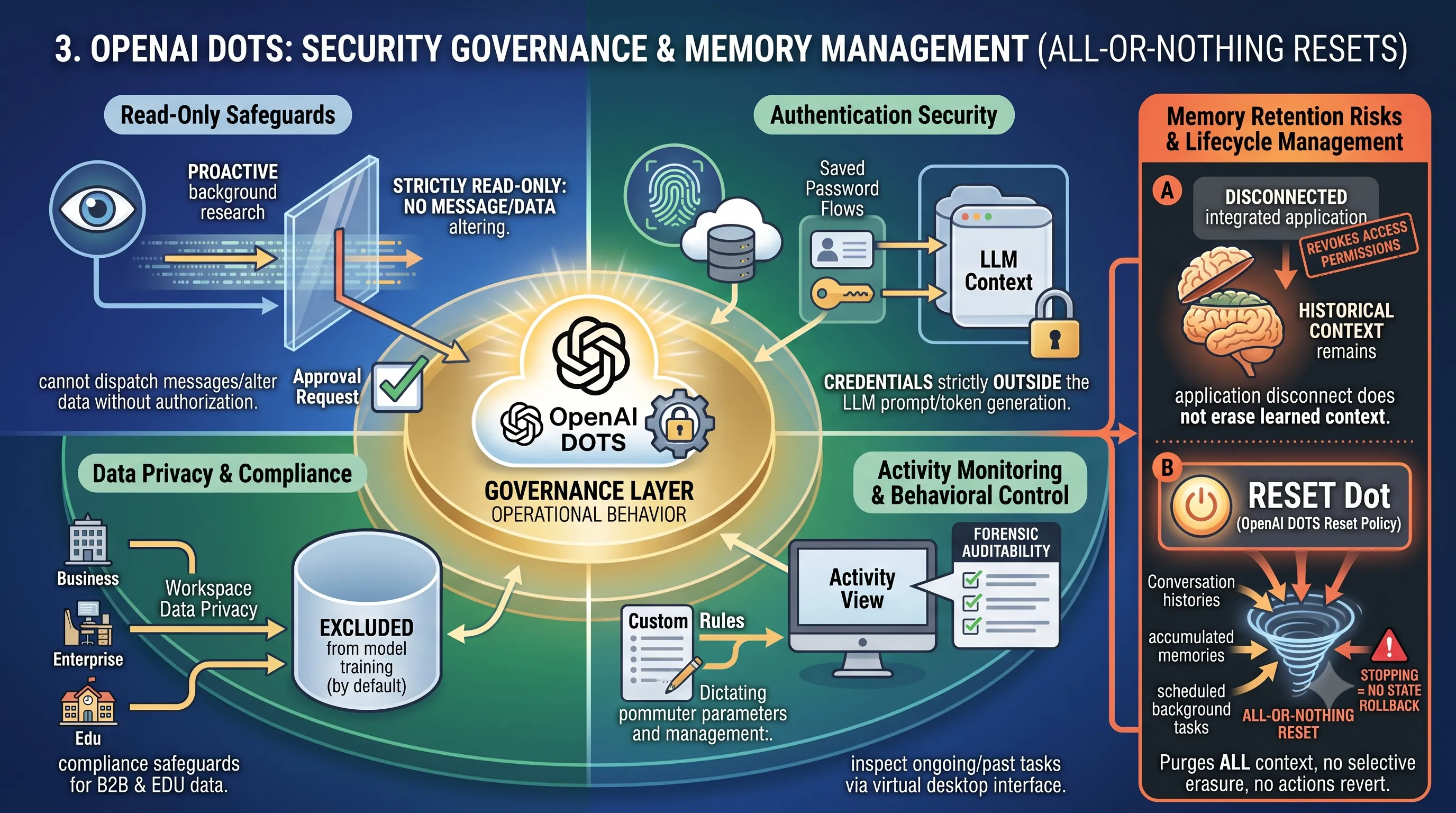
OpenAI Dots enforces a structural distinction between passive research and state-altering interactions.Proactive background research operates strictly in a read-only mode.
Under this safeguard, a Dot cannot dispatch messages, alter application states, or modify stored data without explicit user authorization.
When an operation interacts with external accounts or involves sharing sensitive information, built-in automated review systems intervene.
These automated review checks evaluate the action's potential impact and immediately trigger explicit approval requests or initiate a manual handoff to the user before execution proceeds.
Authentication security is maintained by separating access credentials from model ingestion.
Saved password flows ensure that user credentials remain strictly outside the LLM model context, preventing secret exposure during prompt construction or token generation.
Furthermore, enterprise compliance safeguards are enabled by default: data from Business, Enterprise, and Edu workspaces is excluded from model training.
Desktop Activity Monitoring and Custom Rules
To govern agent behavior during task execution, users can establish optional Custom Rules that dictate operational boundaries.Real-time tracking and forensic auditability are provided through the dedicated desktop Activity View.
Via the desktop Activity View, users can inspect both ongoing and past tasks, monitoring the agent's progress across applications directly on its virtual desktop interface.
| Governance Layer | Operational Behavior | Enforcement Mechanism & Scope |
|---|---|---|
| Proactive Background Research | Autonomous information gathering | Strictly read-only; cannot send messages or alter app data without explicit authorization. |
| High-Stakes Account Actions | State changes and sensitive data sharing | Automated review triggers approval requests or requires manual handoff. |
| Credential Management | Application logins and authentication | Saved password flows keep credentials entirely outside the LLM context. |
| Workspace Data Privacy | Enterprise data handling | Excluded from model training by default for Business, Enterprise, and Edu workspaces. |
| Behavioral Customization | Execution parameters and monitoring | Configured via optional Custom Rules and tracked through the desktop Activity View. |
Memory Retention Risks and the All-or-Nothing Reset Policy
Despite structured security guardrails, memory retention and lifecycle management present distinct governance challenges.Data removal operates at a coarse granularity.
According to the OpenAI getting-started guide, disconnecting an integrated application successfully revokes all future access permissions but does not erase the historical context or knowledge the Dot has already learned from prior sessions.
When users need to purge retained context, OpenAI Dots enforces an all-or-nothing reset policy.
Resetting a Dot cannot be performed selectively; it requires the simultaneous deletion of all conversation histories, accumulated memories, and scheduled background tasks.
Additionally, task termination does not provide state rollback capabilities.
Stopping an active task pauses ongoing work immediately, but it does not automatically undo or revert actions and changes that the agent has already executed on the desktop environment.
4. Tier Availability, Resource Allocation, and Geographic Rollout Constraints
Understanding the operational constraints of granting an autonomous agent its own virtual workspace requires a detailed look at account tier entitlements, quota mechanics, and deployment prerequisites.
OpenAI has tied access to Dots directly to specific subscription tiers, governing both basic conversational interaction and extended compute execution.
Subscription Eligibility across Pro 100-500 and Enterprise Plans
Access to OpenAI Dots is structured around premium and organizational subscription tiers.
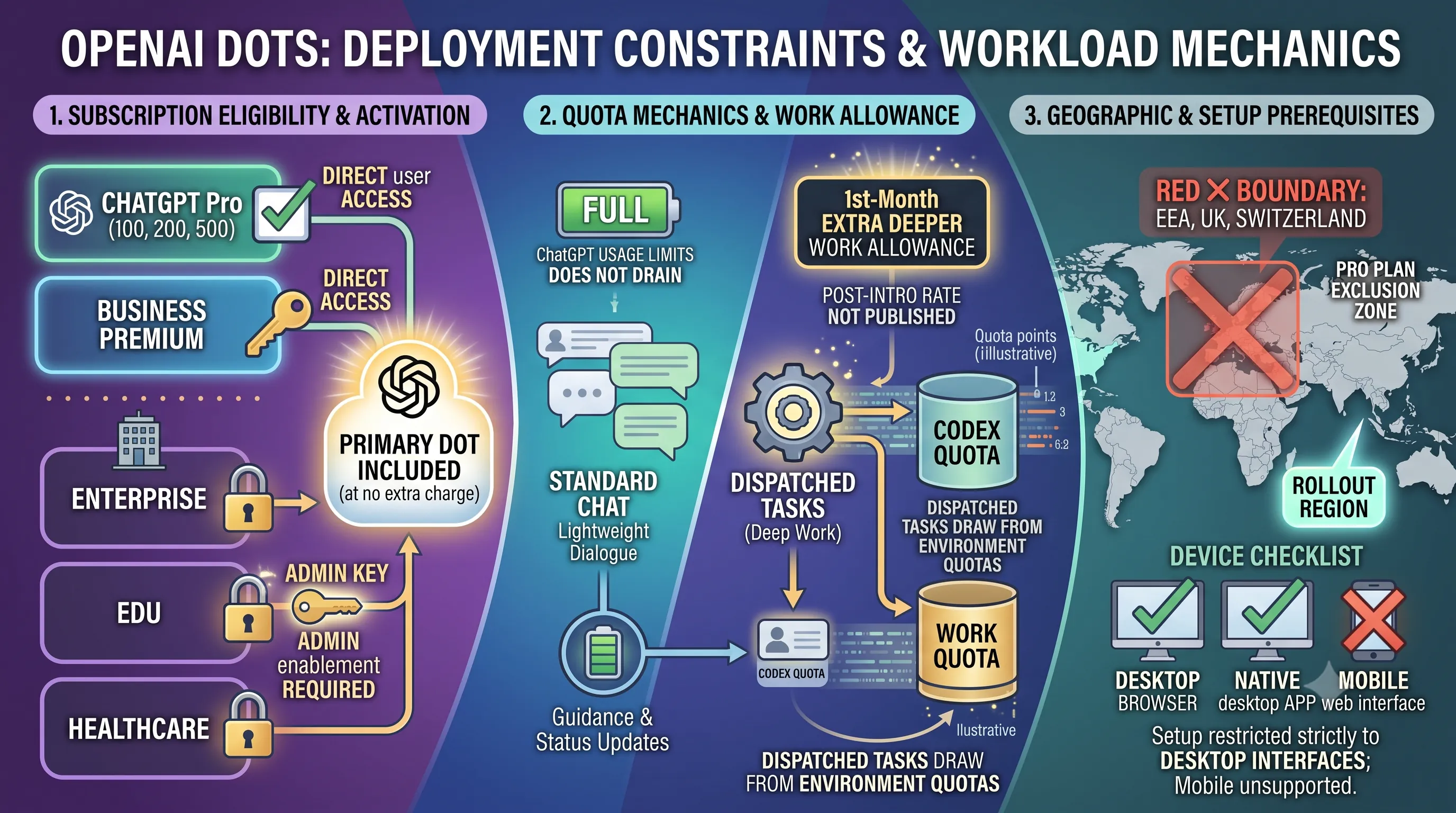
The first primary Dot is included at no extra charge on eligible ChatGPT Pro, Business Premium, and Enterprise plans.
Within the Pro subscription framework, eligibility extends across multiple capacity tiers, specifically covering Pro 100, Pro 200, and Pro 500.
For institutional accounts—including Enterprise, Edu, and Healthcare tiers—Dots access is not enabled by default.
These organizational tiers require explicit administrator enablement before users can provision and interact with their dedicated Dot environment.
Execution Quotas and Deeper-Work Allowance Rules
The consumption model distinguishes between lightweight dialogue and heavy computational workloads dispatched within the agent's virtual machine environment.
Standard conversational interaction with a Dot does not consume standard ChatGPT usage limits.
This allows users to communicate, guide, and receive status updates from their agent without depleting their primary conversational chat allowances.
However, when an autonomous task transitions from direct chat to intensive compute or specialized integrations, quota consumption shifts accordingly.
Tasks dispatched by a Dot into Codex or ChatGPT Work draw directly from the respective usage quotas allocated to those specific environments.
To assist with initial onboarding and extensive task delegation, Dots includes an extended deeper-work allowance during the first month following launch.
OpenAI has not published ongoing post-introductory pricing for deeper work or for provisioning additional Dots beyond the initial primary allocation.
| Plan Tier | Primary Dot Inclusion | Activation Requirement | Usage Quota Impact |
|---|---|---|---|
| ChatGPT Pro (Pro 100, Pro 200, Pro 500) | Included at no extra charge | Direct user access | Standard chat does not drain limits; dispatched Codex/Work tasks draw from environment quotas |
| Business Premium | Included at no extra charge | Direct user access | Standard chat does not drain limits; dispatched Codex/Work tasks draw from environment quotas |
| Enterprise | Included at no extra charge | Administrator enablement required | Standard chat does not drain limits; dispatched Codex/Work tasks draw from environment quotas |
| Edu & Healthcare | Tier-managed access | Administrator enablement required | Standard chat does not drain limits; dispatched Codex/Work tasks draw from environment quotas |
Regional EEA/UK Exclusions and Desktop Setup Requirements
Despite the broad utility of providing an agent with an isolated execution environment, deployment is subject to regional boundaries and platform limitations.
The Pro plan rollout at launch excludes users located in the European Economic Area (EEA), the United Kingdom (UK), and Switzerland.
In addition to geographic boundaries, strict interface requirements govern the initial provisioning workflow.
Setup is restricted strictly to desktop browsers or native desktop applications.
Configuring or initializing a Dot via mobile web interfaces is entirely unsupported.
5. Real-World Workflow Verification, Failure Modes, and the Autonomous Agent Landscape
Providing an autonomous AI agent with a dedicated personal virtual computing environment connects high-level reasoning models directly to operating-system-level actions.Evaluating OpenAI Dots within this operational paradigm requires examining verified real-world workflow cases, failure modes, and how the platform compares across the broader autonomous agent ecosystem.
Verified Task Execution vs. Longitudinal Failure Points
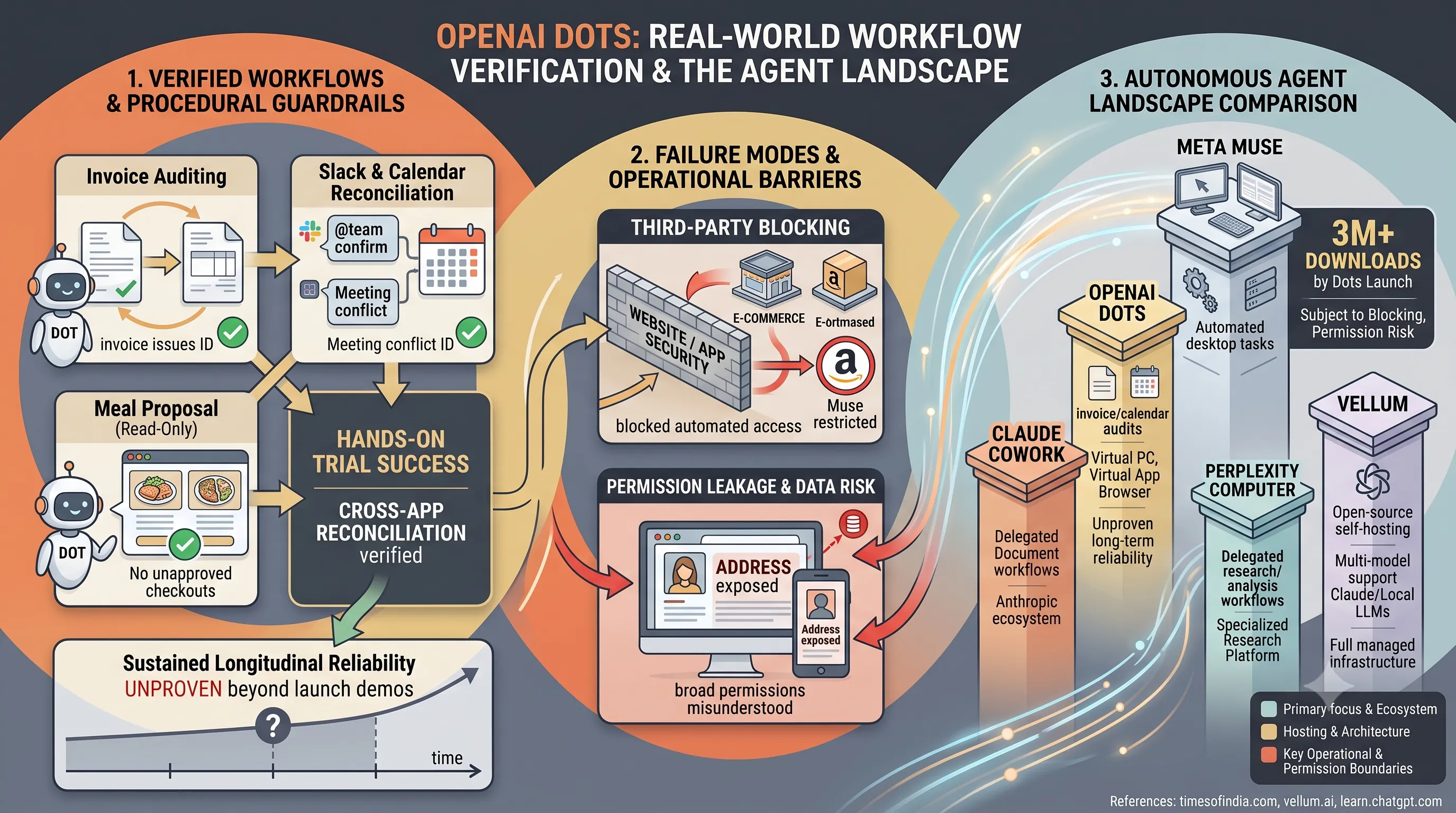
Early workflow demonstrations confirm that OpenAI Dots can navigate productivity tasks while maintaining specific procedural guardrails.In hands-on trials, Dots successfully reviewed documentation to identify invoice issues and surfaced contextual meal order options without executing unapproved checkouts.
Cross-application reconciliation was further demonstrated during early testing observed by Dan Shipper, where a Dot accurately flagged an upcoming calendar conflict by identifying a missed Slack thread without hallucinating information.
However, these successes exist alongside clear evaluation boundaries.
Long-term longitudinal reliability and sustained real-world task success rates remain unproven beyond short-term launch demos, leaving questions about agent performance over extended autonomous durations.
Platform Blocking and Permission Leakage Risks
Deploying autonomous agents into live consumer and enterprise environments introduces external operational barriers and security concerns.A primary operational challenge is defensive countermeasures by third-party services.
External platforms may actively block autonomous agents from completing tasks, a limitation highlighted when Amazon restricted automated access from Meta Muse.
Security risks also emerge when configuring access rights across personal environments.
Broad permissions create significant data leakage risks, as demonstrated in an incident where Meta Muse exposed a user's address due to misunderstood permission scopes during execution.
Comparative Assessment: Dots vs. Muse, Claude Cowork, and Vellum
The landscape of delegated computing solutions spans proprietary consumer tools, ecosystem-specific workflow engines, and open-source frameworks.Meta Muse established significant early scale, recording over 3 million downloads by the launch date of OpenAI Dots.
Within specific developer and research ecosystems, Claude Cowork provides delegated document workflows within Anthropic's ecosystem, while Perplexity Computer focuses on delegated research and analysis workflows.
For teams requiring direct infrastructure governance, alternative agent architectures such as Vellum provide open-source self-hosting capabilities alongside multi-model support spanning Claude and local LLMs.
| Solution | Primary Workflow Focus & Model Ecosystem | Hosting & Architecture | Key Operational & Permission Boundaries |
|---|---|---|---|
| OpenAI Dots | Invoice auditing, calendar conflict detection via Slack, and meal proposal workflows. | Virtual PC agent environment within OpenAI ecosystem. | Restricts unapproved checkouts; long-term longitudinal reliability remains unproven beyond launch demos. |
| Meta Muse | General automated desktop workflows (surpassed 3 million downloads by Dots launch date). | Proprietary client application. | Subject to third-party blocking (e.g., Amazon restrictions); demonstrated address leakage risks via broad permissions. |
| Claude Cowork | Delegated document workflows. | Anthropic ecosystem integration. | Confined to ecosystem-specific document processing tasks. |
| Perplexity Computer | Delegated research and structured analysis workflows. | Specialized research platform. | Optimized specifically for research-driven delegation tasks. |
| Vellum | Multi-model execution across Claude and local LLMs. | Open-source, self-hosted architecture. | Provides full user-managed infrastructure and flexible model integration boundaries. |
Related Posts
Generative AI may have assisted with research or drafting for this article. Topic selection, fact-checking, final wording, and publication remain the responsibility of DragonStone74. AI use disclosure