
How OpenAI Dots Brings Autonomous Background Coding to Developers
🚀 Key Takeaways
- From Prompting to Autonomy: Dots marks a fundamental evolution from turn-by-turn chat prompts to a persistent entity holding ongoing responsibility for codebases.
- End-to-End Task Ownership: The assistant autonomously handles complex engineering workflows, including multi-file API migrations, test execution, and proactive bug diagnosis.
- Hybrid Compute Architecture: Isolated cloud virtual environments ensure continuous background execution even when physical developer machines are disconnected.
- Granular Security Controls: Configurable rules and strict read-only modes protect mission-critical repositories while allowing autonomous maintenance tasks.
- Cross-Platform Collaboration: Engineers can interact with their Dot across terminals, shared digital spaces, and workplace communication tools like Slack and Teams.
- Bundled Subscription Model: Primary personal agents are integrated directly into premium developer tiers with delegated task computing.
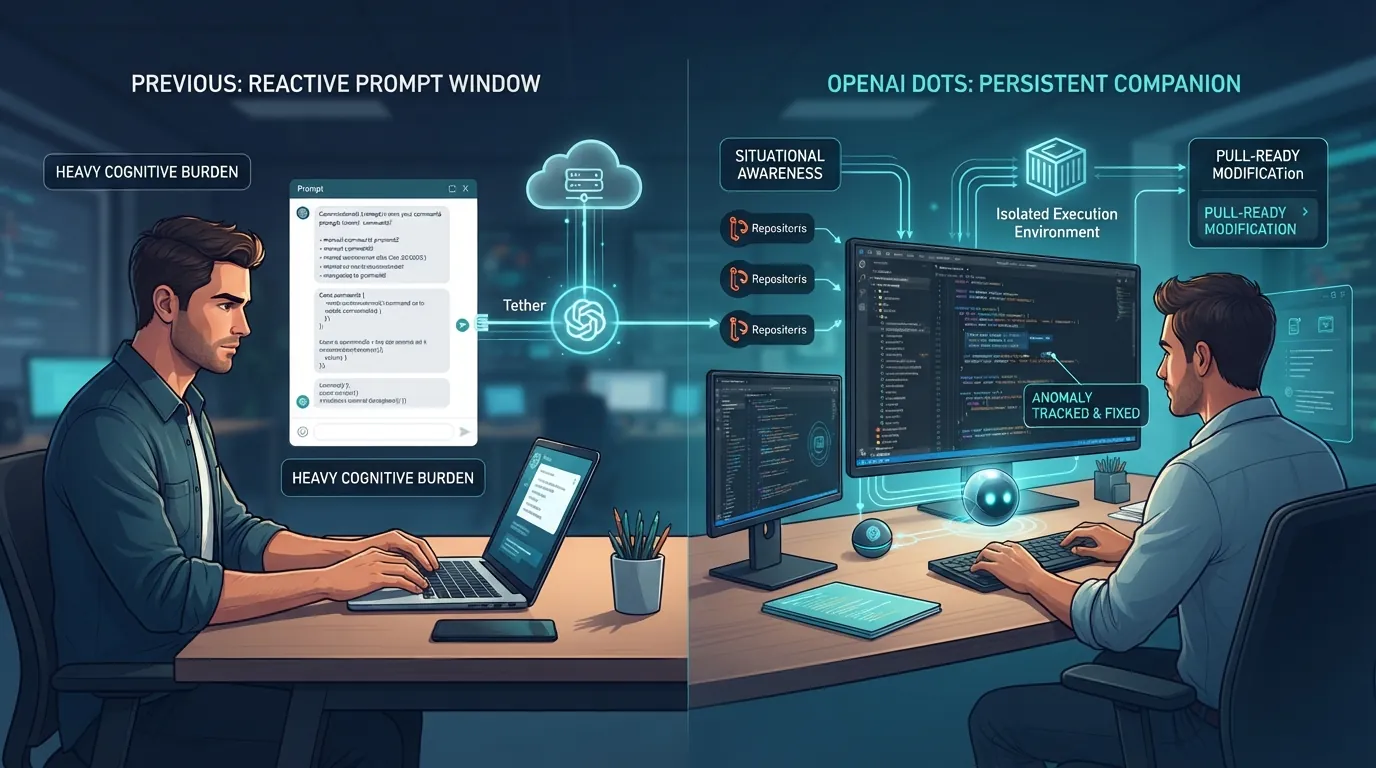
For years, AI-assisted software engineering has remained tethered to the conversational prompt window.
While early assistants rapidly accelerated snippet generation, developers still bore the heavy cognitive burden of manually steering every edit, copying code fragments, and context-switching between tools.
The introduction of OpenAI Dots represents a decisive architectural departure from reactive code completion toward persistent, always-on software companions.
Instead of disappearing when a chat session closes, a Dot maintains unbroken situational awareness across repositories, proactively tracking anomalies and preparing pull-ready modifications in isolated execution environments.
As engineering organizations navigate accelerating delivery cycles and complex architectural refactors, this paradigm shift promises to redefine developer productivity.
Understanding how Dots bridges local developer setups with background cloud execution reveals how autonomous agents are set to transform everyday software craftsmanship.
1. From Ephemeral Prompts to Always-On Entities: The Evolution of Dots
To understand how Dots could revolutionize how developers use AI for coding, one must examine the fundamental architectural shift in how engineers interact with machine intelligence.Rather than relying on isolated prompts, OpenAI has reimagined the developer environment as an enduring collaboration with an autonomous entity.
Replacing Disjointed Chat Threads with Persistent Agentic Identity
OpenAI officially announced Dots on September 29, 2026, at DevDay 2026.The platform evolved directly out of the agentic coding tools that OpenAI built internally for software engineers.
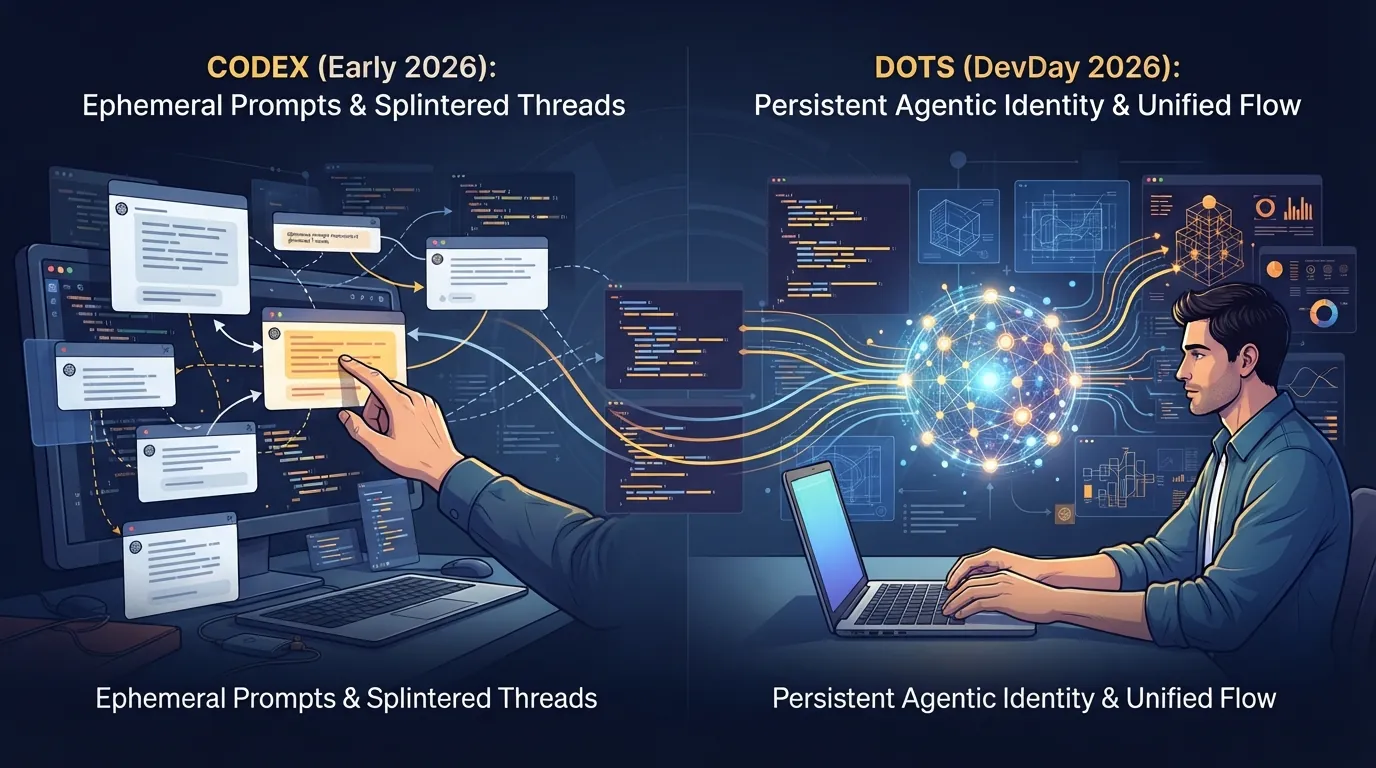
Before this architectural pivot, developers routinely managed multiple splintered conversation threads, forcing them to re-establish context and state across disparate windows.
Dots eliminates this fragmentation by operating as a persistent single entity rather than isolated, ephemeral chat sessions.
Alexander Embiricos, enterprise product team lead at OpenAI, noted that the team realized framing the product as an entity and a single conversation makes agentic workflows intuitive.
By consolidating technical context within a unified entity, the assistant maintains state across extended software lifecycles without requiring context resets.
Moving Beyond Codex: From Prompt Hand-Holding to Autonomous Delegation
OpenAI released its Codex coding tool at the beginning of 2026, establishing an initial baseline for automated programming assistance.While Codex allowed advanced workflows, it required continuous manual hand-holding and constant prompts from the engineer to complete multi-step tasks.
Dots fundamentally shifts user interaction away from those single-turn prompt requests toward ongoing, autonomous responsibility inside bounded parameters.
Addressing this operational evolution, Sam Altman stated that Dots is designed so users do not have to instruct the AI on every single task.
This transition frees software engineers from micro-managing individual lines of code, delegating broader engineering objectives to an assistant equipped for independent execution.
| Dimension | OpenAI Codex (Early 2026) | Dots (DevDay 2026) |
|---|---|---|
| Timeline & Milestone | Released at the beginning of 2026 | Announced September 29, 2026, at DevDay 2026 |
| Interaction Architecture | Splintered conversation threads | Persistent single entity maintaining a unified conversation |
| Operational Model | Single-turn prompt requests requiring continuous manual hand-holding | Autonomous responsibility inside bounded parameters without instructing every single task |
| Lineage & Foundation | Early agentic coding tool foundation | Direct evolution out of OpenAI's internal agentic coding tools |
2. Autonomous Codebase Refactoring and Background Engineering Workflows
The proposition that Dots could revolutionize how developers use AI for coding is anchored in its transition from a passive autocomplete interface to an autonomous background execution engine.By integrating with over 4,000 applications through the ChatGPT plugin ecosystem, Dots bridges chat-based reasoning with direct, programmatic interactions across developer toolchains.
End-to-End API Migrations and Parallel Background Agents
Traditional AI assistance requires developers to manually copy snippets, guide refactoring file-by-file, and manually invoke linters and test runners.Dots alters this workflow by executing multi-step engineering assignments autonomously across full project trees.
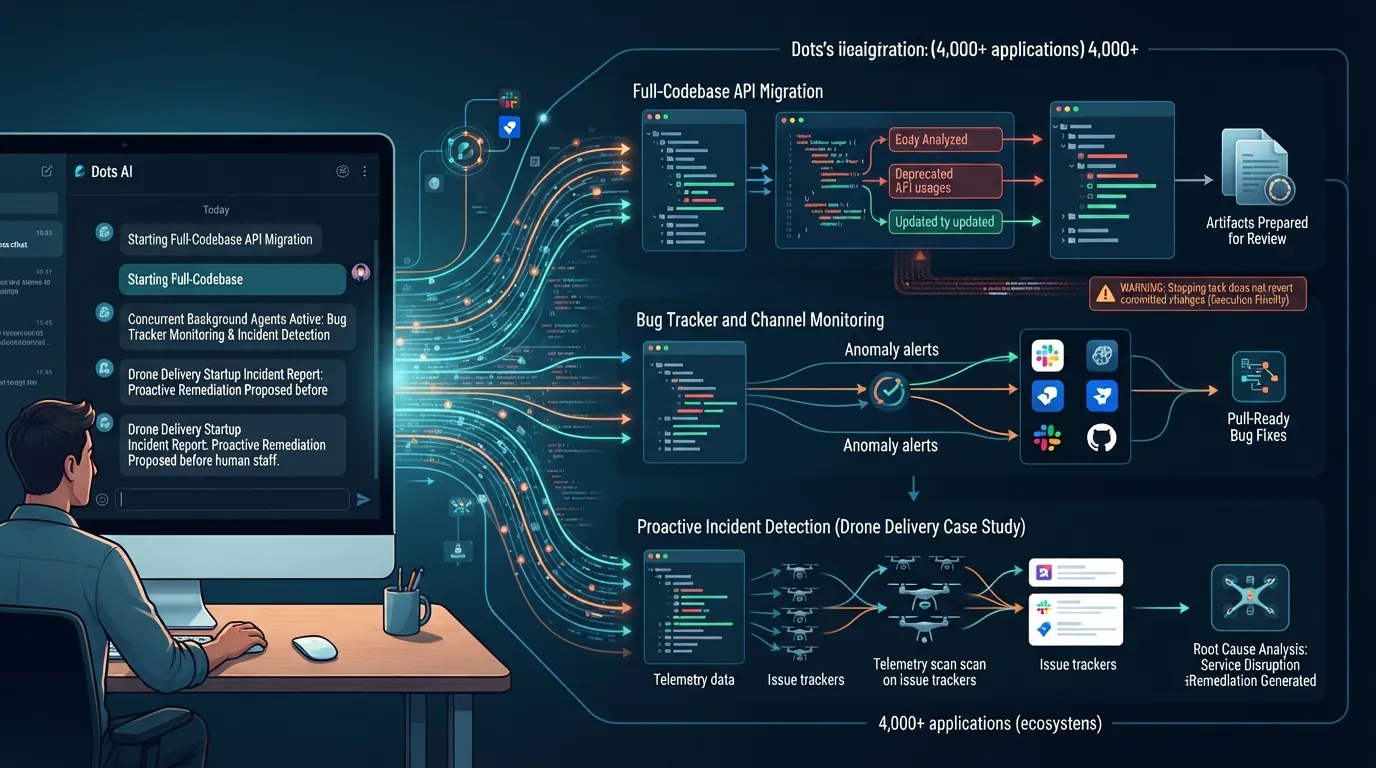
When assigned an API migration, Dots locates all deprecated API usages across an entire codebase, analyzes architectural impact, updates code, runs tests, and prepares artifacts for developer review.
Engineers are not forced to pause their workflow while these operations run.
Background agents allow Dots to process multiple development tasks in parallel while engineers continue conversing with it.
| Workflow Capability | Operational Mechanism | Output Artifact |
|---|---|---|
| Full-Codebase API Migration | Locates deprecated API usages across the entire codebase, analyzes architectural impact, updates code, and runs tests. | Prepared artifacts for developer review. |
| Concurrent Background Processing | Background agents process multiple development tasks in parallel while preserving conversational availability. | Independent execution threads without blocking the active chat. |
| Bug Tracker and Channel Monitoring | Monitors external customer feedback channels and bug trackers to investigate software anomalies. | Pull-ready bug fixes. |
Proactive Incident Detection: The Drone Delivery Case Study
The capacity of Dots to operate continuously across linked ecosystems enables proactive anomaly remediation rather than purely reactive debugging.Dots can monitor customer feedback channels and bug trackers to investigate software anomalies and prepare pull-ready bug fixes.
Demonstrating this real-world utility, Alexander Embiricos shared an example of a drone delivery startup engineer whose Dot detected, diagnosed, and proposed resolution steps for an outage before human staff noticed it.
By parsing incoming telemetry alongside issue trackers, the agent surfaced the underlying root cause and generated remediation procedures without waiting for manual incident escalation.
Execution Finality: Irreversible System Changes
While autonomous execution expands operational throughput, it introduces distinct lifecycle risks into CI/CD pipelines and production environments.A core technical limitation is that stopping a main task does not automatically undo actions that Dots has already executed in code or systems.
If an engineer cancels an in-flight workflow, changes already committed to files, external services, or integration targets via its connected plugins remain persistent.
Because rollback states are not automatically constructed upon cancellation, developers must account for execution finality and inspect intermediate system states after interrupting long-running autonomous routines.
3. Hybrid Execution Architecture: GPT-6 Astra, Cloud Sandboxes, and Local Pairing
Understanding the underlying execution stack demonstrates why Dots could revolutionize how developers use AI for coding.Rather than acting as a simple text completion engine, a Dot functions as an autonomous, persistent technical operator that bridges cloud runtime environments with physical developer machines.
This architecture relies on high-tier foundational intelligence coordinated across dedicated virtual sandboxes, specialized Codex environments, and secured local pairings.
GPT-6 Astra and Persistent Isolated Cloud Sandboxes
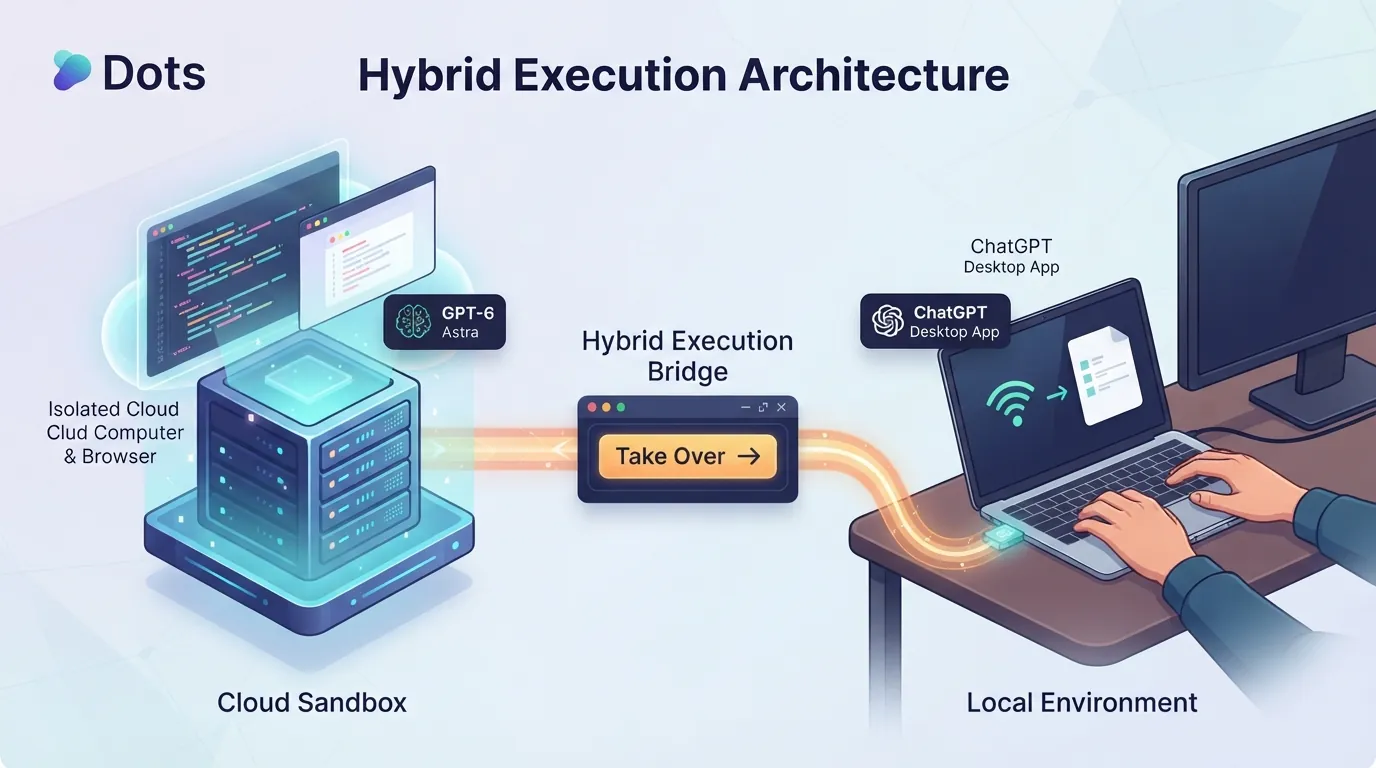
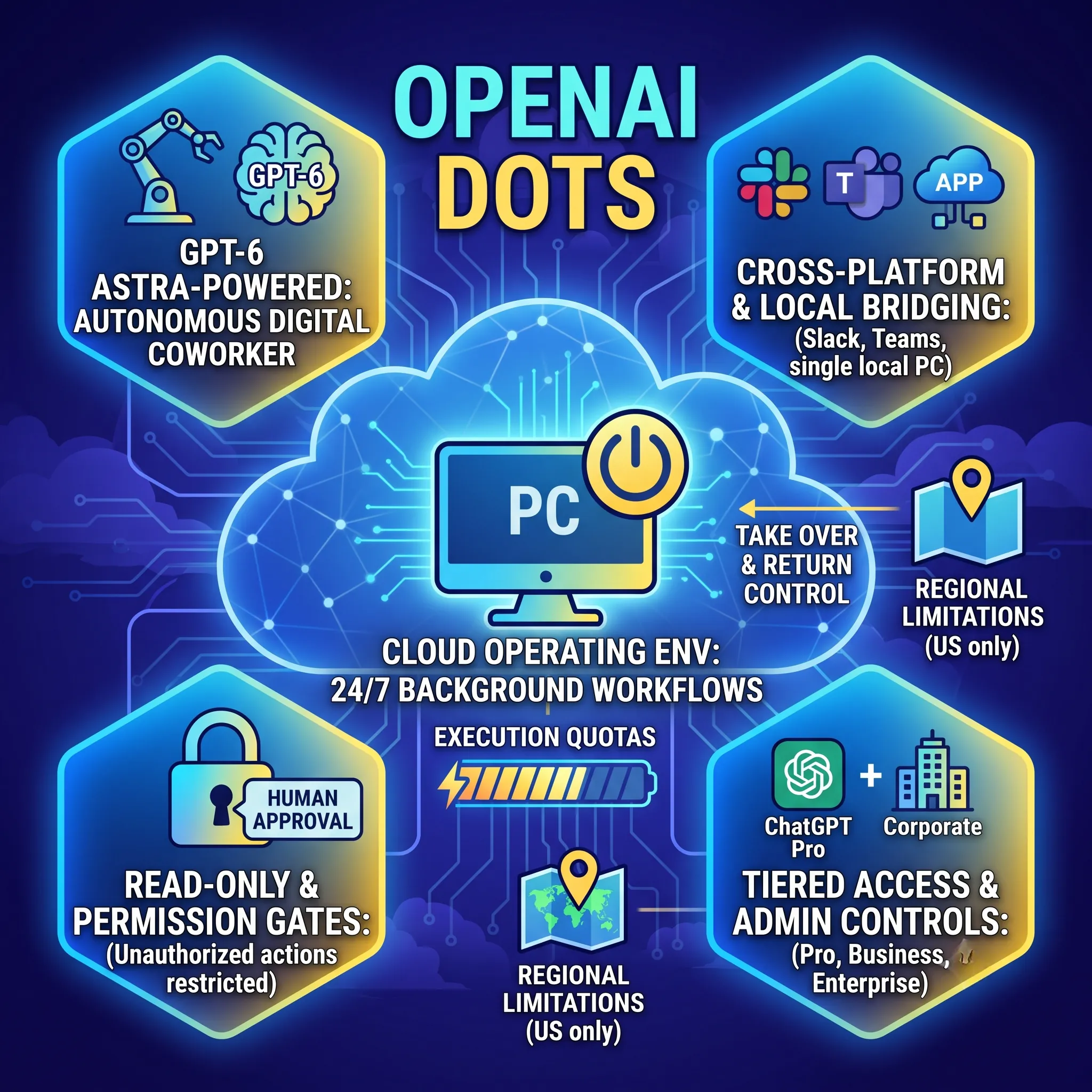
At the core of the system, Dots runs on OpenAI's GPT-6 Astra model.This model powers the agentic reasoning required to interpret instructions, design implementation steps, and interact directly with technical tooling.
To facilitate safe and uninterrupted development workflows, every Dot possesses an isolated cloud computer and cloud browser.
Because the compute layer lives in an isolated cloud sandbox, coding and execution continue even when developer workstations are powered down.
Long-running scripts, environment setups, test suite executions, and web interactions persist independently in the cloud sandbox without requiring active client-side uptime or battery consumption.
Local Machine Pairing and Codex Cloud Tooling
While cloud persistence manages asynchronous workloads, development often requires direct contact with local environments.Developers can connect their local computer through the desktop app to give Dots access to local repositories, files, and terminal tasks.
This local workstation pairing allows the model to inspect repository structures, run commands on the developer's hardware, and edit project trees directly.
However, specific architectural boundaries govern this connection.
Developers can connect only 1 personal computer to a Dot at a time.
Furthermore, local computer access requires the ChatGPT desktop app to remain running and online on the user's physical machine; disconnecting or closing the app cuts off local repository and terminal access.
Architecturally, connecting a local computer is separate from Codex tool connection or Work Sync permissions, maintaining discrete boundary layers across tool integrations.
Beyond basic terminal tasks, Dots can trigger, run, and continue tasks inside existing local Codex setups or dedicated Codex Cloud environments, providing native execution flexibility regardless of where dependencies reside.
| Architecture Dimension | Cloud Sandbox (Isolated Computer & Browser) | Local Desktop Pairing (ChatGPT Desktop App) |
|---|---|---|
| Process Execution | Runs inside an isolated cloud computer and cloud browser powered by GPT-6 Astra; triggers tasks in Codex Cloud environments. | Executes terminal tasks, inspects files, and accesses local repositories or existing local Codex setups. |
| Offline Behavior | Coding and execution continue uninterrupted even when developer workstations are powered down. | Requires the ChatGPT desktop app to remain running and online on the user's physical machine. |
| Device Limits | Every Dot possesses its own isolated cloud instance. | Developers can connect only 1 personal computer to a Dot at a time. |
| Work Sync & Tool Separation | Integrates directly with dedicated Codex Cloud environments. | Connecting a local computer is strictly separate from Codex tool connection or Work Sync permissions. |
The 'Take Over' Mechanism: Hybrid Manual Control
Autonomous agent execution requires an escape hatch when a human engineer needs to verify state, navigate credentials, or fine-tune code.Dots addresses this through integrated manual intervention.
Developers can select 'Take over' at any point to manually control the cloud browser or environment, returning control once finished.
This interaction loop ensures that developers never lose visibility into what the cloud computer is executing.
By toggling between autonomous GPT-6 Astra execution and hands-on developer guidance, the hybrid environment maintains strict user oversight without sacrificing automated development progress.
4. Security Guardrails, Custom Permission Rules, and Proactive Auditing
Connecting directly to the vision of how Dots could revolutionize how developers use AI for coding, continuous autonomous development relies fundamentally on ironclad trust and deterministic safety boundaries.Allowing an always-on agent to evaluate repositories requires comprehensive guardrails that prevent unauthorized code modifications while still affording the system enough context to surface meaningful software optimizations.
Granular Action Policies: Allowed, Approval-Required, and Blocked Rules
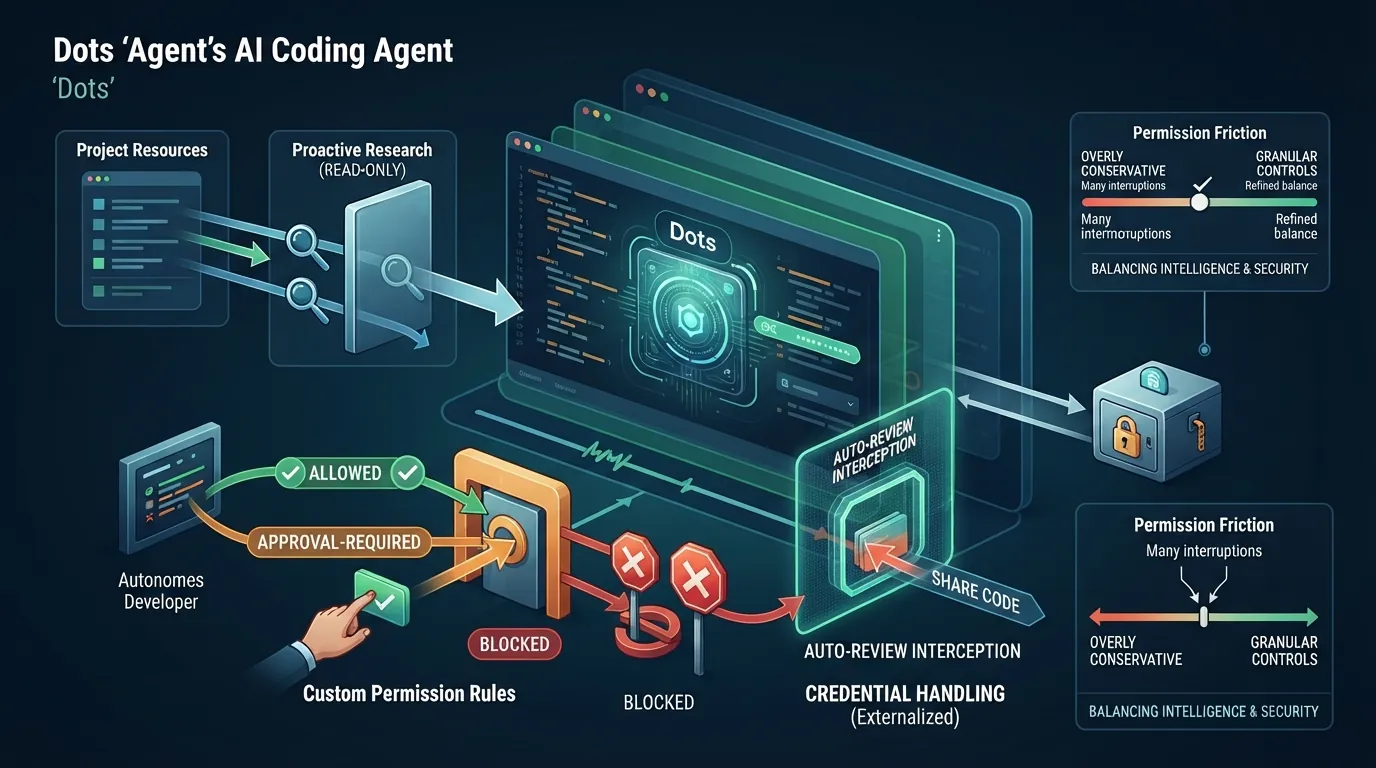
To balance autonomous initiative with engineering oversight, Dots structures background work around isolated cadences and explicit boundary enforcement.Proactive research operates on a dedicated background cadence designed to inspect connected project resources and surface relevant optimization tasks without altering live files.
Every tool executing during this proactive background research phase is strictly restricted to read-only access, ensuring that background scans cannot write to disk, run destructive terminal executions, or modify project environments.
To govern higher-stakes operations, developers can configure Custom Rules that explicitly categorize agent actions into three distinct operational states: allowed, approval-required, or blocked.
| Custom Rule Category | Operational Scope and Policy Enforcement |
|---|---|
| Allowed | Actions permitted to run autonomously within the session without pausing for manual intervention. |
| Approval-Required | Actions that pause execution to prompt the engineer for explicit interactive confirmation before proceeding. |
| Blocked | Actions completely barred from execution by the agent under any circumstances. |
Externalized Credential Handling and Auto-Review Interceptions
Beyond user-defined policy tiers, Dots embeds dynamic safeguards that monitor agent operations across secure operational boundaries.An integrated auto-review mechanism inspects ongoing tasks and automatically intercepts actions that affect accounts or share code outside the conversation boundary.
This auto-review layer acts as an automated safety perimeter, preventing sensitive proprietary source code from exiting the isolated session perimeter.
Furthermore, credential management is kept decoupled from model inference.
Credential logins use an externalized, private input form designed so that website passwords and authentication tokens are not exposed directly to the model context.
This separation keeps secrets out of the LLM prompt history, eliminating vector leaks during multi-turn coding dialogs.
Permission Friction and Read-Only Cloud Storage Challenges
While the platform provides rigid controls, early implementations revealed notable friction in day-to-day developer workflows.A present constraint is that Dots currently does not accept read-only access for certain cloud storage drives, requiring broader access permissions that challenge least-privilege configurations.
Additionally, proactive timing early in development occasionally surfaced alerts with very little lead time, catching engineers off-guard.
OpenAI acknowledged that early system defaults were overly conservative, creating friction by frequently interrupting developers for manual approvals during standard coding routines.
Addressing this operational friction, Alexander Embiricos stated that OpenAI needs to build out super granular permissions controls to balance intelligence with security.
5. Collaborative Development: Multi-Surface Context, ChatGPT Space, and Specialist Dots
To revolutionize how developers use AI for coding, AI tooling must move beyond isolated personal assistants and operate inside shared engineering ecosystems.Dots expands coding workflows from individual IDE windows into collaborative team environments by maintaining continuous context across multiple team surfaces.
ChatGPT Space: Shared Environments for Teams and Agent Collectives
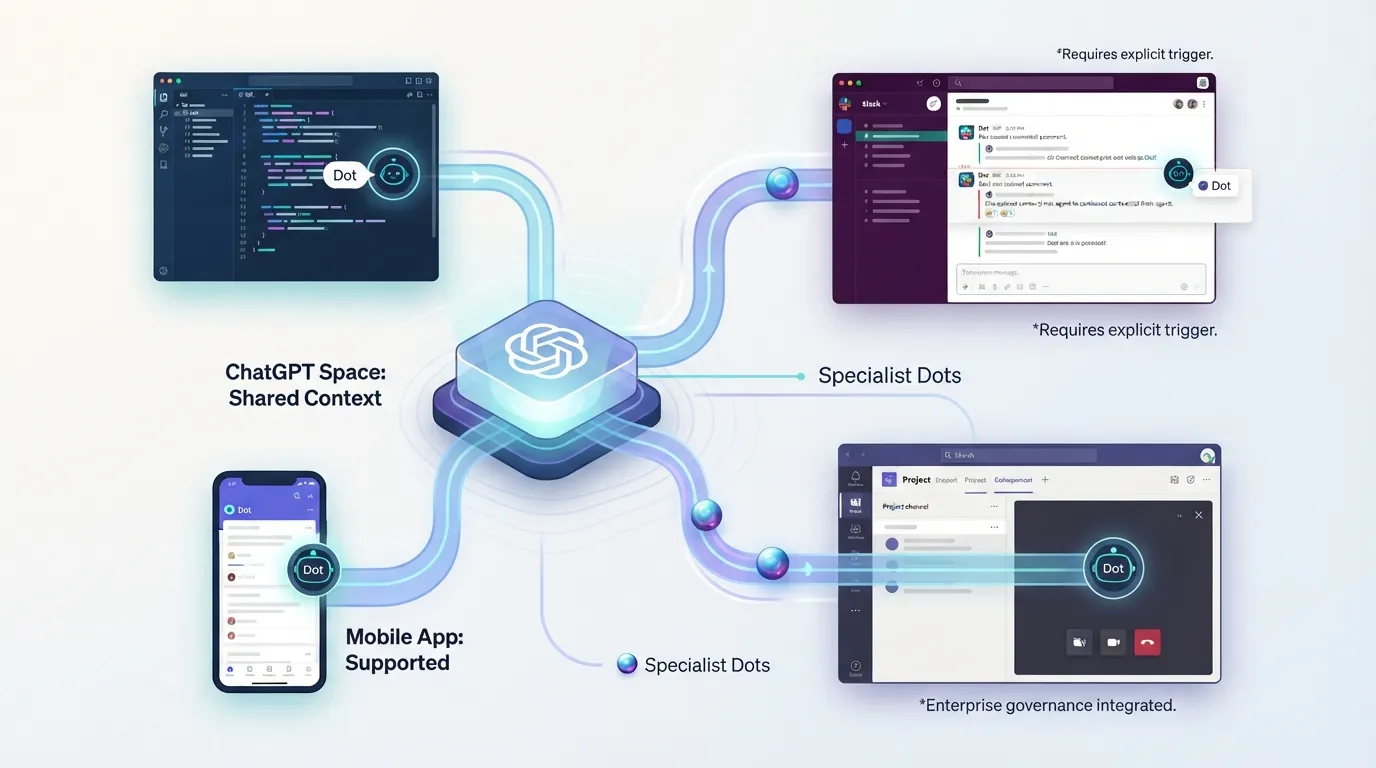
Engineering projects rarely happen in isolation, and ChatGPT Space addresses this by functioning as a single shared digital workspace where multiple engineers and their respective Dots collaborate directly.Within this collective workspace, agents work alongside developers rather than existing as siloed instances tied to a single user session.
Team members can mention a Dot directly inside documentation comments or Slack channels to delegate specific tracking or drafting assignments.
Because the system retains context across interactions, a task assigned in team communication surfaces remains fully synchronized with the collective development environment in ChatGPT Space.
Specialist Dots and Microsoft Agent 365 Integration
Beyond individual assistant roles, organizations can deploy Specialist Dots configured for dedicated organizational functions.These Specialist Dots offer pre-provisioned identities, distinct credentials, and dedicated system access to interface safely with enterprise systems.
To address administrative control and enterprise compliance, OpenAI is partnering with Microsoft to integrate Specialist Dots governance directly into Microsoft Agent 365.
While multi-agent orchestration expands inside collaborative spaces, operational boundaries remain critical.
Highlighting the limits of automated presence in professional communication, Alexander Embiricos stated he personally does not intend to attend meetings hosted by other people's AI agents.
Cross-Surface Operations: Chat Triggers and Unsupported Mobile Web
Dots supports persistent cross-surface context across ChatGPT desktop, web, mobile, Slack, and Microsoft Teams.However, enterprise deployment requires clear operational triggers and platform awareness.
Simply adding a Dot to a Slack or Microsoft Teams channel does not automatically initiate continuous monitoring.
Instead, monitoring begins only after explicit event criteria are assigned to the Dot within those channels.
Additionally, while native applications are supported across devices, mobile web browser access is unsupported.
| Surface / Platform | Context & Support Status | Operational Requirements & Capabilities |
|---|---|---|
| ChatGPT Desktop, Web, and Mobile | Supported | Maintains persistent cross-surface context across user environments. |
| Slack | Supported | Supports direct mentions for tracking or drafting assignments; requires explicit event criteria assigned before channel monitoring initiates. |
| Microsoft Teams | Supported | Integrates persistent context; requires explicit event criteria assigned before channel monitoring initiates. |
| Mobile Web Browser | Unsupported | Direct access through mobile web browsers is unsupported. |
6. Access Tiers, Consumption Allowances, and Enterprise Onboarding Limits
Evaluating how Dots could revolutionize how developers use AI for coding requires a clear understanding of the commercial structures, compute accounting models, and administrative policies governing access.Deploying an always-on assistant into active software engineering workflows hinges on subscription tiers, compute quotas across delegative engines, and enterprise governance controls.
Pricing Tiers and Geographic Availability Restrictions
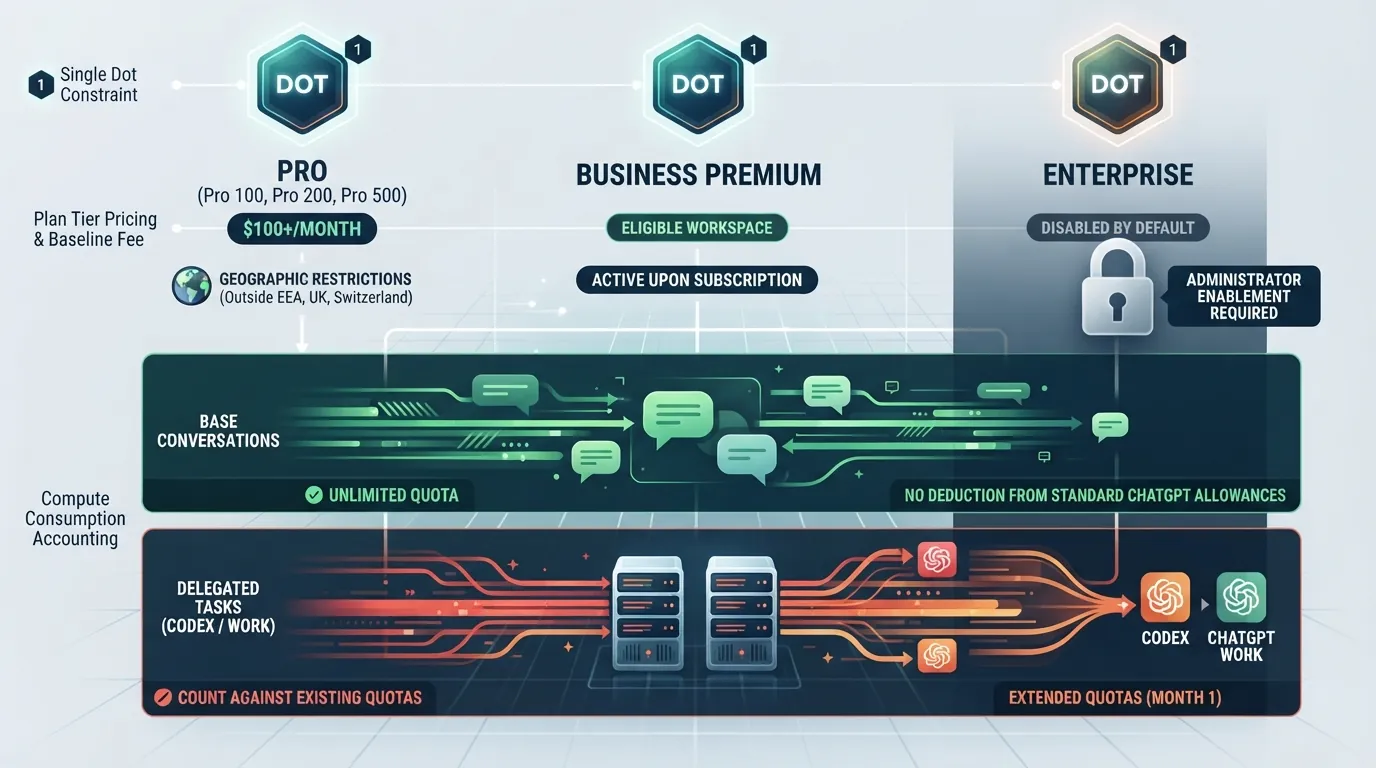
Access to Dots begins within paid subscription tiers starting at $100 per month.Commercial availability spans Pro tiers—specifically Pro 100, Pro 200, and Pro 500—alongside Business Premium and Enterprise plans.
For all qualifying tiers, the first personal Dot is bundled into the existing subscription without incurring separate baseline fees.
However, geographic and account limitations apply to individual access.
Initial Pro plan availability is restricted to users who are at least 18 years of age and residing outside the European Economic Area (EEA), the United Kingdom, and Switzerland.
These perimeter constraints define the initial deployment footprint for individual developers seeking to incorporate personal Dots into their daily programming routines.
| Plan Tier | Pricing & Baseline Fee | Conversational Deductions | Delegative Deductions (Codex / Work) | Default Enablement State | Active Dot Capacity |
|---|---|---|---|---|---|
| Pro (Pro 100, Pro 200, Pro 500) | Plans with Dots access start at $100/month; first personal Dot bundled without separate baseline fee | Direct interactions do not deduct from standard ChatGPT usage allowances | Delegated tasks count against existing Codex and ChatGPT Work limits | Active upon subscription (restricted to users 18+ outside EEA, UK, and Switzerland) | Restricted to one Dot per user |
| Business Premium | Eligible subscription tier; first personal Dot bundled without separate baseline fee | Direct interactions do not deduct from standard ChatGPT usage allowances | Delegated tasks count against existing Codex and ChatGPT Work limits | Available to eligible workspace users | Restricted to one Dot per user |
| Enterprise | Eligible subscription tier; first personal Dot bundled without separate baseline fee | Direct interactions do not deduct from standard ChatGPT usage allowances | Delegated tasks count against existing Codex and ChatGPT Work limits | Disabled by default (requires workspace administrator enablement) | Restricted to one Dot per user |
Compute Consumption Accounting: Base Conversations vs. Codex Engines
Compute consumption for Dots splits into two distinct operational layers: direct conversational interaction and delegated programmatic execution.Direct conversational exchanges between a developer and their Dot do not deduct from standard ChatGPT usage allowances.
This structure allows continuous dialogue, planning, and contextual back-and-forth without eroding baseline chat quotas.
When a Dot executes substantive implementation tasks by delegating workloads to Codex or ChatGPT Work, consumption accounting shifts.
Tasks delegated to Codex or ChatGPT Work count directly against the existing usage limits established for those respective execution engines.
To support intensive engineering requirements, eligible subscriptions include an allowance for deeper computation, supplemented by extended quotas during the first month following rollout.
Enterprise Rollout Policies and Single-Dot Constraints
Within organizational environments, security and governance policies control how development teams adopt assistant capabilities.For Enterprise accounts, Dots is disabled by default.
Deployment cannot occur until a workspace administrator explicitly enables the feature within the organizational settings, ensuring compliance oversight prior to onboarding.
At present, systemic capacity constraints limit deployments across all eligible tiers to a single Dot per user.
Developers cannot instantiate multiple concurrent Dots for partitioned project workflows under current limits.
Multi-Dot support remains slated for future releases as the underlying orchestration framework matures.
Related Posts
Generative AI may have assisted with research or drafting for this article. Topic selection, fact-checking, final wording, and publication remain the responsibility of DragonStone74. AI use disclosure