
Inside dotnetup: Microsoft's New Toolchain Manager for .NET SDKs
🚀 Key Takeaways
- User-Level Non-Admin Management: Operates in a local directory without elevated permissions, leaving system-wide framework directories untouched.
- Ecosystem Inspiration: Modeled after modern toolchain tools like rustup and nvm to streamline installation, updates, and side-by-side versions.
- Flexible Access Modes: Offers three isolation strategies—none, shell, and everywhere—to control how command-line environments discover toolchains.
- Automated Channel Tracking: Smoothly switches between stable channels, preview bands, and daily builds while respecting pinned
global.jsonboundaries. - Public Preview Boundaries: Designed for modern local workflows and ephemeral CI pipelines, while enterprise production workloads remain on standard system installers.
For years, managing multiple .NET SDKs and runtime builds across development machines required navigating complex installer packages, system-wide admin privileges, or bespoke shell scripts. As development workflows increasingly lean toward rapid preview testing, containerized continuous integration, and non-elevated user environments, the need for a dedicated, unified toolchain manager has become essential.
To resolve these friction points, Microsoft introduced dotnetup, an official command-line toolchain manager announced by Chet Husk. Drawing architectural inspiration from standard-bearers in other ecosystems—such as Rust's rustup and Node's nvm—the utility establishes a standardized, cross-platform approach to acquiring, tracking, and servicing .NET installations directly inside user space.
Currently in public preview, dotnetup decouples individual user requirements from core OS directories, offering granular channel tracking and customizable environment visibility across Windows, macOS, and Linux. Understanding how this toolchain orchestrates SDK binaries, evaluates project boundaries, and interacts with existing environments is critical for teams planning the future of their local development configurations.
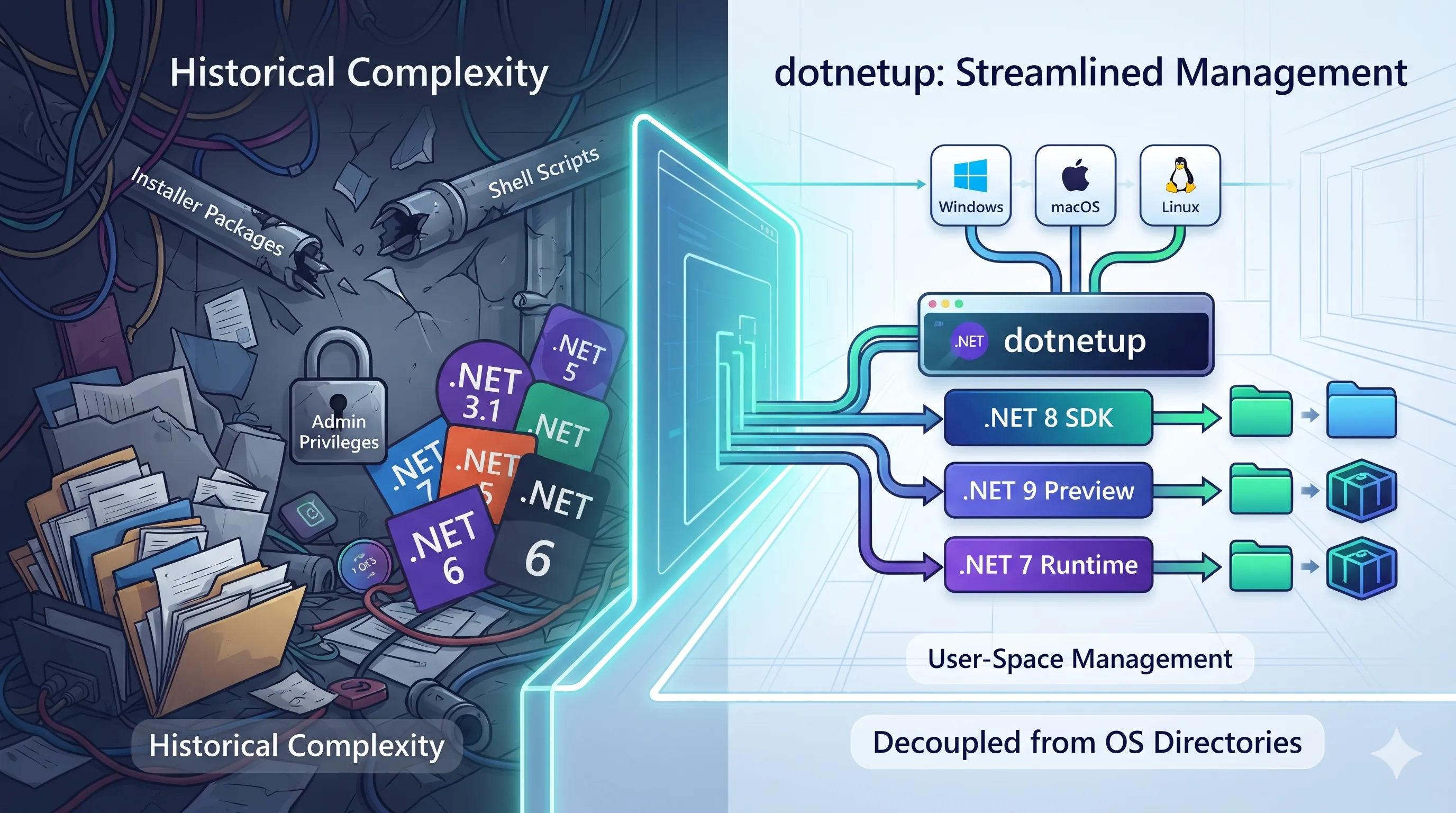
1. Core Architecture: Non-Admin Isolation and Intent-Based Toolchain Management
Connecting directly to the broader mission of understanding how dotnetup manages .NET toolchains, the architecture of this utility represents a fundamental departure from traditional machine-wide SDK installations.Announced by Chet Husk, program manager for the .NET SDK, dotnetup introduces a cross-platform toolchain manager engineered to install, update, and remove .NET SDKs and runtimes directly within a user-owned directory.
Its architectural lineage is explicitly modeled after modern language toolchain managers such as rustup in Rust and nvm in Node.js, prioritizing developer autonomy and isolated local environments over system-wide configuration changes.
User-Owned Directories and Intent Tracking
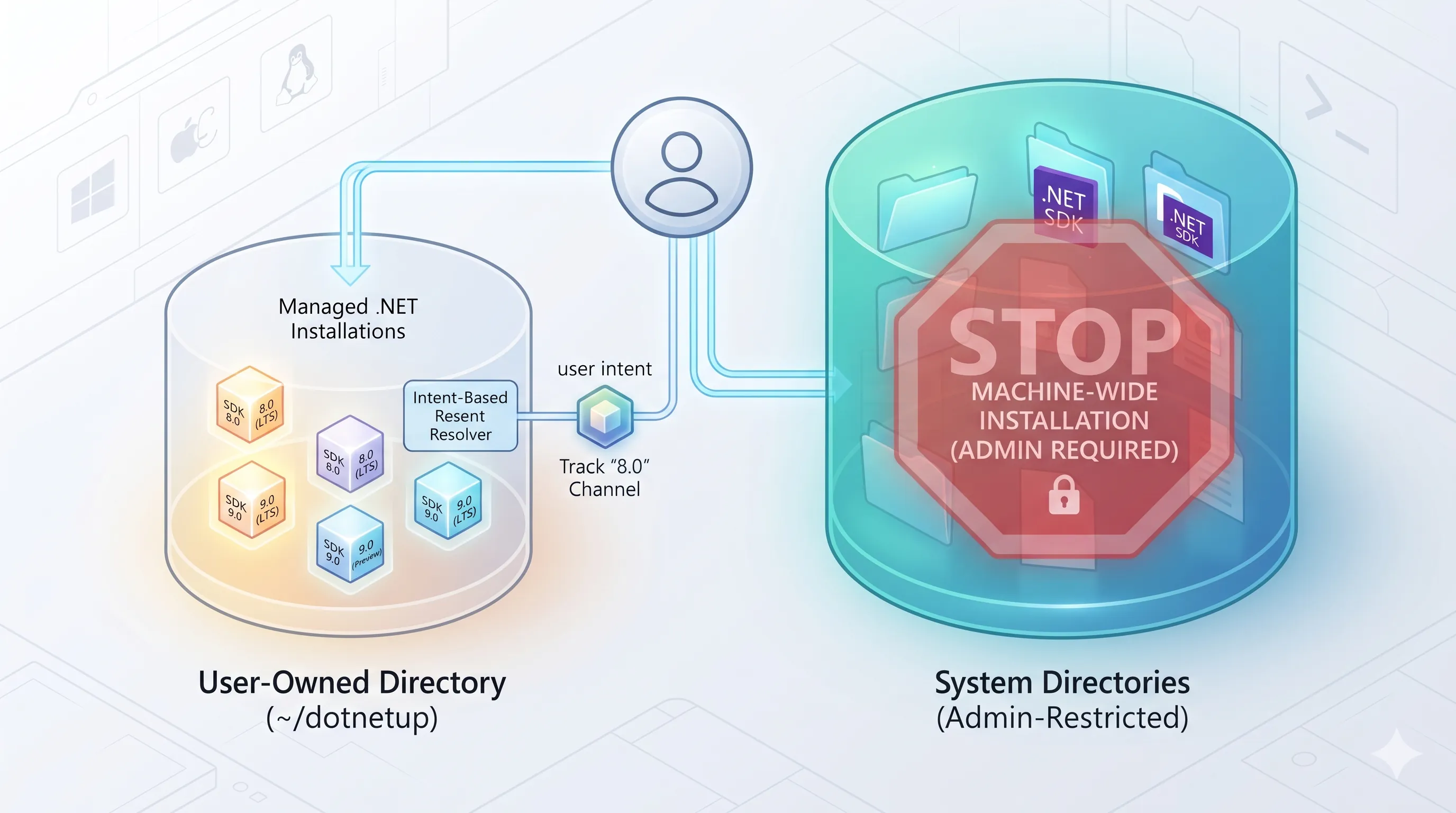
By default, dotnetup operates entirely non-admin, eliminating the need for elevated permissions during regular toolchain management workflows.Instead of writing to shared, system-managed locations such as
Program Files\dotnet on Windows or /usr/share/dotnet on Linux, dotnetup restricts all write operations to user-owned paths.This non-admin isolation prevents collisions between project-specific requirements and platform-level software distribution mechanisms.
Beyond directory placement, dotnetup restructures how installations are resolved by separating requested user requirements from the physical files installed on disk.
Rather than pinning environments to static, brittle lists of exact patch versions, dotnetup tracks high-level user intent, such as major channels or specific feature bands.
Because user intent is decoupled from the underlying storage layer, several distinct requirements can safely share a single managed installation, reducing disk footprint while keeping the environment aligned with the developer's specified release channel.
Preview Status and Production Environment Guidance
While dotnetup establishes a streamlined model for local toolchain orchestration, it is currently in public preview.As a consequence of its preview state, available commands, CLI options, and operational behaviors remain subject to change prior to general availability.
Due to these ongoing developments, production machines are explicitly advised to continue relying on existing deployment methods, including standard system installers, platform package managers, or Visual Studio.
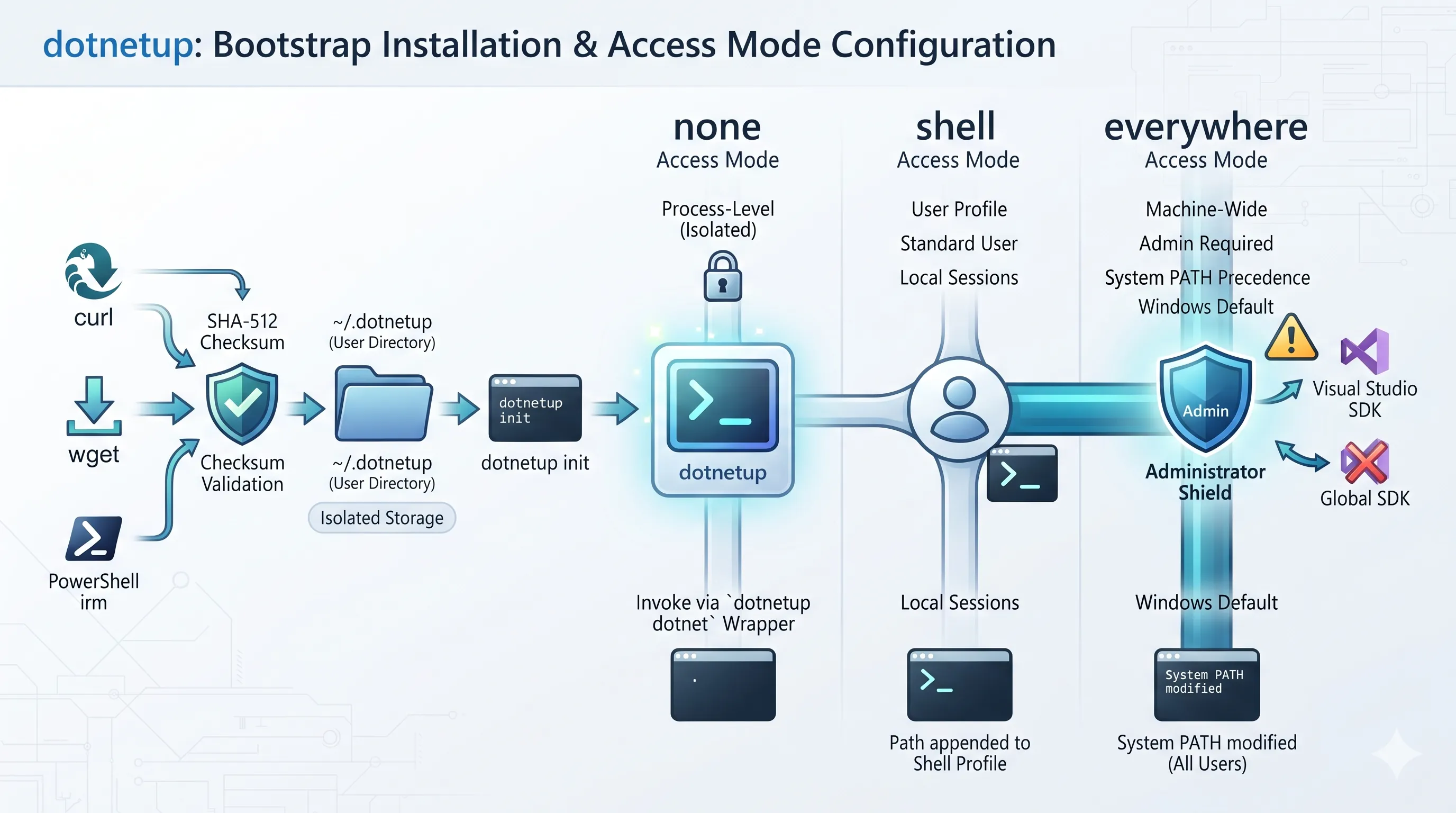
2. Bootstrap Installation and Configuring Access Modes: None, Shell, and Everywhere
To establish a predictable foundation for understanding how dotnetup manages .NET toolchains, engineers must first evaluate how the toolchain manager bootstraps onto a host machine and restricts its runtime footprint.The installation architecture establishes isolated management boundaries early, ensuring runtime artifacts remain contained prior to configuring shell interaction.
Bootstrap Acquisition and ~/.dotnetup Storage
Acquisition of the toolchain manager relies on a lightweight bootstrap script retrieved directly from aka.ms using standard transfer utilities, specifically curl, wget, or PowerShell irm.Upon download, the bootstrap installer enforces integrity by conducting a strict SHA-512 checksum validation against the incoming payload before unpacking any executables.
Once verified, the process downloads and extracts the binary files directly into the local user directory at ~/.dotnetup.
This dedicated storage directory keeps the toolchain manager isolated from operating system directories and standard global utility paths until explicit activation occurs.
To kick off environment configuration and retrieve runtime components, developers run the initialization workflow.
Initialize dotnetup, configure the shell, and download the latest stable SDK:
dotnetup initEvaluating None, Shell, and Everywhere Access Modes
Toolchain discovery depends on which access mode is configured across the operating system.dotnetup provides three distinct access modes: none, shell, and everywhere.
Under none mode, dotnetup operates with zero ambient presence, leaving system environment variables and shell configuration profiles completely untouched.
To invoke toolchain commands in this isolated posture, developers execute operations through an explicit forwarding wrapper.
Execute the managed .NET CLI without modifying shell profile or PATH:
dotnetup dotnetUnder shell mode, the toolchain manager balances convenience and isolation by appending the managed toolchain path directly to the user's personal shell profile.
Terminal sessions initiated by that specific user immediately resolve managed .NET commands without requiring system-wide changes.
In contrast, everywhere mode alters the system PATH across all user accounts on the machine.
Applying this mode alters system-level environment variables and consequently requires elevated administrative privileges.
Importantly, everywhere mode serves as the Windows-only default configuration.
Because it writes directly to the machine-level PATH, it takes absolute precedence over existing machine-wide installations, including SDKs installed by Visual Studio.
As a consequence of this precedence hierarchy, if everywhere mode is active, projects requiring a machine-wide SDK not installed by dotnetup will fail to build unless migrated into the dotnetup management layer.
| Access Mode | Scope | Privileges Required | Behavior and Environmental Impact |
|---|---|---|---|
| none | Process-level via wrapper invocation | Standard user | Runs .NET via dotnetup dotnet without altering system environment variables or shell profiles. |
| shell | User profile and local terminal sessions | Standard user | Appends the managed toolchain path directly to the user's shell profile for automated session resolution. |
| everywhere | Machine-wide across all users (Windows-only default) | Elevated (Administrator) | Modifies system PATH across all users; takes precedence over machine-wide installations, including Visual Studio, causing builds to fail if required SDKs are not migrated. |
3. Channel Tracking, global.json Determinism, and Automated Servicing Cleanup
In understanding how dotnetup manages .NET toolchains, a critical capability lies in how the utility reconciles rolling servicing releases with predictable, repeatable build environments.While traditional toolchain management often forces developers to choose between manual patch installs and uncontrolled drift, dotnetup balances automated channel progression with explicit project determinism.
Tracking Channels and global.json Resolution
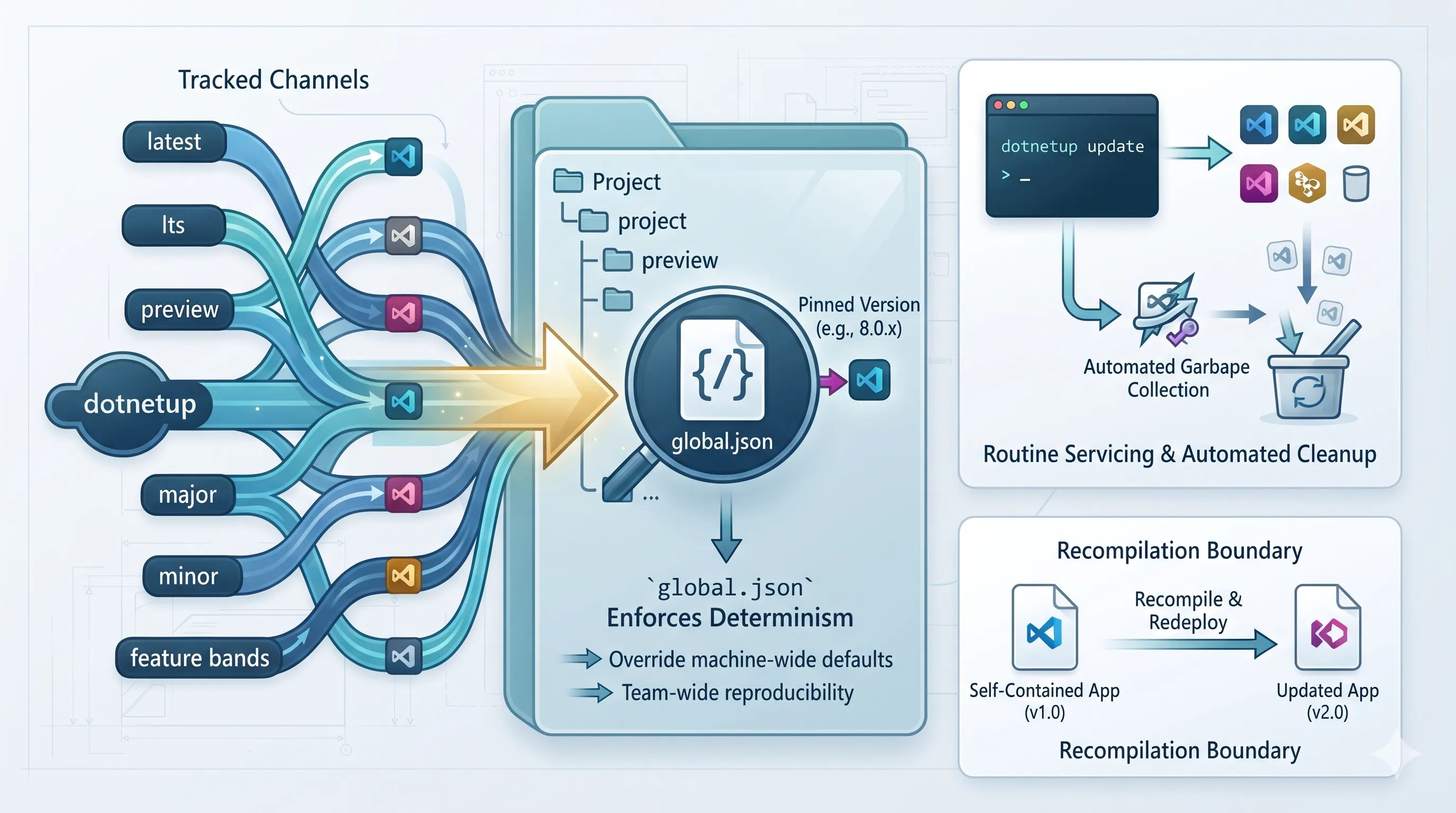
Developers can configure dotnetup to track dynamic delivery streams, including channels such as latest, lts, preview, daily, major releases, minor versions, or specific feature bands.These tracking rules allow machines to automatically receive rolling fixes and SDK improvements aligned with organizational release cadences.
Conversely, exact-version requirements remain strictly pinned and do not advance during servicing updates.
To preserve predictability across distributed teams and automated continuous integration pipelines, dotnetup automatically reads the nearest global.json file.
This hierarchical discovery ensures that project-level SDK constraints override machine-wide defaults, maintaining fully deterministic team builds without requiring manual environment reconfigurations.
| Requirement Type | Resolution Behavior | Servicing Impact |
|---|---|---|
| Tracked Channels (latest, lts, preview, daily, major, minor, feature bands) | Re-evaluates to the newest build matching the specified tracking stream. | Advances automatically during toolchain update cycles. |
| Exact-Version Requirements | Locks the target SDK to a specific, immutable version identifier. | Remains strictly pinned and never advances during servicing sweeps. |
| global.json Constraints | Automatically located and evaluated from the nearest file in the directory tree. | Guarantees team-wide build reproducibility across distinct environments. |
To install a specific runtime version flavor without installing an entire SDK:
dotnetup runtime install aspnetcore@10.0Automated Garbage Collection and Component Servicing
Routine maintenance is streamlined through unified update commands that synchronize all locally configured feeds.The update command re-resolves all tracked channels and installs the latest matching releases.
To perform routine monthly servicing across all tracked SDK and runtime channels:
dotnetup updateTo prevent disk bloat over time, automated garbage collection removes components and runtimes that are no longer referenced by any tracked requirement.
If manual pruning is preferred, components can be individually targeted and removed using sdk uninstall or runtime uninstall commands.
A critical boundary to observe during servicing involves deployment topologies.
Updating local SDKs does not patch previously published self-contained applications; those require recompilation and redeployment.
Because self-contained artifacts embed private runtime binaries directly into their publication bundle, updating the developer machine's host toolchain leaves distributed application binaries unchanged until fresh builds are executed.
4. Managing Side-by-Side Toolchains, Daily Builds, and Executable Self-Updates
Within the broader scope of understanding how dotnetup manages .NET toolchains, orchestrating multiple development environments requires disciplined handling of parallel versions.Rather than relying on disjointed platform-specific installers, dotnetup provides a unified mechanism to control, isolate, and refresh local toolchains across distinct release stages.
Side-by-Side SDK and Runtime Component Tracking
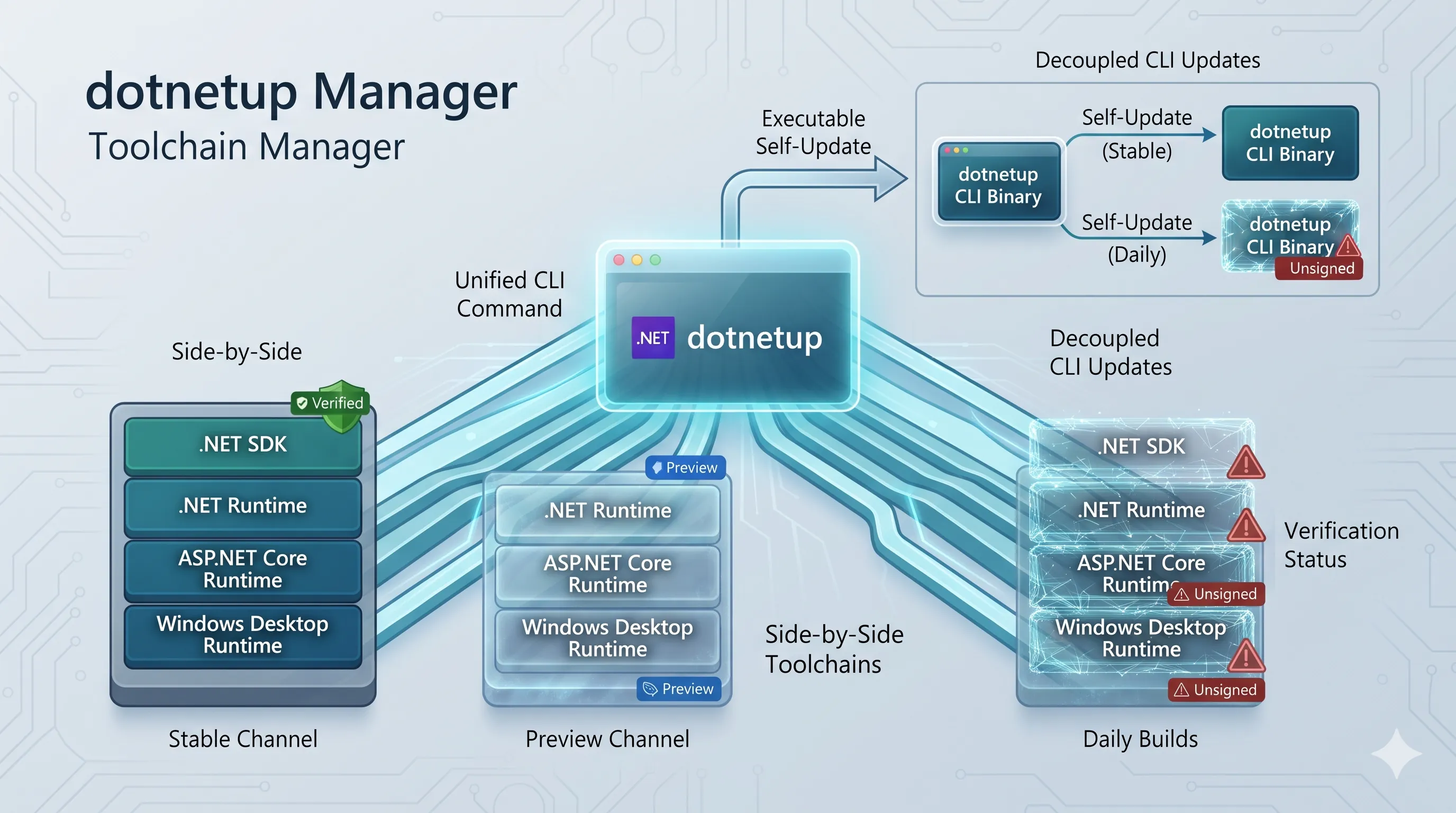
To support varied development needs without manual tarball extraction, dotnetup supports side-by-side installations of stable releases, preview channels, and daily builds.Developers can maintain disparate release lines concurrently without risking workspace corruption or conflicting path configurations.
The tool enforces this parity across all supported components, targeting specific layers based on environmental needs.
| Supported Component | Installation and Packaging Scope |
|---|---|
| Full .NET SDK | Installs complete build and tooling capabilities side-by-side without manual tarball extraction. |
| .NET Runtime | Provides base execution runtime side-by-side across stable, preview, and daily channels. |
| ASP.NET Core Runtime | Installs web server and hosting runtime dependencies side-by-side across channels. |
| Windows Desktop Runtime | Installs desktop application runtime components side-by-side on supported environments. |
This ensures that every downloaded archive meets verification requirements before integration into local storage.
When a developer needs to install a preview SDK release alongside existing stable toolchains, the CLI provides a direct target channel command:
dotnetup sdk install previewThe operation ensures preview features can be evaluated without modifying or replacing established production SDK environments.
Unsigned Daily Builds and CLI Self-Updating
Beyond preview bands, bleeding-edge development often requires access to daily pipeline artifacts.However, daily builds do not undergo release validation and are not code-signed, making them intended strictly for short-term testing.
Because they lack cryptographic signature guarantees and standard qualification, these artifacts are isolated for validation rather than long-term use.
In addition to managing toolchains, the dotnetup tool updates its own binary directly via a self-update command.
To update the dotnetup tool binary itself to the latest release, execute the base self-update command:
dotnetup self updateThe underlying toolchain components remain intact while the executable receives current logic.
When testing unreleased pipeline capabilities within the manager itself, developers can update the dotnetup executable to the daily channel:
dotnetup self update --channel dailyBy decoupling CLI self-updates from the managed .NET components, the system enables targeted inspection of early features under uniform terminal commands.
5. Cross-Platform Matrix, Tooling Interoperability, and the Future Roadmap
Understanding how dotnetup manages .NET toolchains requires evaluating its cross-platform target matrix and its operational boundaries within modern developer environments.A toolchain manager's utility depends on consistent behavior across local development hosts, ephemeral automation runners, and developer IDEs.
Supported OS Architectures and CI Container Usability
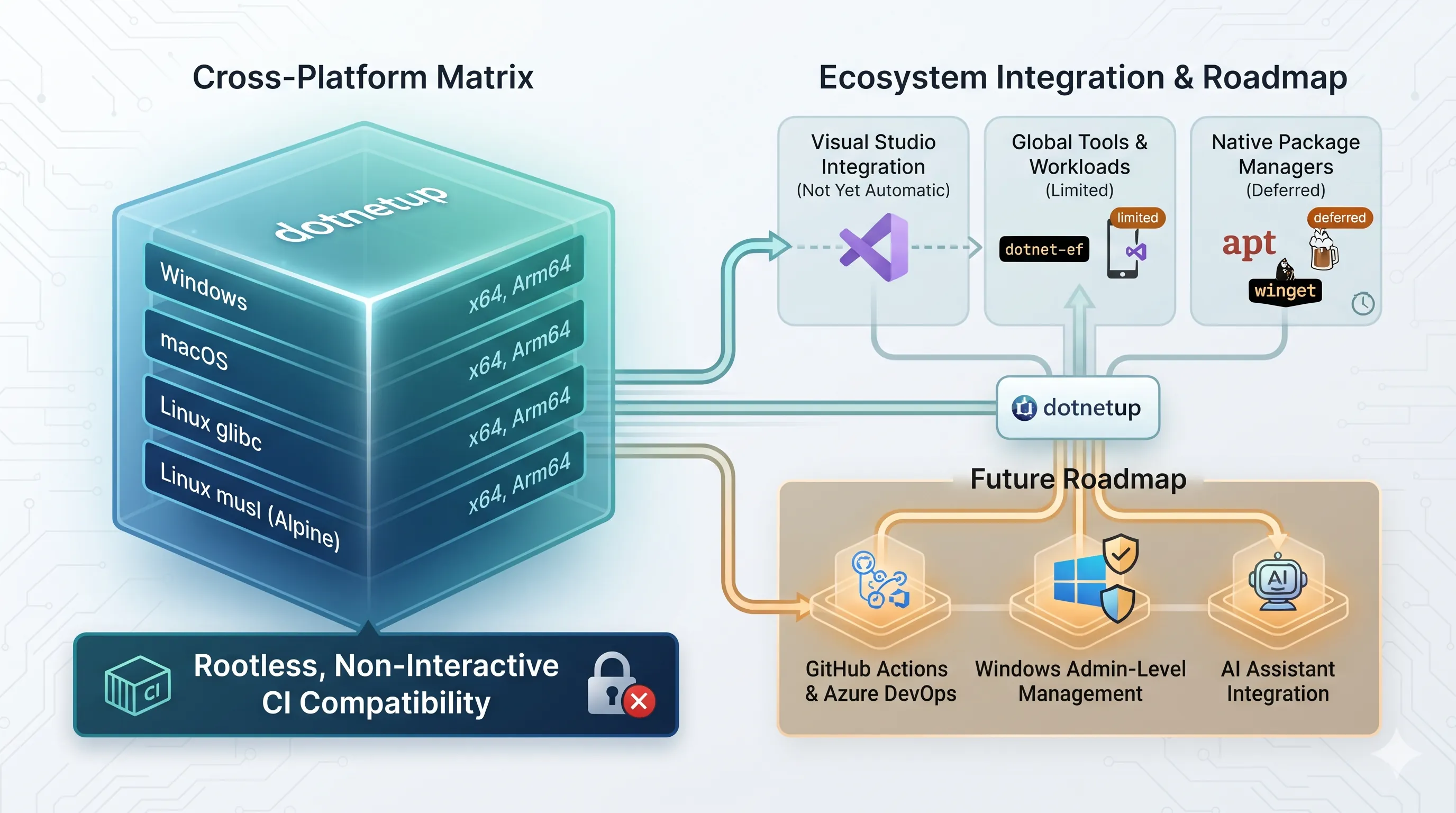
The deployment surface for dotnetup spans major computing platforms across both standard and emerging CPU architectures.The toolchain manager explicitly targets Windows (x64, Arm64), macOS (x64, Arm64), Linux glibc (x64, Arm64), and Linux musl/Alpine (x64, Arm64).
This coverage ensures that both standard Linux enterprise distributions and lightweight Alpine-based container topologies share identical management semantics.
Beyond local developer workstations, dotnetup operates non-interactively without root access.
This non-privileged execution model makes it fully compatible with ephemeral container CI workers, allowing CI pipelines to provision exact toolchains on demand without requiring elevated container permissions.
| Operating System / Platform | Supported Architecture | Rootless Container CI Compatibility |
|---|---|---|
| Windows | x64, Arm64 | Supported non-interactively without root access |
| macOS | x64, Arm64 | Supported non-interactively without root access |
| Linux (glibc) | x64, Arm64 | Supported non-interactively without root access |
| Linux musl (Alpine) | x64, Arm64 | Supported non-interactively without root access |
Ecosystem Integration Gaps and Long-Term Roadmap
While the core architecture supports extensive platform targets, early adopters face several concrete integration limitations in the first preview release.Visual Studio does not automatically detect installations managed exclusively by dotnetup.
Furthermore, global CLI tools such as dotnet-ef and mobile/workload installs are not yet managed by the first preview release.
For macOS users, system-wide macOS package management is not currently supported or planned, keeping its footprint scoped to managed user directories.
These initial operational constraints have prompted developers across the community to draw direct comparisons with established polyglot managers like mise.
Additionally, official distribution through native operating system package managers—such as apt, Homebrew, and winget—is deferred until after initial user validation.
Chet Husk confirmed that native package manager distribution is planned following this validation phase.
The future project roadmap targets several foundational expansions to embed dotnetup into enterprise and developer workflows.
Planned roadmap items include Windows admin-level installer management and direct integration into GitHub Actions and Azure DevOps to replace legacy installation scripts.
Finally, the roadmap includes dedicated agent skills designed to help AI assistants interface directly with dotnetup by default, streamlining automated diagnostics and environment configuration.
Related Posts
OpenAI Codex v0.173.0-alpha.5 Brings Terminal Links and Lazy MCP LoadingExplore OpenAI Codex v0.173.0-alpha.5 updates, featuring terminal thread linking, lazy MCP server...

How Frontier AI Models Are Rewriting Theoretical PhysicsExplore how frontier AI models and autonomous agents are transforming theoretical physics,...

OpenAI GPT-6.2 Billing Fix: Astra Hits Limits 40% FasterOpenAI fixes a GPT-6.2 launch billing bug, causing Astra limits to hit 40% faster and Sol 25%...
Generative AI may have assisted with research or drafting for this article. Topic selection, fact-checking, final wording, and publication remain the responsibility of DragonStone74. AI use disclosure