
How NVIDIA Kimodo and DLSS 5 Redefine Real-Time Game Development
🚀 Key Takeaways
- Direct Motion Generation in Unreal Engine: NVIDIA Kimodo integrates generative AI animation into Unreal Engine's Sequencer, synthesizing smooth character locomotion from text prompts, spline paths, and keyframe target poses.
- Audio-Driven Character Expressiveness: Audio2Face and Avatar Cloud Engine (ACE) streamline real-time lip-sync and facial rigging animation directly from audio tracks across Maya and Omniverse pipelines.
- Next-Level Neural Rendering: DLSS 5 introduces 3D-guided neural rendering to modern game engines, elevating surface microcontrast, shadows, and reflections beyond legacy post-processing limits.
- Unified Local Inferencing: The In-Game Inferencing SDK enables developers to run language, speech, and generative models on-device alongside graphics workloads across heterogeneous GPU and CPU setups.
- Scalable Many-Light Sampling: RTX Dynamic Illumination 3.2 refines spatial resampling and reservoir handling to manage millions of dynamic light sources without overwhelming compute budgets.
- Integrated Radiance Caching: RTX Path Tracing incorporates SHaRC radiance caching and asynchronous compute scheduling, significantly boosting real-time path tracing throughput.
- Deep Traversal Diagnostics: Dedicated developer utilities, including Real-Time BVH Viewer and DLSS-aware Nsight profilers, grant clear visibility into ray-tracing acceleration structures and generated frames.
Real-time graphics production has reached a critical turning point where brute-force asset creation and conventional rendering pipelines struggle to satisfy the industry's demand for photorealism. Game studios and virtual production teams face escalating complexity in character rigging, secondary motion authoring, and complex global illumination calculations. NVIDIA’s expanding portfolio of real-time technologies addresses these bottlenecks by coupling generative machine learning models with hardware-accelerated ray tracing architectures.
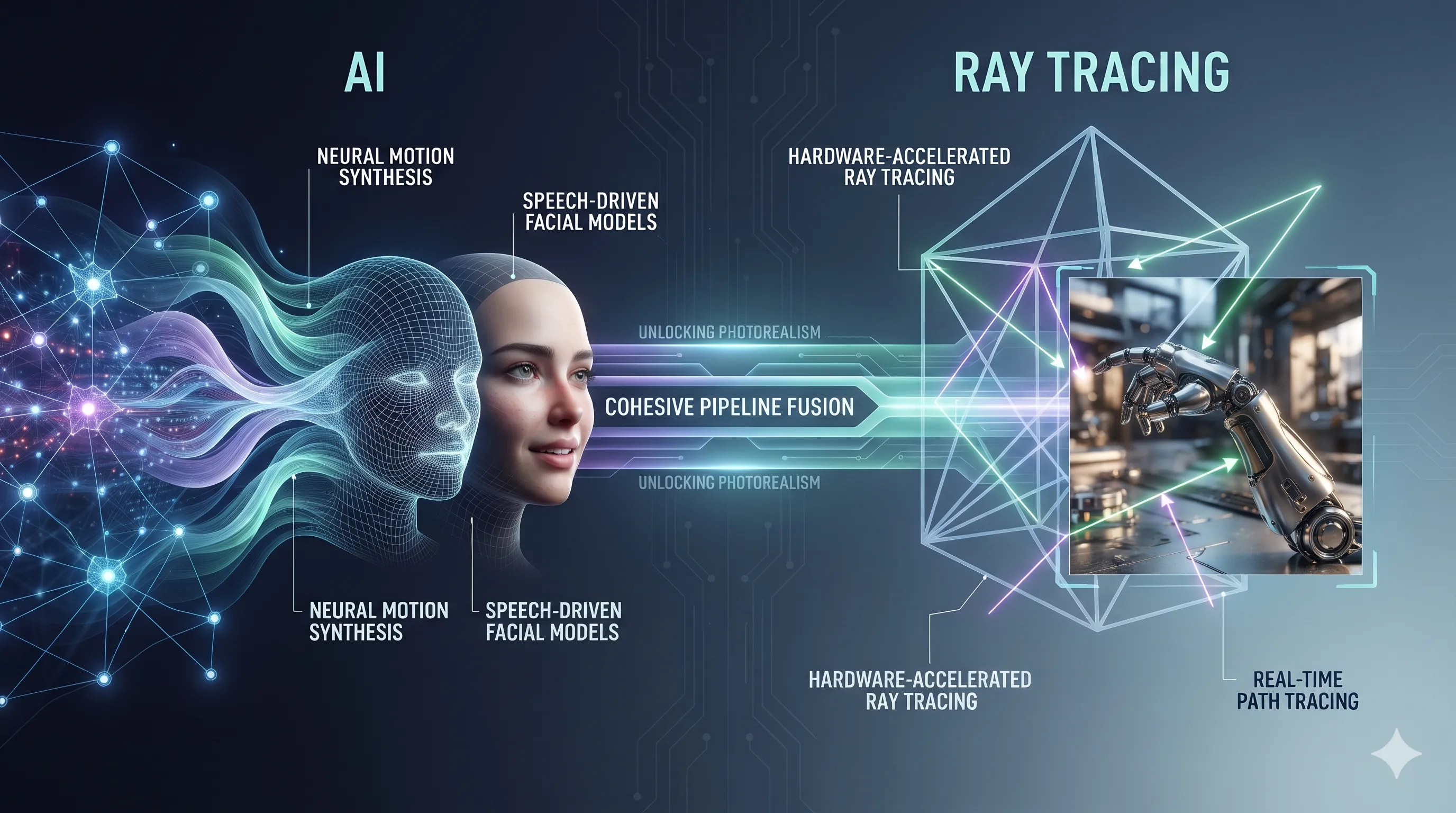
Rather than treating artificial intelligence and rendering as isolated disciplines, modern game development frameworks now fuse them into a cohesive pipeline. Neural motion synthesizers produce physically plausible character locomotion directly on editing timelines, while speech-driven facial models eliminate weeks of manual keyframing. Simultaneously, neural reconstructors and radiance caching algorithms process full path tracing calculations in real time, delivering cinematic fidelity within standard frame budgets.
Unlocking the full potential of these advancements requires understanding how high-level authoring tools interface with underlying runtime SDKs and diagnostic profilers. This technical overview breaks down how NVIDIA’s AI-powered animation models, ray tracing toolkits, and runtime performance monitors operate together to define modern interactive visual experiences.
1. Kimodo AI Motion Synthesis: Direct Timeline Animation in Unreal Engine 5.9
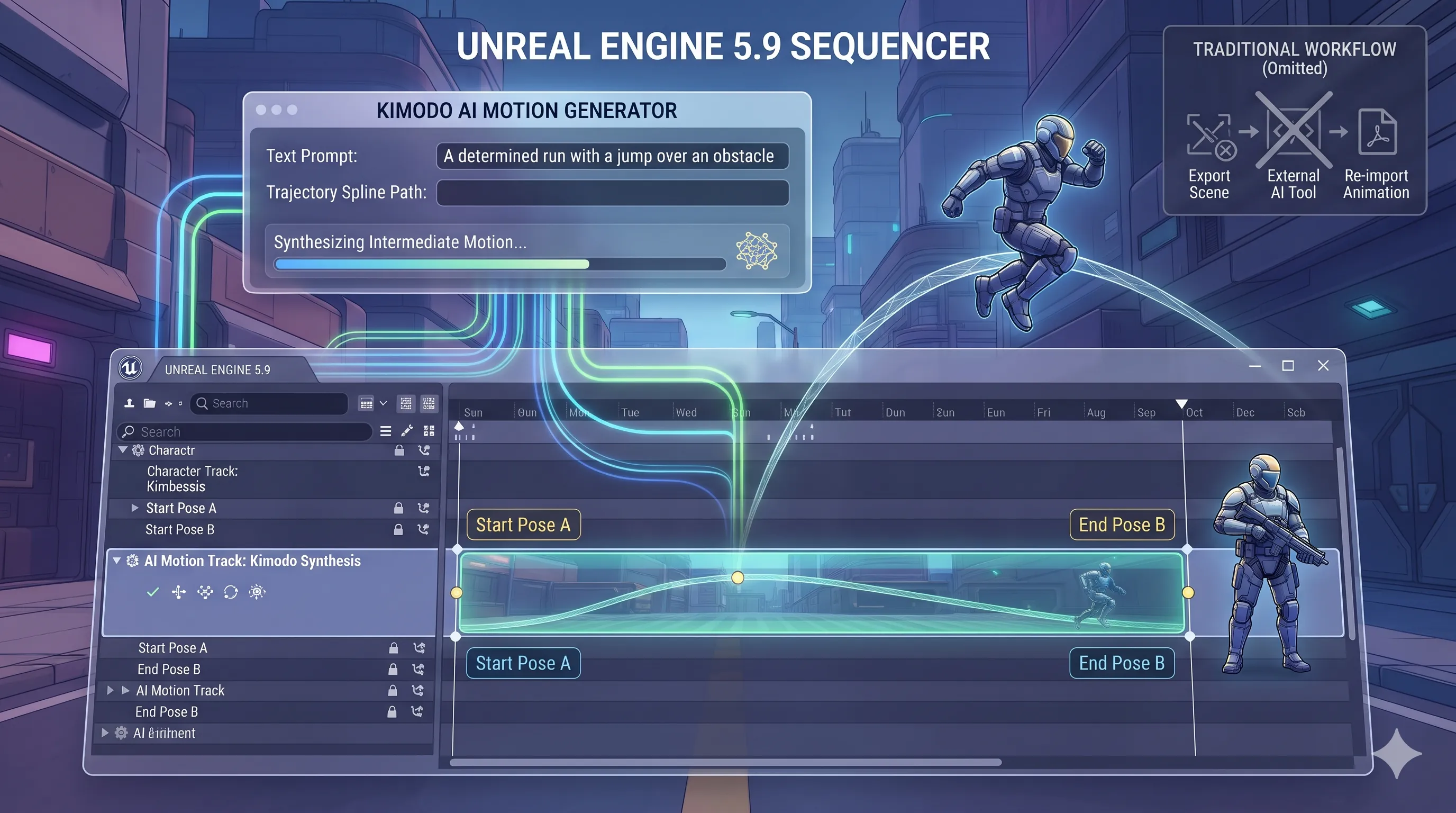
Understanding how NVIDIA’s AI animation and RTX tools work requires examining how generative models interface with industry-standard production pipelines.NVIDIA Kimodo represents a major technical advance within this ecosystem, functioning as the first AI motion-generation model integrated into the Unreal Engine guided animation framework.
Rather than isolating generative animation inside external standalone toolsets, Kimodo bridges deep-learning motion synthesis directly with real-time viewport tools in Unreal Engine 5.9 Preview.
Sequencer Integration and AnimGenOffline Workflow
The architectural integration of NVIDIA Kimodo is handled natively through the AnimGenOffline plugin in Unreal Engine 5.9.This plugin connects the neural generation runtime directly to Unreal Engine’s primary cinematic and gameplay timeline editor, Sequencer.
By pairing GPU-accelerated motion generation directly with the timeline editor workflow, animators no longer need to export scene data or rely on asynchronous third-party processing to leverage machine learning.
Instead, motion tracks can be populated and evaluated directly within the sequence environment, allowing production teams to produce animations directly within sequences.
This tight integration ensures that the generated motions align with existing skeletal rigs, environmental collisions, and project-specific assets without introducing disruptive pipeline translation layers.
Constraint Synthesis via Text Prompts, Spline Paths, and Target Poses
Kimodo fundamentally alters the timeline creation process by pairing prompt-driven generation with explicit spatial direction.Animators can generate character motion inside Sequencer using text prompts, spline paths, and target poses in a unified authoring pass.
Rather than relying on unguided stochastic output, the framework allows animators to specify precise trajectory constraints along world-space splines and define exact keyframe target poses.
Once these constraints are established, the GPU-accelerated Kimodo model synthesizes all the intermediate motion required to seamlessly link them together.
This approach provides deterministic control over character pathways and end-states while utilizing AI to eliminate the manual labor of hand-keying complex intermediate frames.
2. Audio2Face and NVIDIA ACE: Real-Time Audio-Driven Facial Rigging Architecture
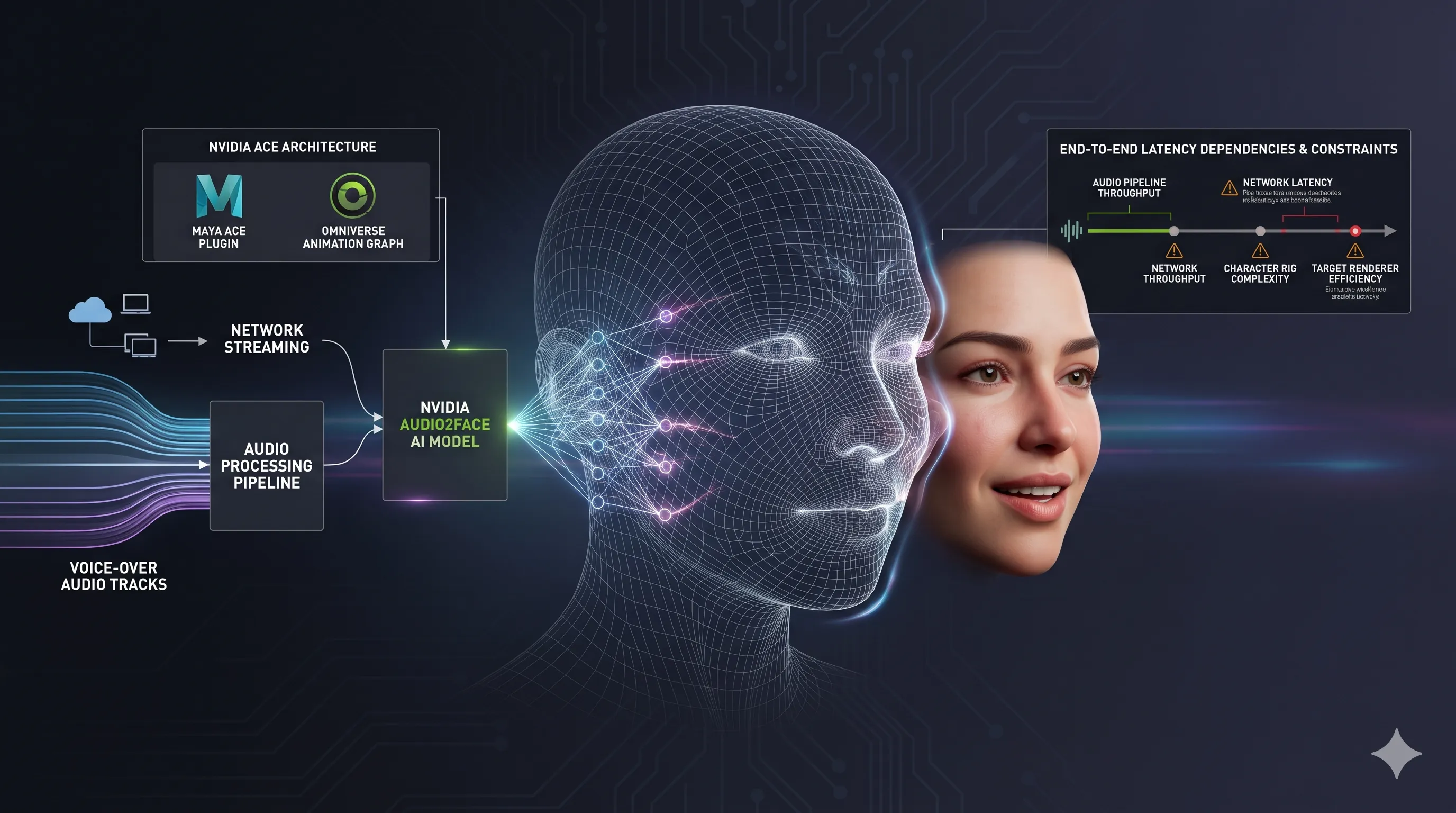
As part of understanding how NVIDIA’s AI animation and RTX tools work, Audio2Face serves as a foundational generative AI component within the NVIDIA Avatar Cloud Engine (ACE) architecture.It translates voice-over audio inputs directly into dynamic facial expressions and realistic lip-sync without requiring manual keyframing.
By integrating deep learning directly into the animation pipeline, Audio2Face operationalizes interactive digital humans across diverse real-time environments.
Interactive Digital Humans via Omniverse and Maya ACE Plugins
Within the broader NVIDIA ACE framework, Audio2Face acts as a core building block dedicated to generating real-time facial animation and lip-sync driven exclusively by voice-over audio tracks.To facilitate traditional and modern character animation authoring, the system supports authoring workflows through the Maya ACE plugin as well as the Omniverse Animation Graph.
This multi-tool integration allows technical artists and animators to author, test, and manipulate facial rigs natively within Autodesk Maya or assemble complex node-based character behaviors directly inside the Omniverse platform.
As voice data streams into the system, the underlying architecture parses the acoustic signals to drive facial geometry and blendshapes, enabling interactive digital humans to articulate dialogue dynamically in real time.
End-to-End Latency Dependencies and Character Rigging Constraints
While the model automates facial performance directly from speech signals, practical deployment requires careful pipeline optimization.The end-to-end performance of an Audio2Face implementation depends heavily on the specific runtime deployment architecture chosen for the interactive application.
Latency and throughput are governed by ongoing network conditions when streaming data across distributed cloud or client setups, alongside the throughput of the underlying audio pipelines processing the voice-over tracks.
Furthermore, mechanical responsiveness and visual fidelity remain constrained by the complexity of the character rigging itself and the efficiency of the targeted renderer handling the visual output.
Balancing these architectural bottlenecks across network streaming, audio processing, character deformation, and rendering targets is essential for sustaining real-time conversational fidelity in digital human deployments.
3. DLSS 5 and 3D-Guided Neural Rendering: Dagor Engine Color Pipeline Integration
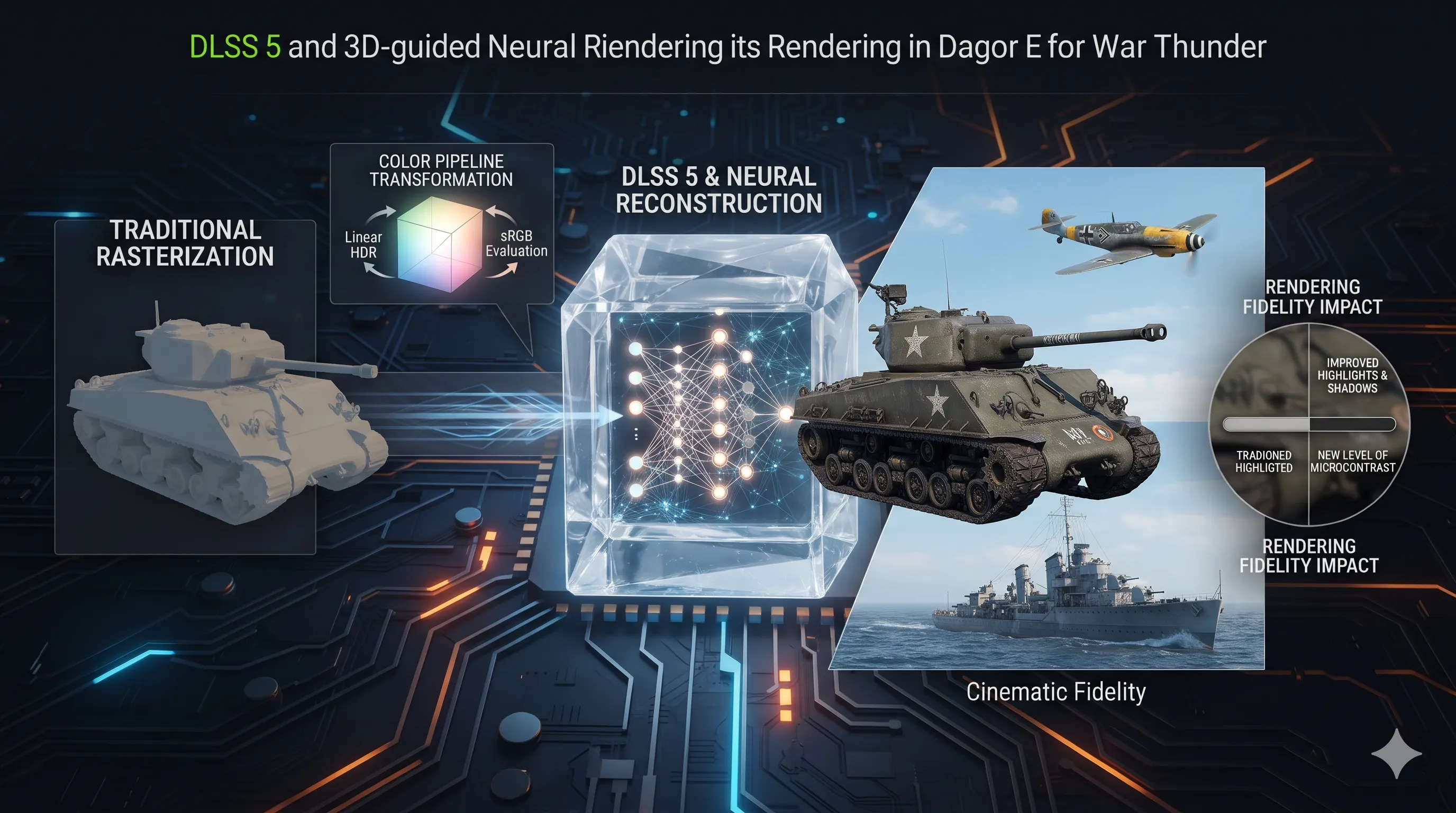
Within the broader scope of how NVIDIA’s AI Animation and RTX Tools work, real-time neural rendering pipelines bridge the gap between traditional rasterization and deep learning inference.Gaijin Entertainment integrated DLSS 5 alongside 3D-Guided Neural Rendering into the Dagor Engine for War Thunder, showcasing how neural reconstruction integrates into complex rendering pipelines.
sRGB Evaluation and Linear HDR Color Pipeline Transformation
Implementing 3D-Guided Neural Rendering alongside DLSS 5 required architectural modifications to the Dagor Engine's color management pipeline.Rather than applying reconstruction directly in linear space without domain transformation, the engine adapts its color pipeline to evaluate DLSS 5 in sRGB space.
This evaluation occurs prior to post-processing passes and user interface rendering.
Following this neural evaluation stage, the pipeline maps the processed sRGB results back into linear HDR color space.
This bidirectional color transformation ensures that intermediate spatial and neural reconstruction operations interface cleanly with the engine's downstream lighting and compositing stages.
Multi-Domain Combat Tuning: Preserving Surface Wear and Microcontrast
Because War Thunder features distinct theaters of operation, the integration was evaluated separately across air, ground, and naval combat environments to balance performance and visual quality.The implementation was tuned specifically against reference art direction to preserve critical historical and physical details, including vehicle markings, surface wear, and complex material properties across diverse combat assets.
Assessing the impact of the integration on rendering fidelity, Gaijin Entertainment stated: "DLSS 5 delivers improved highlights and shadows while introducing a new level of microcontrast that we simply haven’t been able to achieve before. The result is a more natural, lifelike image, with finer detail and a stronger sense of realism."
4. In-Game Inferencing SDK 1.8: On-Device AI Execution and Runtime Scheduling
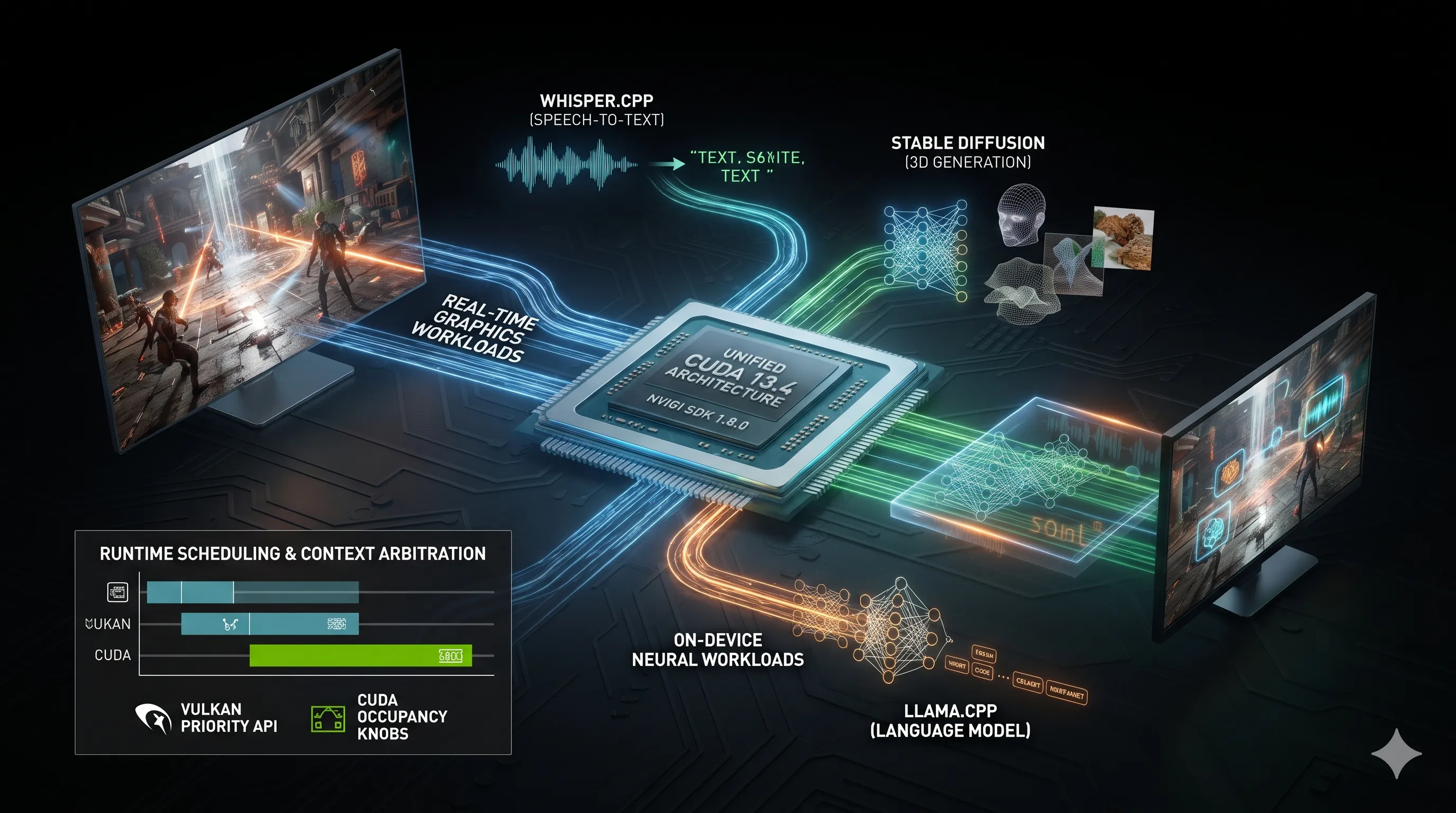
Within the broader framework of how NVIDIA’s AI animation and RTX tools work, real-time animation, neural rendering, and voice synthesis pipelines ultimately depend on a low-latency execution layer that coordinates neural workloads directly alongside real-time graphics rendering.The In-Game Inferencing SDK (NVIGI SDK) serves as this operational bridge, managing computational resource contention between rendering pipelines and neural network evaluation.
With the release of NVIGI SDK version 1.8.0, NVIDIA establishes a standardized execution environment designed to schedule both local and cloud-based transformer models across heterogeneous workstation and mobile system configurations.
Unified CUDA 13.4 Architecture and Cross-Platform Inference Engines
NVIGI SDK version 1.8.0 introduces a unified build solution targeting CUDA 13.4 across both x64 and arm64 hardware architectures.This unified architecture provides a common on-device inference interface across GPU and CPU hardware, allowing game titles and creative applications to execute AI workloads concurrently alongside active graphics rendering pipelines.
Deployment reliability across diverse hardware setups has been expanded through hardened platform deployment support for RTX Spark.
At the execution level, version 1.8.0 updates and integrates native inference engines, specifically modernizing local llama.cpp and whisper.cpp backends.
Through the updated whisper.cpp integration, developers can now deploy the Parakeet automatic speech recognition (ASR) model directly on-device to power conversational voice mechanics and audio-driven interactions.
In addition to on-device neural model execution, NVIGI SDK 1.8.0 extends hybrid pipeline flexibility by enabling GPT 6 Luna access via the dedicated GPT cloud plugin.
Expanding ecosystem parity beyond traditional desktop hardware, version 1.8.0 also adds native Windows on ARM support for the Stable Diffusion plugin and its accompanying 3D sample.
Vulkan Execution Knobs, Context-Switch Handling, and ARM64 Debug Workarounds
Coordinating rendering workloads with deep learning inference requires fine-grained runtime scheduling to avoid frame drops.NVIGI SDK 1.8.0 implements Vulkan priority API integration alongside dedicated CUDA occupancy knobs in Vulkan graphics through public extensions, enabling granular arbitration of graphics queues and compute resources.
Despite these scheduling controls, specific architectural and driver configurations present runtime boundaries that engineers must navigate during integration.
On Blackwell hardware running Windows with driver series 620+, the GPT Vulkan backend can trigger GPU context-switch timeouts and Vulkan device loss under high load.
Similarly, the GPT CUDA backend on Windows on ARM platforms can encounter a system hang during model loading if the CUDA in Graphics configuration is enabled.
Furthermore, under Direct3D 12 on Windows on ARM platforms, Debug builds of the Stable Diffusion 3D sample may fail during initialization at the
CreateDXGIFactory2 call.To resolve the
CreateDXGIFactory2 failure on ARM64 systems during Debug builds, engineers must explicitly bypass the debug runtime flag in the sample setup source files.Apply the following parameter adjustment in
source/samples/nvigi.3d.sd/src/nvigi/SDContextRuntime.cpp:instanceParams.enableDebugRuntime = false;SDContextRuntime.cpp while preserving all other standard Debug build configurations and compiler definitions, allowing the D3D12 factory to initialize successfully on Windows on ARM.| Runtime Backend / Plugin | Supported Architectures | Features and Capabilities | Hardware / Driver Failure Modes |
|---|---|---|---|
| Stable Diffusion Plugin & 3D Sample | x64, arm64 (Windows on ARM) | Native Windows on ARM execution; on-device 3D generative inference alongside graphics. | Debug builds on Windows on ARM may fail at CreateDXGIFactory2 under D3D12. |
| GPT Vulkan Backend | x64 | Vulkan priority API integration; CUDA occupancy knobs via public extensions. | Blackwell Windows setups may trigger GPU context-switch timeouts and Vulkan device loss on driver series 620+. |
| GPT CUDA Backend | x64, arm64 (Windows on ARM) | Unified CUDA 13.4 inference interface across CPU and GPU hardware. | Can hang during model loading on Windows on ARM when CUDA in Graphics is enabled. |
| whisper.cpp Engine | x64, arm64 | Updated local speech backend; adds Parakeet automatic speech recognition (ASR) model support. | None documented in SDK 1.8.0 runtime notes. |
| llama.cpp Engine | x64, arm64 | Updated local backend running inference unified under CUDA 13.4. | None documented in SDK 1.8.0 runtime notes. |
| GPT Cloud Plugin | x64, arm64 | Enables external access to GPT 6 Luna via cloud integration. | Requires active cloud endpoint connectivity. |
5. RTX Dynamic Illumination 3.2: Low-Discrepancy Resampling and Reservoir Inspection
Within the broader scope of how NVIDIA’s AI animation and RTX tools work, rendering pipelines rely on dynamic light sampling algorithms to convert complex lighting environments into real-time visual fidelity.RTX Dynamic Illumination (RTXDI) serves as a foundational pillar in this toolset by enabling scalable direct illumination, indirect lighting, and path tracing.
The release of RTXDI 3.2.0 refines the mathematical stability of reservoir-based spatio-temporal importance resampling (ReSTIR) algorithms while providing deep diagnostic visibility into the underlying state of sampled reservoirs.
Stratified Low-Discrepancy Spatial Resampling and Fallback Mechanics
RTXDI 3.2.0 introduces structural upgrades to its core direct illumination pipeline, specifically targeting sample correlation and sample starvation.Prior implementations built on ReSTIR principles evolved across releases, with ReSTIR GI introduced in version 2.0 and ReSTIR PT introduced in version 3.0.
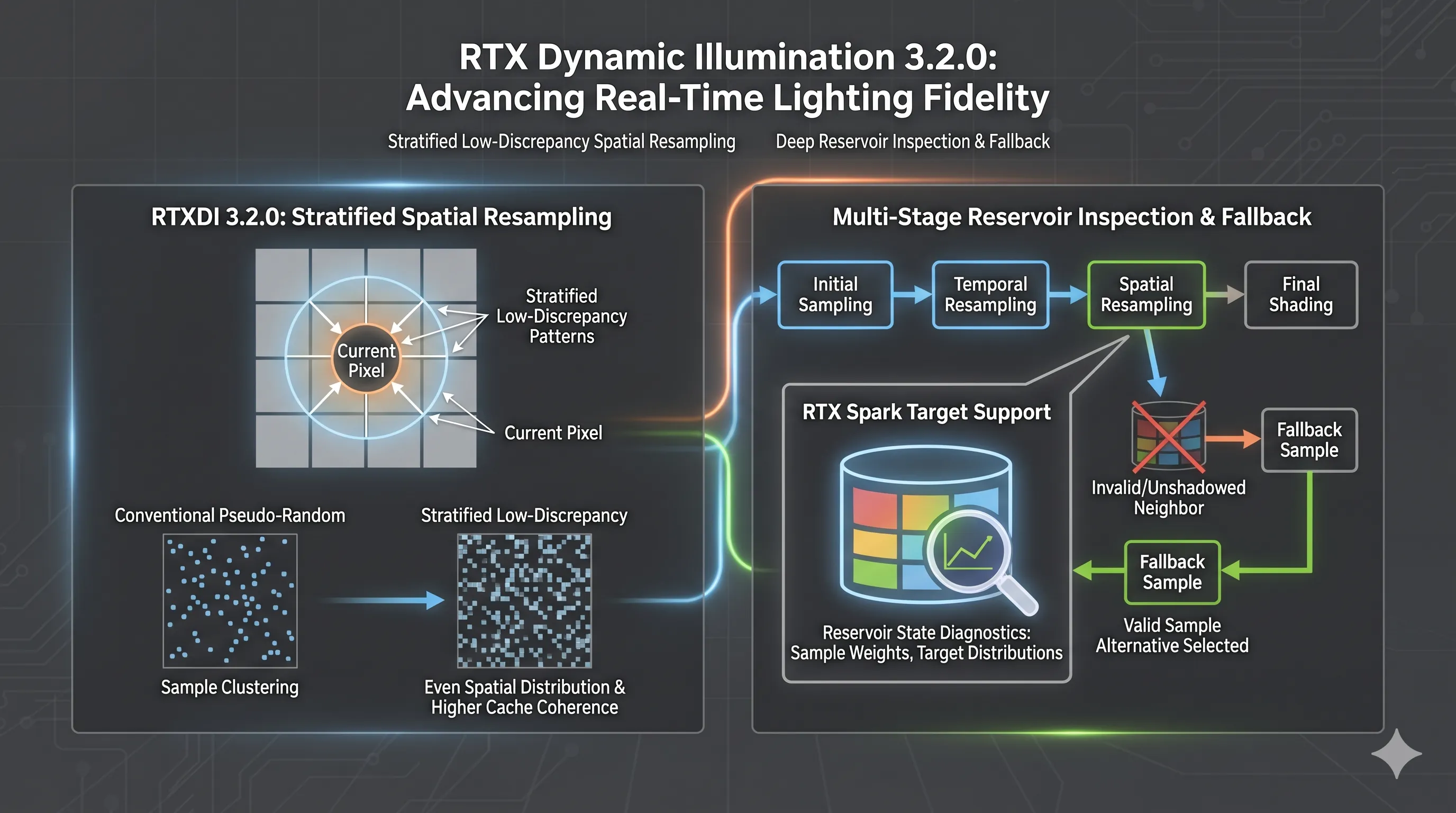
In RTXDI 3.2.0, ReSTIR DI receives stratified low-discrepancy sampling for spatial resampling passes.
By replacing purely pseudo-random spatial neighbor selections with stratified low-discrepancy patterns, the engine prevents sample clustering and uneven spatial distribution across neighboring pixels.
This improves convergence rates and reduces spatial noise during aggressive camera and geometry motion.
Additionally, RTXDI 3.2.0 incorporates a dedicated fallback sample mechanism for ReSTIR DI.
When spatial or temporal neighbor reservoirs become invalid, unshadowed, or discarded due to geometric discontinuities, the fallback mechanism ensures that a valid sample alternative is selected.
This prevents sample extinction and dark visual artifacts in edge cases where geometric occlusions or surface disocclusions occur.
| RTXDI Version | Key Lighting Architecture Milestones |
|---|---|
| Version 2.0 | Introduced ReSTIR GI for scalable indirect global illumination resampling. |
| Version 3.0 | Introduced ReSTIR PT to extend reservoir sampling architectures to full path tracing workflows. |
| Version 3.2.0 | Introduced stratified low-discrepancy sampling for ReSTIR DI spatial resampling, fallback sample mechanics, expanded reservoir inspection, and RTX Spark platform target support. |
Specifically, the ReSTIR PT spatial pass exhibits residual sampling bias under specific multi-bounce configurations.
Engineers analyzing full path tracing integration must balance spatial filter passes against this residual bias when tuning visual convergence.
Multi-Stage Reservoir Visualization, Donut Framework, and CLI Execution
To streamline debugging across the rendering pipeline, RTXDI 3.2.0 expands reservoir inspection visualizations across direct illumination, global illumination, and path tracing.Developers can inspect reservoir states, sample weights, and target distributions directly inside the viewport to identify convergence bottlenecks across direct illumination, indirect bounces, and full path traced paths.
However, the debug path visualization tool exhibits an issue where it may intermittently insert an extraneous vertex at the camera position during path display rendering.
Under the hood, the SDK updates the underlying Donut framework and the NVRHI rendering API abstraction layer submodules.
Alongside these framework revisions, RTXDI 3.2.0 adds support for RTX Spark platform targets, broadening the deployment envelope across NVIDIA RTX platforms.
To configure and build RTXDI sample applications on Linux platforms, clone the repository with its submodules and generate the project configuration via CMake:
git clone --recursive https://github.com/NVIDIA-RTX/RTXDI.git
mkdir build && cd build
cmake ..
make -j8Once built, developers can launch the sample application directly into the Vulkan rendering backend rather than defaulting to Direct3D 12:
bin/FullSample --device.vkWhen executing under Vulkan, developers should be aware that Vulkan validation layers emit a warning regarding t_NeighborOffsets buffer resource alignment.
This warning originates from the alignment characteristics of the neighbor offset buffer resource and does not impede application execution or sample generation.
6. RTX Path Tracing 1.9: SHaRC Radiance Caching and Multi-Million Light Scaling
As real-time graphics pipelines converge with generative AI and neural rendering workflows, the foundational rendering toolkits must deliver massive throughput to supply ground-truth radiance to reconstruction models.In the broader framework of how NVIDIA’s AI animation and RTX tools work, RTX Path Tracing (RTXPT) serves as the reference path tracing architecture that feeds denoising and neural reconstruction frameworks like DLSS Ray Reconstruction (DLSS-RR).
The release of RTX Path Tracing 1.9.0 establishes an approximate 20% performance uplift over version 1.8.1 while sustaining comparable or better visual fidelity, integrating architectural optimizations that streamline radiance caching, expand direct illumination limits, and offload CPU bottlenecks directly to the GPU.
SHaRC Radiance Caching and Asynchronous DLSS Ray Reconstruction
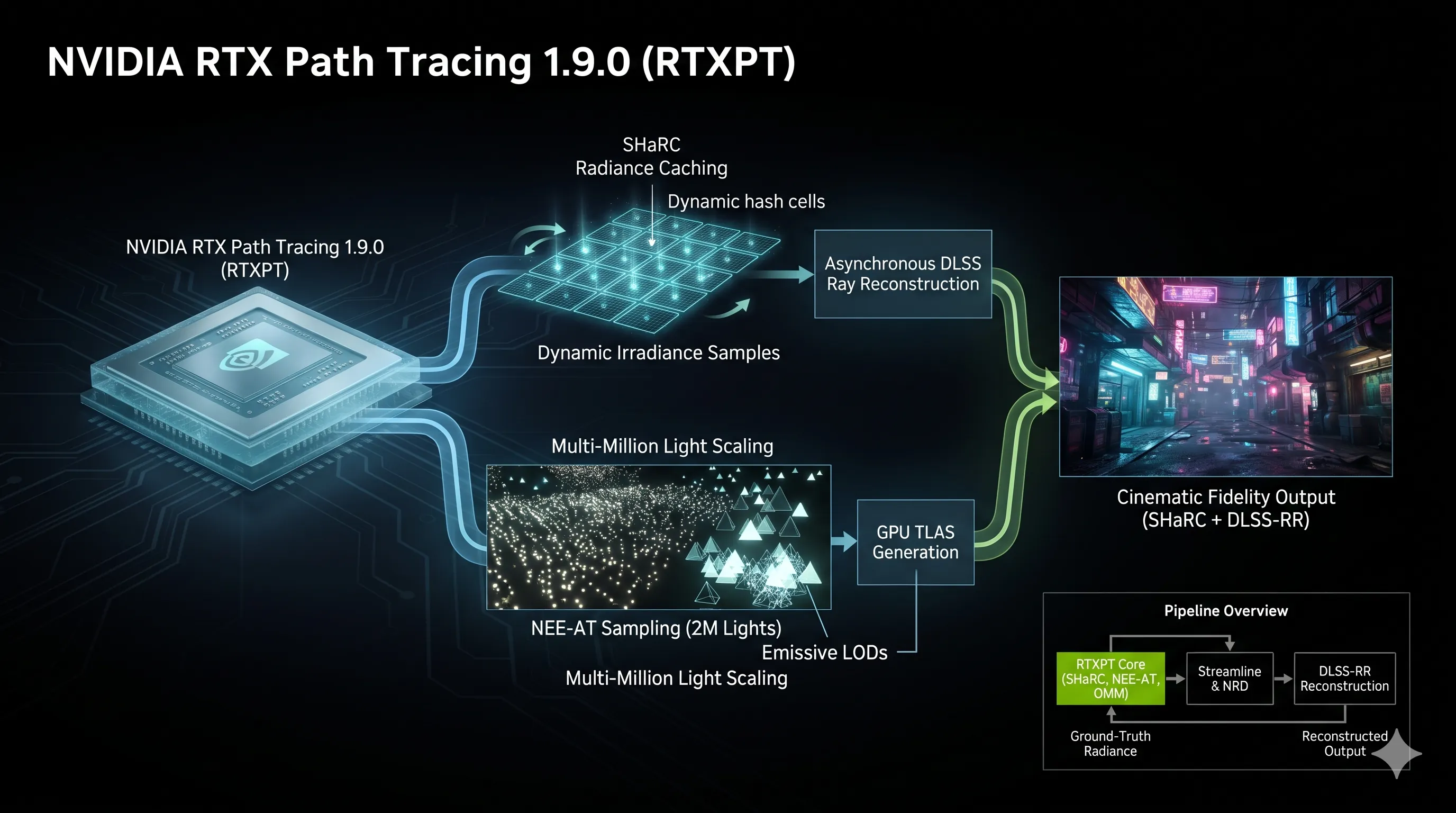
RTX Path Tracing 1.9.0 integrates the Spatially Hashed Radiance Cache (SHaRC) directly into the real-time path tracer by default.SHaRC functions as a spatial hash grid caching dynamic irradiance and radiance samples throughout the scene volume.
By default, this cached representation provides stable, low-noise indirect lighting data directly to DLSS-RR, significantly easing the neural reconstruction model’s task of resolving complex multi-bounce diffuse and glossy paths.
To further optimize throughput, the 1.9.0 pipeline implements real-time subsampling (sub-1spp).
Rather than tracing full primary or secondary paths per pixel every frame, sub-1spp modes sparsely evaluate radiance, relying on SHaRC's spatial continuity and DLSS-RR's temporal-spatial awareness to reconstruct high-fidelity output.
Simultaneously, the execution model decouples path evaluation from neural processing by utilizing asynchronous compute queues.
The pipeline overlaps DLSS Ray Reconstruction execution with the subsequent frame's path tracing workloads, ensuring that tensor core inference and RT core ray intersection traversal saturate GPU functional units in parallel rather than stalling in serial pipeline bubbles.
To guide graphics engineers transitioning legacy rendering loops toward pure ray tracing, RTXPT 1.9.0 provides a 9-step introductory hybrid deferred renderer sample.
This sample demonstrates the step-by-step structural evolution of a traditional raster deferred rendering pipeline into a unified, real-time path-traced rendering architecture across nine selectable runtime stages.
Two-Million Light NEE-AT Sampling, Emissive LODs, and GPU TLAS Generation
Direct lighting evaluation in production scenes often breaks down when facing hundreds of thousands of dynamic geometric emitters.RTX Path Tracing 1.9.0 significantly scales Next Event Estimation with Adaptive Temporal sampling (NEE-AT) to evaluate up to 2 million lights, scaling up directly from the prior limit of 512,000 lights.
This fourfold expansion allows artists to populate sprawling game environments with unconstrained point, spot, and area emitters without requiring aggressive, manual visibility culling hacks.
To complement NEE-AT scaling, the 1.9.0 engine introduces emissive triangle clustering into light levels of detail (LODs).
In scenes featuring high-density lighting geometry—such as neon signage, complex fixtures, or dense light-emitting particle meshes—emissive triangles are automatically grouped into hierarchical clusters based on spatial proximity and directional orientation.
This clustering prevents RT core divergence and bounds the light sampling tree depth during next-event estimation passes.
Furthermore, RTXPT 1.9.0 transitions Top-Level Acceleration Structure (TLAS) instance generation entirely to the GPU.
Rather than having the CPU iterate through scene transforms, evaluate visibility flags, and marshal instance descriptors into memory buffers each frame, compute shaders construct the TLAS instance arrays directly on device memory.
This eliminates significant driver dispatch overhead and CPU-side bottlenecks in draw-call-heavy workloads.
Cross-Platform Build Pipelines and Agility SDK Configuration
Expanding target deployment environments, RTX Path Tracing 1.9.0 introduces native compilation and execution support for Windows on ARM64 platforms alongside standard x86_64 targets.Running the 1.9.0 pipeline requires GeForce Game Ready Driver 595.71 or newer and CMake 4.1 or higher.
The framework packages an updated suite of core RTX submodules:
| Integrated Submodule / Dependency | Integrated Version | Pipeline Role & Driver / API Constraints |
|---|---|---|
| Streamline | 2.14.16 | Framework for plugging DLSS-RR and graphics telemetry into the render loop. |
| NRD (NVIDIA Real-Time Denoisers) | 4.17.3 | Spatio-temporal denoising library backing hybrid and fallback reconstruction stages. |
| RTXDI (RTX Direct Illumination) | 3.0 | Manages ReSTIR algorithms, reservoir sampling, and NEE-AT scaling to 2 million lights. |
| OMM (Opacity Micromap) | 1.10 | Accelerates ray traversal through alpha-tested foliage and complex geometric cutouts. |
| DirectX Agility SDK | 1.619.6 | Requires DXR 1.2 and Shader Model 6.9 support; requires manual CMake variable clearing if unavailable. |
| GeForce Game Ready Driver | 595.71+ | Minimum baseline driver requirement for Windows execution and modern DXR/Vulkan features. |
To clone, configure, and build RTX Path Tracing on Windows using the default visual toolchain:
git clone --recursive https://github.com/NVIDIA-RTX/RTXPT.git
cd RTXPT
cmake CMakeLists.txt -B ./build./build directory.Note that if targeting DirectX 12 via Agility SDK 1.619.6 on hardware or developer environments lacking DXR 1.2 and Shader Model 6.9, CMake configuration will raise errors unless corresponding Agility SDK variables are manually cleared.
For cross-compiling the suite for Windows on ARM from an x64 development workstation:
cmake CMakeLists.txt -B ./build -A ARM64bin_arm64 directory.Once binaries are generated, the path tracer can be launched across DirectX 12 or Vulkan graphics backends.
To execute the path tracing sample using the Vulkan backend targeting a custom scene definition at 4K resolution:
Rtxpt.exe --vk --scene programmer-art.scene.json --width 3840 --height 2160programmer-art.scene.json asset descriptor.Engineers running the Vulkan path on hardware from third-party vendors must account for known driver anomalies.
Specifically, running Vulkan on AMD GPUs can trigger a Timeout Detection and Recovery (TDR) crash during TLAS construction when processing scenes containing null instances.
Additionally, intermittent black or incorrect reflections and transparencies have been observed when executing under certain AMD driver stacks, requiring explicit null-instance validation prior to dispatching GPU-side TLAS generation routines.
7. Real-Time BVH Viewer 1.0: Independent Acceleration Structure Inspection and Cost Heatmaps
Understanding how NVIDIA's AI animation and RTX tools work requires visibility into the underlying ray-tracing acceleration structures that render those dynamic scenes.The release of NVIDIA Real-Time BVH Viewer 1.0.0 provides developers with specialized runtime diagnostics to profile, validate, and optimize ray traversal workloads in real time.
Decoupled TLAS Inspection and Per-Pixel Traversal Heatmaps
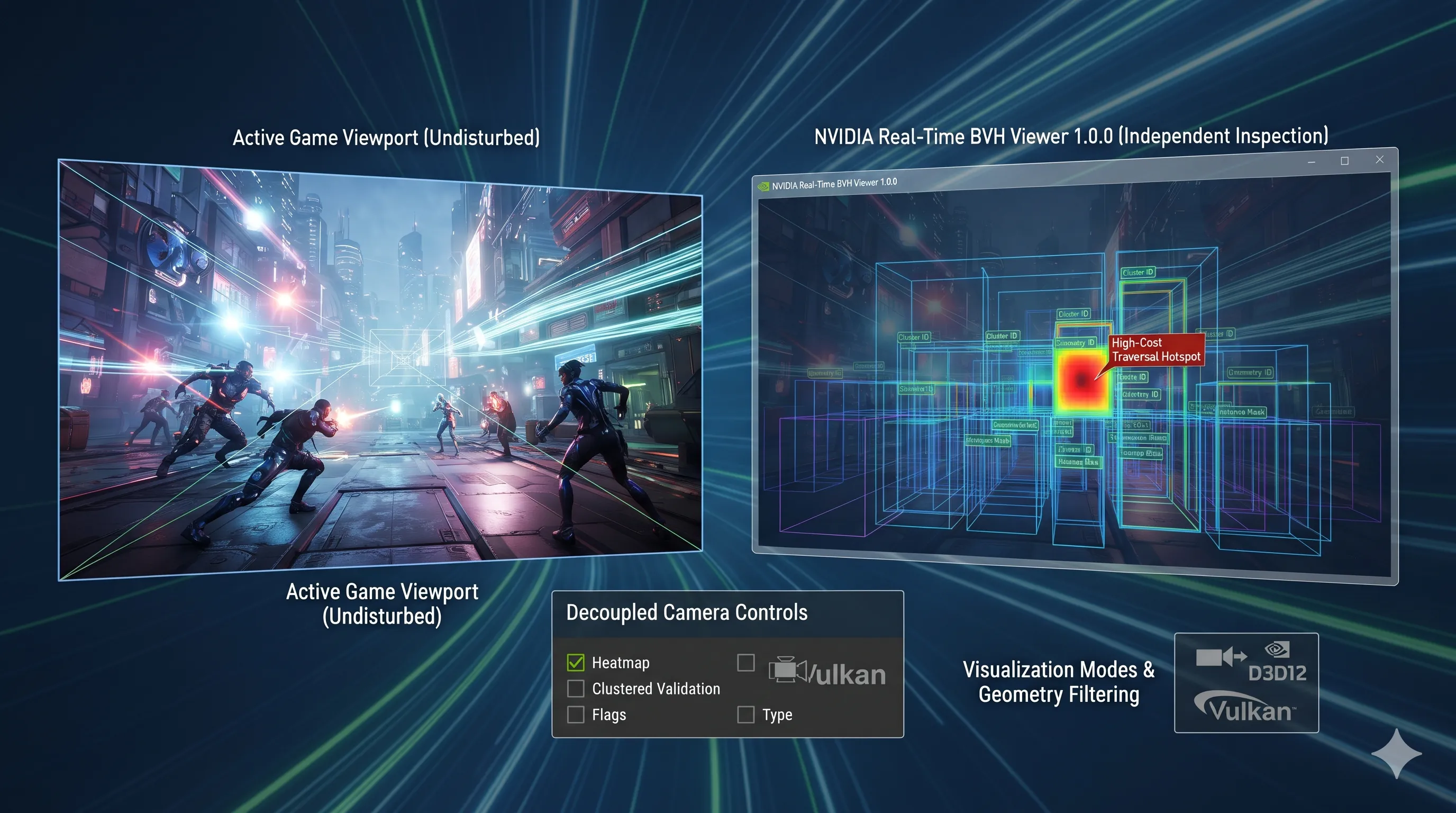
NVIDIA Real-Time BVH Viewer 1.0.0 renders live ray-tracing acceleration structures for both D3D12 and Vulkan applications inside a completely independent external window.By incorporating an independent camera system, the tool allows graphics engineers to inspect Top-Level Acceleration Structures (TLAS) completely decoupled from in-game rendering cameras.
Developers can freely orbit, pan, and reposition the inspection viewpoint across the scene hierarchy without disturbing the active title's viewport or camera state.
To identify structural inefficiencies in scene geometry, Real-Time BVH Viewer 1.0.0 generates per-pixel trace time heatmaps.
These heatmaps visually expose high-cost ray traversal hotspots across the scene, highlighting excessive overlapping bounding boxes or inefficient hierarchy depth that degrade frame rates.
Engineers can isolate problematic elements using flexible visualization modes, which render the hierarchy according to primitive, geometry, instance, and cluster IDs, as well as Bottom-Level Acceleration Structure (BLAS) addresses, instance masks, and flags.
Furthermore, the viewer supports granular geometry filtering across build flags, geometry types, and ray culling parameters to isolate specific scene components during interactive debugging.
Clustered Geometry Validation and Non-Intrusive Runtime Injection
Modern ray tracing pipelines increasingly rely on sub-mesh clustering, and Real-Time BVH Viewer 1.0.0 directly integrates clustered geometry validation within D3D12.This feature allows developers to verify cluster partitioning, alignment, and bounding integrity inside complex geometric hierarchies.
Integration does not require instrumenting game codebases or rebuilding executables.
The utility provides a standalone sampler tool capable of attaching directly to running game processes without modifying game source code.
Built on a vendor-agnostic architecture, NVIDIA Real-Time BVH Viewer 1.0.0 ships with native builds for both Windows x64 and RTX Spark environments.
| Capability Category | Technical Specification and Supported Features |
|---|---|
| Graphics APIs Supported | Direct3D 12 (D3D12) and Vulkan |
| Camera and Viewing System | Independent external window with decoupled camera controls for isolated TLAS inspection |
| Hierarchy Visualization Modes | Primitive IDs, geometry IDs, instance IDs, cluster IDs, BLAS addresses, instance masks, and flags |
| Performance Diagnostics | Per-pixel trace time heatmaps for detecting high-cost traversal regions |
| Filtering and Geometry Validation | Geometry filtering across flags, types, and culling parameters; D3D12 clustered geometry validation |
| Process Attachment and Deployment | Standalone sampler attachment with zero source code modification; vendor-agnostic architecture for Windows x64 and RTX Spark |
8. Nsight Profiling 2026: Multi-Frame Generation Tracking and Model Context Protocol Agents
Understanding how NVIDIA’s AI animation and RTX tools work in production requires deep instrumentation into how generated intermediate frames interact with real-time rendering pipelines.With the introduction of complex neural pipelines, profiling requires separating traditional rasterization from neural synthesis.
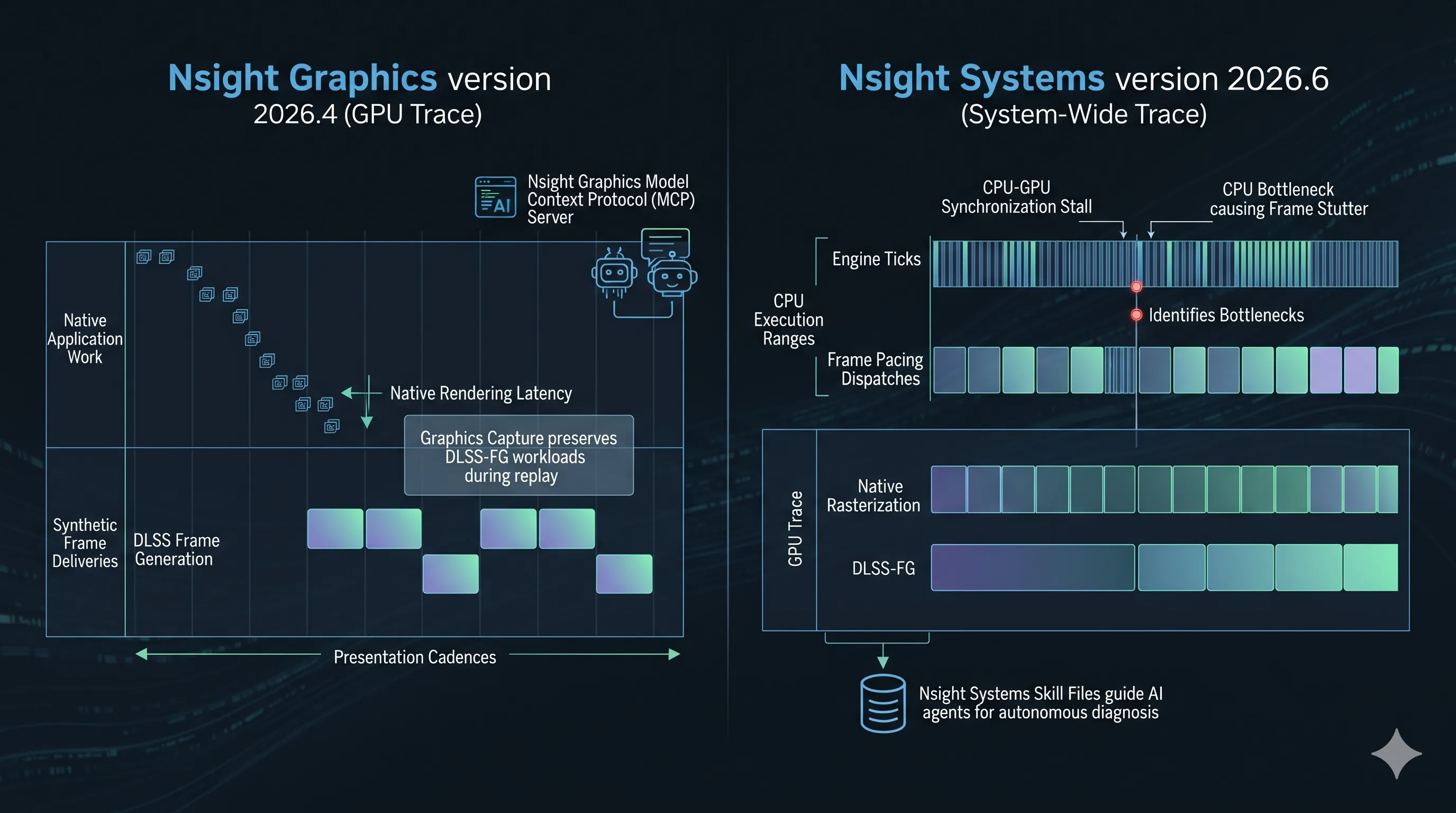
The integration of Nsight Graphics version 2026.4 and Nsight Systems version 2026.6 bridges this gap by introducing dedicated frame profiling support for DLSS Frame Generation and Multi-Frame Generation.
GPU Trace Timeline Decoupling for Frame Generation and Multi-Frame Generation
To accurately analyze pipelines utilizing frame synthesis, developers must rely on Streamline SDK version 2.12 or newer for DLSS-FG analysis.In Nsight Graphics version 2026.4, the GPU Trace interface isolates the execution flow by rendering application work and presented frames on completely independent timeline rows.
This visual and functional separation ensures developers can discern native rendering latency from presentation cadences introduced by frame interpolation.
Furthermore, Graphics Capture in Nsight Graphics isolates and preserves DLSS-FG workloads during frame capture and replay, allowing graphics engineers to inspect pipeline states without collapsing or skipping generated frames.
Complementing this in the system-wide scope, Nsight Systems version 2026.6 separates generated frames from host application frames and directly correlates them with CPU execution ranges.
This CPU-to-GPU mapping ensures that engine ticks, frame pacing dispatches, and synthetic frame deliveries are traceable across both processing domains.
| Tool / Component | Profiling & Capture Capabilities | Streamline SDK Dependency | Automated Agent Diagnostic Workflow |
|---|---|---|---|
| Nsight Graphics version 2026.4 | GPU Trace renders application work and presented frames on independent timeline rows; Graphics Capture isolates and preserves DLSS-FG workloads during capture and replay. | Requires Streamline SDK version 2.12 or newer for DLSS-FG analysis | Exposes an Nsight Graphics Model Context Protocol (MCP) server enabling AI agents to autonomously trigger captures and analyze GPU traces. |
| Nsight Systems version 2026.6 | Separates generated frames from host application frames and correlates them directly with CPU execution ranges for DLSS Frame Generation and Multi-Frame Generation. | Requires Streamline SDK version 2.12 or newer for DLSS-FG analysis | Provides Nsight Systems skill files that guide AI agents in diagnosing CPU bottlenecks, frame stutter, and CPU-GPU synchronization stalls. |
Automated Diagnostics via Model Context Protocol (MCP) Servers and Skill Files
Instrumentation workflows in the 2026 toolset transition from purely manual inspection to agent-assisted telemetry.Nsight Graphics version 2026.4 introduces an official Nsight Graphics Model Context Protocol (MCP) server.
This protocol layer allows external AI agents to programmatically interface with the profiling tools, autonomously triggering graphics captures and analyzing GPU traces without manual GUI guidance.
In parallel, Nsight Systems version 2026.6 ships with specialized skill files designed for agentic analysis.
These skill files provide domain-specific diagnostic heuristics that guide AI agents in identifying CPU bottlenecks, pinpointing root causes of frame stutter, and detecting complex CPU-GPU synchronization stalls across the timeline.
Related Posts

How Frontier AI Models Are Rewriting Theoretical PhysicsExplore how frontier AI models and autonomous agents are transforming theoretical physics,...
OpenAI GPT-6.2 Billing Fix: Astra Hits Limits 40% FasterOpenAI fixes a GPT-6.2 launch billing bug, causing Astra limits to hit 40% faster and Sol 25%...
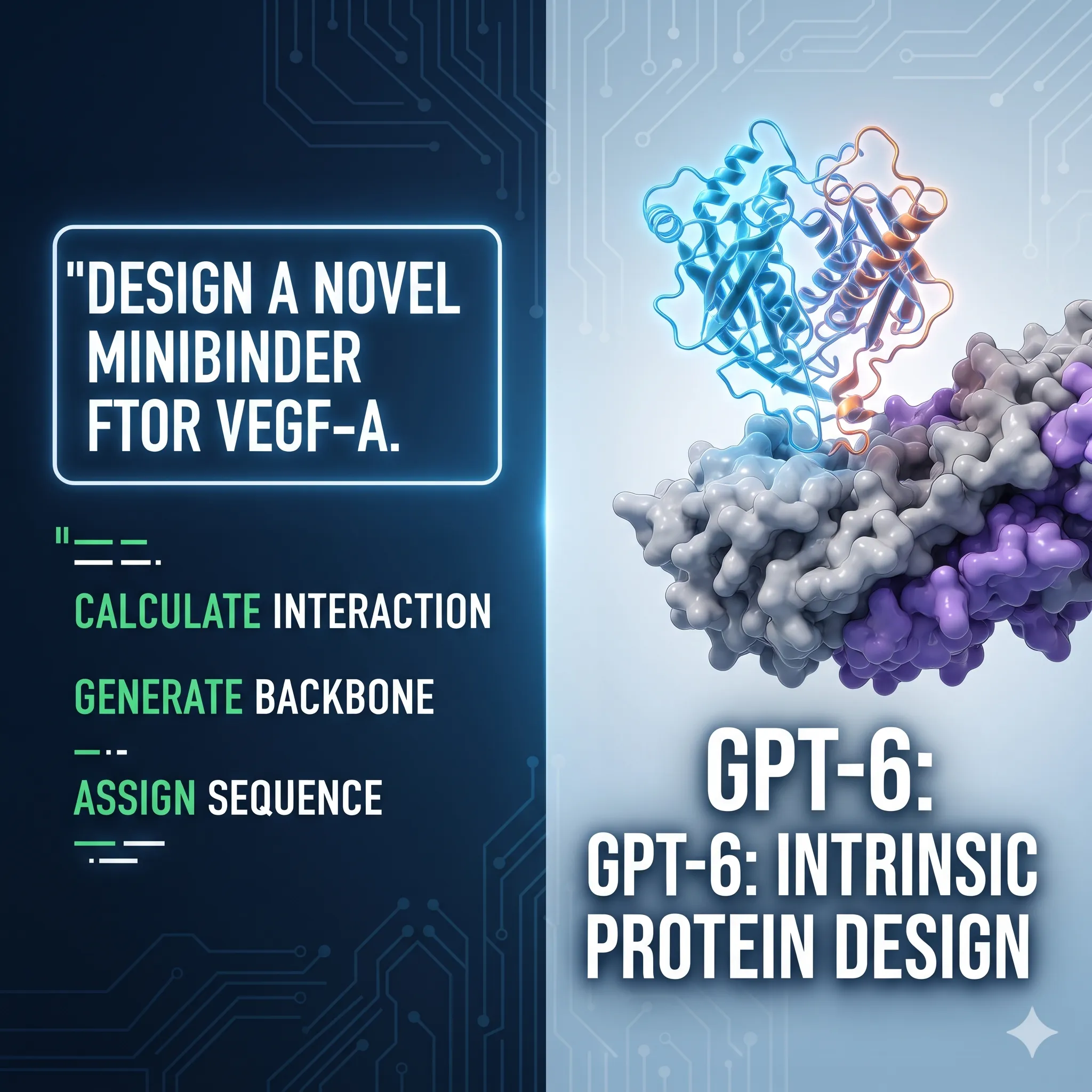
How GPT-6 Achieves Intrinsic Protein Design Without Specialized AIDiscover how GPT-6 models achieve intrinsic protein design and de novo minibinder generation using...
Generative AI may have assisted with research or drafting for this article. Topic selection, fact-checking, final wording, and publication remain the responsibility of DragonStone74. AI use disclosure