
Inside Windows 11: Why Electron Apps Face Performance Bottlenecks
🚀 Key Takeaways
- Native Engine Migrations: Flagship desktop platforms are increasingly piloting native rewrites in languages like Rust to eliminate the persistent overhead of bundled web runtimes.
- Shared Host Efficiencies: Shifting to shared system web hosts like Edge WebView2 has enabled major apps to drastically cut redundant process footprints.
- Rendering Pipeline Limits: JavaScript garbage collection pauses and DOM reflow cycles make it difficult for web-based rendering stacks to reliably meet tight display refresh deadlines.
- Windows I/O Sensitivity: The recursive module resolution model in Node.js creates measurable disk access penalties that delay application startup on Windows file systems.
- Compositor and Power Friction: Windows 11 Desktop Window Manager features and OS-level background throttling frequently clash with multi-process Chromium rendering layers.
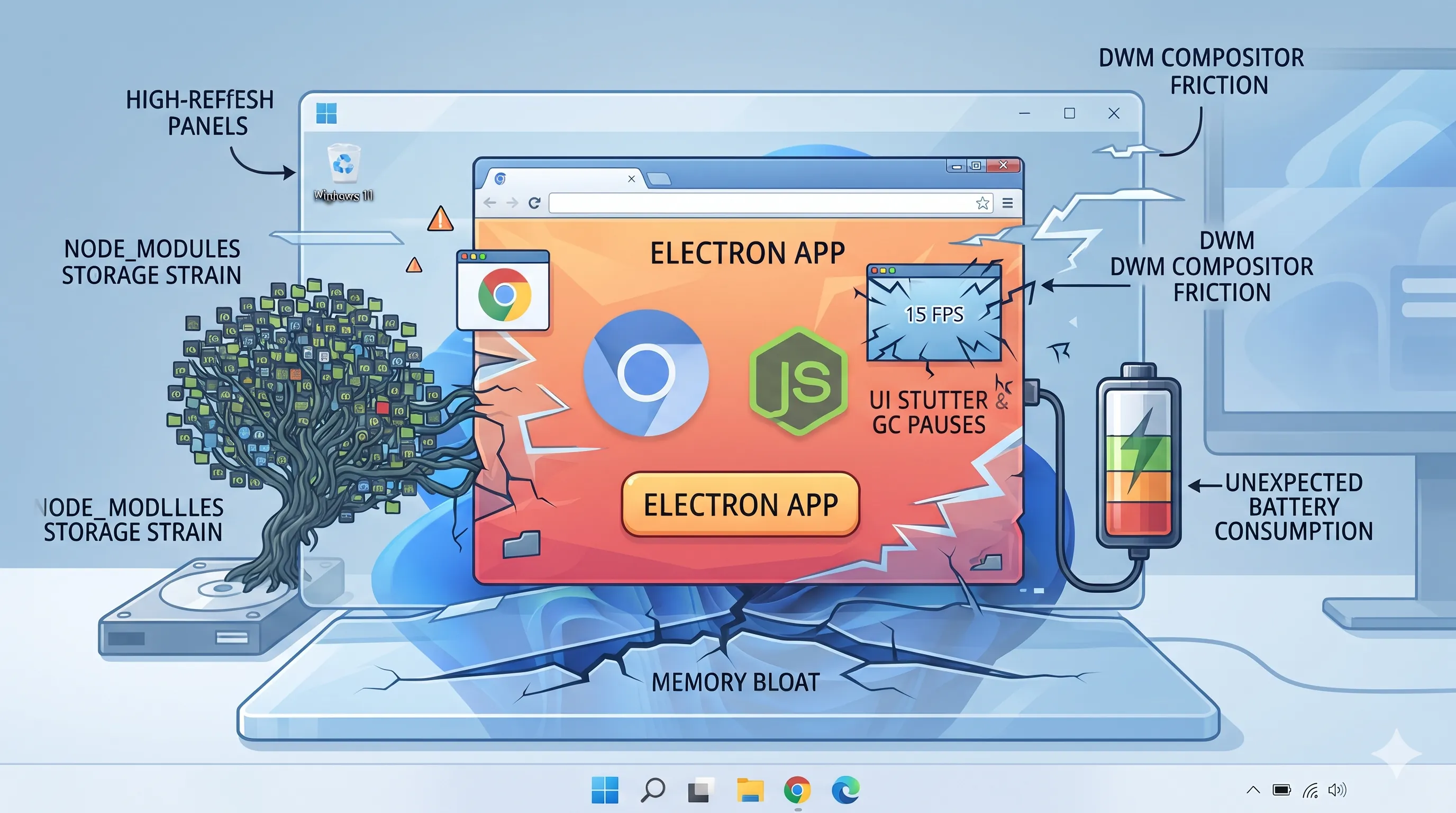
For more than a decade, the desktop application ecosystem converged on Electron as the gold standard for rapid, cross-platform product delivery. Shipping web code inside a self-contained runtime allowed engineering teams to deploy rich software to millions of machines with unmatched velocity. However, on modern Windows 11 environments, that architectural convenience increasingly collides with hardware performance expectations, resulting in noticeable UI stutter, memory bloat, and unexpected battery consumption.
The friction stems from fundamental design trade-offs inside desktop web wrappers. Bundling dedicated browser engines and runtime environments alongside deep module trees strains Windows storage subsystems, fights the native Desktop Window Manager, and introduces GC-induced rendering hiccups on modern high-refresh panels.
As industry leaders rethink their client architectures—ranging from shared framework runtimes to direct GPU-accelerated native builds—the pressures facing Electron on Windows have shifted from minor optimization quirks to major architectural bottlenecks.
1. Process Architecture and Windows File System Overhead in Electron
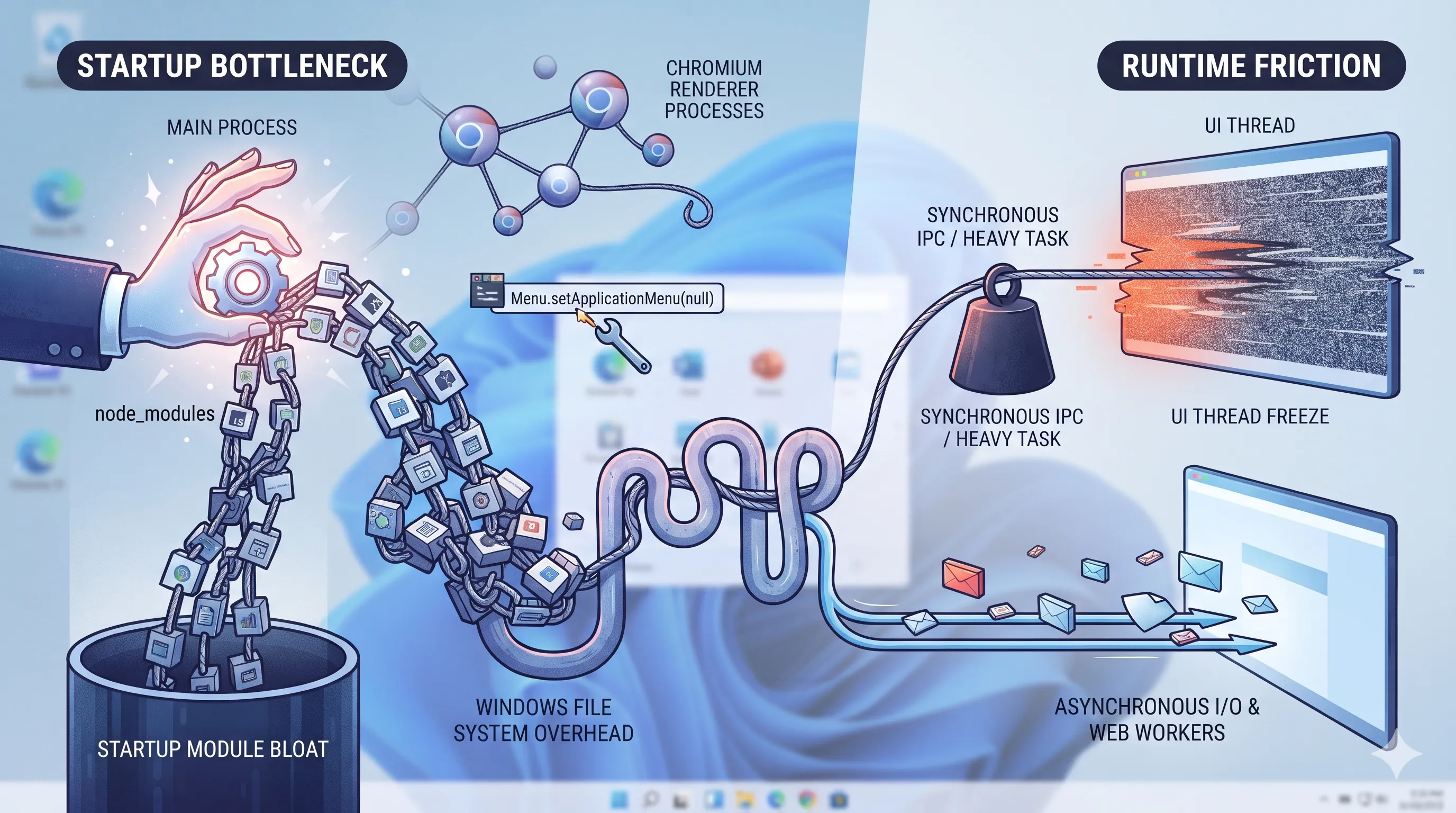
Understanding why Electron apps face performance challenges on Windows 11 requires examining the framework's core runtime model and how it interacts with the underlying OS.Electron architecture separates execution across a main process holding the UI thread and multiple Chromium renderer processes.
Because the main process governs window lifecycles and coordinates system interactions, any architectural friction directly degrades client responsiveness.
Node.js Module Resolution and Windows I/O Penalties
Loading and resolving Node.js modules via require calls is an expensive operation that is particularly slow on Windows file systems.In fact, Electron official documentation states that loading modules is a surprisingly expensive operation, especially on Windows.
Eagerly importing large modules at startup blocks early initialization and lengthens launch time.
To mitigate early initialization cost, developers must strip non-essential runtime components prior to app lifecycle milestones.
Specifically, this pattern is needed to prevent Electron from instantiating its standard default menu during startup to reduce initial setup overhead:
Menu.setApplicationMenu(null)Synchronous IPC Freezes and Startup Module Bloat
Dependency design choices further compound file system overhead during app initialization.Including server-oriented Node.js packages can force desktop apps to parse massive JSON files or unnecessary dependencies at boot.
Once execution moves past startup, inter-process communication introduces additional thread risks.
Synchronous IPC calls or heavy main-process tasks freeze the UI thread, causing complete window unresponsive states.
To maintain responsiveness across execution boundaries, asynchronous I/O and web workers allow moving heavy CPU and file tasks away from the main thread.
2. Rendering Pipeline Strain: Garbage Collection Pauses and DOM Relayouts
The structural foundation of desktop web runtimes creates fundamental rendering challenges, explaining directly why Electron apps face performance challenges on Windows 11 systems running high-refresh monitors.When running interactive software on modern operating systems, maintaining interface responsiveness requires synchronizing with the hardware refresh cycle, a requirement that places severe mechanical demands on web-based application stacks.
The 8.33ms Display Frame Budget and Non-Deterministic GC
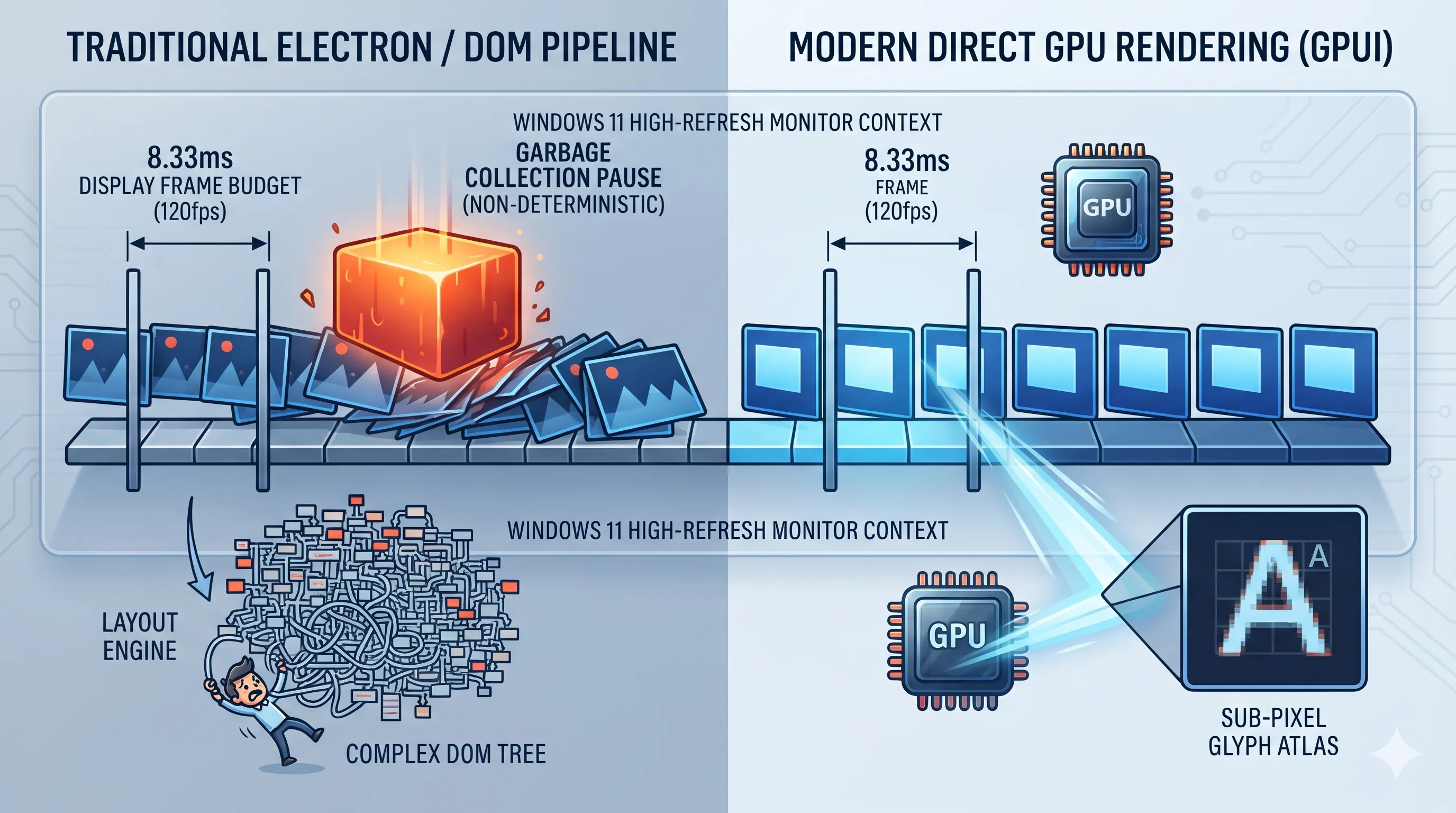
Modern displays operate at 60 to 120 frames per second, leaving an 8.33ms per-frame budget at 120 fps.Within this narrow execution window, an application must complete all script execution, layout computation, painting, and compositing before the next vertical blanking interval occurs.
Electron applications struggle to meet tight frame deadlines due to unexpected pauses from JavaScript garbage collection.
Because memory reclamation within the engine occurs non-deterministically, automatic garbage collector sweeps introduce latency spikes that interrupt the execution thread.
Antonio Scandurra noted that working on Atom within Electron made consistent frame delivery feel impossible due to GC pauses and DOM relayouts.
When a collection sweep overlaps with an active animation or rapid user input, the application misses its 8.33ms frame window, creating visible interface stutter and dropped frames.
DOM Relayout Bottlenecks vs. Direct GPU Texture Atlas Rendering
In addition to runtime reclamation pauses, expensive DOM tree relayouts in web rendering engines introduce frame drops and stutter.Any structural or visual modification to elements requires the layout engine to recalculate geometric bounds, perform tree traversals, and execute layer re-rasterization.
Micro-optimizing Electron rendering pipelines of standard web elements cannot consistently match GPU-accelerated rendering rates.
To bypass these systemic web engine bottlenecks, specialized architectures like Zed's GPUI abandon the traditional DOM pipeline entirely in favor of immediate hardware execution.
GPUI offloads 2D primitives directly to the GPU using specialized shaders for rectangles, drop shadows, and text.
Rather than relying on browser-style layout reflows, GPUI relies on OS-level shaping and rasterization into an alpha-only GPU texture atlas to accelerate text drawing.
To maintain typographic fidelity without introducing rendering artifacts, GPUI renders up to 16 variants of each individual glyph to handle sub-pixel positioning.
By shifting interface layout and glyph rasterization directly to GPU hardware buffers and specialized shaders, this architecture demonstrates the inherent limits of conventional web rendering engines that must continuously recalculate DOM elements under stringent refresh budgets.
3. Windows 11 DWM Compositor Clashes and Background Resource Throttling
A fundamental reason why Electron apps face performance challenges on Windows 11 stems from low-level friction between the operating system's window management pipeline and the underlying Chromium engine.Rather than operating in isolation, desktop runtimes must negotiate rendering buffers and resource allocation directly with Windows system subsystems, where architectural mismatches frequently surface.
Desktop Window Manager and Multiplane Overlay Glitches
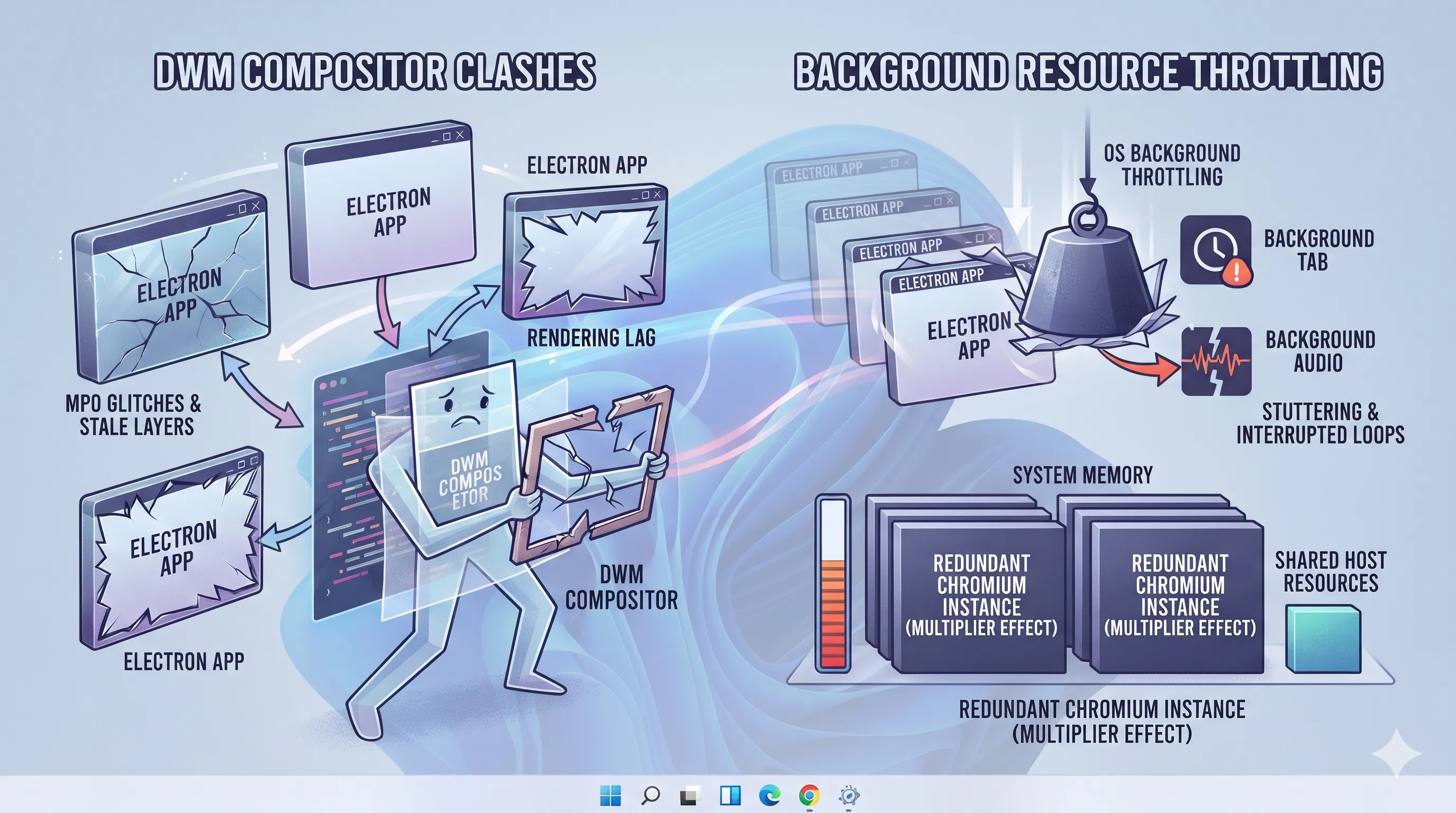
The Windows Desktop Window Manager utilizes Multiplane Overlay to present composited frames from desktop applications.While Multiplane Overlay is designed to optimize graphics processing by delegating hardware plane composition, it introduces significant friction into modern desktop web runtimes.
Specifically, Multiplane Overlay can leave stale rendering layers on Chromium presentation pipelines unless disabled or bypassed.
This interaction produces noticeable UI anomalies during day-to-day desktop usage.
Microsoft Tech Community discussions noted rendering lag and visual glitching in Chromium apps linked to Desktop Window Manager Multiplane Overlay.
When these compositing pipeline breakdowns occur, frames fail to update predictably, presenting users with unresponsive window surfaces and visual freezing across application interfaces.
Operating System Background Throttling and Chromium Multiplier Effects
System-level performance degradation on Windows 11 extends beyond visual compositors into active process management.Operating system background resource throttling can cause background Electron tabs and audio processes to stutter.
When an application moves out of foreground focus, Windows prioritizes active desktop tasks by restricting scheduling cycles, which interrupts the runtime loops required to sustain seamless playback and background synchronization.
This behavioral limitation is exacerbated by the standalone packaging model inherent to the ecosystem.
Bundling complete Chromium instances per application multiplies background system memory overhead across Windows desktop sessions.
Because each running utility provisions its own redundant runtime environment rather than leveraging shared operational resources, the cumulative demand systematically drains system memory and intensifies platform-level performance constraints.
4. Shared Runtimes vs. Bundled Engines: Microsoft Teams' Move to WebView2
Contextualizing the broader architectural discussion surrounding why Electron apps face performance challenges on Windows 11, the primary friction point stems from bundling complete, dedicated runtimes for single enterprise applications.When evaluating why Electron apps encounter resource exhaustion on modern operating systems, Microsoft Teams provides an authoritative case study.
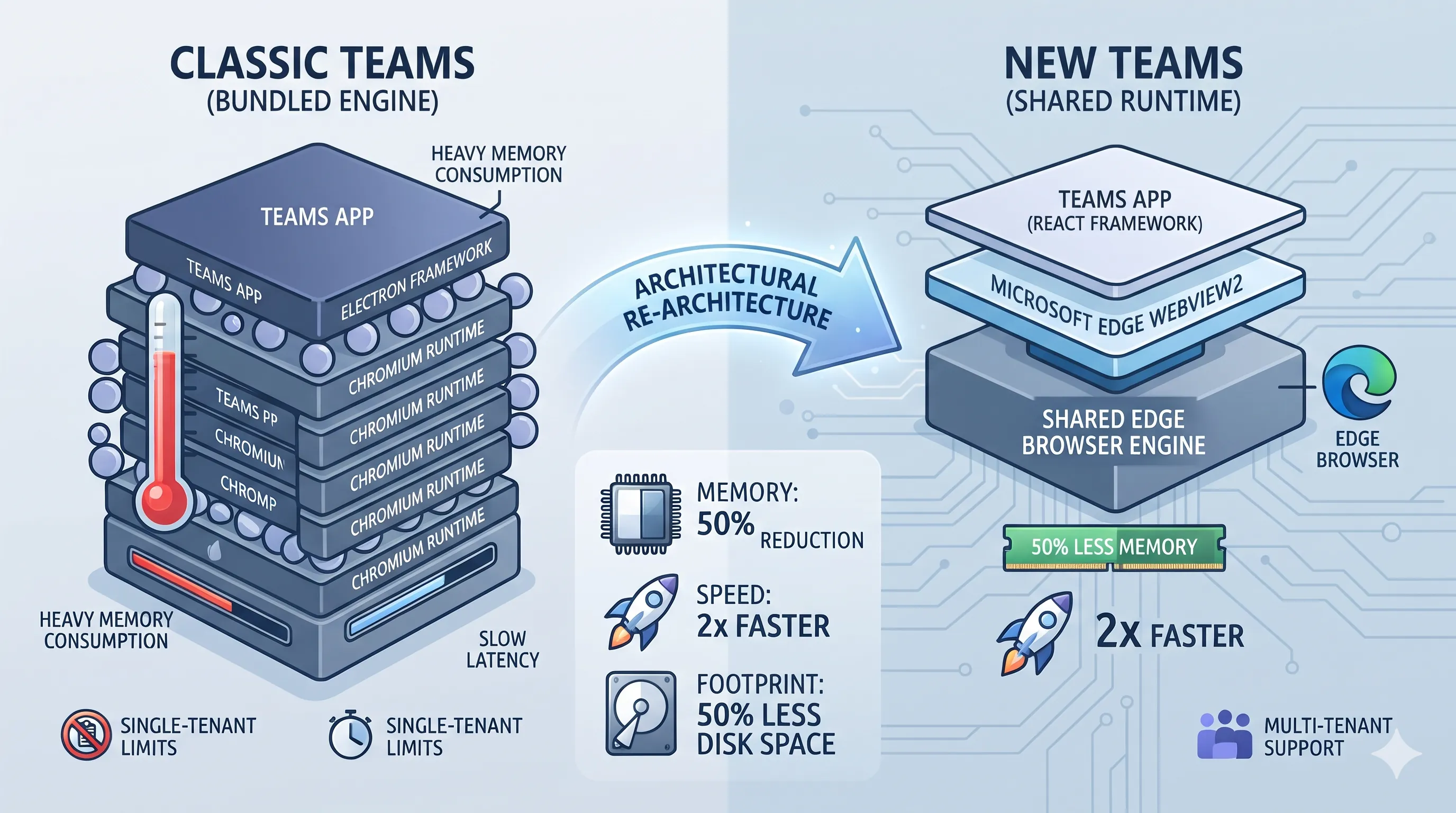
Historically, the classic desktop client architecture suffered from heavy memory consumption and slower navigation latencies, demonstrating the operational drag created by standalone Chromium instances on system resources.
To resolve these inefficiencies, Microsoft departed from its legacy packaging model by shifting to a shared runtime ecosystem.
Eliminating Dedicated Bundled Chromium Instances with WebView2
Microsoft tackled the architectural overhead of classic Teams by reimagining the application from the ground up to be faster, simpler, and use less memory, as highlighted on the Microsoft Teams Blog.Under this re-architecture, Microsoft rebuilt Teams on the React framework, leveraging Microsoft Edge WebView2 as the application host on Windows.
Rather than bundling separate browser engines that compete for local hardware resources, WebView2 enables shared resources with Microsoft Edge to minimize disk space and memory footprint.
Beyond basic runtime efficiency, this framework evolution introduced fundamental enterprise capabilities, including complete architectural support for Multi-tenant organizations and multi-tenant multi-account setups.
While the automatic migration of classic Teams users was scheduled to occur past March 31, 2024, that milestone is now historical, with the unified WebView2 runtime serving as the long-term enterprise baseline on Windows 11.
Quantifying Gains: Memory Halving, Navigation Latency, and Disk Footprint
The architectural transition from a legacy standalone client to Edge WebView2 produced substantial, measurable improvements across core system metrics.Early testing during the new Teams preview confirmed that the redesigned client was up to two times faster while using 50% less memory than classic Teams.
Independent testing documented by GigaOm corroborated these findings, reporting that the new Teams was on average two times faster when loading, joining meetings, and switching chats and channels.
Additionally, official performance metrics confirmed that the new client consumes up to 50% less memory and disk space compared to classic Teams, mitigating the classic client's memory bloat and navigation latencies.
| Metric / Dimension | Classic Teams | New Teams (WebView2 + React) |
|---|---|---|
| Application Host & Framework | Classic desktop client architecture | React framework hosted via Microsoft Edge WebView2 |
| Memory Consumption | Heavy memory consumption baseline | Consumes up to 50% less memory; preview demonstrated using 50% less memory |
| Disk Footprint & Engine Sharing | Unshared client footprint | Up to 50% less disk space via shared resources with Microsoft Edge |
| Navigation Latency & Speed | Slower navigation latencies | Up to 2x faster overall; GigaOm reported on average 2x faster loading, meeting joins, and channel/chat switching |
| Tenant & Account Architecture | Legacy single-tenant switching constraints | Integrated support for Multi-tenant organizations and multi-tenant multi-account setups |
5. Bypassing Web Runtimes: Discord's Native Rust Rebuild
The persistent performance challenges observed with Electron apps on Windows 11 often stem from the foundational design of packaging web technologies into desktop containers.When desktop software experiences severe resource contention, bypassing packaged web engines altogether becomes a necessary architectural pivot.
Discord's transition away from its legacy client architecture demonstrates how moving to a native framework directly targets the core inefficiencies tied to running web runtimes on the desktop.
Direct Machine Code Execution vs. Bundled Web Runtimes
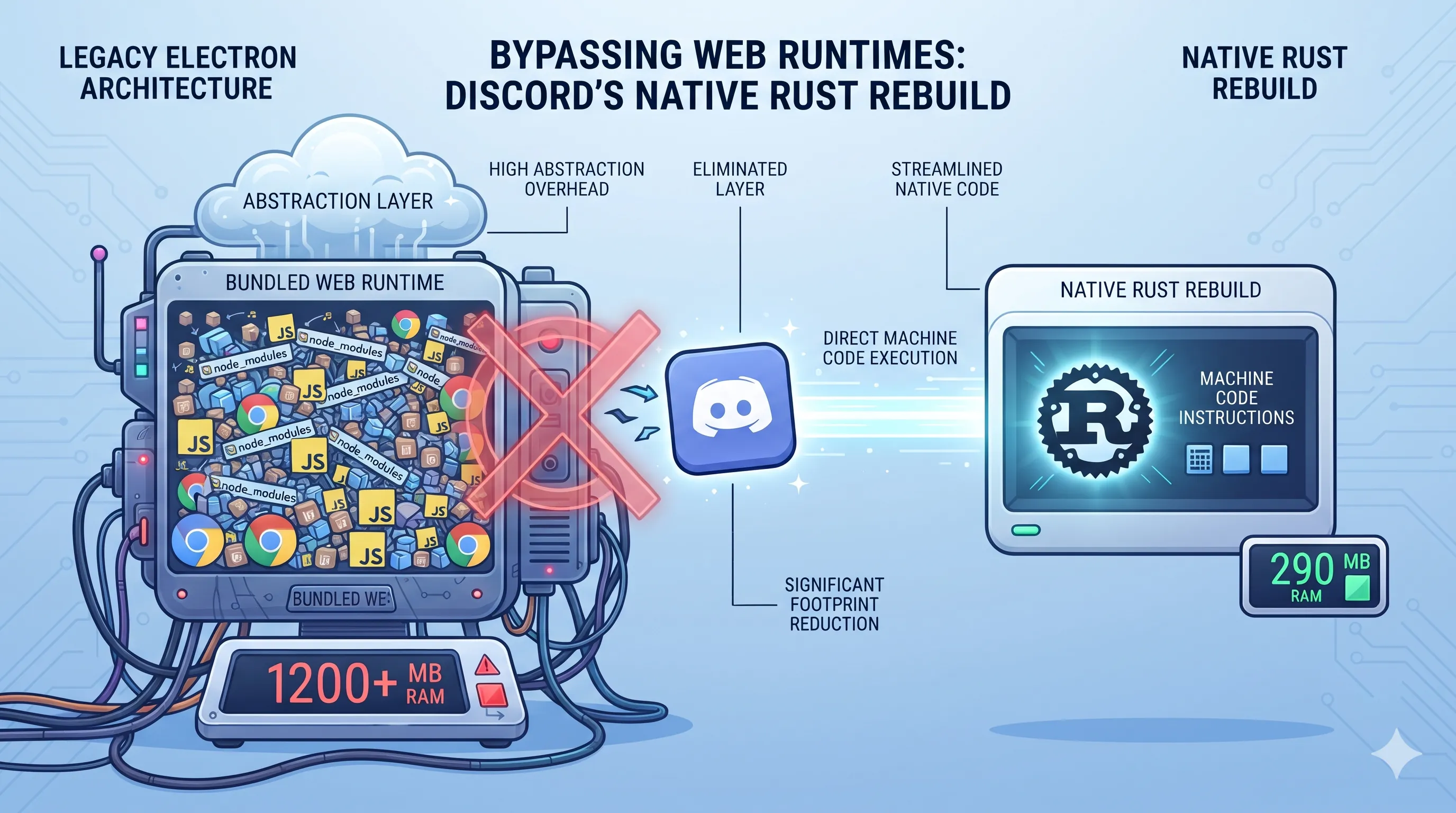
Discord's legacy client performance on Windows highlighted significant resource usage under the Electron framework.Because applications built on Electron rely on bundled web runtimes to function, they inevitably introduce abstraction overhead and consume considerable system resources to deliver user interfaces.
To resolve these architectural limitations, Discord initiated a rebuild of its client using the Rust programming language to replace its existing client architecture.
Native client implementations execute machine code directly rather than relying on bundled web runtimes.
By compiling directly to native machine instructions, a Rust-based implementation strips away the runtime layers that define Electron, eliminating the runtime engine required to interpret and present the desktop interface.
Sub-300 MB Footprints: Discord's Shift to Native Rust
The operational impact of discarding bundled web runtimes is immediately reflected in baseline hardware consumption.TechPowerUp reported that Discord is rebuilding its desktop app in Rust, underscoring a deliberate departure from its legacy framework.
According to TechPowerUp's coverage, an early build of Discord rebuilt in Rust uses 290 MB of RAM.
Achieving a sub-300 MB operational footprint illustrates the stark reduction in memory cost made possible when leaving Electron runtimes behind.
By replacing runtime interpretation with direct machine code execution, native builds establish a streamlined architecture that curtails the high resource footprint historically associated with Windows client deployments.
Related Posts

Generative AI may have assisted with research or drafting for this article. Topic selection, fact-checking, final wording, and publication remain the responsibility of DragonStone74. AI use disclosure