
Ensuring Reliable Structured Outputs from LLMs with OpenAI and Instructor
🚀 Key Takeaways
- OpenAI Structured Outputs guarantee model responses adhere to a user-defined JSON schema, evolving beyond basic JSON mode.
- This feature eliminates the need for manual validation and retries of incorrectly formatted LLM outputs, ensuring reliability.
- Available in GPT-4o and later OpenAI models, it simplifies prompting and is highly recommended by OpenAI.
- Key use cases include structured data extraction, UI generation, and moderation, making LLM integration more robust.
- The Instructor library is the leading Python tool for LLM structured data extraction, built on Pydantic for type-safe outputs.
- Instructor offers automatic re-asking and validation on failure, ensuring high-quality, reliable structured data across 15+ LLM providers.
- While Function Calling connects LLMs to external tools, Structured Outputs are ideal for directly structuring model responses for user applications.
The promise of Large Language Models (LLMs) to revolutionize applications often collides with the reality of unreliable output formats.
Developers have long grappled with the challenge of converting free-form natural language responses into consistently structured, machine-parseable data, leading to frustrating JSON parsing errors and complex error-handling logic.
Fortunately, this struggle is becoming a thing of the past.
As of 2026-08-26, advancements like OpenAI's Structured Outputs and robust libraries such as Instructor have emerged, offering powerful solutions to guarantee the integrity of LLM-generated data.
These tools ensure that model responses strictly adhere to predefined schemas, dramatically improving reliability and developer experience.
This guide explores how to leverage these innovations to build more resilient LLM applications.
We will delve into OpenAI's native Structured Outputs feature, its capabilities, and its distinctions from older JSON mode and function calling.
Additionally, we will examine the Instructor Python library, a cornerstone for type-safe data extraction across various LLMs, demonstrating how to effectively eliminate JSON parsing headaches for good.
Developers have long grappled with the challenge of converting free-form natural language responses into consistently structured, machine-parseable data, leading to frustrating JSON parsing errors and complex error-handling logic.
Fortunately, this struggle is becoming a thing of the past.
As of 2026-08-26, advancements like OpenAI's Structured Outputs and robust libraries such as Instructor have emerged, offering powerful solutions to guarantee the integrity of LLM-generated data.
These tools ensure that model responses strictly adhere to predefined schemas, dramatically improving reliability and developer experience.
This guide explores how to leverage these innovations to build more resilient LLM applications.
We will delve into OpenAI's native Structured Outputs feature, its capabilities, and its distinctions from older JSON mode and function calling.
Additionally, we will examine the Instructor Python library, a cornerstone for type-safe data extraction across various LLMs, demonstrating how to effectively eliminate JSON parsing headaches for good.

1. Understanding Large Language Models (LLMs) and Their Foundation
To effectively command a Large Language Model (LLM) to produce perfectly structured data like JSON, we must first understand the nature of the engine we are steering.This section provides that essential foundation, exploring what LLMs are, their developmental history, and their significance in the current AI landscape.
Grasping these fundamentals is the first step toward moving beyond frustrating parsing errors and achieving reliable, structured outputs.
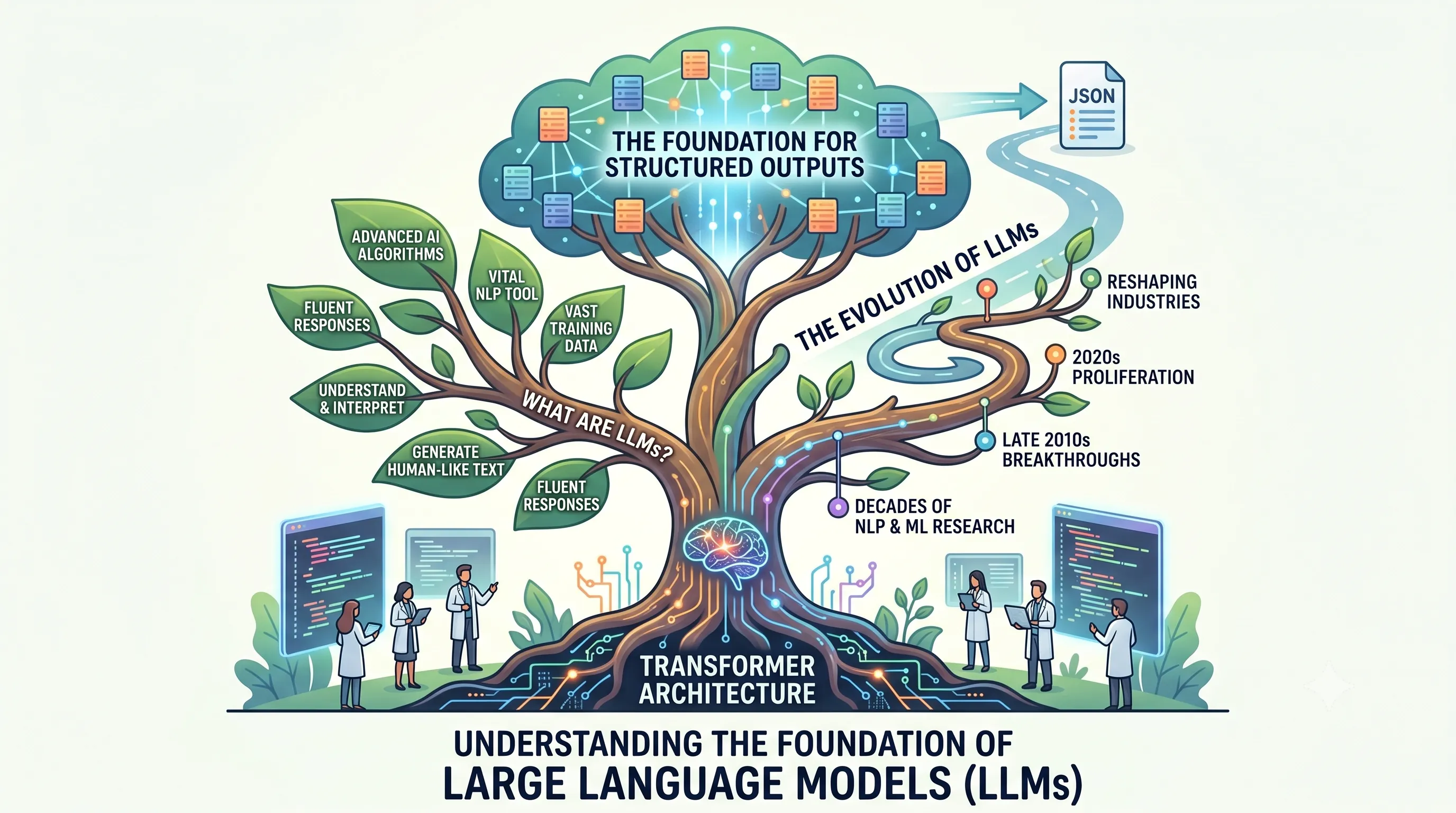
What Are LLMs?
Large Language Models, or LLMs, are highly advanced AI algorithms specifically designed for natural language processing (NLP).They are trained on truly vast quantities of data, which allows them to understand, interpret, and generate human-like text with remarkable fluency.
At their core, modern LLMs are built upon the transformer architecture, a specific type of neural network that has been expanded in multiple dimensions—such as the size of the model, the volume of training data, and the computational power used—to achieve their powerful capabilities.
The Evolution of LLMs
The emergence of today's powerful LLMs was not an overnight event; rather, it represents the culmination of decades of dedicated research in the fields of natural language processing and machine learning.While the foundational concepts have existed for a long time, the specific breakthrough development and proliferation of these large-scale models occurred relatively recently, primarily in the late 2010s and through the 2020s.
This period marked a significant inflection point where theoretical research translated into the practical, powerful AI applications that are now reshaping industries.
2. The Persistent Challenge of LLM Output Parsing and Early Solutions
This section establishes the foundational problem that structured output features were designed to solve.It details the historical unreliability of LLM-generated JSON and the early, often complex, workarounds developers had to implement, thereby highlighting the critical need for the modern solutions discussed in the main article.
Pre-Structured Output Era: Parsing Nightmares
In the early days of building LLM-powered applications, one of the most significant and frustrating hurdles was output reliability.Before the advent of advanced, built-in solutions, developers frequently found that LLMs did not always return perfectly valid, schema-compliant JSON, even when explicitly prompted to do so.
An application might request user data in a specific JSON structure but receive a response containing trailing commas, missing brackets, or unstructured natural language explanations mixed in with the code.
These inconsistencies meant that a simple `JSON.parse()` command would often fail, crashing application workflows and requiring constant developer intervention.
The Need for Robust Output Handling
This unreliability made it clear that simply prompting for a format was not enough for production systems.Consequently, a layer of robust error handling and parsing logic became a non-negotiable part of the development stack.
Specialized parsing code or entire frameworks were required specifically to handle cases where an LLM's output did not match the expected format.
These frameworks were essential tools to convert messy, and often unpredictable, natural-language LLM outputs into the clean, machine-parseable JSON that applications could safely consume.
The landscape began to shift significantly as model providers acknowledged this pain point directly; for instance, Anthropic launched structured outputs for Claude in late 2025, introducing native support for JSON schema responses and signaling a move toward more reliable, developer-friendly interactions.

3. OpenAI's JSON Mode: A Step Towards Structured Output
This section explores one of the earliest and most direct solutions for getting structured data from language models: OpenAI's native JSON Mode. While the main article focuses on advanced libraries that guarantee schema adherence, understanding JSON Mode is crucial as it represents the foundational layer upon which many of these tools were initially built and highlights the core problem—syntactic validity versus schematic correctness—that developers face.What is JSON Mode?
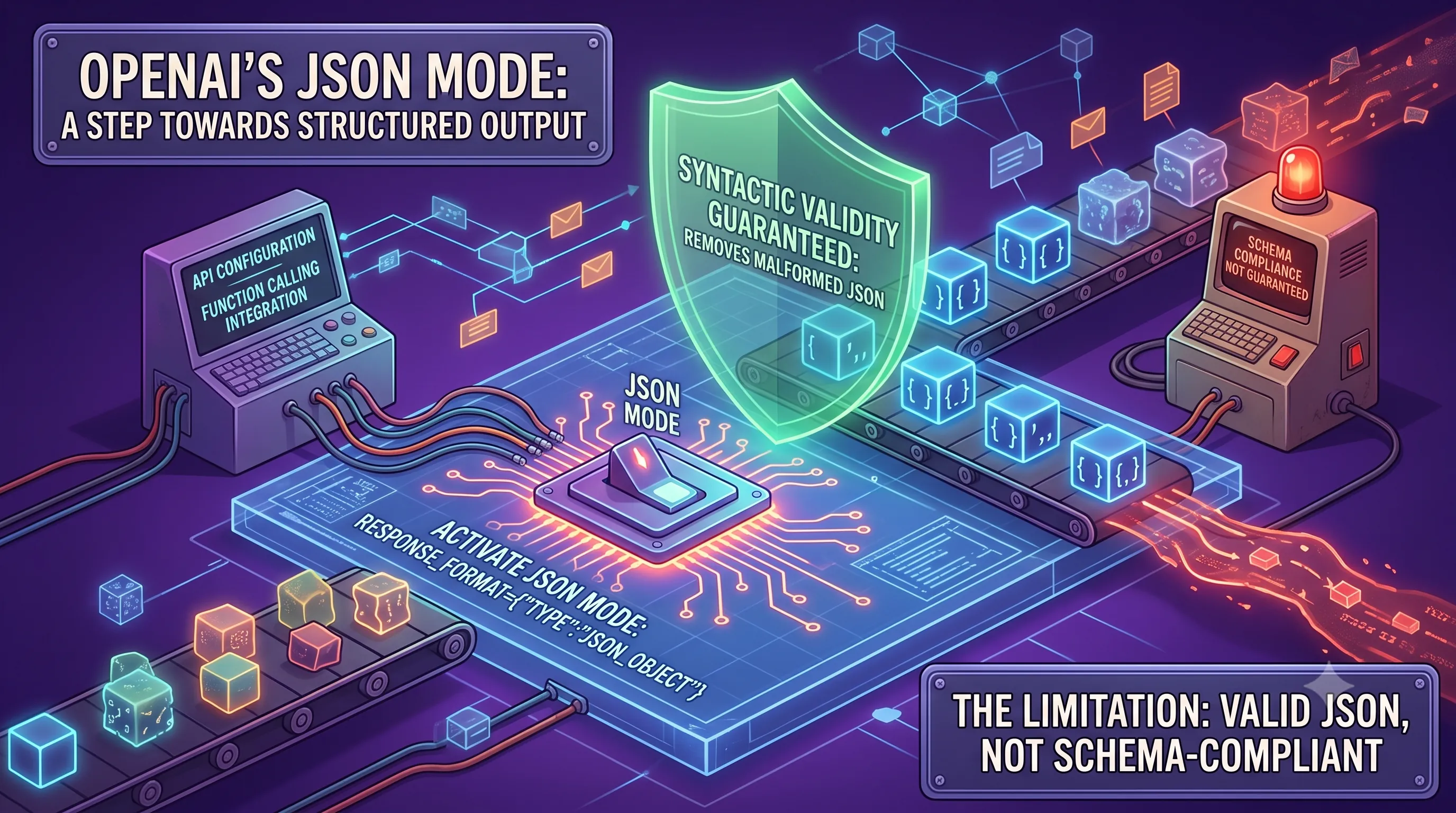
JSON Mode is a feature provided by OpenAI that compels a model to output a string that is a syntactically valid JSON object. It should be seen as a more basic version of the sophisticated structured output tools discussed later in this article.Its primary function is to eliminate common parsing errors caused by malformed JSON, such as trailing commas, incorrect quoting, or incomplete structures. To activate this mode's logic, the model must be explicitly instructed to produce JSON, for example, within the system message. A peculiar requirement of the API is that the string "JSON" must appear somewhere in the context; otherwise, an error may be thrown to prevent the model from generating continuous whitespace or non-JSON text.
Enabling JSON Mode in API Calls
Activating JSON Mode is a straightforward process involving a specific parameter in the API request. For the Chat Completions API, you enable it by setting the `response_format` parameter to `{ "type": "json_object" }`. A similar setting exists for the Responses API, where the `text.format` parameter would be set to the same value.It is also important to note that JSON Mode is always turned on whenever you use function calling capabilities. This is a logical necessity, as the model must generate a syntactically correct JSON object containing the arguments for the specified function to be executed properly by the client-side code.
Limitations: Valid JSON, Not Schema-Compliant
The most significant limitation of JSON Mode, and the primary reason for the existence of more advanced libraries, is that it does not guarantee the output matches any specific schema. The model ensures the braces, brackets, and quotes are correctly placed, but it does not validate the content *within* the JSON.This means the generated object might be missing required fields, include extraneous ones, use incorrect data types (e.g., a string instead of a number), or fail to conform to any other structural rule you defined in your Pydantic model or JSON Schema. Consequently, the application code must still bear the full burden of validating the JSON's structure and handling edge cases, such as when the model output is not a complete JSON object despite the mode being active. This gap between syntactic validity and schematic compliance is precisely the problem that modern structured output libraries aim to solve.
4. Revolutionizing Reliability: An Overview of OpenAI Structured Outputs
This section provides a foundational overview of OpenAI's Structured Outputs, a powerful feature designed to eliminate the common frustrations of inconsistent or invalid JSON from Large Language Models (LLMs), which is the central challenge our main article addresses.Beyond JSON Mode: Guaranteed Schema Adherence
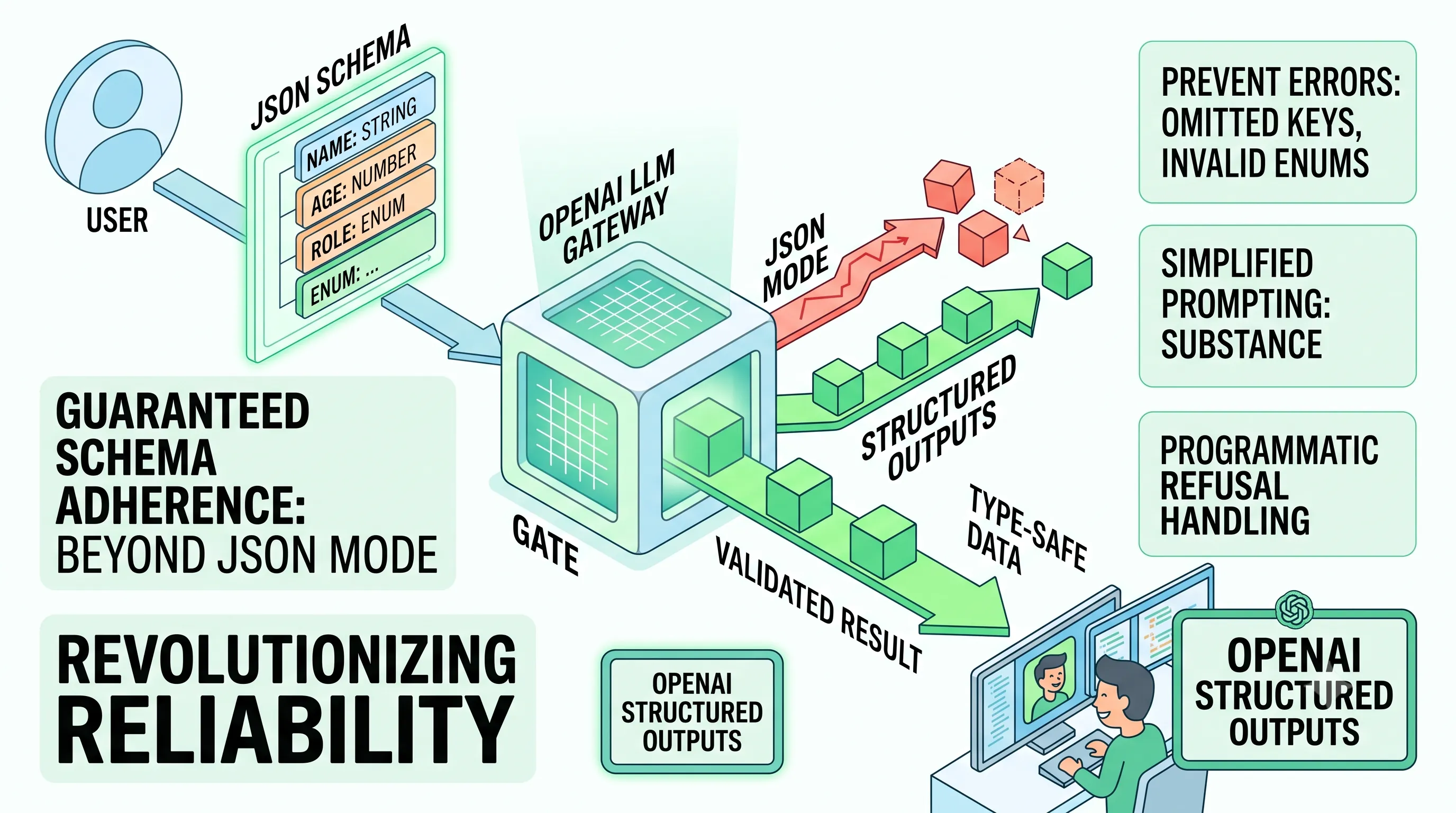
OpenAI's Structured Outputs represents a significant evolution from the pre-existing JSON mode.While JSON mode was a major step forward, its guarantee was limited to producing syntactically valid JSON.
Structured Outputs elevates this by ensuring that the model's text responses not only are valid JSON but also strictly adhere to a user-defined JSON schema.
The entire feature is designed to make models consistently generate responses that follow a specified JSON Schema, moving from a suggestion to a guarantee.
This fundamental difference is why OpenAI now recommends using Structured Outputs over the older JSON mode whenever possible for building robust applications.
This capability is supported across a wide range of OpenAI interfaces, including the Responses API, Chat Completions API, Assistants API, Fine-tuning API, and Batch API, ensuring broad applicability for developers.
Key Benefits and Features for Developers
The primary advantage of Structured Outputs lies in its ability to enforce data integrity directly at the generation stage.It helps prevent common LLM output errors, such as models omitting required keys from the JSON object or hallucinating invalid enum values that are not part of the predefined list.
This strict adherence to the schema provides reliable type-safety for developers.
The direct consequence is a dramatic reduction in downstream engineering effort, effectively removing the need to write complex validation logic or implement retry mechanisms for incorrectly formatted responses.
Another critical feature for production-grade systems is the ability to programmatically detect safety-based model refusals.
Instead of ambiguous or unstructured refusal messages, Structured Outputs provides explicit refusals, allowing applications to handle these cases gracefully and predictably.
Streamlining Prompting and Enhancing Reliability
Beyond data integrity, Structured Outputs significantly improves the developer experience by simplifying the prompting process.Engineers no longer need to rely on strongly worded instructions or complex few-shot examples within the prompt to coax the model into a specific format.
By defining the structure programmatically via a JSON schema, the prompt can focus purely on the task's substance, reducing complexity and potential points of failure.
This shift from instructional prompting to declarative schema definition makes the entire system more reliable and easier to maintain.
Ultimately, by guaranteeing schema adherence, preventing common formatting errors, and simplifying prompts, Structured Outputs provides the reliability needed for enterprise-level applications dependent on structured data from LLMs.
5. Deep Dive: Technical Details and Advanced Usage of OpenAI Structured Outputs
This section delves into the specific technical requirements, constraints, and advanced features of OpenAI's Structured Outputs, providing the detailed knowledge necessary for robust implementation. It directly follows the introduction by explaining precisely which models support this feature, the quantitative limits of the schemas you can build, and how to leverage the full power of the API for complex tasks.Model Compatibility and Schema Constraints
Structured Outputs are a feature of OpenAI's latest generation of large language models, specifically available starting with GPT-4o.For new projects, OpenAI recommends using GPT-5.6 to leverage the most capable models.
This feature is officially supported for requests using
response_format: {type: "json_schema", ...} with model snapshots gpt-4o-mini, gpt-4o-mini-2024-07-18, gpt-4o-2024-08-06, and any subsequent versions. Older models, such as GPT-4-turbo and its predecessors, do not support this specific structured output mechanism and may rely on the less-constrained JSON mode instead.
A noteworthy performance consideration involves fine-tuned models: the very first request made to a fine-tuned model that includes a new schema will incur additional latency.
However, all subsequent requests using that same schema will not have this added delay, as the processing is cached.
This initial latency limitation does not apply to standard, non-fine-tuned models.
To ensure performance and prevent abuse, OpenAI enforces specific constraints on the JSON Schema provided.
These limitations define the maximum complexity of the data structure you can request from the model.
| Constraint Category | Limit | Description |
|---|---|---|
| Total Object Properties | 5000 | The total number of properties across all objects within the entire schema. |
| Nesting Depth | 10 levels | The maximum depth of nested objects or arrays. |
| Total String Length | 120,000 characters | The combined length of all property names, definition names, enum values, and const values in the schema. |
| Total Enum Values | 1000 | The total number of enum values permitted across all enum properties in the schema. |
| Single Enum String Length | 15,000 characters | For a single enum property with over 250 string values, the total character length of all its values cannot exceed this limit. |
Practical Use Cases and Best Practices
The ability to enforce a strict schema opens up several powerful use cases beyond simple data extraction.These include advanced chain of thought processing, where the model can output its reasoning steps into a structured format before providing a final answer.
It is also highly effective for structured data extraction, such as pulling names, dates, and amounts from unstructured text into a predefined object.
A more advanced application is UI generation, where the model can represent HTML or other interface components as recursive data structures, which can then be rendered by a client application.
Finally, it is useful for moderation tasks, allowing the model to classify user inputs according to a fixed set of categories and flags.
To achieve the highest quality outputs, OpenAI recommends several best practices.
First, use clear and intuitive key names in your schema, as the model uses these names as a primary signal for what data to place where.
For critical keys, supplement them with clear titles and descriptions within the JSON Schema to provide the model with additional context and reduce ambiguity.
One of the most reliable ways to guarantee predictable outputs is to leverage the fact that the model will produce JSON with keys in the same order as they appear in your schema.
Finally, it is crucial to use evals (evaluations) to test and iterate on your schema design to find the most effective structure for your specific task.
Leveraging SDKs and Streaming
While Structured Outputs can be used directly via the REST API by providing a JSON Schema, OpenAI strongly recommends using its official SDKs for Python and JavaScript.These SDKs simplify the process significantly by allowing developers to define their desired object schemas using popular data validation libraries—Pydantic for Python and Zod for JavaScript.
The SDKs automatically handle the conversion of these native class definitions into the required JSON Schema format.
Once the model responds, the SDK helper's
parse method automatically parses the JSON string response back into an instance of your Pydantic or Zod class, providing type-safe, validated objects to work with in your code. The feature also supports streaming, which is essential for applications requiring real-time feedback or for processing large, complex outputs.
Streaming allows you to process the model's response or function call arguments as they are being generated, token by token, rather than waiting for the entire JSON object to be completed.
The SDKs provide stream helpers designed to handle this process, capable of parsing function call arguments and streaming model responses directly.
OpenAI recommends using these SDK helpers to manage the complexities of streaming with Structured Outputs reliably.
Supported JSON Schema Features and Key Limitations
OpenAI's implementation supports a well-defined subset of the JSON Schema specification.Supported data types include
String, Number, Boolean, Integer, Object, Array, Enum, and the composition keyword anyOf for creating union types.For each type, certain validation properties are supported:
- String:
pattern(for regex matching) andformat(supporting common formats likedate-time,time,date,duration,email,hostname,ipv4,ipv6, anduuid). - Number:
multipleOf,maximum,exclusiveMaximum,minimum, andexclusiveMinimum. - Array:
minItemsandmaxItems.
definitions keyword, allowing for more modular and reusable schema designs. However, there are crucial requirements and limitations to be aware of.
First, you must explicitly opt into the strict schema enforcement by setting
additionalProperties: false in your object definitions. Second, the root of your schema must be of type
object and cannot use anyOf at the top level. Third, all fields or function parameters within an object must be specified as
required. Optional parameters are not directly supported but can be simulated by defining a field as a union type with
null (e.g., using anyOf with a type and a null type). If you attempt to use an unsupported JSON Schema feature with
strict: true set, the API will return an error. Several JSON Schema keywords are explicitly not supported, including composition keywords like
allOf and not, and conditional keywords such as if, then, else, dependentRequired, and dependentSchemas. Fine-tuned models have additional restrictions and do not support validation keywords like
minLength, maxLength, pattern, or format for strings; minimum, maximum, or multipleOf for numbers; patternProperties for objects; or minItems/maxItems for arrays. Finally, even with a valid schema, the model may fail to generate a valid response if it refuses the request for safety reasons or if it hits a
max tokens limit, resulting in a truncated and incomplete JSON object. 
6. Pydantic: The Essential Backbone for Robust Python Data Validation
This section serves as a foundational pillar for the main topic of achieving reliable structured outputs from LLMs.Before we can effectively force an LLM to generate structured data like JSON, we must first have a robust, clear, and enforceable way to define what that structure *is* within our Python code.
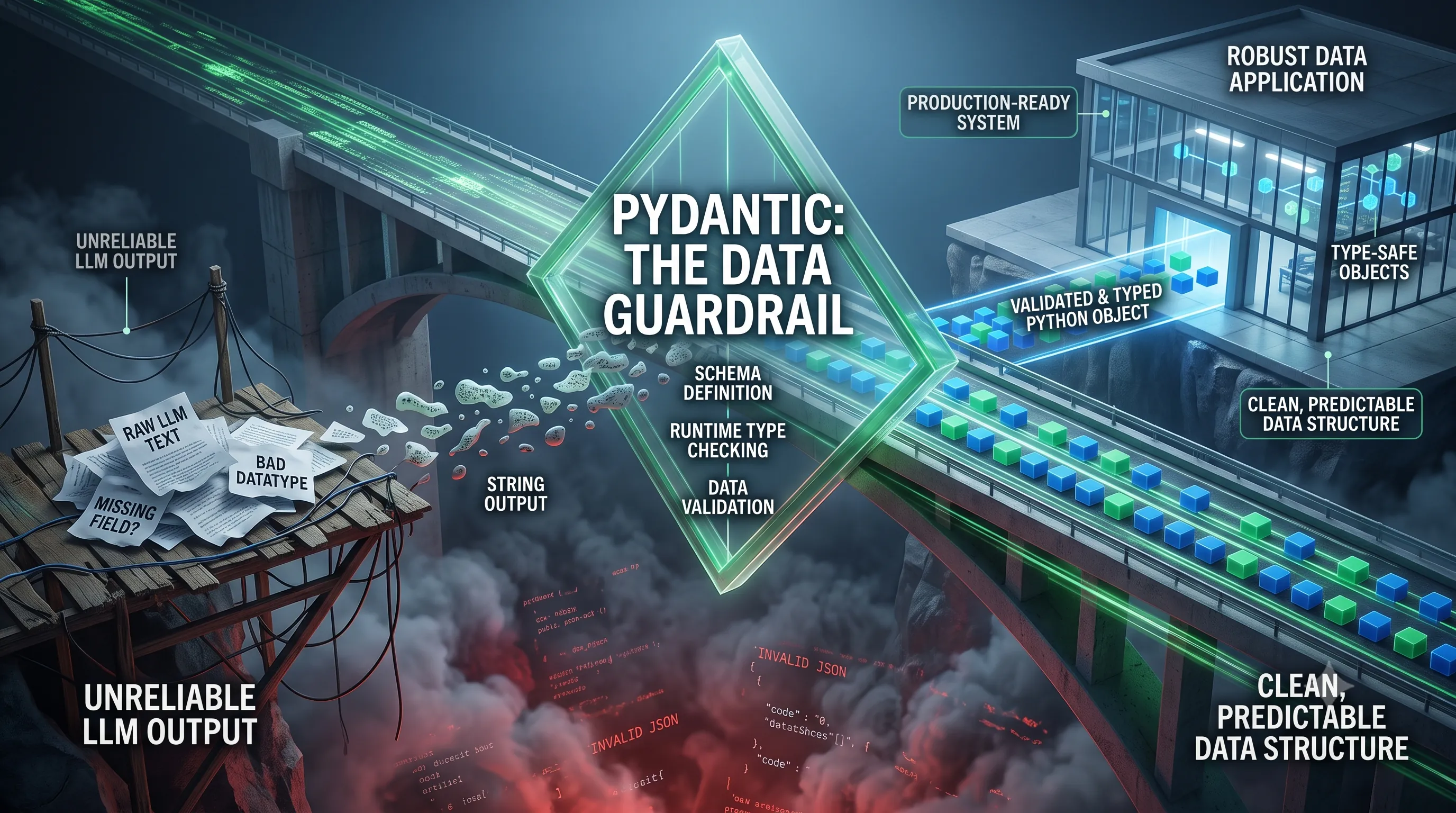
Pydantic provides this exact mechanism, acting as the schema, validator, and parser that transforms a raw, potentially flawed LLM output into a reliable, type-safe Python object.
It is the critical link that ensures the data we receive is not just syntactically correct JSON, but semantically correct according to our application's business logic.
What is Pydantic?
Pydantic is a high-performance data validation and parsing library for Python.At its core, its primary function is to define how data should be structured using standard Python type hints.
Unlike older, more cumbersome data validation tools, Pydantic is widely regarded as intuitive, high-performing, and flexible.
This combination of ease-of-use and power has led to its adoption as a core engine in various applications where data flows, from web APIs with frameworks like FastAPI to data processing pipelines and, critically for our purposes, interacting with LLMs.
It leverages syntax that is already familiar to modern Python developers, making the learning curve gentle while providing powerful guarantees about data integrity.
The library has matured significantly, and with modern iterations like Pydantic V2, it also ships with Pydantic V1 built-in, ensuring a smoother transition and backward compatibility for existing projects.
Core Features: Runtime Type Checking and Data Validation
The magic of Pydantic lies in its ability to take Python's standard type hints, which are typically ignored by the interpreter at runtime, and use them for concrete actions.First and foremost, Pydantic enforces type hints at runtime.
When you pass data (like a dictionary parsed from a JSON string) into a Pydantic model, it doesn't just trust that the data is correct; it verifies it.
It checks that a field annotated as `int` is actually an integer (or can be cleanly converted to one) and that a field marked as `str` is a string.
This runtime enforcement is the fundamental guarantee Pydantic provides.
Equally important is what happens when data *fails* to meet these defined rules.
Pydantic provides user-friendly errors when data is invalid.
Instead of a generic `TypeError` or `KeyError` that can be difficult to trace back to the source, Pydantic raises a detailed `ValidationError` that explicitly states which field failed, what value it received, and what kind of error occurred (e.g., "value is not a valid integer").
This level of detailed, human-readable feedback is invaluable for debugging and building resilient systems.
Why Pydantic is Crucial for LLM Applications
The probabilistic nature of Large Language Models makes them powerful but also unpredictable.You can instruct an LLM to return a JSON object, but there is no absolute guarantee that it will be perfectly formed, contain all the required keys, or use the correct data types for each value.
This is precisely where Pydantic becomes indispensable.
By defining a Pydantic model that mirrors your desired JSON structure, you create a powerful "guardrail" for the LLM's output.
When the LLM responds, you pass its output through your Pydantic model.
If the data is valid, Pydantic parses it into a clean, fully-typed Python object that your application can safely work with.
If the data is invalid—for instance, if a field is missing or a user ID is returned as a string instead of an integer—Pydantic's runtime validation will catch it immediately.
The resulting user-friendly error can be logged for analysis or even be used in a retry loop to inform the LLM of its mistake and ask it to generate a corrected output.
In essence, Pydantic transforms the unreliable string output of an LLM into a predictable, validated, and robust data structure, making the entire process of structured data extraction not just possible, but practical for production use.
7. Instructor: The Leading Python Library for Type-Safe LLM Data Extraction
This section introduces Instructor, a leading Python library designed to solve the common problem of inconsistent and error-prone JSON from Large Language Models (LLMs) by enforcing structured, type-safe outputs.Why Instructor Excels in LLM Extraction
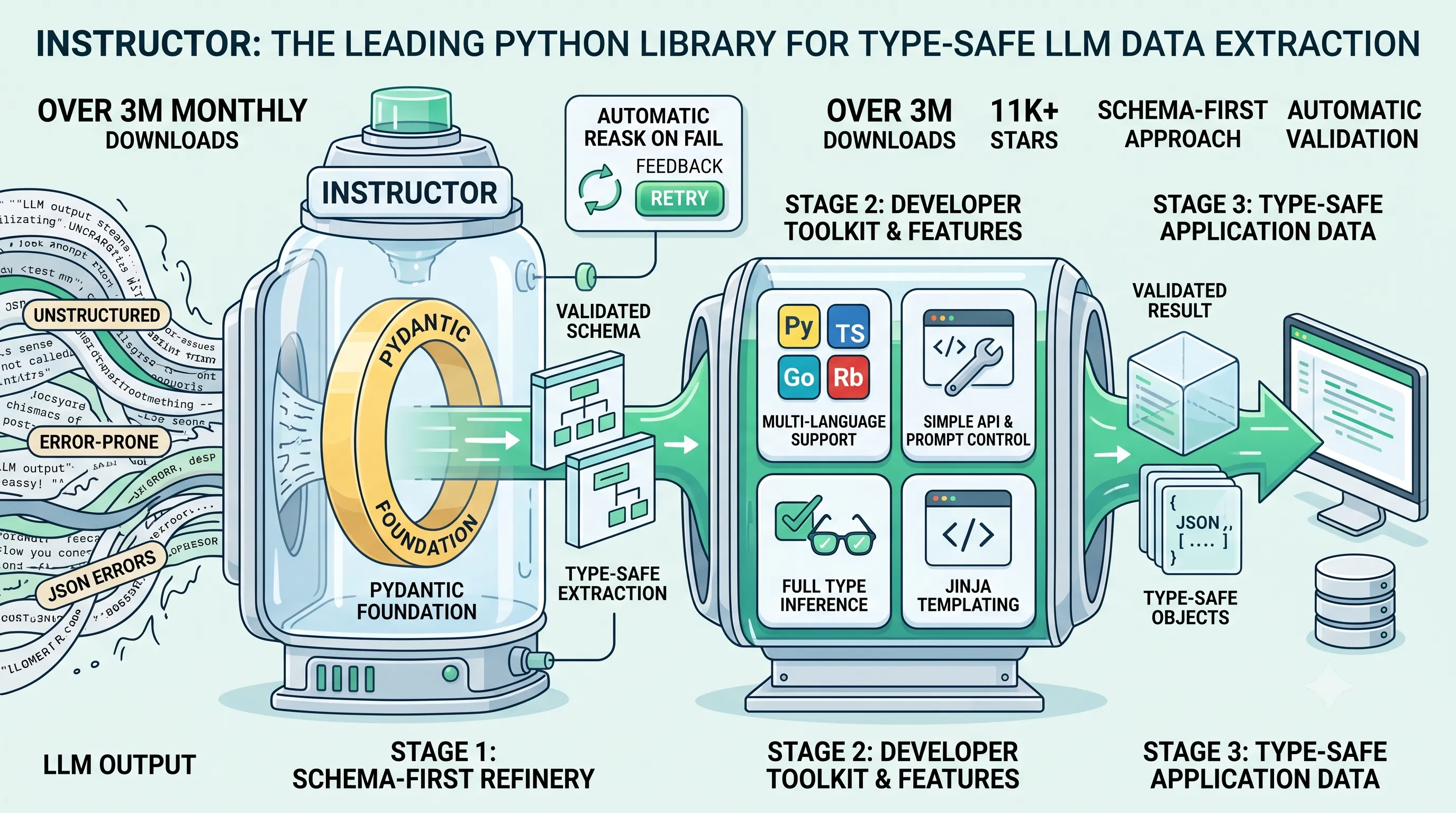
Instructor has established itself as the most popular Python library specifically for extracting structured data from LLMs, a claim supported by its significant community adoption.It boasts impressive metrics, including over 3 million monthly downloads, 11,000 stars on its repository, and contributions from more than 100 developers.
The library's core purpose is to guarantee that outputs from an LLM are not just text, but are always structured and validated against a predefined schema, directly addressing the parsing failures that developers frequently encounter.
Core Features and Benefits
Instructor operates on a schema-first approach, enabling fast and high-quality data extraction without the overhead of extra agents.It provides developers with a robust set of features to ensure reliability and ease of use.
Key among these is type-safe data extraction, which is complemented by automatic validation.
A standout feature is its ability to automatically reask the model when validation fails, which significantly improves the reliability of the final output.
The library also offers streaming support, allowing for real-time data processing as it's generated by the LLM.
For developers, Instructor offers full type inference, which enhances IDE support and overall type safety in the development environment.
Its simple API grants full prompt control for fine-tuned customization of LLM interactions, and it supports templating with Jinja for creating dynamic prompts.
Furthermore, Instructor offers multi-language support for type hints and validation, extending its utility beyond a single ecosystem.
| Language | Supported For |
|---|---|
| Python | Type Hints and Validation |
| TypeScript | Type Hints and Validation |
| Go | Type Hints and Validation |
| Ruby | Type Hints and Validation |
| Elixir | Type Hints and Validation |
| Rust | Type Hints and Validation |
Pydantic's Role in Instructor's Design
Instructor is fundamentally built on top of Pydantic, the popular data validation library for Python.This foundation is central to its power and simplicity.
Instructor utilizes Pydantic for several critical functions: schema validation, prompting control, and enabling the LLM to retry on failure.
By leveraging Pydantic models as the desired output schema, developers can define complex data structures with standard Python type hints.
This integration not only ensures the LLM's output conforms to the required structure but also leads to less code and provides excellent IDE integration with features like autocompletion and type checking, making the development process more efficient and less error-prone.
8. Implementing Instructor: Practical Capabilities and Usage Examples
This section moves from theory to practice, demonstrating how the Instructor library provides a robust and flexible framework for implementing structured output, directly addressing the core challenge of avoiding JSON parsing errors mentioned in this article's title.We will explore its technical capabilities, from its broad compatibility with various Large Language Models (LLMs) to its advanced features for handling complex data extraction scenarios.
Broad LLM Provider Compatibility
A significant strength of Instructor is its vendor-agnostic design, which prevents lock-in to a single LLM provider.It works seamlessly with over 15 popular LLM providers, ensuring developers can switch models or use multiple providers without overhauling their data extraction logic.
This is achieved through a unified interface, the `from_provider` function, which standardizes the client patching process across different services.
Support extends to major commercial APIs as well as open-source models running locally.
Developers can leverage models on their own hardware using frameworks like Ollama, `llama-cpp-python`, or `vLLM`.
The wide range of compatibility includes industry leaders, offering extensive choice for any project's needs.
| Provider/Framework | Type | Notes |
|---|---|---|
| OpenAI | Commercial API | Core integration target for client patching. |
| Anthropic | Commercial API | Full support for Claude series models. |
| Commercial API | Includes Vertex AI and Gemini models. | |
| Mistral | Commercial API | Compatible with Mistral's model lineup. |
| Cohere | Commercial API | Supported via the unified interface. |
| Ollama | Local/Open-Source | Enables running various open-source models locally. |
| LiteLLM | Proxy/Adapter | Acts as a universal adapter to many other LLMs. |
Handling Complex Data Structures and Validation
Instructor's core competency is extracting structured data that conforms to a predefined schema, and it excels at handling complex, nested data structures.The library's integration with Pydantic is central to this capability.
Developers define their desired output format using a Pydantic `BaseModel`, and Instructor ensures the LLM's output is coerced and validated against that model.
This means you can define intricate schemas with nested objects, lists of objects, and specific data types, and Instructor will manage the extraction and validation process.
Crucially, it leverages Pydantic's built-in validation, allowing for the definition of custom validation rules directly within the data model.
This guarantees data integrity and quality at the point of extraction, eliminating the need for separate, downstream validation steps.
While a basic familiarity with Pydantic is helpful, it is not a prerequisite to get started; any valid Pydantic `BaseModel` will work out of the box.
Advanced Features: Hooks, Streaming, and Async Support
Beyond basic extraction, Instructor provides a suite of advanced features for production-grade applications.It includes a hooks system that allows developers to intercept and handle various events during the LLM interaction lifecycle.
This is particularly useful for tasks such as logging requests and responses, monitoring performance, or implementing custom error handling logic.
Instructor also offers specialized methods for different use cases.
The standard `create` method handles basic extraction, while `create_with_completion` provides access to the original, raw LLM completion alongside the parsed Pydantic object.
For applications requiring real-time data, `create_partial` can stream partial data objects as they are generated by the model, enabling fluid UI updates.
Furthermore, `create_iterable` is designed to stream multiple distinct objects from a single LLM response.
The library fully supports modern asynchronous programming with `async/await`, which can be enabled by passing `async_client=True` when creating the client.
A Practical Instructor Implementation Example
Let's walk through a concrete example to see how these features come together.The goal is to extract user information from a natural language string into a structured Pydantic model.
1. Define the Output Structure with Pydantic:
First, we define the `UserInfo` schema using a `Pydantic BaseModel`. This class specifies the exact fields and data types we want to extract: `name` as a string, `age` as an integer, and `skills` as a list of strings.
from pydantic import BaseModel
from typing import List

class UserInfo(BaseModel):
    name: str
    age: int
    skills: List[str]
2. Patch the LLM Client:
Next, we import the necessary libraries and "patch" a standard OpenAI client with Instructor's capabilities. The `from_openai` function wraps the client, adding the structured output functionality.
import instructor
from openai import OpenAI

# Patch the OpenAI client with Instructor
client = instructor.from_openai(OpenAI())
3. Make the Extraction Call:
With the patched client, we call the standard `chat.completions.create` method but with a new parameter: `response_model`. We pass our `UserInfo` class to this parameter. This tells Instructor to ensure the LLM's response conforms to our `UserInfo` schema.
The input text is: "Hong Gildong is 28 years old and is skilled in Python and Docker."
user_info = client.chat.completions.create(
    model="gpt-4o-mini",
    response_model=UserInfo,
    messages=[
        {"role": "user", "content": "Hong Gildong is 28 years old and is skilled in Python and Docker."},
    ],
)
4. Receive Structured Data:
The `user_info` variable now holds a validated Pydantic object, not a raw JSON string that needs parsing. The library handles the extraction automatically.
Based on the input, Instructor successfully extracts the name "Hong Gildong", the age, and a list of skills containing "Python" and "Docker".
# The output is a Pydantic object, not a string
assert isinstance(user_info, UserInfo)
print(user_info.name)
# > Hong Gildong
print(user_info.skills)
# > ['Python', 'Docker']
This example demonstrates how Instructor streamlines the process, converting unstructured text into clean, validated, and ready-to-use Python objects with minimal code.

9. Structured Outputs vs. Function Calling: Choosing the Right Strategy for LLM Interactions
To effectively eliminate JSON parsing errors, it is crucial to understand not just how to get structured data, but which tool to use for a given task. This section dissects the two primary methods for achieving reliable structured data—Structured Outputs via `response_format` and Function Calling—to help you make the right architectural choice for your application. While both can produce structured data, their intended purposes, workflows, and cost implications are fundamentally different.Defining the Core Differences
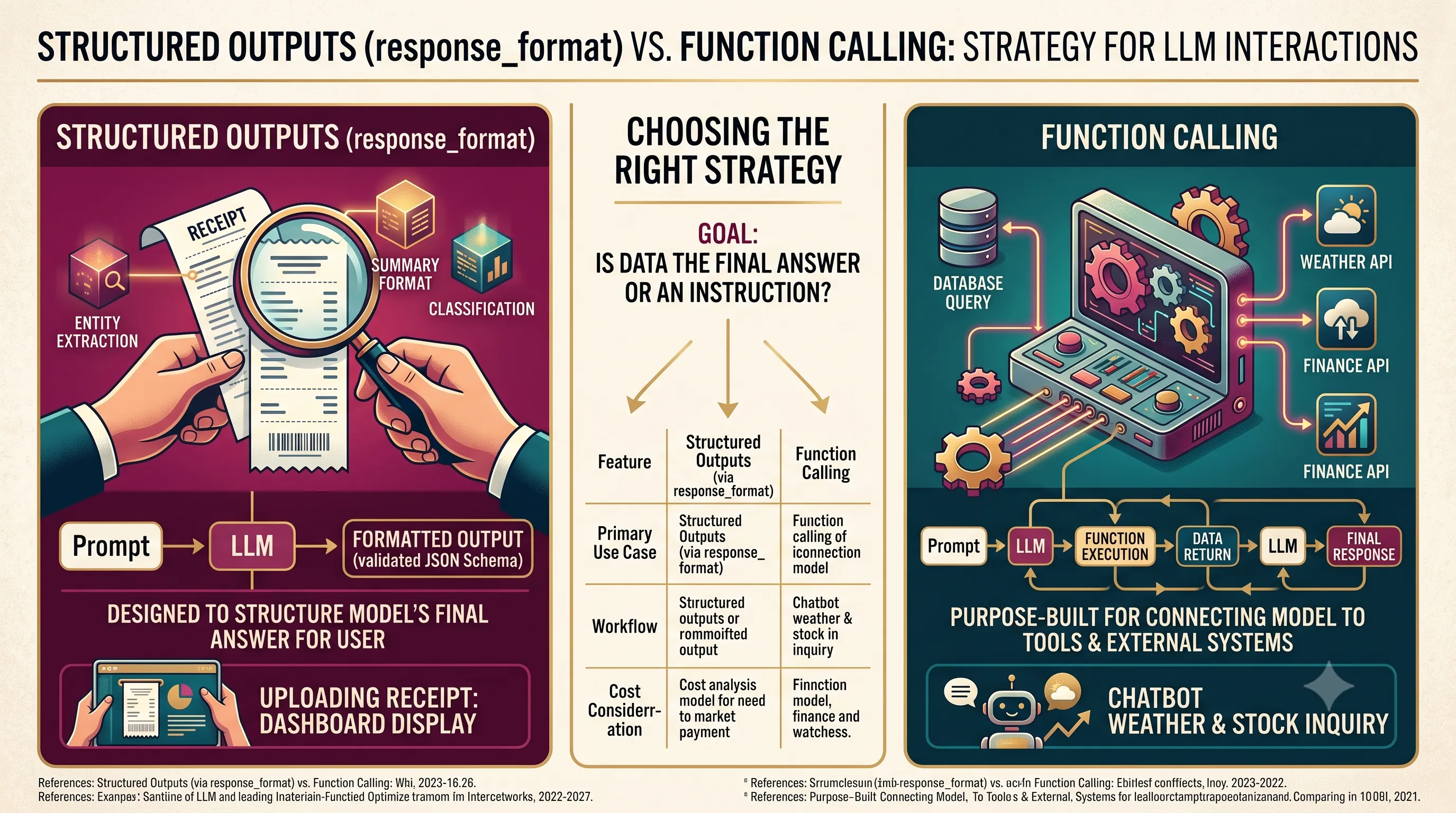
At a high level, the choice between Structured Outputs and Function Calling hinges on your ultimate goal. Is the structured data the final answer for the user, or is it an instruction for another part of your system?Structured Outputs, specifically when using the `response_format` parameter with a `json_schema`, are designed to directly format the model's final response to the user. The primary objective is to constrain the LLM's generative output into a predictable, machine-readable format that conforms to a strict JSON schema. This ensures the text generated for the end-user is immediately usable without parsing errors.
Function Calling, on the other hand, is purpose-built for connecting the model to external tools and system functionalities. It is the ideal mechanism when you need the LLM to trigger an action within your application, such as performing a database query, interacting with a UI element, or calling an external API. The structured output in this case is not the final answer but a request for your code to execute a function. It's important to note that Structured Outputs functionality is also available when using function calling, but the primary use case remains distinct.
When to Prioritize Structured Outputs
You should prioritize Structured Outputs using `response_format` when your primary requirement is to structure the model’s final output for direct presentation or consumption. If the LLM's task is to analyze a piece of text and extract entities, summarize content into a specific format, or classify information according to a predefined schema, this method is the most direct and efficient approach. The goal is to receive a clean, validated JSON object that represents the model's answer to the user's prompt.Example Scenario: A user uploads a business receipt, and your application needs to extract the vendor name, date, total amount, and line items into a JSON object to display on a dashboard. Here, the structured data is the final product, making `response_format` the correct choice.
When to Leverage Function Calling
Function Calling should be your default choice whenever you need the LLM to integrate with and control other parts of your system. If the model needs to fetch real-time data, execute code, or manipulate state within your application, function calling provides the necessary bridge. It transforms the LLM from a simple text generator into a reasoning engine that can delegate tasks to more specialized tools.Example Scenario: A user asks a chatbot, "What's the weather like in Seoul and what is the current stock price for Samsung Electronics?" The model would generate two distinct function calls: one to a weather API (`get_weather(city='Seoul')`) and another to a finance API (`get_stock_price(ticker='005930.KS')`). Your system executes these functions, returns the data to the model, which then synthesizes a natural language answer for the user.
Architectural Considerations and Cost Efficiency
The choice between these two strategies has significant architectural implications for agent design. An agent built with Structured Outputs is simpler, typically following a linear path: Prompt -> LLM -> Formatted Output. In contrast, an agent using Function Calling operates on a loop: Prompt -> LLM -> Function Call -> Code Execution -> Data Return -> LLM -> Final Response. This loop-based architecture is more powerful for creating complex, multi-step agents.From a cost perspective, there is also a key difference. For pure information extraction tasks where either method could technically work, Function Calling generally processes fewer tokens per call. This can make it a cheaper option for high-volume extraction workflows, as the overhead required to define the function and its parameters can be more token-efficient than embedding a complex JSON schema directly into a prompt or using the `response_format` parameter in some scenarios.
| Feature | Structured Outputs (via response_format) | Function Calling |
|---|---|---|
| Primary Use Case | Structuring the model's response directly for the user. | Connecting the model to tools, functions, or data in a system. |
| Architectural Role | Formats the final output of an LLM call into a strict JSON schema. | Acts as an intermediary step, instructing the application to execute code (e.g., database queries, UI interactions). |
| Typical Workflow | A single-pass interaction where the final output is the structured data. | A multi-step, loop-based interaction involving model reasoning, tool execution, and response synthesis. |
| Cost Consideration | Directly tied to the complexity of the prompt and the generated structured content. | Generally processes fewer tokens per call, which can make it cheaper for extraction-focused tasks. |
References
- https://developers.openai.com/api/docs/guides/structured-outputs
- https://python.useinstructor.com/
- Handling LLM Output Parsing Errors
- Structured Outputs and Function Calling, In Depth (2026)
- The Essential Guide to Large Language Models Structured Output, and …
- Stop Parsing Nightmares: Prompting LLMs to Return Clean, …
- Stop Parsing JSON by Hand: Structured LLM Outputs With Pydantic
- Structured Outputs vs Function Calling vs Tool Use for LLMs
- LLM Structured Output: JSON Mode vs Function Calling
- Structured Outputs and Constrained Decoding: Eliminating Parsing …
Related Posts

GPT-6 Astra: Cybersecurity Risks and Recurrent Depth Architecture AnalysisAn analysis of GPT-6 Astra's critical cybersecurity classification, its recurrent depth...

Gemini 3.8 Flash: GA Specifications, Reasoning Controls, and Cost-Efficiency AnalysisExplore the official Gemini 3.8 Flash release: covering its 1M context window, configurable...

Comparing GPT-6 Astra and Claude Fable 5.1: Pricing, Reasoning, and ArchitectureA comparative analysis of the September 2026 releases of GPT-6 Astra and Claude Fable 5.1, focusing...