Claude Code Agent Teams: Configuration, Architecture, and Multi-Agent Orchestration Guide
🚀 Key Takeaways
- Seamless Feature Activation: Multi-agent orchestration is enabled directly via the
CLAUDE_CODE_EXPERIMENTAL_AGENT_TEAMSenvironment flag or persistent settings files. - Horizontal Collaborative Architecture: Unlike isolated hierarchical subagents, Agent Teams coordinate as peer specialists using shared task boards and direct inter-agent messaging.
- Flexible Interface Modes: Developers can toggle between a zero-dependency in-process terminal view and a multiplexed split-pane layout using tmux or iTerm2.
- Conflict-Free Workflows: Isolating agent assignments through Git worktrees or disjoint file scopes prevents concurrent edit collisions across the workspace.
- Automated Quality Gates: Programmable lifecycle hooks dynamically evaluate agent transitions, block premature completions, and enforce validation routines.
- Session and Structural Guardrails: Each active session maintains a single fixed team lead without nested team hierarchies or multi-session teammate resumption.
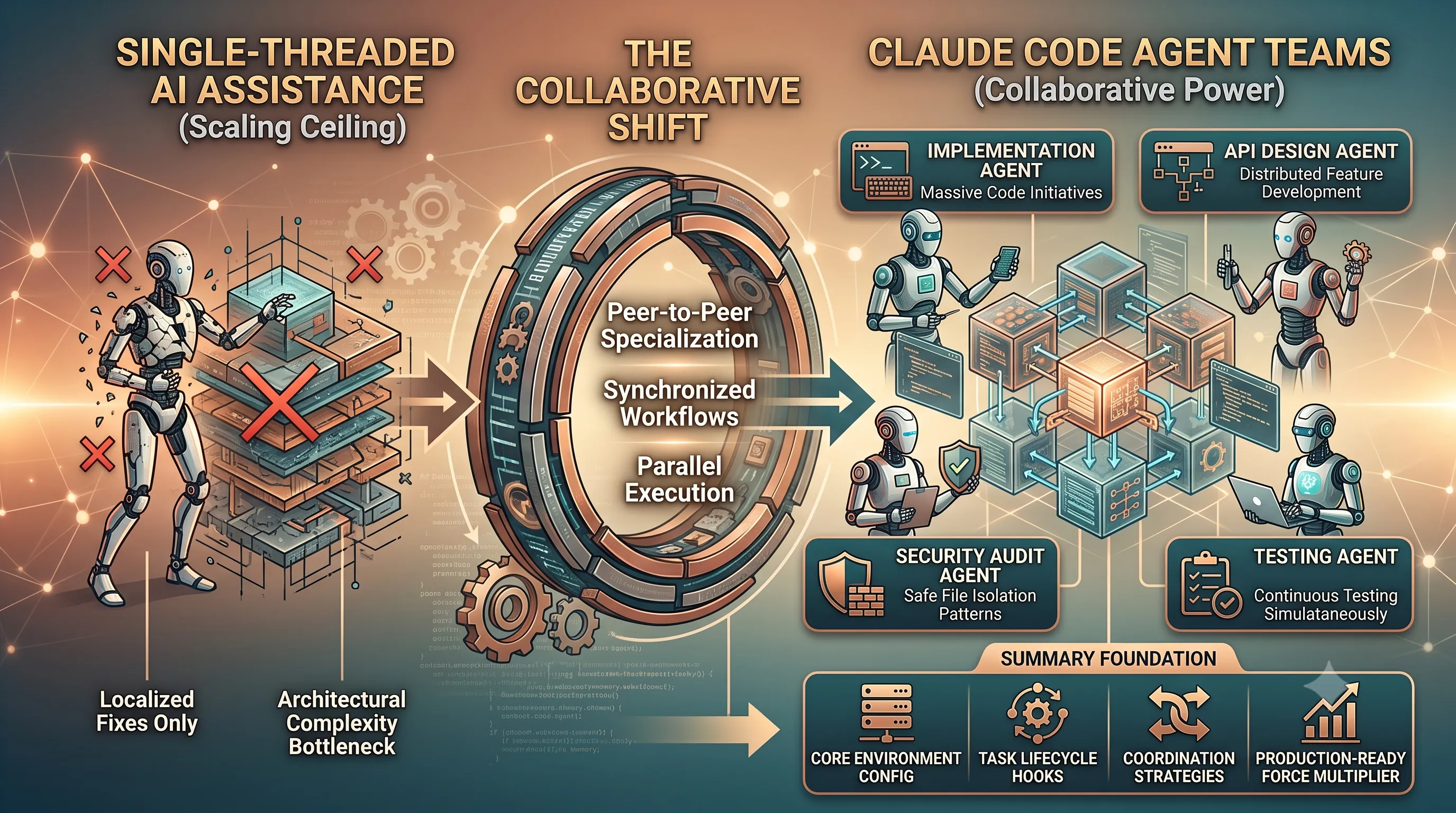
Single-threaded AI coding assistants have reached a fundamental scaling ceiling when tackling multi-layered modern software architectures. While standalone agents excel at bounded, localized fixes, complex refactoring and distributed feature development demand true specialization across distinct engineering domains.
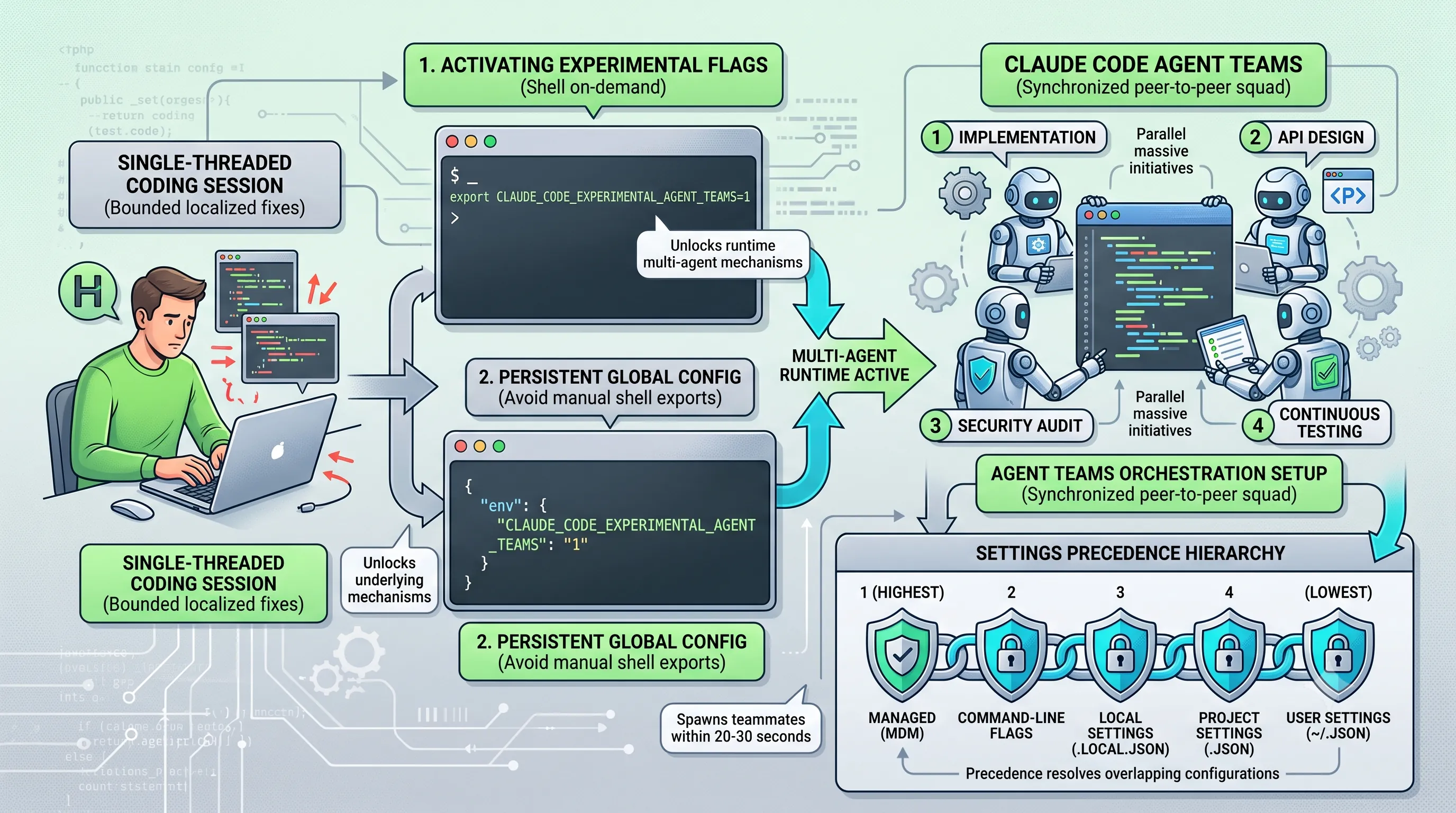
Claude Code Agent Teams shifts the paradigm from solitary prompt-response loops to a synchronized, peer-to-peer developer squad. By orchestrating dedicated roles for implementation, API design, security audits, and continuous testing simultaneously, teams can execute massive code initiatives in parallel.
Unlocking this collaborative power requires understanding core environment configurations, task lifecycle hooks, and safe file isolation patterns. Mastering these coordination strategies transforms AI-driven software delivery into a structured, production-ready force multiplier.
1. Activating Claude Code Agent Teams: Environment Variables and Configuration Hierarchy
To transform single-instance coding sessions into a multi-agent orchestration setup under the theme of "Stop Coding Alone, Launch a Team: Claude Code 'Agent Teams' Environment Variables and Practical Tips", you must first unlock the underlying runtime mechanisms.Claude Code gates its multi-agent functionality behind an experimental feature flag, requiring explicit environment configuration before subagents can be initialized and dispatched.
Enabling Experimental Flags via Shell and settings.json
Enabling multi-agent capabilities requires setting the designated experimental flag to an active state.To enable Claude Code Agent Teams on-demand within your current shell environment, export the activation variable directly in your terminal session or add it to your startup script.
export CLAUDE_CODE_EXPERIMENTAL_AGENT_TEAMS=1If you prefer a persistent approach that avoids manual shell exports across different terminals and projects, you can register the flag directly in Claude Code's global configuration file.
To persist Agent Teams enablement across all Claude Code runs, configure the environment variable inside your global settings configuration.
{
  "env": {
    "CLAUDE_CODE_EXPERIMENTAL_AGENT_TEAMS": "1"
  }
}Configuration values can be persisted globally in ~/.claude/settings.json, or scoped locally to specific repositories using .claude/settings.json and .claude/settings.local.json.
Settings Precedence Hierarchy and Model Fallback Rules
When coordinating multi-agent workflows, configuration parameters are evaluated across multiple configuration layers.Claude Code resolves overlapping configurations by enforcing a strict hierarchy from enterprise-level policies down to user defaults.
| Precedence Level | Configuration Source | Scope and Role |
|---|---|---|
| 1 (Highest) | Managed (MDM) | Enterprise mobile device management policies overriding all downstream settings. |
| 2 | Command-line flags | Runtime flags passed directly during command execution. |
| 3 | Local Settings (.claude/settings.local.json) |
Local repository-specific settings ignored by version control. |
| 4 | Project Settings (.claude/settings.json) |
Shared repository-level configuration committed to version control. |
| 5 (Lowest) | User Settings (~/.claude/settings.json) |
Global user defaults applied across all projects. |
Teammate model selection can be controlled via the initial spawn prompt, explicit subagent definitions, the CLAUDE_CODE_SUBAGENT_MODEL environment variable, or by adopting the lead agent's currently active model.
If a requested teammate configuration specifies a blocked family alias or an unsupported provider-specific model alias, the system gracefully falls back to the lead agent's model to maintain execution continuity.
Once configured and triggered, teammates typically spawn within 20 to 30 seconds to join the active workspace team.
2. Architecture Deep Dive: Comparing Agent Teams to Traditional Subagents
To move beyond solo coding workflows and effectively coordinate multi-agent execution in Claude Code, understanding the underlying system topology is essential.While traditional single-session setups rely on hierarchical subagents, Agent Teams restructure agent interactions into a collaborative, decentralized network.
Horizontal Collaboration vs Vertical Isolation
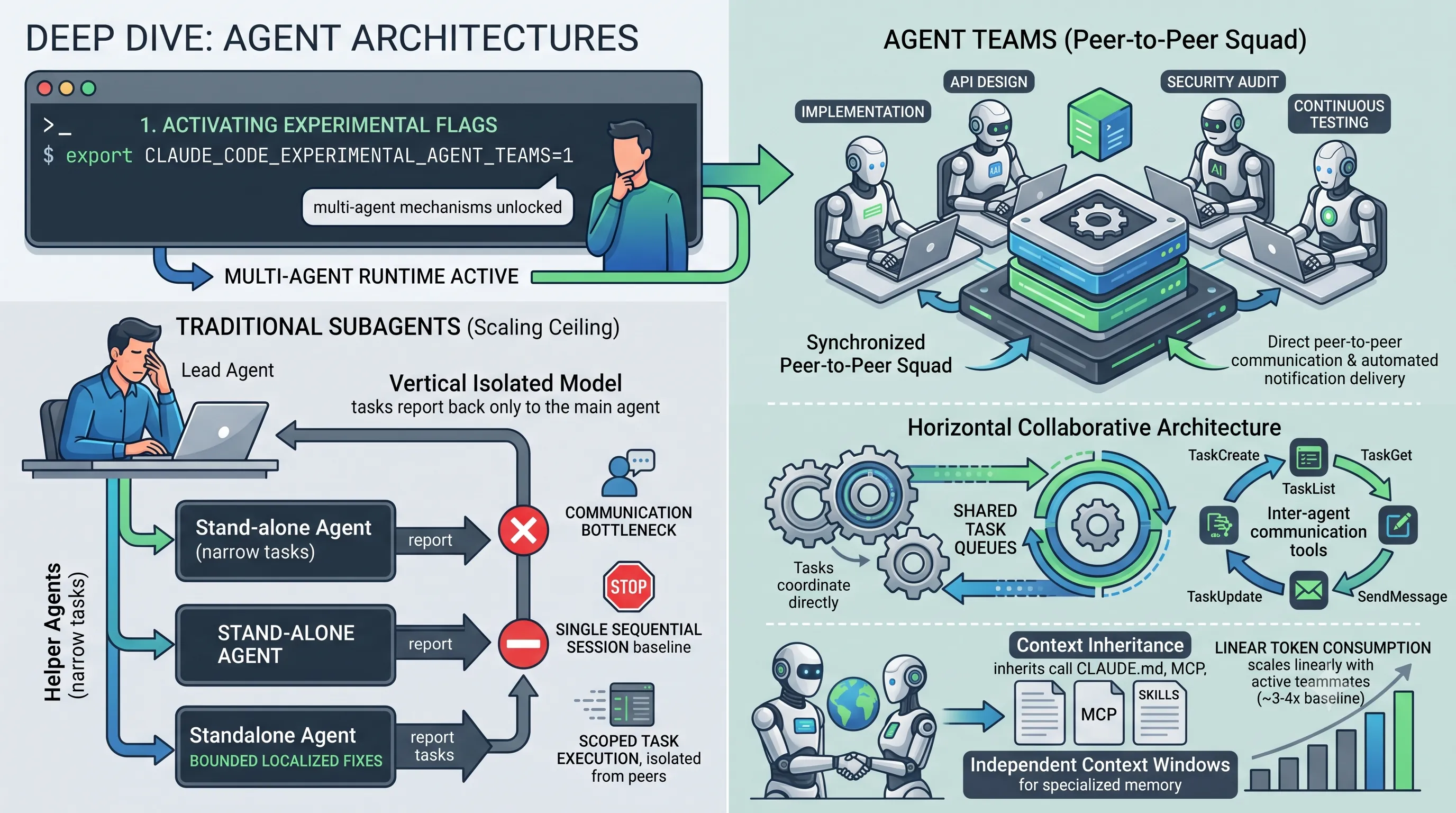
Traditional subagents follow a strictly vertical isolated model.In that legacy structure, helper agents execute narrow tasks and report their outputs solely back to the primary coordinating agent, creating a communication bottleneck.
Agent Teams replace this hierarchy with a horizontal collaborative architecture.
Under this design, teammates coordinate directly through shared task lists and real-time peer communication.
| Architectural Dimension | Traditional Subagents | Agent Teams |
|---|---|---|
| Architecture | Vertical isolated model where tasks report back only to the main agent. | Horizontal collaborative architecture with shared task lists. |
| Communication | Strict parent-to-child reporting without direct peer interactions. | Direct peer-to-peer communication and automated notification delivery. |
| Context Sharing | Scoped task execution isolated from peer agents. | Independent context windows with shared project context (CLAUDE.md, MCP servers, skills). |
| Token Cost | Single sequential session baseline consumption. | Scales linearly with active teammates (roughly 3 to 4 times for a 3-teammate team). |
Shared Task Queues and Peer Communication Tools
Team state and orchestration data are maintained locally on the file system rather than in an opaque remote black box.Team configurations are stored locally at
~/.claude/teams/{team-name}/config.json.Shared task queues and their respective statuses are managed in the local directory at
~/.claude/tasks/{team-name}/.Inter-agent coordination is driven by dedicated tools:
TaskCreate: Adds new work items to the team backlog.TaskGet: Retrieves specific task details and state.TaskList: Queries the active task queue.TaskUpdate: Modifies assignment, progress, and resolution status.SendMessage: Dispatches direct communications between teammates.
Messages and idle notifications are delivered automatically across teammates without requiring continuous polling by the lead agent.
Context Inheritance and Linear Token Consumption
Each teammate in an Agent Team operates within an independent context window.This boundary ensures that agents maintain specialized working memory without polluting one another's active scratchpads.
Teammates inherit broad project context upon instantiation, including instructions from
CLAUDE.md, configured MCP servers, and available skills.However, context boundaries require explicit coordination.
The prior conversation history of the lead agent does not automatically carry over to teammate context windows.
Because each teammate maintains an independent context, token consumption scales linearly with the number of active teammates.
Specifically, a 3-teammate team consumes roughly 3 to 4 times the tokens of a single sequential session.
3. Terminal Display Modes and Interactive Navigation Shortcuts
Orchestrating autonomous agents with Claude Code Agent Teams requires real-time monitoring and active operational control across concurrent tasks.Managing multiple collaborators effectively depends on configuring the right terminal display architecture and mastering panel navigation shortcuts.
In-Process vs Split-Pane Display Requirements
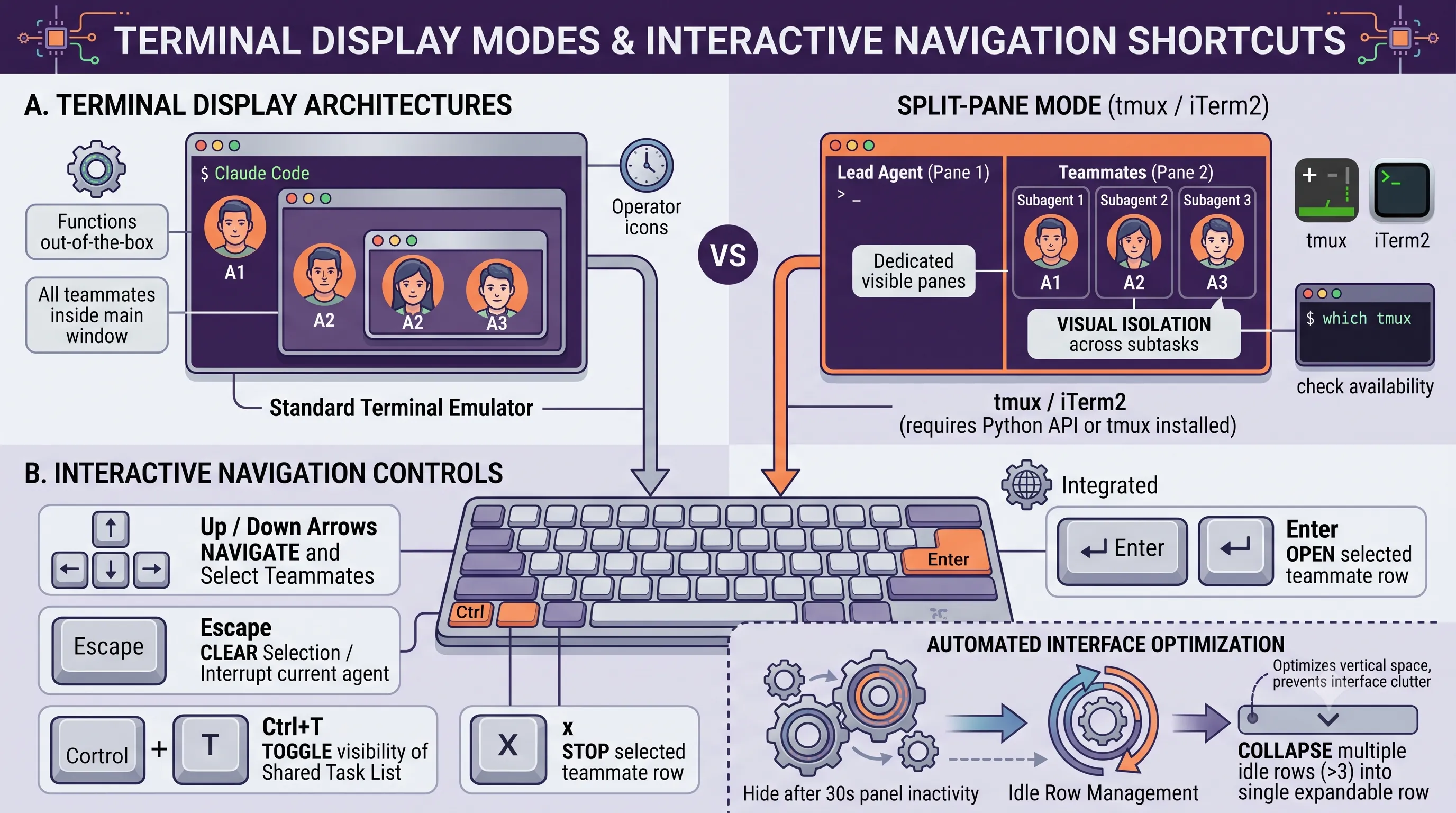
Claude Code Agent Teams supports two primary rendering modes depending on your terminal emulator and environment setup.In-process mode runs all teammates directly inside the main terminal window and functions out-of-the-box across standard terminals without requiring extra configuration.
For developers who need visual isolation across subtasks, split-pane mode opens dedicated visible panes for each teammate.
This advanced display mode requires either tmux or iTerm2 with Python API enabled.
However, split-pane display mode is not supported in the VS Code integrated terminal, Windows Terminal, or Ghostty.
To check tmux availability for split-pane display mode in your current shell environment, run the following verification command:
which tmuxKeyboard Shortcuts for Team Control and Task Inspection
Managing running agents does not require switching contexts or opening secondary shells.Interactive navigation controls allow developers to inspect outputs, send direct instructions, and clean up idle resources directly from the agent interface.
| Key / Shortcut | Function and Behavior |
|---|---|
| Up / Down Arrows | Navigate and select teammates in the agent panel. |
| Enter | Opens the transcript of a selected teammate to view output or type direct messages. |
| Escape | Clears selection or interrupts the active turn of the currently viewed teammate. |
| Ctrl+T | Toggles visibility of the shared task list. |
| x | Stops that teammate when pressed on a selected teammate row. |
Idle teammate rows hide after 30 seconds of panel inactivity.
Furthermore, surplus idle rows collapse into an expandable single row when more than 3 teammates are idle, preventing interface clutter during large team runs.
4. Practical Orchestration: Role Specialization, Testing Tiers, and Conflict Avoidance
Connecting directly to the core philosophy of "Stop coding alone and launch a team" with Claude Code Agent Teams, orchestrating multi-agent collaboration requires explicit role distribution and rigid operational boundaries.Rather than deploying generic, undifferentiated workers, structured orchestration pairs dedicated domain specialists with a coordinating Team Lead to maximize throughput and maintain code integrity.
Role Specialization and Orchestration Capacities
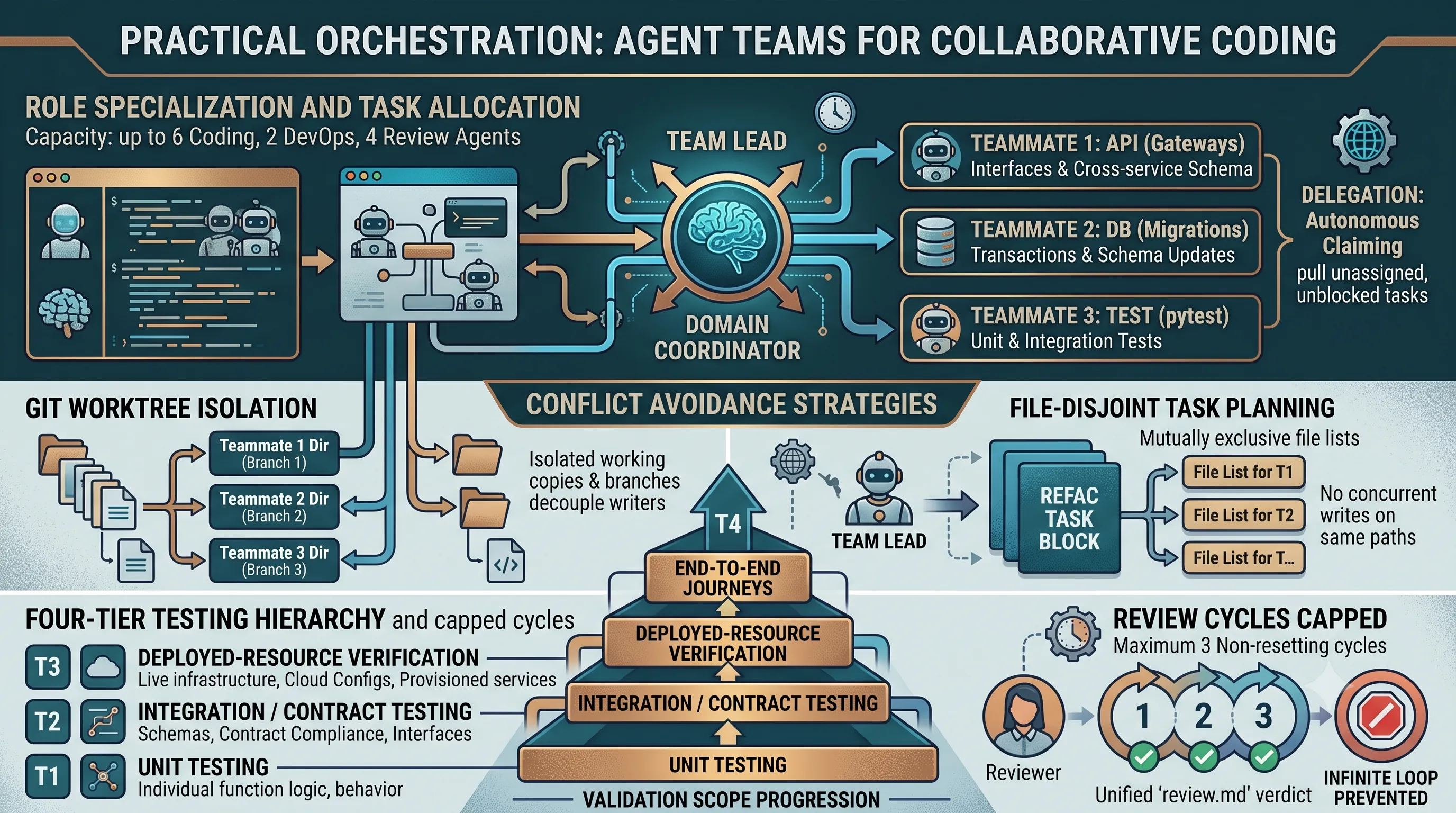
Effective multi-agent topologies depend on capacity limits and strict role specialization.Standard orchestration pools support allocations of up to 6 coding agents, 2 DevOps agents, and 4 review agents operating within a single coordinated environment.
The Team Lead coordinates schedules, tracks project state, and synthesizes incoming deliverables, while specialist teammates focus exclusively on domain boundaries such as API interfaces, database migrations, testing suites, and deployment infrastructure.
Task delegation operates through two primary coordination patterns: explicit lead assignment or autonomous claiming.
In autonomous claiming patterns, specialist agents pull work independently from a shared queue containing unassigned and unblocked tasks as dependencies clear.
To spawn and orchestrate a multi-agent team for refactoring tasks, execute the following prompt inside the Claude Code interface:
claude

> "Set up an Agent Team to refactor the payment module:
   - Team Lead: Coordinate the overall schedule and synthesize deliverables
   - Teammate 1 (API Specialist): Modify payment gateway interfaces
   - Teammate 2 (DB Specialist): Write transaction table migrations
   - Teammate 3 (Test Specialist): Write pytest unit tests
Ensure each teammate shares progress through the shared task list and coordinates without merge conflicts."The prompt establishes clear domain ownership across API modification, database schema updates, and test implementation, preventing cross-domain confusion.
Git Worktree Isolation and Disjoint Task Planning
Simultaneous modification of identical files across concurrent teammates triggers severe Git merge conflicts unless isolation boundaries are enforced.When multiple agents edit the same repository paths simultaneously, uncoordinated writes overwrite adjacent changes and corrupt version history.
Two architectural strategies eliminate merge conflicts during parallel execution:
First, implement Git Worktrees to provide each agent with an isolated physical directory and dedicated branch, decoupling working copies from the primary working tree.
Second, enforce file-disjoint task planning, ensuring that the Team Lead decomposes work packages into mutually exclusive file lists so no two agents touch the same module or script concurrently.
Four-Tier Testing Hierarchy and Capped Review Cycles
Verification workflows in multi-agent environments require a rigorous multi-tier testing pipeline alongside structured review boundaries to prevent endless iteration loops.Review pools operate across parallel disjoint slices, synthesizing their findings into a single unified review.md verdict document.
To maintain convergence, review scopes are strictly capped at 3 non-resetting cycles per task scope, preventing agents from entering infinite critique loops.
| Tier Level | Testing Tier Scope | Validation Focus |
|---|---|---|
| T1 | Unit Testing | Individual function logic and isolated component behavior |
| T2 | Integration / Contract Testing | Cross-service schemas, contract compliance, and interface boundaries |
| T3 | Deployed-Resource Verification | Live infrastructure state, cloud configurations, and provisioned services |
| T4 | End-to-End Journeys | Full user journeys, end-to-end workflows, and complete system execution |
5. Quality Gates, Lifecycle Hooks, and Process Teardown
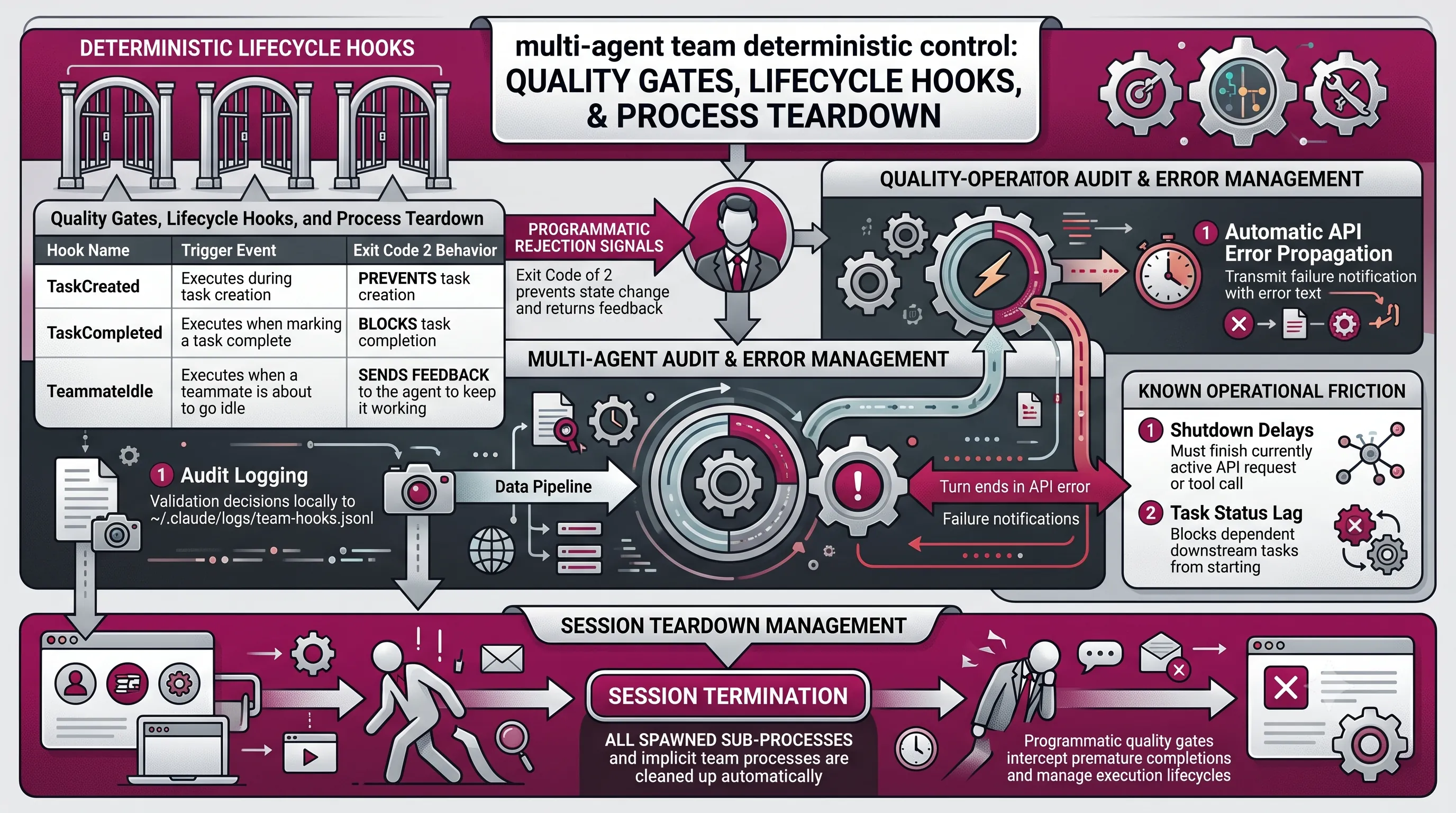
To move beyond single-developer workflows and orchestrate a multi-agent team under the architecture of "Stop Coding Alone, Launch a Team: Claude Code 'Agent Teams' Environment Variables and Practical Tips", deterministic control over agent execution states is essential.Programmatic quality gates allow team leads to enforce operational standards, intercept premature completions, and manage execution lifecycles safely across all spawned teammates.
Enforcing Quality Gates with Exit Code 2 Lifecycle Hooks
Claude Code provides lifecycle hooks that execute at distinct operational transition points during multi-agent collaboration.When a hook script evaluates teammate actions, returning an exit code of 2 signals programmatic rejection, preventing the intended state change and returning feedback directly to the agent.
| Hook Name | Trigger Event | Exit Code 2 Behavior |
|---|---|---|
| TaskCreated | Executes during task creation | Prevents task creation |
| TaskCompleted | Executes when marking a task complete | Blocks task completion |
| TeammateIdle | Executes when a teammate is about to go idle | Sends feedback to the agent to keep it working |
The TaskCompleted hook evaluates criteria when an agent attempts to resolve a work item, blocking completion if testing or validation checks fail.
Similarly, the TeammateIdle hook acts as an automated supervisor when an agent attempts to stop working prematurely, re-engaging the teammate with corrective instructions via the feedback payload.
Audit Logging, API Error Propagation, and Teardown Management
Maintaining team-wide visibility requires robust monitoring and cleanup mechanisms during autonomous workflows.Hook enforcement scripts can audit all validation decisions locally to ~/.claude/logs/team-hooks.jsonl, while implementing fail-open handling on unexpected script errors to prevent complete pipeline lockups.
Error management and process lifecycles are also handled systematically across teammate nodes:
- Automatic API Error Propagation: Teammates whose turns end in an API error automatically transmit failure notifications containing the exact error text back to the lead agent.
- Session Teardown: All spawned sub-processes and implicit team processes are cleaned up automatically upon session termination.
Despite these automated safeguards, teams should account for known operational friction points in production environments.
Shutdown requests can experience delays because teammates must finish their currently active API request or tool call before halting execution.
Additionally, task status lag can occur if teammates fail to mark tasks completed in the shared tracker, which subsequently blocks dependent downstream tasks from starting.
6. Operational Boundaries, Permission Models, and Current Limitations
Understanding the operational boundaries of Claude Code Agent Teams is essential for managing multi-agent workflows effectively and building robust collaborative architectures under the main theme of moving beyond solo coding with Claude Code Agent Teams.Session Single-Team Limit and Non-Restorable Teammate State
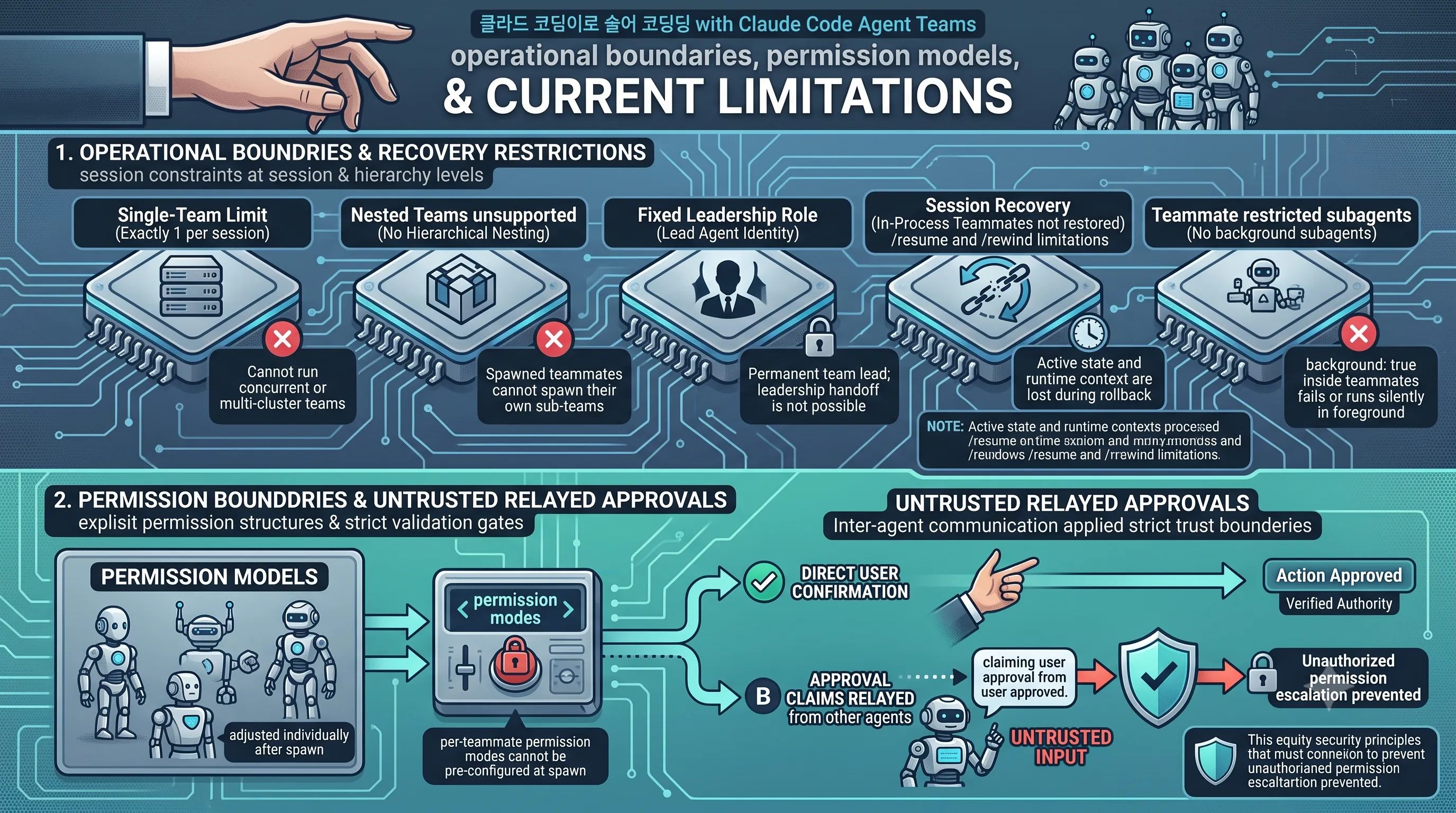
Claude Code enforces strict structural constraints at the session and hierarchy levels.Each interactive session is restricted to exactly 1 team.
Hierarchical nesting is not supported, meaning spawned teammates cannot create or spawn their own sub-teams.
Furthermore, the main session maintains a fixed identity as the team lead, and leadership cannot be transferred or handed off to another teammate during execution.
State persistence also exhibits specific boundaries during interruption or rollback workflows.
Session resumption commands, specifically
/resume and /rewind, do not restore in-process teammates.When a session is rewound or resumed, the lead agent session recovers, but the active state and runtime context of associated teammates are lost rather than reinstated.
Execution within teammates also carries subagent restrictions: in-process teammates cannot run background subagents, causing configurations with
background: true to fail or execute silently in the foreground.| Architectural Dimension | Enforced Constraint | Operational Impact |
|---|---|---|
| Team Allocation | Exactly 1 team per session | Cannot run concurrent or multi-cluster teams within a single session instance. |
| Team Hierarchy | Nested teams are not supported | Teammates cannot spawn their own sub-teams or delegate to secondary team structures. |
| Leadership Role | Fixed lead agent identity | The main session remains the permanent team lead; leadership handoff is not possible. |
| Session Recovery | /resume and /rewind limitations |
In-process teammates are not restored when resuming or rewinding sessions. |
| Background Execution | No background subagents in teammates | Setting background: true inside an in-process teammate fails or runs silently in the foreground. |
Permission Boundaries and Untrusted Relayed Approvals
Security and execution control in multi-agent workflows rely on explicit permission structures and strict validation gates.Per-teammate permission modes cannot be defined or pre-configured at spawn time.
Instead, permission levels must be adjusted individually for each teammate after the spawn process completes.
Additionally, Claude Code applies strict trust boundaries regarding inter-agent communication.
When an agent passes a message claiming that another agent or user approved an action, Claude Code does not accept that claim as verified authority.
Approval claims relayed from other agents are explicitly treated as untrusted input rather than direct user confirmation, preventing unauthorized permission escalation across autonomous agent interactions.
Related Posts