
AI Coding Agents: August 2026 Guide to Models, Benchmarks, Policy & Pricing
🚀 Key Takeaways
- The AI coding agent landscape has seen rapid evolution with major model releases like GPT-5.6 and Claude Opus 5.
- Top-tier agents now demonstrate leading performance on benchmarks, with GPT-5.6 Sol and Claude Opus 5 excelling on Terminal-Bench 2.1.
- Anthropic's Fable 5 continues to dominate in code repair and refactoring as measured by SWE-bench Verified and Pro.
- Significant policy shifts, including GitHub Copilot's move to usage-based credits and OpenAI's GPT-5.6 price reductions, are redefining agent economics.
- The market offers a diverse range of tools, from powerful proprietary cloud agents to highly customizable open-source solutions.
- Developers are increasingly adopting a hybrid agent strategy, combining specialized tools for different coding workflows.
- Enhanced interoperability through standards like MCP and ACP is crucial for seamless integration across various agents and underlying models.
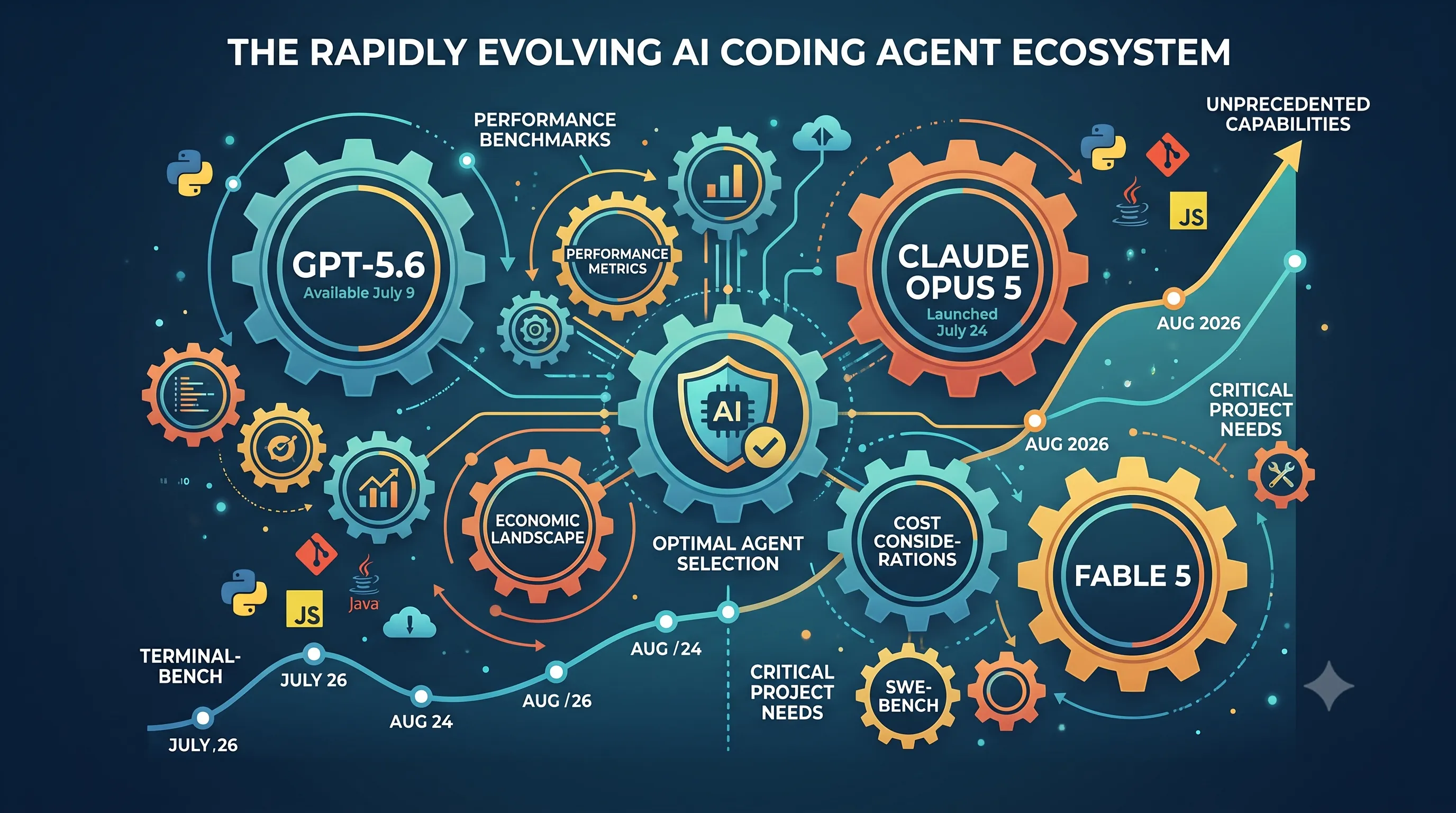
The world of AI coding agents is in a constant state of flux, and the period leading up to August 2026 has been particularly transformative. With the general availability of GPT-5.6 on July 9th and the launch of Claude Opus 5 on July 24th, developers now have access to unprecedented capabilities for automating and enhancing their coding workflows.
These new models, alongside strategic pricing adjustments by key players and the re-emergence of powerful models like Fable 5, have dramatically shifted the performance benchmarks and economic landscape for AI-powered development. Understanding these changes is critical for any developer looking to leverage the most effective tools available.
This guide navigates the current ecosystem, examining leading agents, their underlying models, performance metrics across critical benchmarks like Terminal-Bench and SWE-bench, and cost considerations. Our goal is to equip you with the insights needed to select the optimal AI coding agent for your specific project needs in this rapidly evolving environment.
These new models, alongside strategic pricing adjustments by key players and the re-emergence of powerful models like Fable 5, have dramatically shifted the performance benchmarks and economic landscape for AI-powered development. Understanding these changes is critical for any developer looking to leverage the most effective tools available.
This guide navigates the current ecosystem, examining leading agents, their underlying models, performance metrics across critical benchmarks like Terminal-Bench and SWE-bench, and cost considerations. Our goal is to equip you with the insights needed to select the optimal AI coding agent for your specific project needs in this rapidly evolving environment.
1. Understanding the Latest AI Agent Landscape (August 2026 Update)
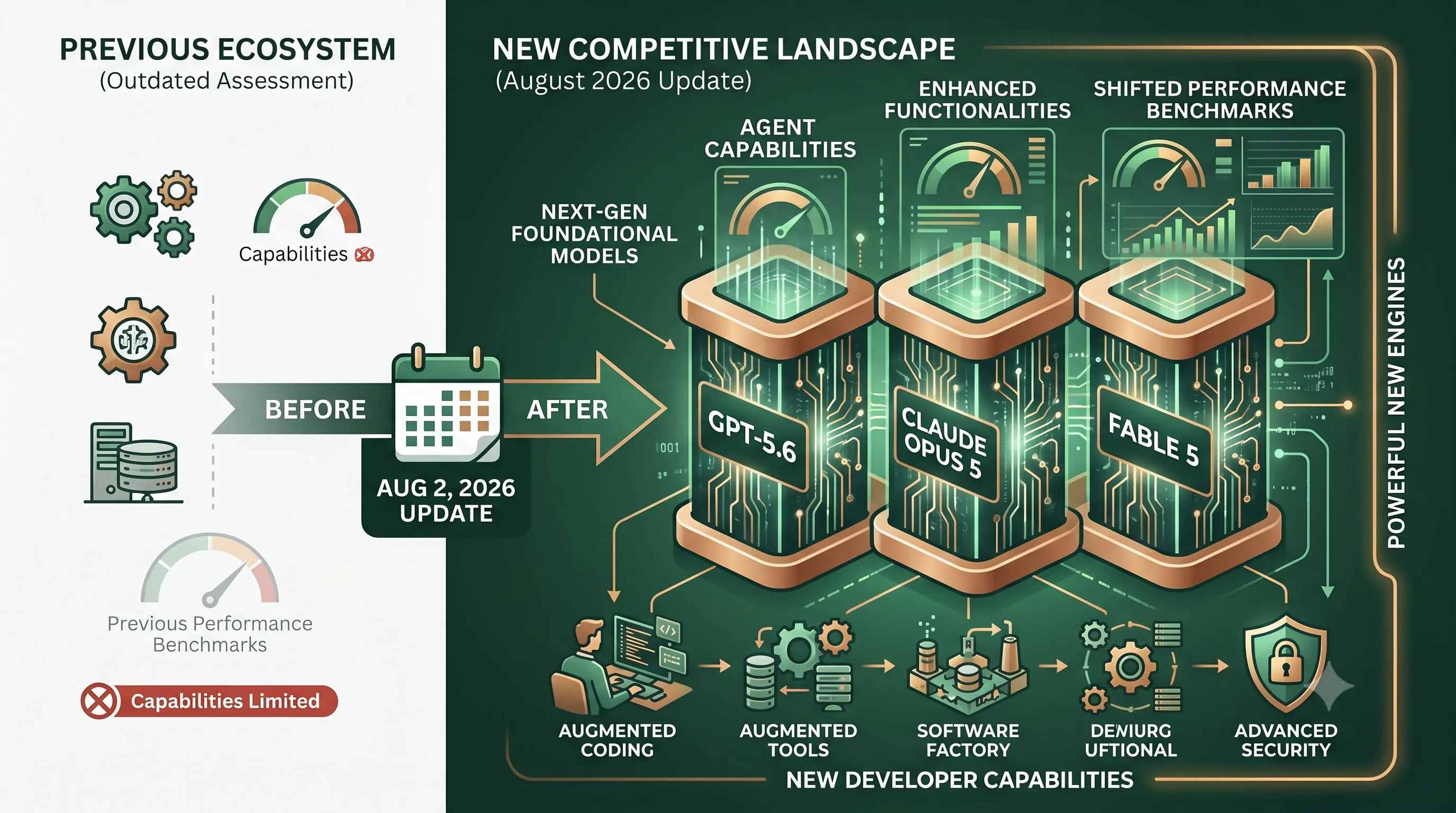
To provide the most relevant and actionable advice, this guide was comprehensively updated on August 2, 2026.This revision was critical, as it took place after the landmark releases of next-generation foundational models.
The introduction of these powerful new engines has significantly shifted the capabilities and performance benchmarks across the entire AI coding agent market, rendering previous assessments outdated.
This updated analysis, therefore, reflects the new competitive landscape and the enhanced functionalities now available to developers.
2. Key AI Model Releases and Policy Shifts (June-July 2026)
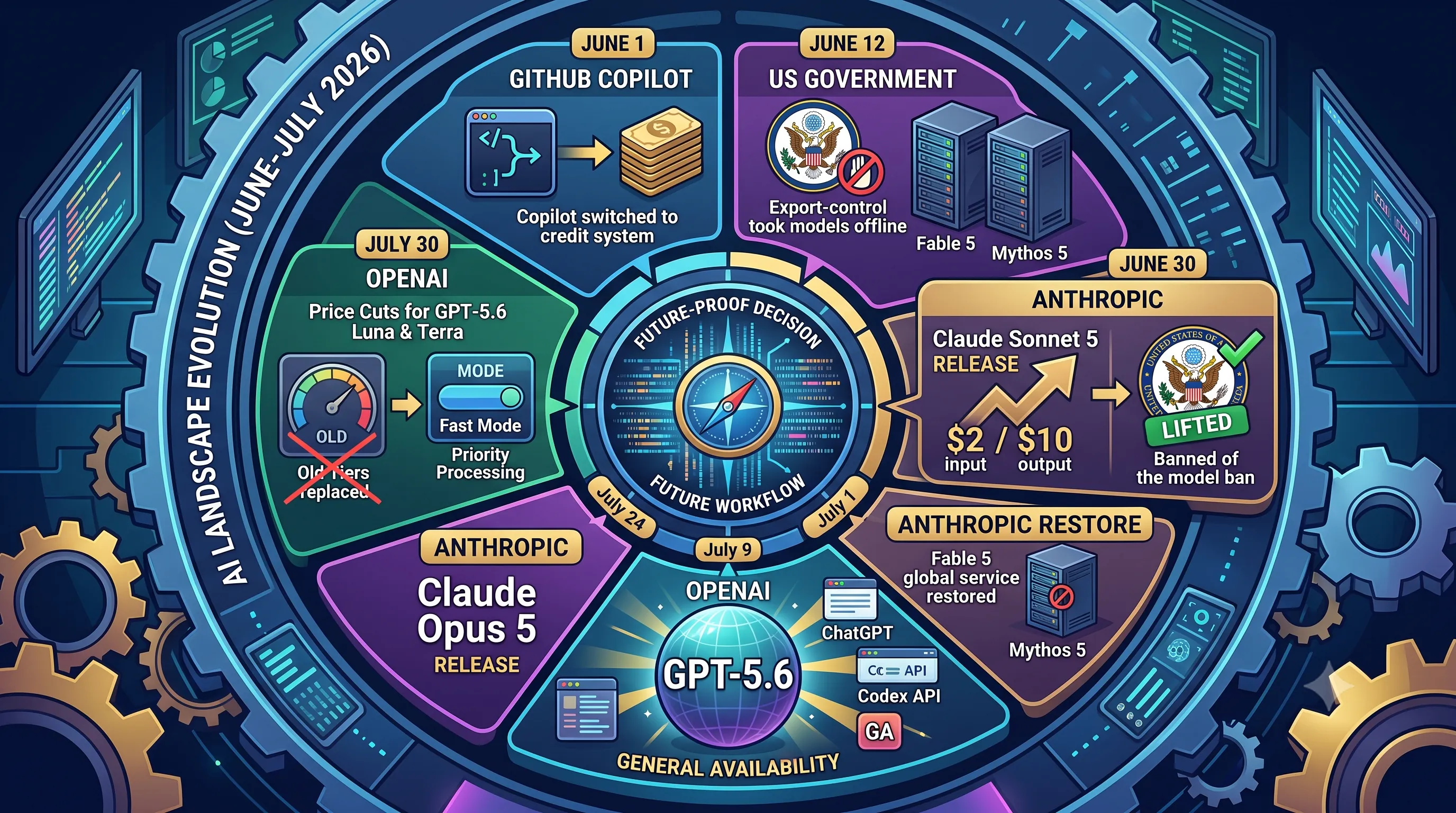
This section provides critical context on the rapid evolution of the AI landscape in June and July 2026, directly impacting the selection of a coding agent. The availability, cost, and access policies of the underlying large language models changed dramatically over these two months. Understanding these shifts—from GitHub Copilot's new credit system to major price cuts by OpenAI and temporary geopolitical restrictions on Anthropic's models—is essential for making an informed, future-proof decision for your development workflow.Major Model Launches
The early summer of 2026 was marked by a flurry of significant model releases from major AI labs, expanding the options available to developers.On July 9, 2026, OpenAI's highly anticipated GPT-5.6 became generally available (GA), integrating across its entire product suite including ChatGPT, the dedicated Codex platform, and its developer API.
Anthropic also had a busy period, first shipping Claude Sonnet 5 on June 30, 2026.
This was followed by the release of its flagship model, Claude Opus 5, on July 24, 2026, further intensifying the competition in the high-performance model space.
Policy Changes and Pricing Adjustments
Alongside new models, the market experienced significant shifts in pricing and access policies that directly affect developer costs and tool availability.The period began with a major change from Microsoft's GitHub, which on June 1, 2026, switched its popular Copilot service to a usage-based AI credits system, moving away from a simple flat-rate subscription for many users.
A significant geopolitical event briefly disrupted the landscape mid-month. On June 12, 2026, a US export-control order abruptly took Anthropic's Fable 5 and Mythos 5 models offline for international users.
This outage lasted for 19 days until the US Commerce Department lifted the order on June 30, 2026.
Anthropic moved quickly to restore service, bringing Fable 5 back online globally on July 1, 2026.
However, the more powerful Mythos 5 remains under restricted access, available only to approved partners on an invitation-only basis as part of Project Glasswing.
The end of the period saw aggressive pricing adjustments from both Anthropic and OpenAI.
Coinciding with its release on June 30, Claude Sonnet 5 was launched with introductory pricing of $2 / $10 (for input/output tokens per million), which later became its standard rate.
Not to be outdone, OpenAI announced major price reductions on July 30, 2026, cutting the price of its GPT-5.6 Luna model by a steep 80% and the GPT-5.6 Terra model by 20%.
On the same day, OpenAI also streamlined its premium offering, replacing the "Priority Processing" tier with a new "Fast mode" for the top-tier GPT-5.6 Sol model.
| Date (2026) | Company / Entity | Key Event |
|---|---|---|
| June 1 | GitHub | Copilot switched to a usage-based AI credits system. |
| June 12 | US Government | Export-control order took Fable 5 and Mythos 5 offline. |
| June 30 | Anthropic | Claude Sonnet 5 released with new standard pricing ($2 / $10). |
| June 30 | US Government | Export-control order on Anthropic models was lifted. |
| July 1 | Anthropic | Fable 5 service restored globally. Mythos 5 remains restricted. |
| July 9 | OpenAI | GPT-5.6 reached General Availability (GA) across all platforms. |
| July 24 | Anthropic | Claude Opus 5 was released. |
| July 30 | OpenAI | Price cuts for GPT-5.6 Luna (80%) and Terra (20%); "Fast mode" replaced "Priority Processing" for Sol. |
3. Demystifying AI Coding Benchmarks: SWE-bench, Terminal-Bench, and ProjDevBench
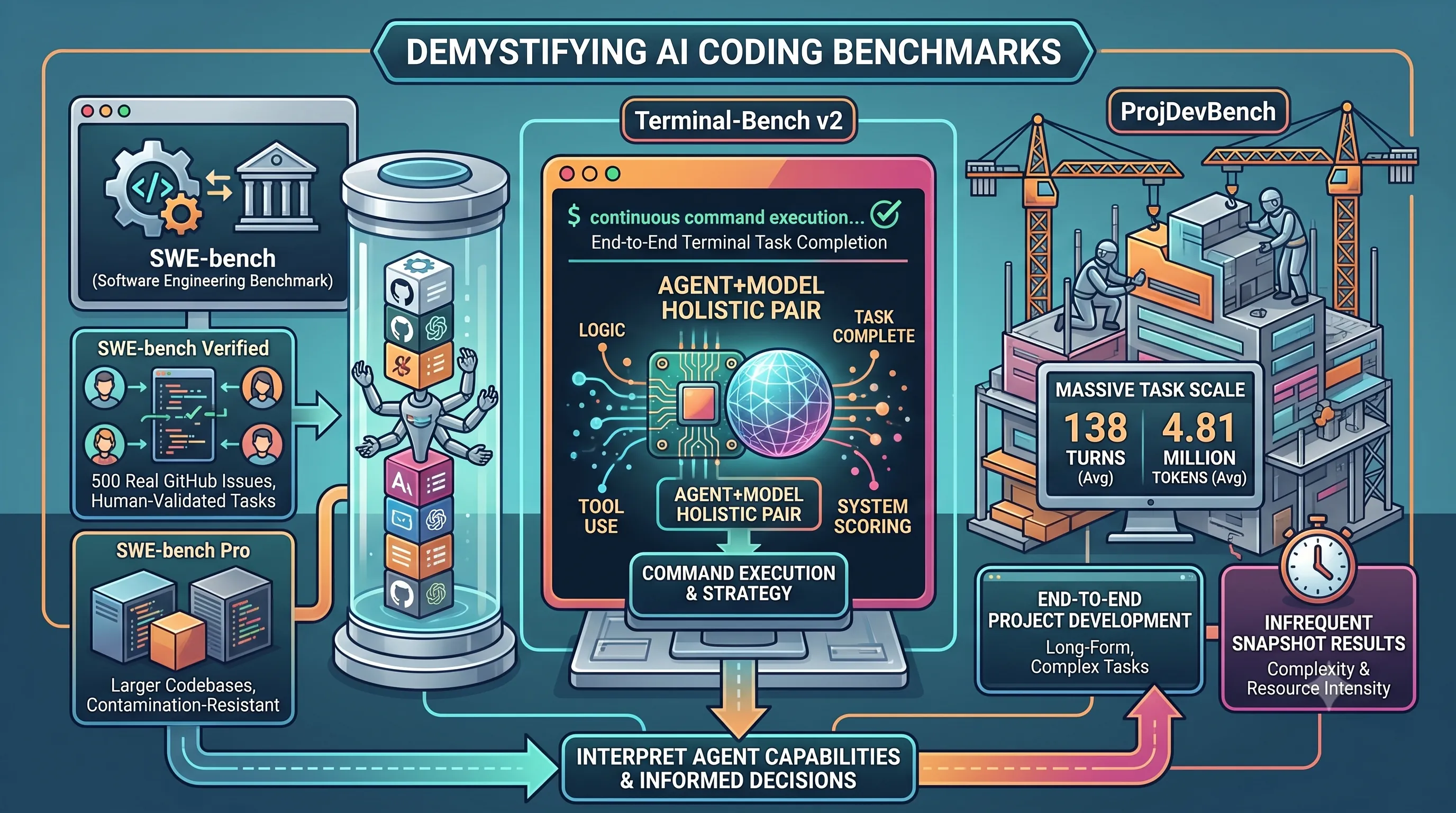
This section provides critical context for the main article by explaining the methodologies behind the key benchmarks used to test and rank AI coding agents.Understanding how performance is measured is essential for interpreting agent capabilities and making an informed decision for your own projects.
| Benchmark | Primary Focus | Key Characteristics |
|---|---|---|
| SWE-bench (Verified & Pro) | Resolving discrete software engineering issues | Uses real GitHub issues; Verified set is human-validated; Pro set is harder and contamination-resistant on large codebases. |
| Terminal-Bench v2 | End-to-end task completion in a terminal | Scores the entire agent-plus-model system, not just the isolated model's ability. |
| ProjDevBench | End-to-end project development | Measures performance on massive, multi-turn tasks (avg. 138 turns); results are a 'snapshot' due to infrequent runs. |
SWE-bench Variants
The Software Engineering Benchmark, or SWE-bench, is a foundational tool for measuring an agent's ability to solve real-world coding problems.The SWE-bench Verified set focuses on the resolution of 500 actual GitHub issues from Python projects.
Its key strength is that these tasks are human-validated, ensuring they represent practical, meaningful challenges that developers face.
A more challenging version, SWE-bench Pro, was introduced to create a harder, contamination-resistant evaluation.
This variant tests agents on larger, commercial-style codebases, providing a more strenuous test of their abilities in complex software environments.
Terminal-Bench v2 Explained
While SWE-bench focuses on code modification, Terminal-Bench v2 evaluates a different, crucial skill: an agent's ability to operate within a command-line environment.The benchmark, referenced in the v2.1 leaderboard, measures if an agent can complete a terminal-driven task from start to finish.
A critical distinction of Terminal-Bench is that it scores the combined performance of the agent-plus-model pair.
This holistic approach recognizes that an agent's effectiveness depends not only on the power of its underlying language model but also on its own logic for tool use, command execution, and problem-solving strategy.
ProjDevBench's Scope and Limitations
Introduced in early 2026 (arXiv 2602.01655), ProjDevBench significantly expands the evaluation scope by adding an end-to-end project-development view.This benchmark assesses an agent's ability to handle complex, long-form development tasks that mirror building a small project from the ground up.
The scale of these tasks is immense, with agents averaging 138 turns and processing an average of 4.81 million tokens to solve a single problem.
However, due to its complexity and resource intensity, ProjDevBench runs less often than more agile benchmarks like Terminal-Bench.
Consequently, its results should be treated as a valuable but infrequent snapshot of an agent's capabilities, rather than a continuously updated measure.
4. Top AI Model Performance: Who Leads the Benchmarks (August 2026)?
This section provides a deep-dive into the raw performance of the leading AI models on critical coding benchmarks as of August 2026.Understanding these foundational model capabilities is essential for evaluating the potential of the AI coding agents built upon them, which is the core focus of this guide.
Terminal-Bench 2.1 Leaders
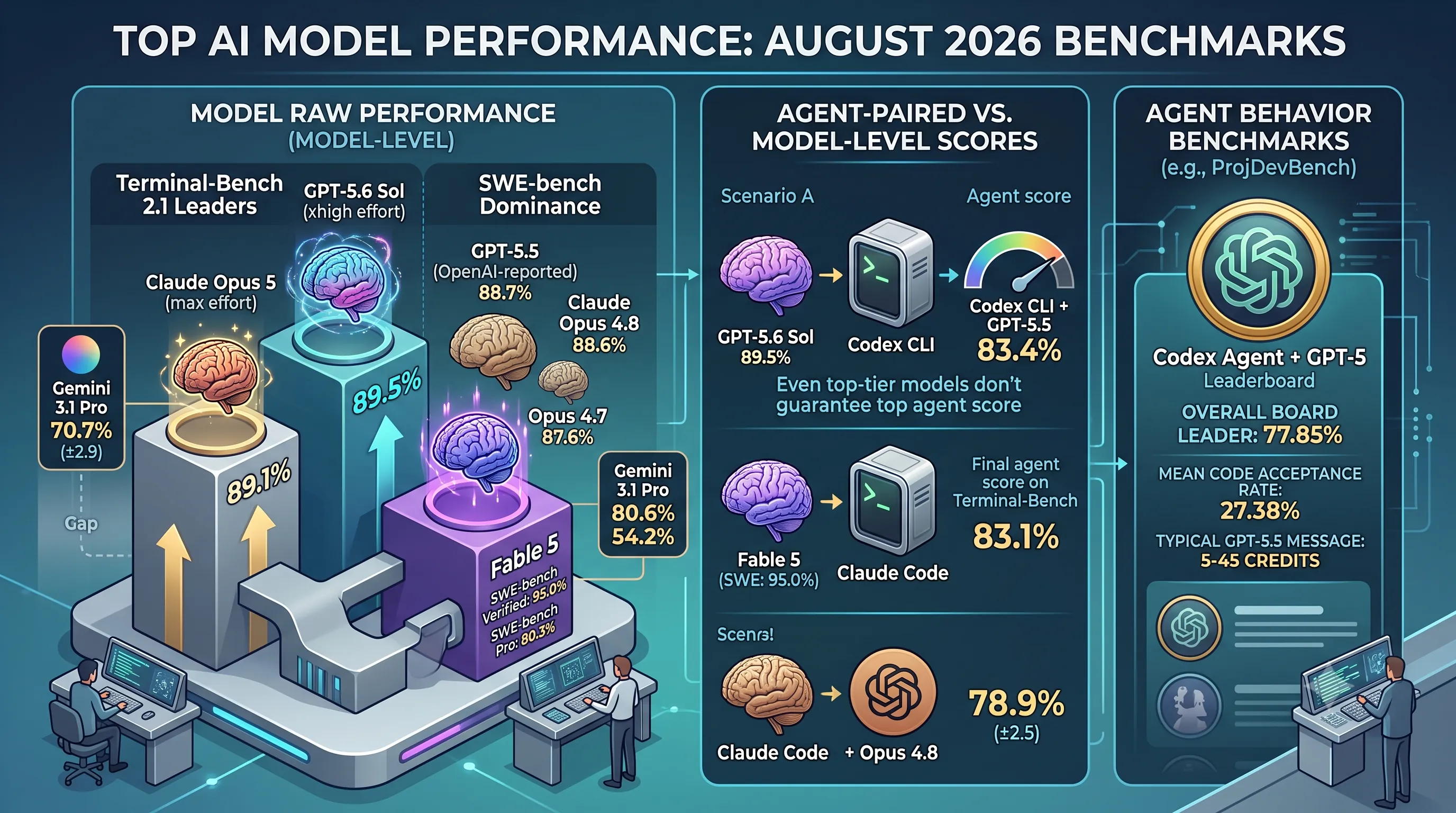
On the command-line task benchmark Terminal-Bench 2.1, the competition at the top is incredibly tight.OpenAI's GPT-5.6 Sol currently holds the narrowest of leads with a score of 89.5%, achieved using an "xhigh effort" setting.
Right behind it, Anthropic's Claude Opus 5 scores an impressive 89.1% with a "max effort" configuration.
The proximity of these scores, separated by less than half a percentage point, underscores the intense rivalry between the two leading models.
These specific results are from model-level runs conducted by Artificial Analysis on the Terminus 2 harness, representing the raw power of the models themselves.
For comparison, Google Antigravity's harness entries for Gemini 3.1 Pro on the same benchmark land between 70.3% and 70.7% (±2.9), showing a significant performance gap between the top two and other competitors on this particular test.
SWE-bench Dominance
The landscape shifts on the Software Engineering Benchmark (SWE-bench), which measures a model's ability to resolve real-world GitHub issues.Here, a new contender, Fable 5, establishes a clear lead, scoring an exceptional 95.0% on SWE-bench Verified and 80.3% on SWE-bench Pro.
This commanding performance, especially on the more challenging "Pro" variant, sets it apart from the rest of the field.
Following Fable 5, the scores are more clustered.
GPT-5.5 has an OpenAI-reported score of 88.7% on SWE-bench Verified, nearly tied with Anthropic's Opus 4.8, which scores 88.6% on the same benchmark.
The older Claude Opus 4.7 also remains competitive on this test with a score of 87.6%.
On the more difficult SWE-bench Pro, Opus 4.8's score drops to 69.2%.
Google Antigravity's entry with Gemini 3.1 Pro achieves 80.6% on SWE-bench Verified and 54.2% on SWE-bench Pro.
| Model | Terminal-Bench 2.1 Score | SWE-bench Verified Score | SWE-bench Pro Score | Notes |
|---|---|---|---|---|
| GPT-5.6 Sol | 89.5% | - | - | xhigh effort, model-level run |
| Claude Opus 5 | 89.1% | - | - | max effort, model-level run |
| Fable 5 | - | 95.0% | 80.3% | Leads both SWE-bench versions |
| GPT-5.5 | - | 88.7% | - | OpenAI-reported |
| Claude Opus 4.8 | - | 88.6% | 69.2% | - |
| Gemini 3.1 Pro | 70.7% (±2.9) | 80.6% | 54.2% | Google Antigravity harness |
Agent-Paired vs. Model-Level Scores
It is critical to distinguish between raw model performance and the scores achieved when a model is integrated into a specific coding agent.The agent framework adds layers of tooling and prompting that can alter outcomes.
For example, while GPT-5.6 Sol achieves 89.5% on Terminal-Bench at the model level, the agent-paired entry of Codex CLI + GPT-5.5 scored 83.4% in a test from May 2026.
Similarly, the Claude Code + Fable 5 agent combination scored 83.1% in June 2026, while the Claude Code + Opus 4.8 pairing registered 78.9% (±2.5).
The Gemini CLI agent, using Gemini 3.1 Pro, scores 70.7% (±2.9) on this benchmark.
These results show that even a top-tier model doesn't guarantee a top-tier agent score, as the agent's implementation plays a significant role.
Other benchmarks focus exclusively on agent behavior, such as ProjDevBench, where the Codex agent running on GPT-5 leads the overall board at 77.85% with a mean code acceptance rate of 27.38%.
The cost of using these agents is also a factor; for instance, a typical GPT-5.5 message within the Codex agent averages between 5 and 45 credits.
5. Morph's Offerings: Accelerating AI-Powered Development
As part of our guide to choosing the right AI coding agent, this section provides a deep dive into Morph, a specialized platform offering a suite of high-performance models and infrastructure tailored specifically for developers building AI-powered coding tools.Their services focus on speed, large context handling, and a set of unique subagents designed to streamline complex development workflows.
Pricing and Model Tiers
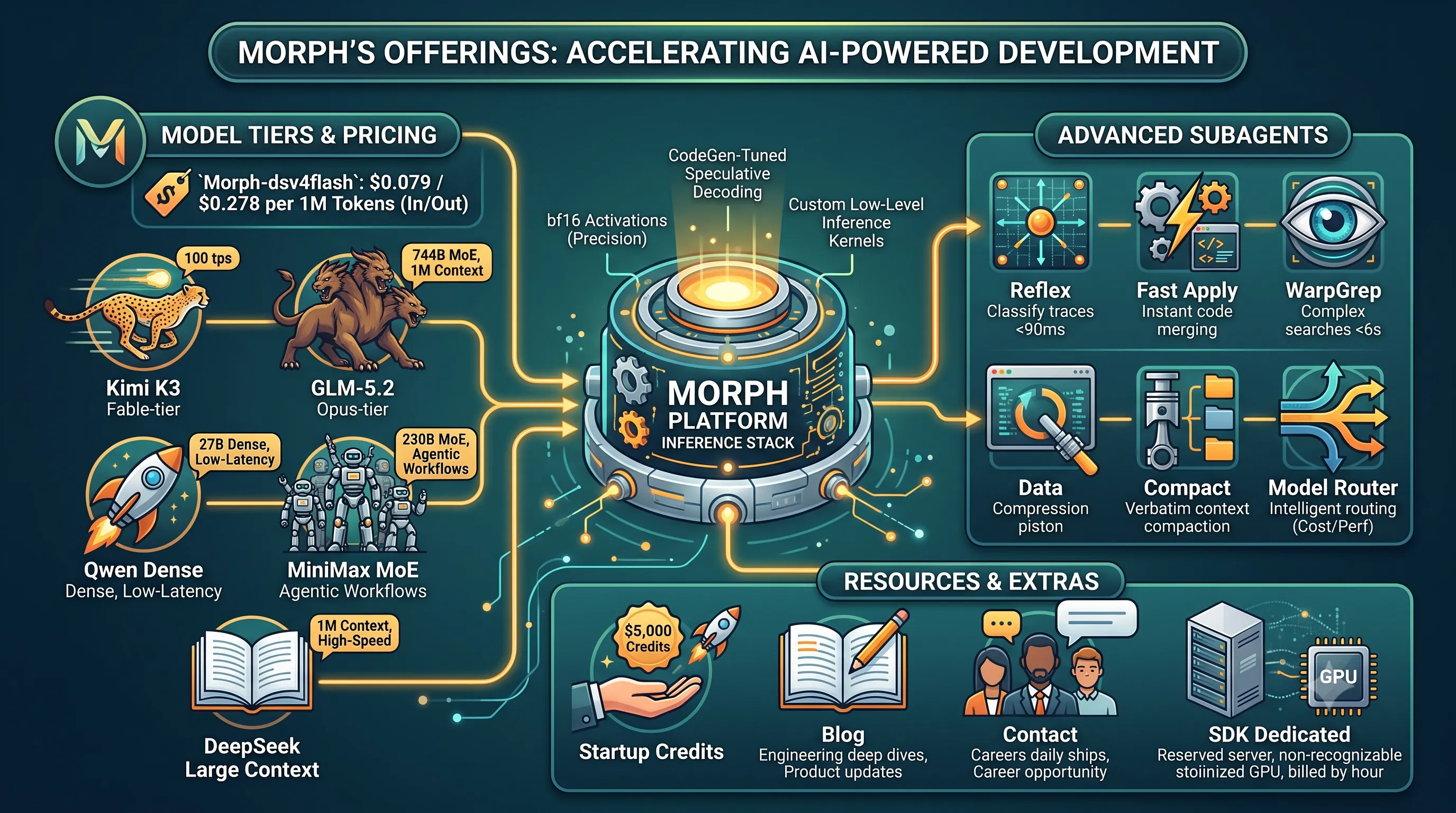
Morph provides access to its services through a clear pricing model, with its flagship `Morph-dsv4flash` model priced at $0.079 per 1 million input tokens and $0.278 per 1 million output tokens.Beyond a single model, the platform offers a curated selection of diverse, high-performance models, each suited for different tasks, from low-latency code completion to complex, agentic reasoning over massive codebases.
| Model | Tier / Type | Key Features & Specialization |
|---|---|---|
| Kimi K3 | Fable-tier | Optimized for high speed, delivering 100 tokens per second. |
| GLM-5.2 | Opus-tier | A massive 744B Mixture-of-Experts (MoE) model with a 1 million token context window for deep code analysis. |
| Qwen | Dense | A 27B dense parameter model engineered for low-latency responses. |
| MiniMax | MoE | A 230B Mixture-of-Experts (MoE) model specifically designed for complex agentic workflows. |
| DeepSeek | Large Context | A model with a 1 million token context window, served with high-speed inference. |
Advanced Tools and Infrastructure
Morph's platform is distinguished by its powerful infrastructure and a set of advanced tools that function as subagents, enabling more sophisticated and efficient AI coding assistants.At the core of its performance is a custom inference stack; Morph serves its open-source coding models using 16-bit (bf16) activations, deliberately avoiding fp8 or int8 quantization to maintain model precision.
This is further accelerated with codegen-tuned speculative decoding and custom low-level inference kernels, optimized specifically for coding applications.
The suite of tools includes:
- Reflex: A tool for classifying agent traces in under 90ms, enabling rapid analysis and debugging of agent behavior.
- Fast Apply: Allows for the instant merging of AI-generated code edits, seamlessly integrating suggestions into a developer's workflow.
- WarpGrep: An AI-powered search subagent that performs complex searches in under 6 seconds.
- Compact: Provides verbatim context compaction, a critical feature for maintaining coherence in long-running agents that process extensive information.
- Model Router: An intelligent layer that automatically routes each prompt to the most cost-effective and performant model for the specific task at hand.
- SDK Dedicated: For teams requiring guaranteed performance, this service offers reserved B200 capacity, billed by the GPU-hour.
Developer Resources
Morph supports its developer community with several resources aimed at fostering adoption and innovation.The Startup Credits program offers up to $5,000 in API credits, helping early-stage companies build on the platform.
The company's Blog serves as a valuable resource, featuring engineering deep dives and detailed product updates that explain how their models are trained and deployed.
For developers looking to engage directly, the platform encourages users to contact the team to discuss specific use cases and provides career opportunities for those interested in joining a small team that ships new features daily.
6. OpenAI Codex: The Standard for Cloud-Native AI Coding
This section provides a deep-dive into OpenAI Codex, a leading contender for developers prioritizing raw performance and seamless cloud integration. As part of our broader "AI Coding Agent Selection Guide," Codex serves as a crucial benchmark for evaluating other tools, particularly in the realm of high-complexity tasks and automated cloud workflows.Codex Features and Model Tiers
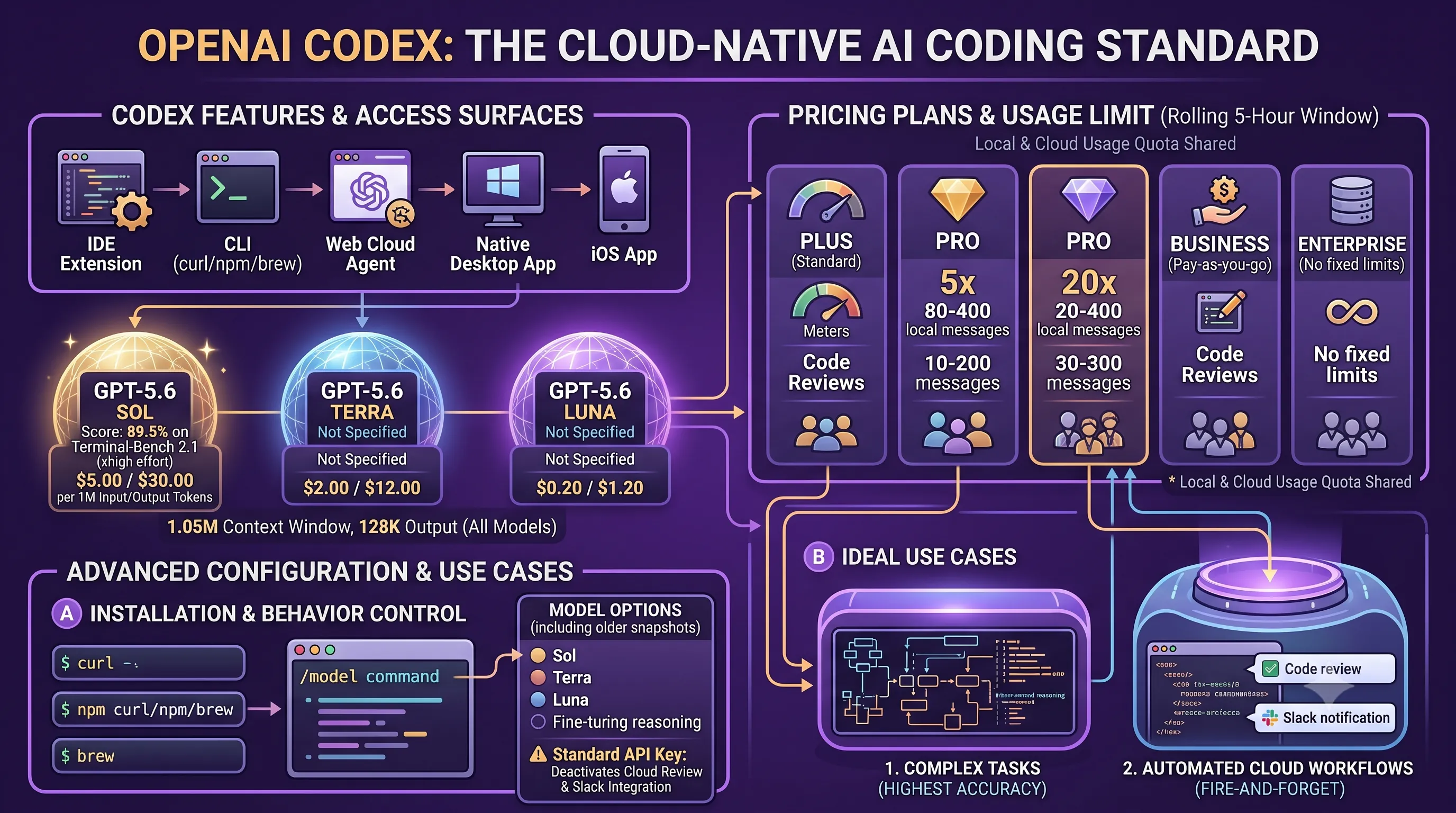
Since its General Availability, OpenAI Codex has defaulted to the GPT-5.6 Sol model, its most powerful tier.This agent is accessible across five distinct surfaces, catering to virtually any developer workflow: a command-line interface (CLI), an IDE extension compatible with VS Code, Cursor, and Windsurf, a dedicated web cloud agent at chatgpt.com/codex, a native desktop application, and an iOS app.
All three tiers of the underlying GPT-5.6 model—Sol, Terra, and Luna—share the same generous architecture, featuring a 1.05 million-token context window and a maximum output of 128,000 tokens per request.
The key differentiators are performance and cost, with the default Sol model achieving a state-of-the-art 89.5% on the Terminal-Bench 2.1 benchmark when run at the 'xhigh' effort setting.
| Model Tier | Terminal-Bench 2.1 Score (at xhigh effort) | Price per 1M Input Tokens | Price per 1M Output Tokens |
|---|---|---|---|
| GPT-5.6 Sol | 89.5% | $5.00 | $30.00 |
| GPT-5.6 Terra | Not Specified | $2.00 | $12.00 |
| GPT-5.6 Luna | Not Specified | $0.20 | $1.20 |
Pricing and Usage
Pricing for the GPT-5.6 series is tiered by capability.The high-performance GPT-5.6 Sol costs $5 per million input tokens and $30 per million output tokens.
The mid-tier GPT-5.6 Terra is priced at $2 for input and $12 for output, reflecting a recent price cut.
The most economical option, GPT-5.6 Luna, costs $0.20 for input and $1.20 for output, also reflecting recent price reductions.
Usage is governed by plan-specific rate limits within a rolling 5-hour window, with local (on-device) and cloud usage sharing the same quota.
A standard ChatGPT Plus subscription allows for 15-80 local messages and 5 cloud tasks or code reviews.
The Pro 5x plan increases this significantly to 80-400 local messages, while the Pro 20x plan offers a massive 300-1,600 local messages in the same window.
For organizational use, Codex offers a Business plan that operates on a pay-as-you-go model at the same limits as the Plus tier, and an Enterprise plan that removes fixed rate limits entirely for maximum flexibility.
Installation and Advanced Configuration
The popular Codex CLI can be installed via several common package managers, including `curl`, `npm`, or `brew`, ensuring easy setup across different development environments.Once installed, users have granular control over the agent's behavior.
The model can be switched on-the-fly within a session using the `/model` command.
By default, Codex operates on a 'medium' reasoning Power setting using the GPT-5.6 Sol model.
However, an advanced setting menu exposes the full range of models, including GPT-5.6 Terra, GPT-5.6 Luna, and even older snapshots of GPT-5.5 and GPT-5.4.
This menu also allows for fine-tuning the reasoning levels for each model to balance speed and accuracy.
While authentication via a standard OpenAI API key is supported, it comes with a significant trade-off: this mode disables cloud-native features like automatic code review and Slack integrations.
Ideal Use Cases
OpenAI Codex is best suited for developers and teams with two primary priorities: achieving the highest possible accuracy on complex tasks and leveraging automated cloud-based workflows.Its top-tier 89.5% score on Terminal-Bench 2.1 makes it the definitive choice for users who require an agent that can reliably handle intricate command-line operations and system interactions.
Furthermore, its deep integration with cloud services like automated code reviews positions it as a powerful tool for "fire-and-forget" tasks, allowing developers to offload complex jobs to the agent and receive notifications or results in platforms like Slack without continuous oversight.
7. Anthropic Claude Code: SWE-bench Leader for Terminal and IDE
This section focuses on Anthropic's Claude Code, a powerful contender in the AI coding agent space. It examines its performance, particularly on the SWE-bench, its diverse model offerings, and its deep integration into the developer workflow, providing a comprehensive look for those considering it as their primary coding partner within the broader landscape of AI tools discussed in this guide.Claude Code Capabilities and Model Options
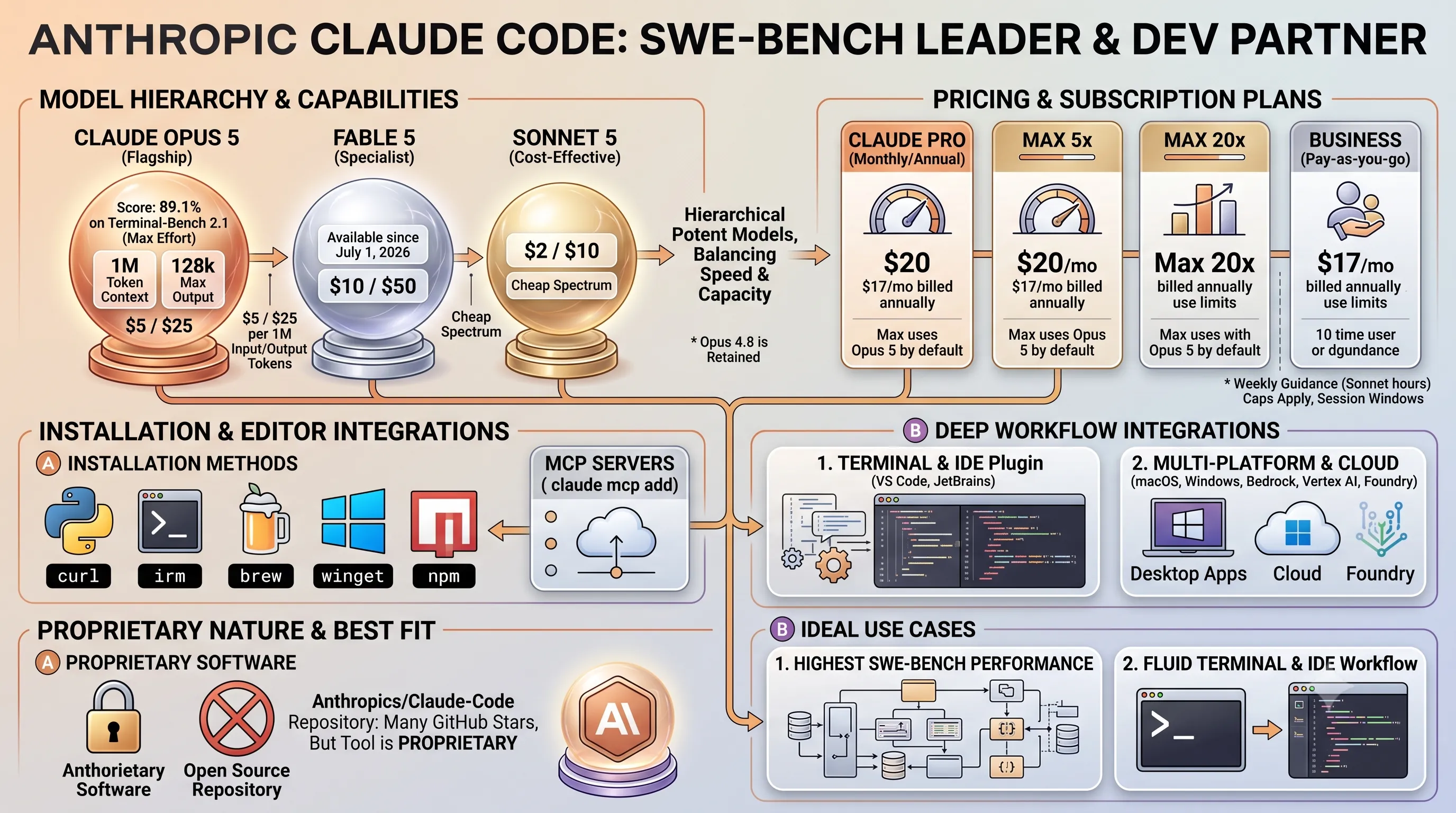
Anthropic's Claude Code agent is powered by a hierarchy of potent models, with Claude Opus 5 serving as the default flagship since its release.This model is a performance powerhouse, boasting an impressive 89.1% score on Terminal-Bench 2.1 when run at max effort, although Anthropic has chosen to ship "high effort" as the default setting for a balance of speed and capability.
Opus 5 features a massive 1M-token context window, putting it on par with competitors like GPT-5.6's 1.05M window and often removing the need for developers to maintain a separate subscription for long-context tasks.
It also supports a generous 128k max output token limit, allowing for extensive code generation in a single pass.
For developers with different needs, Anthropic provides a range of options.
The specialist model, Fable 5, became available again, offering unique capabilities at a higher price point.
At the other end of the spectrum, Sonnet 5 provides a cost-effective entry point for less demanding tasks.
Users who prefer the previous generation model also retain the ability to select Opus 4.8.
| Model | Price per 1M Tokens (Input) | Price per 1M Tokens (Output) | Key Specs |
|---|---|---|---|
| Claude Opus 5 | $5 | $25 | 1M token context, 128k max output, 89.1% on Terminal-Bench 2.1 |
| Fable 5 | $10 | $50 | Available since July 1, 2026 |
| Sonnet 5 | $2 | $10 | Covers the cheap end of the model spectrum |
Pricing and Subscription Plans
Access to Claude Code is exclusively through paid plans; the free claude.ai tier does not include it.The primary entry point is the Claude Pro subscription, which costs $17 per month when billed annually ($200 up front) or $20 per month on a monthly basis.
Pro users get access to the full suite of models, with Opus 5 being the strongest available option.
For users with more intensive needs, Anthropic offers Max plans, which make Opus 5 the default model.
These plans start at $100 per month for 5x the usage limits and $200 per month for 20x the limits.
Usage is governed by a weekly guidance cap, measured in "Sonnet hours," and a 5-hour rolling session window.
For Pro users, this guidance is approximately 40-80 Sonnet hours per week.
Max 5x plan users receive ~140-280 Sonnet hours per week, while Max 20x users get ~240-480 Sonnet hours per week, which can translate to up to ~40 Opus hours.
These usage limits are shared across all of Anthropic's platforms, including claude.ai, the Claude Desktop apps, and Claude Code itself.
Installation and Integrations
Claude Code is designed to integrate seamlessly into a developer's existing environment, functioning both in the shell and connected directly to popular editors.It offers a wide array of native installation methods, catering to virtually any setup.
These include a curl script for macOS, Linux, and WSL; an irm command for Windows PowerShell; and package manager support via brew, winget, and npm.
For Linux distributions, Anthropic also provides signed apt, dnf, and apk repositories for secure and straightforward installation.
Dedicated desktop applications are available for macOS and Windows, with system requirements of macOS 13.0+, Windows 10 1809+, Ubuntu 20.04+, and at least 4GB of RAM.
The agent connects to editors via plugins for VS Code and JetBrains IDEs, bringing its capabilities directly into the coding workflow.
Furthermore, users can add Managed Cloud Provider (MCP) servers using the
claude mcp add command. Beyond local installations, Claude Code's models are also accessible through major cloud platforms, running on Amazon Bedrock, Google Vertex AI, and Microsoft Foundry.
Proprietary Nature and Best Fit
Claude Code is best suited for developers who prioritize having the strongest available model on the SWE-bench benchmark and desire a tool that operates fluidly in both the terminal and the IDE.The combination of top-tier performance and versatile integration makes it a formidable choice for complex software engineering tasks.
However, it is crucial to note that while the `anthropics/claude-code` repository on GitHub has amassed an impressive number of stars, the tool itself is proprietary software.
This means users do not have access to the source code and are dependent on Anthropic for future development and maintenance, a key consideration for teams with strict open-source policies.
8. GitHub Copilot: Comprehensive AI for GitHub-Native Workflows
This section delves into GitHub Copilot, a leading choice for developers deeply integrated into the GitHub ecosystem, exploring its recent shift to a consumption-based model and its extensive feature set.Credit-Based Billing and Plans
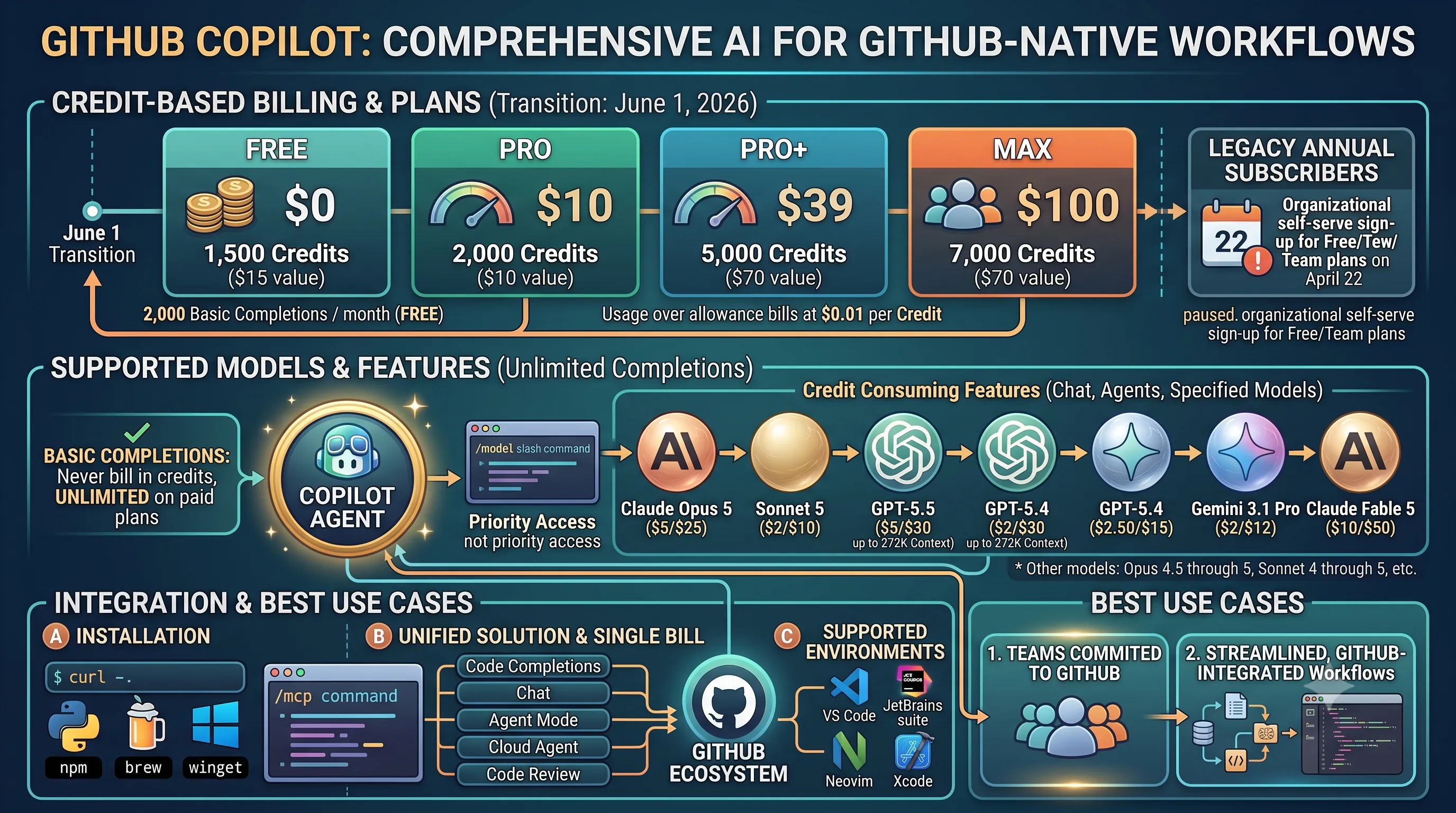
As of June 1, 2026, GitHub Copilot transitioned to a usage-based billing system centered around GitHub AI Credits.Each credit is valued at $0.01, and any usage beyond a plan's included allowance is billed at this standard rate.
GitHub offers several tiers to accommodate different levels of usage:
- The Free plan provides 2,000 basic code completions per month, supplemented by a small allowance of AI credits for more advanced queries.
- The Pro plan, at $10/month, includes 1,500 credits, a $15 value.
- The Pro+ plan costs $39/month and comes with 7,000 credits, equivalent to $70 in value.
- The top-tier Max plan is $100/month and includes 20,000 credits, providing a $200 value.
However, GitHub paused new self-serve sign-ups for Copilot Business for organizations on its Free and Team plans on April 22, 2026.
Legacy annual subscribers on older request-based plans retain their original structure, with 300 (Pro) or 1,500 (Pro+) premium requests per month at a rate of $0.04 each.
| Plan | Monthly Cost | Included AI Credits | Included Credit Value |
|---|---|---|---|
| Free | $0 | Small allowance (plus 2,000 free completions) | N/A |
| Pro | $10 | 1,500 Credits | $15 |
| Pro+ | $39 | 7,000 Credits | $70 |
| Max | $100 | 20,000 Credits | $200 |
Supported Models and Features
A critical aspect of Copilot's billing is that basic code completions and next-edit suggestions are never billed in credits and remain unlimited on all paid plans.Credits are consumed when using chat features or invoking more powerful, specified models.
The cost per one million tokens varies significantly by model:
The agent features a convenient
Copilot also offers support for MCP servers.
The Copilot CLI can be installed easily via several package managers, including npm, brew, or winget.
The platform is best suited for teams already committed to the GitHub ecosystem.
Its primary advantage is providing a unified solution that covers code completions, chat, agent mode, a cloud agent, and code review capabilities all under a single bill.
This integration extends across a wide array of popular development environments, with official support for VS Code, the entire JetBrains suite, Neovim, and Xcode, making it a versatile choice for diverse development teams.
This tight integration enables several core features designed for a fluid coding experience.
The Tab feature acts as a powerful, context-aware autocompletion tool, capable of predicting and generating entire multi-line blocks of code.
For more complex, repository-wide tasks, Composer allows developers to request changes that span multiple files, orchestrating refactors or feature implementations across the project.
Underpinning these capabilities is Cursor's codebase indexing, which scans your entire project to feed relevant context to the AI, ensuring its suggestions and edits are highly relevant to your existing code.
All paid plans operate on a usage-based billing system, providing access to frontier models, MCPs (Model-Compute Providers), skills and hooks for customization, cloud agents for more intensive tasks, and the automated Bugbot reviewer.
A key detail is that when a user selects "Auto" or Cursor's in-house Composer 2.5 model, the usage draws from a separate, more generous pool.
This pool is specifically designed to make everyday agentic coding more affordable than using expensive, top-tier frontier models for every task.
This plan is free, does not require a credit card to sign up, and provides a limited number of Agent requests and Tab completions to get started.
For commercial use in larger organizations, the Teams plan is available for $40 per user per month.
This tier adds critical enterprise features, including SAML/OIDC SSO for secure authentication, automated Bugbot reviews integrated into the development lifecycle, and detailed analytics for monitoring usage and performance.
It is best suited for developers who want powerful inline AI editing capabilities without needing to switch contexts or leave their editor.
If your priority is a seamless workflow where AI assistance feels like a natural extension of your IDE for generating, refactoring, and understanding code, Cursor presents a compelling and purpose-built solution.
As part of our comprehensive guide to AI coding agents, Gemini CLI represents the peak of what's available in the free-tier category, making it a critical benchmark for those managing personal projects or seeking to integrate AI into their workflow without initial financial commitment.
The limits are set high enough for heavy daily use, providing up to 60 requests per minute and a substantial cap of 1,000 requests per day.
This volume is more than sufficient for most individual developers, enabling continuous interaction for code generation, debugging, and command-line assistance without hitting a paywall.
The agent's performance is also noteworthy; on the Terminal-Bench 2.1 benchmark, Gemini CLI, running on Gemini 3.1 Pro, achieves a score of 70.7% (±2.9), placing it firmly in the capable category.
This standard method connects the user to a managed Gemini 3 mix of flash and pro models, allowing Google to dynamically serve the best model for the task while managing load.
For users who require more precise control or predictability, there is an alternative.
By providing an API key, a user can bypass the managed mix and pin a specific model version, such as gemini-2.5-flash, ensuring consistent behavior for specific scripts or automated workflows.
Users can install it directly via npx, npm, or brew, covering the most common package managers in the JavaScript and macOS ecosystems.
Advanced configuration, such as pointing the CLI to different MCP servers, is handled in a simple settings file located at `~/.gemini/settings.json`, making it easy to customize for specific network or development needs.
It is best suited for developers who want a capable agent at zero cost and can operate comfortably within its high daily limits.
Whether for students, hobbyists, or professionals testing AI integration in a personal capacity, Gemini CLI removes the financial barrier to entry without significantly compromising on power or utility.
The project, which has now moved to the `anomalyco/opencode` repository, is specifically designed for developers who appreciate the command-line interface (CLI) interaction of tools like Claude Code but demand freedom from vendor lock-in.
This makes it an ideal choice for users who want to switch between different models and providers without changing their core workflow.
It provides native support for over 75 LLM providers through its integration with the AI SDK and the extensive Models.dev catalog.
This allows developers to connect to a vast array of commercial and open-source models.
For those who require privacy, offline capability, or want to run custom-tuned models, OpenCode supports local model execution via popular runners like Ollama, LM Studio, and llama.cpp.
To help users navigate the wide selection of available models, the OpenCode team maintains OpenCode Zen, a curated and tested list of high-performing models specifically validated for agentic coding tasks.
Users can install the agent via simple one-line commands using curl, npm, or brew.
Beyond the pre-configured providers, OpenCode offers advanced customization by allowing users to add any custom OpenAI-compatible provider directly through a JSON configuration file, offering near-limitless extensibility.
It is fully compatible with accounts for ChatGPT Plus, GitHub Copilot, and GitLab Duo, enabling users to access the powerful models behind these services within the OpenCode CLI.
However, there is a critical and explicit restriction regarding Anthropic's models.
According to OpenCode's documentation, Anthropic's terms of service explicitly prohibit using Claude Pro or Claude Max personal subscriptions with third-party applications like OpenCode.
This makes it a powerful alternative for users of many services, but not a viable pathway for those wanting to use their personal Claude subscription.
Its cross-platform nature is evident in its support for multiple integrated development environments, running in VS Code, Cursor, and Windsurf, with early access available for JetBrains IDEs.
Installation is streamlined through a command-line interface (CLI) available for macOS, Windows, and Linux, requiring a simple `npm i -g cline` command.
It offers native support for major commercial models including Claude, GPT, and Gemini.
For developers with existing infrastructure or custom solutions, Cline can connect to any OpenAI-compatible endpoint and supports a Bring-Your-Own-Key (BYOK) model.
This extends to advanced integrations, with support for MCP servers and custom tools, allowing for deeply customized and powerful agentic workflows.
For larger organizations, an enterprise tier is also available.
It integrates seamlessly with popular local model servers like Ollama and LM Studio.
However, running these models effectively requires significant system memory.
To optimize performance and reduce the context window size for less powerful hardware, it is highly recommended to enable the `Use Compact Prompt` setting during local runs.
System RAM requirements vary based on the model's size and complexity.
By leveraging its open-source license, BYOK support, and especially its robust local model integrations, users can achieve a high degree of control, privacy, and cost-efficiency.
This makes it a compelling alternative to subscription-based services for those with the requisite hardware and technical expertise.
As part of our broader guide to selecting the right AI coding agent, Goose stands out due to its foundation-led governance, extensive integration capabilities, and its design as a general-purpose tool, making it a strong candidate for users who value open standards and multi-faceted automation in their workflow.
This move places its development and future under a neutral, foundation-governed model, with its principles transparently documented in a public `GOVERNANCE.md` file.
Built entirely in Rust, the agent is engineered for performance, safety, and reliability.
Installing the CLI is straightforward for technical users, typically involving a single `curl` command to fetch the appropriate binary from its GitHub releases page.
A key strength is its provider-agnostic architecture, enabling connections to over 15 different AI providers, including major players like Anthropic, OpenAI, and Google, as well as open-source solutions via Ollama and routing services like OpenRouter, Azure, and Bedrock.
Furthermore, it leverages the Morph Computation Protocol (MCP) to integrate with a library of over 70 extensions, significantly expanding its capabilities.
Its design supports a wide array of tasks beyond software development, including research, technical writing, workflow automation, and data analysis.
This makes it an ideal choice for developers and technical professionals who require a single, unified interface for both coding assistance and other complex, knowledge-based work.
It is best suited for users who want a stable, foundation-governed tool that can automate a diverse set of both code and non-code tasks without being locked into a single AI provider's ecosystem.
This allows users to connect their existing paid subscriptions for services like Claude, ChatGPT, or Gemini directly to Goose.
By doing so, developers can leverage the premium models they already pay for within the Goose interface, consolidating their AI interactions without incurring redundant costs.
Its most defining feature is that every change suggested and applied by the AI is automatically staged in Git with a descriptive commit message.
This workflow completely prevents the common, error-prone practice of manually copying and pasting code from a chat window into an editor or manually staging the resulting changes.
The agent handles the entire edit-commit cycle, ensuring a clean and auditable project history.
Users can choose the method that best fits their system's package management philosophy.
Model connection is managed on a per-run basis via command-line flags, giving the user explicit control over which model is used for any given task.
For example, a user could invoke a specific Anthropic model with a command like
This flexibility extends to running local models via Ollama and connecting to any OpenAI-compatible API, ensuring broad compatibility.
As of this writing in late August 2026, the last repository push was on May 22, 2026.
This is a visibly slower cadence when compared to competitors like OpenCode and Cline, which often push updates daily.
This slowdown is also reflected in its official model guidance, which still recommends older models such as Gemini 2.5 Pro, DeepSeek R1/V3, Claude 3.7 Sonnet, o3/o4-mini, and GPT-4.1.
These are no longer considered 2026 frontier models.
However, it is important to note that because of its flexible flag-based system, users are not limited by this guidance and can still point Aider at any current model they have access to.
Its core value proposition is for users who live in the command line and appreciate the rigor of having every AI-driven change automatically and cleanly committed.
It also appeals strongly to developers who want full control over which model they pay for on a task-by-task basis, rather than being locked into a single provider's ecosystem.
Its core offering is the Kilo Gateway, a service that operates on a distinct financial model: it charges a $0 monthly fee and provides access to various AI models at their exact provider rates.
This means Kilo Code adds no markup to the underlying costs, offering a transparent "pass-through" pricing structure.
Reflecting a branding consolidation, the project's original domain, `kilocode.ai`, now permanently redirects to `kilo.ai`.
This functionality allows users to connect their own keys for major providers, including Anthropic, OpenAI, Google, Azure, and Bedrock, directly within the extension.
Crucially, leveraging the BYOK feature does not require any paid Kilo plan, making it a completely free gateway for managing personal or corporate API keys.
For users who prefer a managed solution, Kilo Code offers its own subscription plans through Kilo Pass and a dedicated Teams option.
The Kilo Pass subscriptions are available at three tiers: $19, $49, and $199 per month.
The primary benefit of these passes is the inclusion of bonus credits, which can be as high as 50%, effectively lowering the per-token cost for users.
For collaborative environments, a Teams plan is available at a cost of $15 per user per month.
First, it appeals to those who want a centralized gateway to access multiple AI models at their native cost, completely avoiding markups.
Second, it is an excellent choice for developers who already have their own API keys (BYOK) and simply need a powerful, free, and open-source interface to use them.
The optional Kilo Pass subscriptions add value for users who can leverage the bonus credits to reduce their overall AI expenditure.
For developers looking to try the platform, the free tier provides 50 credits per month.
A significant advantage of this entry-level offering is its inclusion of high-quality models, featuring both open-weight models and Claude Sonnet 4.5, making it a powerful option even without a paid subscription.
The Pro plan is priced at $20/mo for 1,000 credits, the Pro+ plan at $40/mo for 2,000 credits, and the Power plan at $200/mo for 10,000 credits.
If usage exceeds the monthly allowance, overage is billed at the end of the month at a rate of $0.04 per credit.
To encourage adoption, Kiro offers new users a $20 credit that can be applied toward their first upgrade from the free tier.
For organizational use, Team plans are available that mirror the individual credit allocations but add essential administrative features.
These include centralized billing for simplified accounting, usage analytics to monitor team-wide consumption, and Single Sign-On (SSO) capabilities through AWS IAM Identity Center for secure access management.
Additionally, for customers operating within the US public sector, the AWS GovCloud pricing has no free tier.
Pricing for these GovCloud plans is also approximately 20% higher than their standard commercial counterparts.
Its structure ensures costs are capped at the chosen plan level unless overages are explicitly incurred.
The platform's appeal is further enhanced by its robust free tier, which provides direct access to Claude Sonnet 4.5, making it an excellent choice for individuals and small teams who need access to a premium model without an initial financial commitment.
We will analyze its unique architecture, performance benchmarks, and pricing to help you determine if its parallel processing capabilities and API-first approach align with your project's requirements, directly supporting the main article's goal of finding the best AI coding agent for your needs.
The platform was split into a unified harness that orchestrates tasks through a completely redesigned desktop application and a new standalone Command Line Interface (CLI).
This new structure is built with security and enterprise-level control in mind, incorporating several key features.
It introduces cross-platform terminal sandboxing, ensuring that agent actions are isolated and controlled regardless of the operating system.
To protect sensitive information, the system includes built-in credential masking.
Furthermore, it enforces hardened Git policies, allowing teams to maintain strict control over code commits and repository interactions generated by the agent.
In standardized tests, Antigravity 2.0 demonstrated strong performance in software engineering tasks, scoring 80.6% on SWE-bench Verified and 54.2% on SWE-bench Pro.
For command-line operations, the harness entries achieved scores between 70.3% and 70.7% on Terminal-Bench 2.1, showcasing its competence in executing complex shell commands.
The Google AI Pro plan is priced at $19.99/mo and provides 4x the free usage limits for both the agent model and Gemini 3.1 Pro.
For more intensive use cases, the Google AI Ultra tier starts at $99.99/mo and offers up to 20 times the usage of the Pro plan.
It's worth noting that in early June 2026, Google reset all quota counters to zero for both free and paid users to resolve some post-launch issues.
For programmatic access, Google provides a Managed Agents API and an Antigravity SDK for teams that require self-hosted deployments.
This allows the system to delegate different parts of a complex problem—such as running tests, refactoring code, and writing documentation simultaneously—to distinct agents that work in parallel, coordinated by the central harness.
This architecture makes Antigravity 2.0 best suited for developers already working within the Gemini ecosystem who require a visual interface for managing parallel agents and need the extensibility offered by the Managed Agents API.
Our research shows that most developers now settle on a combination of two or three distinct AI agents, each chosen for a specific task in the development lifecycle.
A common and highly effective stack combines agents optimized for different scales of work, along with an option for greater flexibility.
This multi-agent approach allows developers to use the best tool for each specific job, from high-level architecture to line-by-line implementation.
A typical professional stack includes:
This is largely driven by emerging standards like the Model Communication Protocol (MCP) and the Agent Communication Protocol (ACP), which allow different tools to work together more effectively within the IDE.
However, it is crucial to remember where the core intelligence, cost, and quality originate.
Ultimately, the foundational model layer underneath these agent front-ends drives most of the cost and determines the quality of the output.
Whether you are using a proprietary agent tied to a specific model or an open-source tool that lets you choose your backend, the performance of the underlying large language model is the most critical factor in your success.
As this section of our guide explores, the efficiency of an agent is heavily dependent on how quickly it can perform two fundamental tasks: searching the existing codebase and applying its generated changes.
Specialized tools designed to accelerate these processes can be the difference between a sluggish workflow and a highly productive development cycle.
In fact, research from Cognition measured that coding agents spend a staggering 60% of their time on search.
This is precisely the problem WarpGrep, a dedicated AI search sub-agent, was built to solve.
Instead of a simple, linear search, WarpGrep executes 8 parallel searches per turn across 4 turns, allowing it to rapidly scan vast codebases.
The result is a dramatic reduction in search time, with most queries completing in under 6 seconds.
Integration is seamless for modern agents, as WarpGrep runs as an MCP (Modular Component Protocol) server.
This allows it to plug directly into any MCP-compatible agent, such as Codex, Claude Code, or Cursor, acting as a specialized search engine that replaces the agent's slower, built-in capabilities.
The accessibility of this tool is a key advantage; it offers a generous free tier of 100,000 requests, with subsequent usage priced at an affordable $1 per 1 million requests.
This pricing structure makes it feasible for individual developers and large teams alike to eliminate the primary time sink in agent-driven development.
Waiting for this process can interrupt a developer's flow state.
Fast Apply is a utility engineered for one purpose: the instant merging of AI-generated code edits.
It operates at an exceptional speed, applying generated diffs into a codebase at a rate of 10,500 tokens per second.
This high-speed application ensures that the changes proposed by an AI agent appear in the developer's environment almost immediately, creating a fluid, real-time feedback loop between generating code and reviewing its implementation.
Instead of relying on marketing claims, we use GitHub stars as a direct proxy for developer interest and real-world usage, helping readers identify the most trusted and actively supported open-source AI coding agents.
As of August 2026, the hierarchy is clear, with a few projects commanding significant developer attention.
OpenCode stands firmly at the top with a remarkable 172,198 stars, making it the most popular open-source coding agent by a wide margin.
Following it is Gemini CLI with 105,104 stars and the classic OpenAI Codex CLI with 89,991 stars, both demonstrating massive followings.
The ranking continues with Cline (62,996 stars), Goose (48,542 stars), Aider (45,945 stars), and Kilo Code (19,968 stars).
It is important to note that while the `anthropics/claude-code` repository boasts an impressive 131,380 stars, it is not included in this ranking because it is a proprietary tool and not considered open-source.
This metric is a powerful indicator because GitHub stars track real adoption better than marketing campaigns or press releases.
A high star count suggests that a large number of developers have not only discovered the tool but have also found it valuable enough to bookmark, follow, and implicitly endorse.
This grassroots validation often correlates with better documentation, a more active community for support, and a higher likelihood of long-term maintenance and development.
It provides a detailed look at completely free open-source tools and the free tiers offered by popular commercial products, helping you start with AI-assisted coding without any financial commitment.
Tools such as OpenCode, Cline, Goose, Aider, Kilo Code, and Gemini CLI are all free to install and run.
It is crucial to understand the cost model, however.
While the agent software itself is free, they function by making calls to powerful large language models.
This means users typically pay per token for the model's API usage, unless they have the hardware and expertise to run a capable model locally.
These plans are designed to give individual developers, students, and hobbyists a chance to leverage powerful AI assistance without a subscription.
Notable free tiers include GitHub Copilot Free, the Cursor Hobby plan, and the Kiro Free plan.
Each comes with its own set of usage limits and features.
GitHub Copilot's free offering is capped at 2,000 completions per month, while Kiro provides users with a monthly allowance of 50 credits.
The Cursor Hobby plan stands out for its accessibility, as it requires no credit card to sign up, removing a common barrier for trial users.
The Gemini CLI is particularly noteworthy for its generous limits, offering users 60 requests per minute and up to 1,000 requests per day, accessible with only a personal Google account.
This high request volume makes it a powerful option for developers who work frequently from the command line.
The Kiro Free tier also presents a compelling advantage by including access to premium models within its free credit allowance.
The 50 monthly credits can be used with various open-weight models and, significantly, with Anthropic's powerful Claude Sonnet 4.5, giving free users a taste of state-of-the-art model performance.
- Claude Opus 5: $5 input / $25 output
- Claude Sonnet 5: $2 input / $10 output (standard rate)
- GPT-5.5 (up to 272K context): $5 input / $30 output
- GPT-5.4: $2.50 input / $15 output
- Gemini 3.1 Pro: $2 input / $12 output
- Claude Fable 5: $10 input / $50 output
The agent features a convenient
/model slash command to switch between these options on the fly, and subscribers to the Max plan gain priority access to new models as they become available.Copilot also offers support for MCP servers.
Integration and Best Use Cases
GitHub Copilot is designed for seamless integration into a developer's existing workflow.The Copilot CLI can be installed easily via several package managers, including npm, brew, or winget.
The platform is best suited for teams already committed to the GitHub ecosystem.
Its primary advantage is providing a unified solution that covers code completions, chat, agent mode, a cloud agent, and code review capabilities all under a single bill.
This integration extends across a wide array of popular development environments, with official support for VS Code, the entire JetBrains suite, Neovim, and Xcode, making it a versatile choice for diverse development teams.
9. Cursor: AI-First IDE for Seamless Inline Editing
This section provides a deep dive into Cursor, a specialized AI coding agent integrated directly into an IDE. As part of our broader guide to selecting the right AI coding tool, this analysis details a powerful option for developers who prefer AI assistance to be a native, inline part of their editor, rather than a separate chat window or extension. By examining its core features, pricing, and ideal use case, you can determine if Cursor's editor-centric approach is the best fit for your project's workflow.Core AI Editing Features
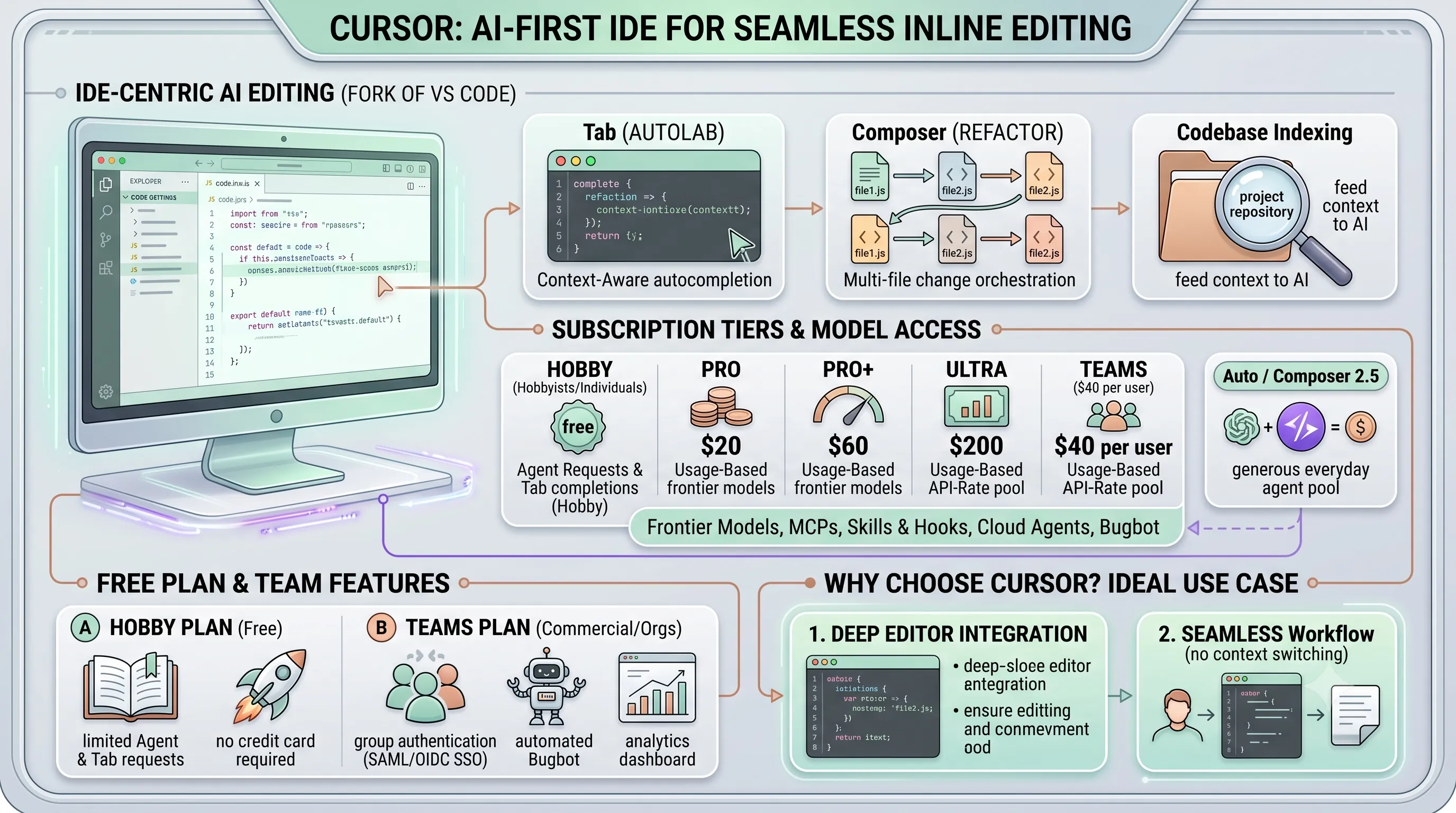
Cursor distinguishes itself by being a complete Integrated Development Environment (IDE) built as a fork of VS Code, fundamentally re-engineered around AI.This tight integration enables several core features designed for a fluid coding experience.
The Tab feature acts as a powerful, context-aware autocompletion tool, capable of predicting and generating entire multi-line blocks of code.
For more complex, repository-wide tasks, Composer allows developers to request changes that span multiple files, orchestrating refactors or feature implementations across the project.
Underpinning these capabilities is Cursor's codebase indexing, which scans your entire project to feed relevant context to the AI, ensuring its suggestions and edits are highly relevant to your existing code.
Subscription Tiers and Model Access
Cursor operates on a tiered subscription model, with access to advanced features and models tied to its paid plans.All paid plans operate on a usage-based billing system, providing access to frontier models, MCPs (Model-Compute Providers), skills and hooks for customization, cloud agents for more intensive tasks, and the automated Bugbot reviewer.
A key detail is that when a user selects "Auto" or Cursor's in-house Composer 2.5 model, the usage draws from a separate, more generous pool.
This pool is specifically designed to make everyday agentic coding more affordable than using expensive, top-tier frontier models for every task.
| Plan | Monthly Cost | Included API-Rate Usage Value |
|---|---|---|
| Pro | $20 | ~$20 |
| Pro+ | $60 | $70 |
| Ultra | $200 | $400 |
| Teams | $40 per user | Varies with plan configuration |
Free Plan and Team Features
For individual developers or those wishing to try the platform, Cursor offers a Hobby plan.This plan is free, does not require a credit card to sign up, and provides a limited number of Agent requests and Tab completions to get started.
For commercial use in larger organizations, the Teams plan is available for $40 per user per month.
This tier adds critical enterprise features, including SAML/OIDC SSO for secure authentication, automated Bugbot reviews integrated into the development lifecycle, and detailed analytics for monitoring usage and performance.
Why Choose Cursor?
Cursor's core value proposition lies in its deep, native integration of AI within the editing environment.It is best suited for developers who want powerful inline AI editing capabilities without needing to switch contexts or leave their editor.
If your priority is a seamless workflow where AI assistance feels like a natural extension of your IDE for generating, refactoring, and understanding code, Cursor presents a compelling and purpose-built solution.
10. Gemini CLI: Powerful Free-Tier AI Coding for Daily Tasks
This section delves into Gemini CLI, a standout option for developers who prioritize high performance without a price tag.As part of our comprehensive guide to AI coding agents, Gemini CLI represents the peak of what's available in the free-tier category, making it a critical benchmark for those managing personal projects or seeking to integrate AI into their workflow without initial financial commitment.
Free Tier Advantages
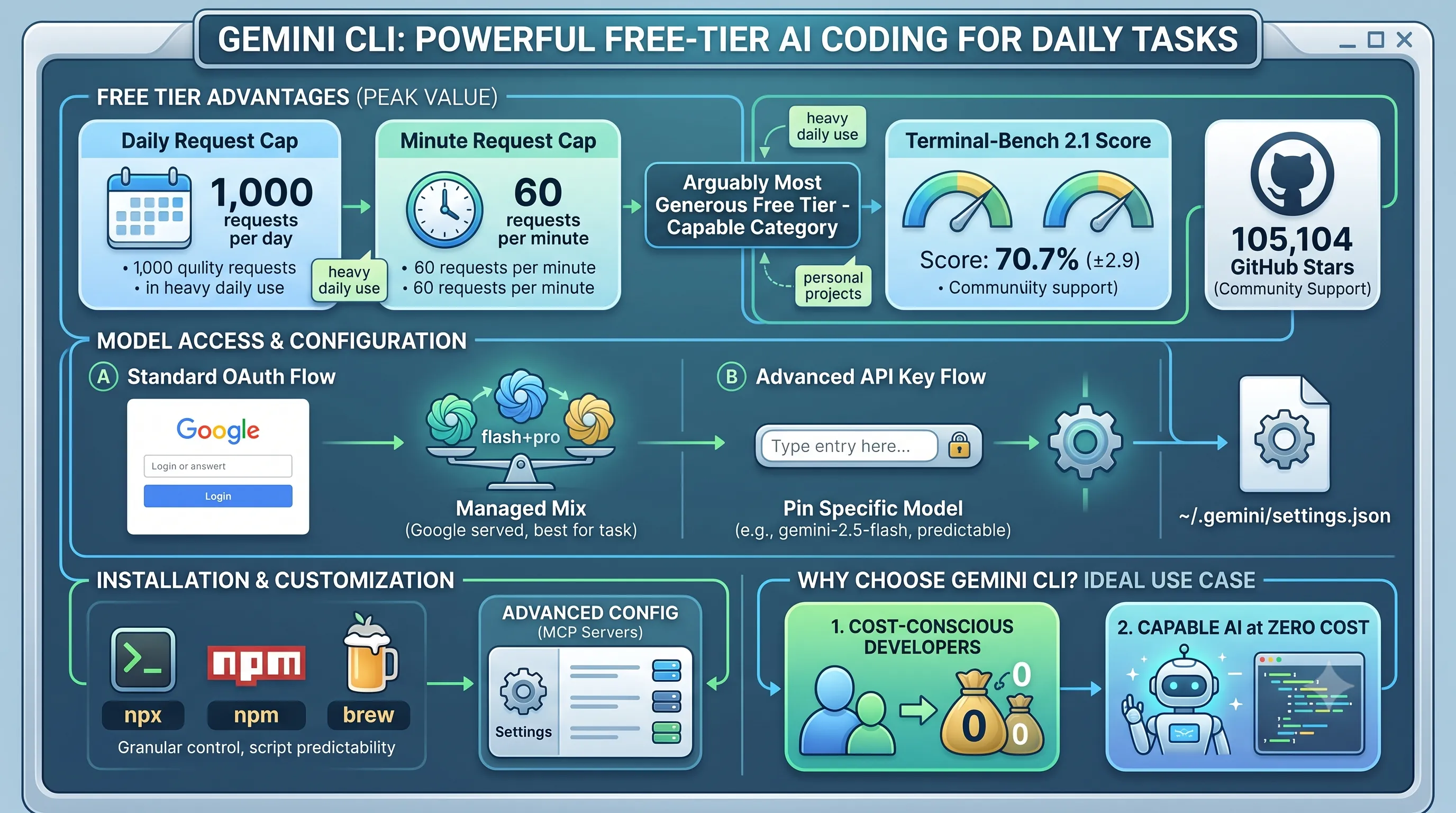
Gemini CLI offers what is arguably the most generous free tier among all the agents we evaluated.The limits are set high enough for heavy daily use, providing up to 60 requests per minute and a substantial cap of 1,000 requests per day.
This volume is more than sufficient for most individual developers, enabling continuous interaction for code generation, debugging, and command-line assistance without hitting a paywall.
The agent's performance is also noteworthy; on the Terminal-Bench 2.1 benchmark, Gemini CLI, running on Gemini 3.1 Pro, achieves a score of 70.7% (±2.9), placing it firmly in the capable category.
| Metric | Specification |
|---|---|
| Free Tier Limit (Minute) | 60 requests per minute |
| Free Tier Limit (Day) | 1,000 requests per day |
| Performance Benchmark | 70.7% (±2.9) on Terminal-Bench 2.1 |
| Community Support | 105,104 GitHub Stars |
Model Access and Configuration
By default, Gemini CLI provides access through a personal Google account using a simple OAuth flow.This standard method connects the user to a managed Gemini 3 mix of flash and pro models, allowing Google to dynamically serve the best model for the task while managing load.
For users who require more precise control or predictability, there is an alternative.
By providing an API key, a user can bypass the managed mix and pin a specific model version, such as gemini-2.5-flash, ensuring consistent behavior for specific scripts or automated workflows.
Installation and Setup
Getting started with Gemini CLI is straightforward, with multiple installation methods available to suit different development environments.Users can install it directly via npx, npm, or brew, covering the most common package managers in the JavaScript and macOS ecosystems.
Advanced configuration, such as pointing the CLI to different MCP servers, is handled in a simple settings file located at `~/.gemini/settings.json`, making it easy to customize for specific network or development needs.
Ideal for Cost-Conscious Developers
The combination of a high-performance model, robust daily limits, and zero cost makes Gemini CLI the definitive choice for a specific type of user.It is best suited for developers who want a capable agent at zero cost and can operate comfortably within its high daily limits.
Whether for students, hobbyists, or professionals testing AI integration in a personal capacity, Gemini CLI removes the financial barrier to entry without significantly compromising on power or utility.
11. OpenCode: The Most Popular Open-Source, Vendor-Agnostic Agent
Open-Source Leadership and Flexibility
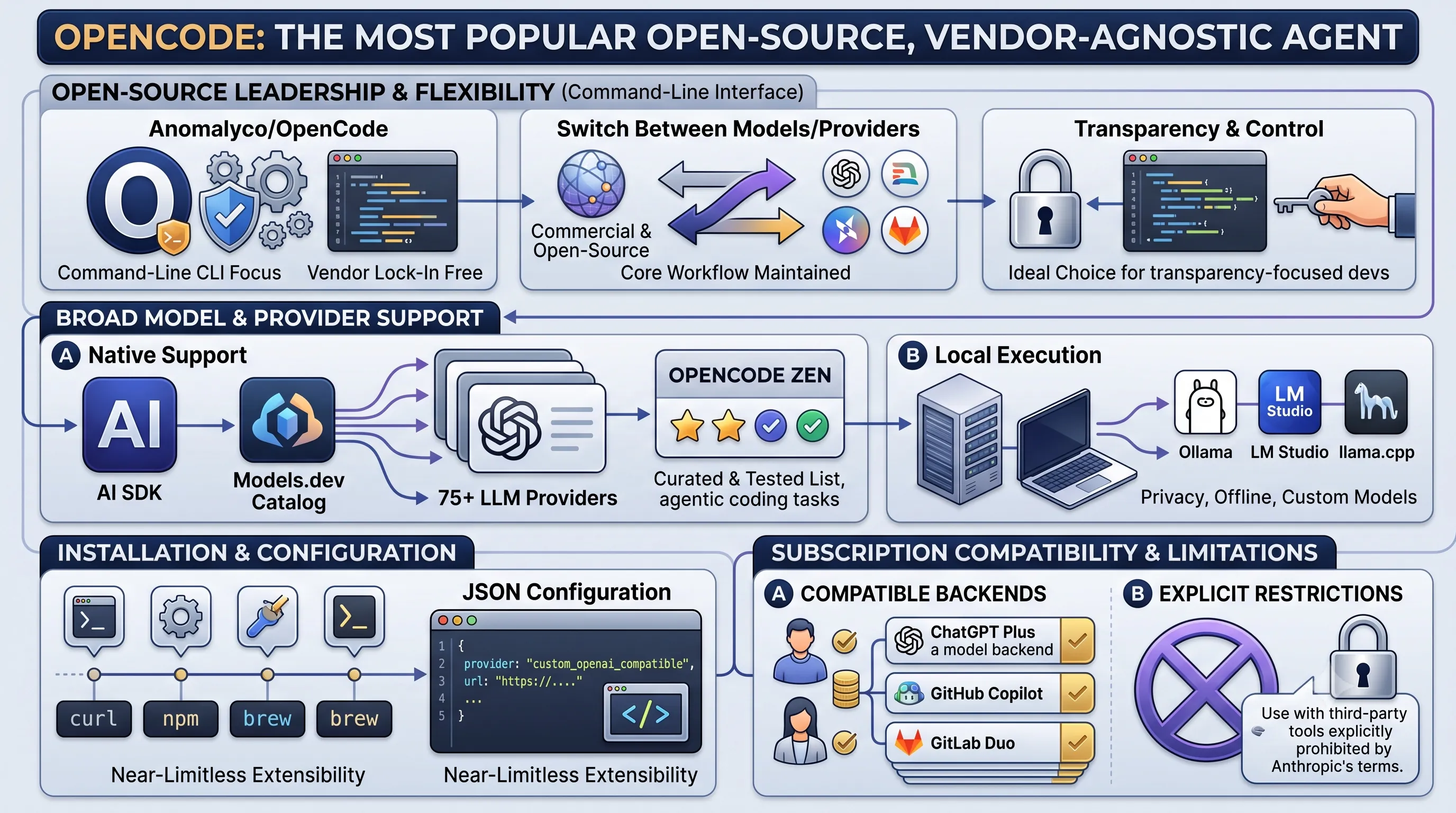
For developers prioritizing transparency and control, OpenCode stands out as a dominant force in the AI coding agent landscape.The project, which has now moved to the `anomalyco/opencode` repository, is specifically designed for developers who appreciate the command-line interface (CLI) interaction of tools like Claude Code but demand freedom from vendor lock-in.
This makes it an ideal choice for users who want to switch between different models and providers without changing their core workflow.
Broad Model and Provider Support
OpenCode's core strength is its unparalleled interoperability.It provides native support for over 75 LLM providers through its integration with the AI SDK and the extensive Models.dev catalog.
This allows developers to connect to a vast array of commercial and open-source models.
For those who require privacy, offline capability, or want to run custom-tuned models, OpenCode supports local model execution via popular runners like Ollama, LM Studio, and llama.cpp.
To help users navigate the wide selection of available models, the OpenCode team maintains OpenCode Zen, a curated and tested list of high-performing models specifically validated for agentic coding tasks.
Installation and Configuration
Getting started with OpenCode is straightforward, with multiple installation options available to suit different development environments.Users can install the agent via simple one-line commands using curl, npm, or brew.
Beyond the pre-configured providers, OpenCode offers advanced customization by allowing users to add any custom OpenAI-compatible provider directly through a JSON configuration file, offering near-limitless extensibility.
Subscription Compatibility and Limitations
OpenCode enhances its value by allowing developers to leverage their existing commercial subscriptions as backends.It is fully compatible with accounts for ChatGPT Plus, GitHub Copilot, and GitLab Duo, enabling users to access the powerful models behind these services within the OpenCode CLI.
However, there is a critical and explicit restriction regarding Anthropic's models.
According to OpenCode's documentation, Anthropic's terms of service explicitly prohibit using Claude Pro or Claude Max personal subscriptions with third-party applications like OpenCode.
This makes it a powerful alternative for users of many services, but not a viable pathway for those wanting to use their personal Claude subscription.
| Subscription Service | Compatibility with OpenCode | Notes |
|---|---|---|
| ChatGPT Plus | Compatible | Can be used as a model backend. |
| GitHub Copilot | Compatible | Can be used as a model backend. |
| GitLab Duo | Compatible | Can be used as a model backend. |
| Claude Pro / Max | Not Compatible | Use with third-party tools is explicitly prohibited by Anthropic's terms. |
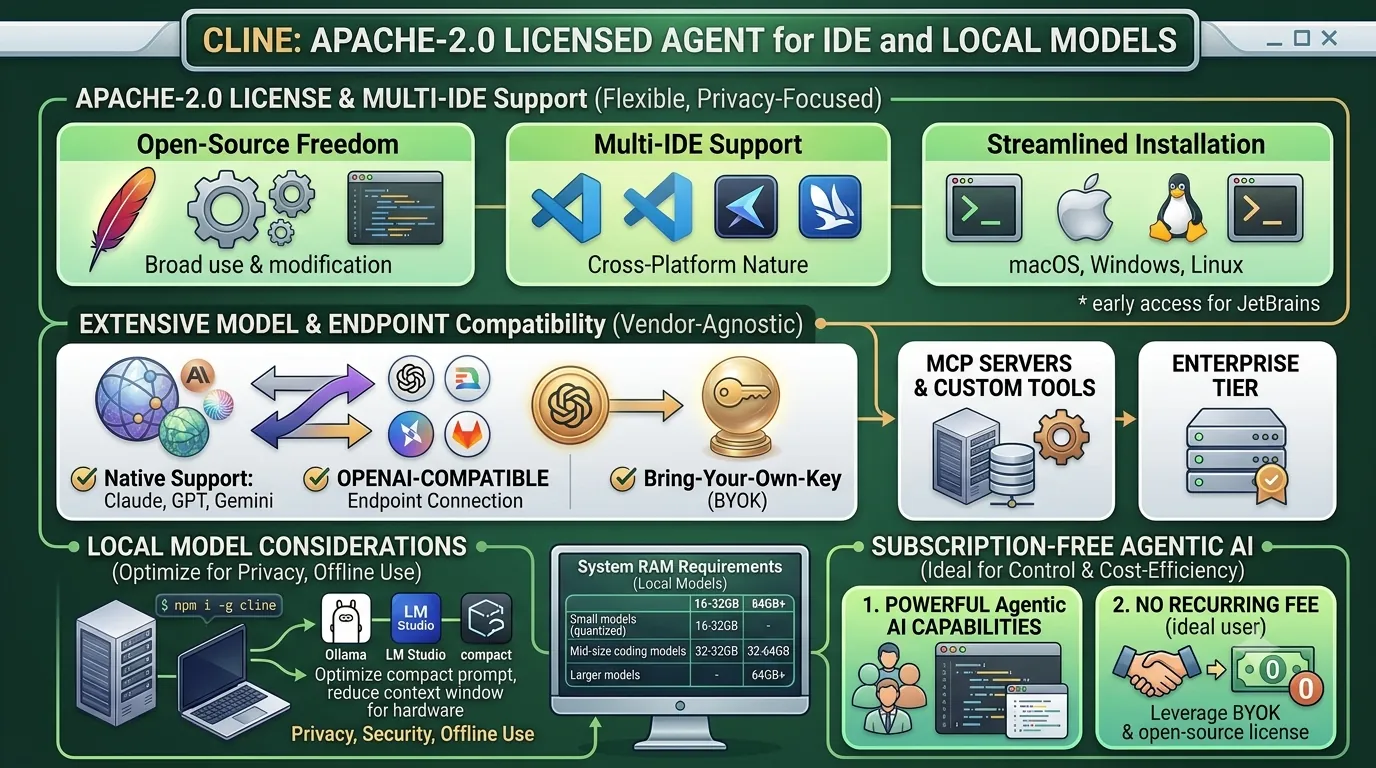
12. Cline: Apache-2.0 Licensed Agent for IDE and Local Models
This section contributes to the main topic by providing a detailed analysis of Cline, a powerful, open-source option for developers who prioritize flexibility, privacy, and cost-effectiveness by running models locally or connecting to custom endpoints directly within their IDE.Apache-2.0 License and Multi-IDE Support
Cline stands out as a highly flexible agent due to its Apache-2.0 license, permitting broad use and modification for individual developers and enterprises.Its cross-platform nature is evident in its support for multiple integrated development environments, running in VS Code, Cursor, and Windsurf, with early access available for JetBrains IDEs.
Installation is streamlined through a command-line interface (CLI) available for macOS, Windows, and Linux, requiring a simple `npm i -g cline` command.
Extensive Model and Endpoint Compatibility
A key strength of Cline is its vendor-agnostic approach to AI models.It offers native support for major commercial models including Claude, GPT, and Gemini.
For developers with existing infrastructure or custom solutions, Cline can connect to any OpenAI-compatible endpoint and supports a Bring-Your-Own-Key (BYOK) model.
This extends to advanced integrations, with support for MCP servers and custom tools, allowing for deeply customized and powerful agentic workflows.
For larger organizations, an enterprise tier is also available.
Local Model Considerations
Cline is a leading choice for developers who want to run AI models locally for privacy, security, or offline use.It integrates seamlessly with popular local model servers like Ollama and LM Studio.
However, running these models effectively requires significant system memory.
To optimize performance and reduce the context window size for less powerful hardware, it is highly recommended to enable the `Use Compact Prompt` setting during local runs.
System RAM requirements vary based on the model's size and complexity.
| Local Model Type | Suggested System RAM |
|---|---|
| Small or quantized models | 16-32GB |
| Mid-size local coding models | 32-64GB |
| Larger local models | 64GB+ |
Subscription-Free Agentic AI
Cline's ideal user is a developer working primarily in VS Code or JetBrains who desires powerful, agentic AI capabilities without the commitment of a recurring subscription fee.By leveraging its open-source license, BYOK support, and especially its robust local model integrations, users can achieve a high degree of control, privacy, and cost-efficiency.
This makes it a compelling alternative to subscription-based services for those with the requisite hardware and technical expertise.
13. Goose: Foundation-Governed, General-Purpose Agentic AI
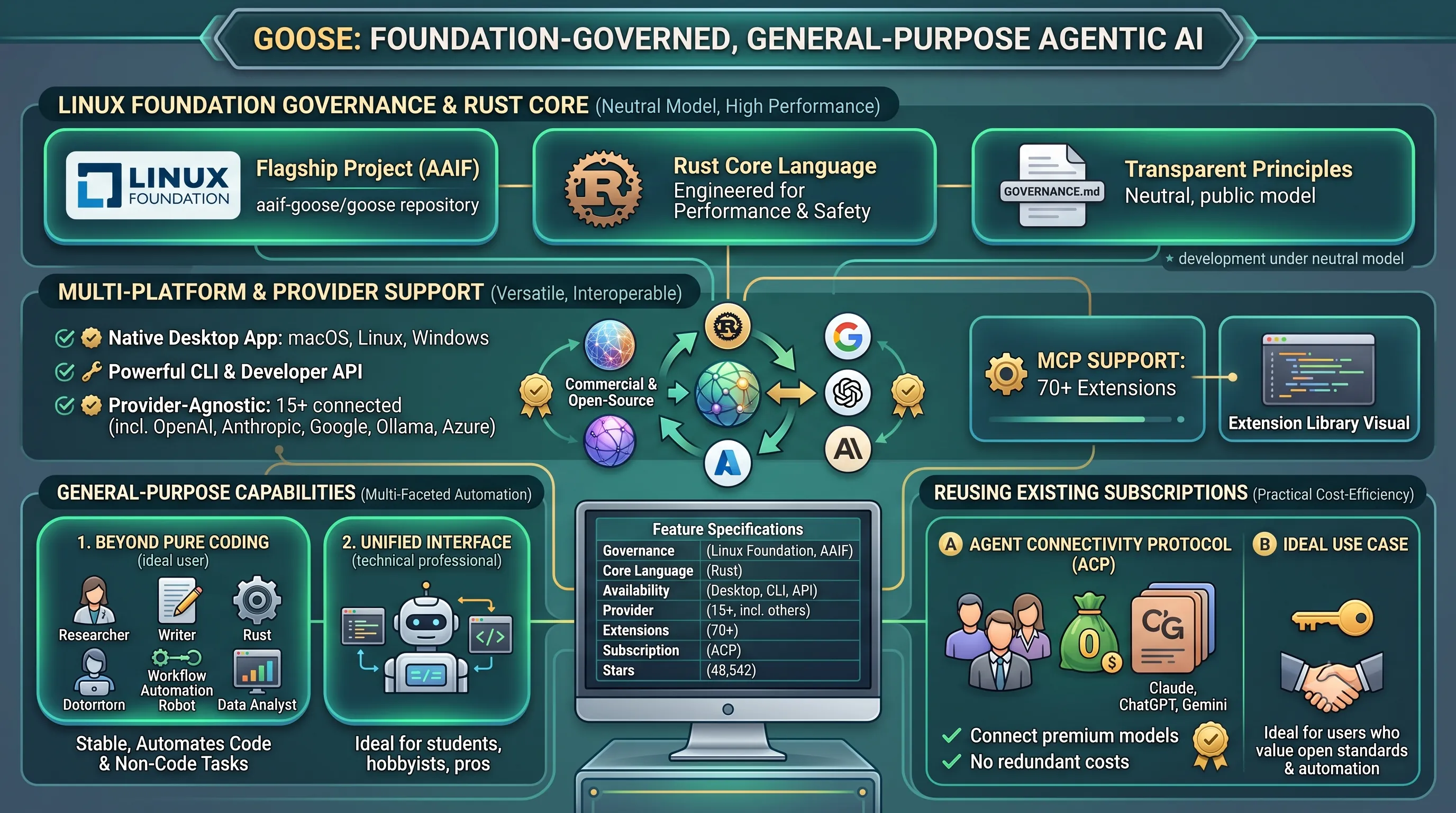
This section introduces Goose, a powerful option for developers seeking a versatile, provider-agnostic AI agent that extends beyond pure coding tasks.As part of our broader guide to selecting the right AI coding agent, Goose stands out due to its foundation-led governance, extensive integration capabilities, and its design as a general-purpose tool, making it a strong candidate for users who value open standards and multi-faceted automation in their workflow.
Linux Foundation Governance and Rust Core
Goose recently transitioned from its original repository (`block/goose`) to become a flagship project under the Linux Foundation's new Agentic AI Foundation (AAIF), now hosted at `aaif-goose/goose`.This move places its development and future under a neutral, foundation-governed model, with its principles transparently documented in a public `GOVERNANCE.md` file.
Built entirely in Rust, the agent is engineered for performance, safety, and reliability.
Multi-Platform and Provider Support
Goose offers broad accessibility, shipping as a native desktop application for macOS, Linux, and Windows, in addition to a powerful Command-Line Interface (CLI) and a developer API.Installing the CLI is straightforward for technical users, typically involving a single `curl` command to fetch the appropriate binary from its GitHub releases page.
A key strength is its provider-agnostic architecture, enabling connections to over 15 different AI providers, including major players like Anthropic, OpenAI, and Google, as well as open-source solutions via Ollama and routing services like OpenRouter, Azure, and Bedrock.
Furthermore, it leverages the Morph Computation Protocol (MCP) to integrate with a library of over 70 extensions, significantly expanding its capabilities.
General-Purpose Capabilities
While highly effective for coding, Goose is explicitly positioned as a general-purpose agent.Its design supports a wide array of tasks beyond software development, including research, technical writing, workflow automation, and data analysis.
This makes it an ideal choice for developers and technical professionals who require a single, unified interface for both coding assistance and other complex, knowledge-based work.
It is best suited for users who want a stable, foundation-governed tool that can automate a diverse set of both code and non-code tasks without being locked into a single AI provider's ecosystem.
Reusing Existing Subscriptions
Goose provides a practical cost-saving and management feature through its Agent Connectivity Protocol (ACP).This allows users to connect their existing paid subscriptions for services like Claude, ChatGPT, or Gemini directly to Goose.
By doing so, developers can leverage the premium models they already pay for within the Goose interface, consolidating their AI interactions without incurring redundant costs.
| Feature | Specification |
|---|---|
| Governance | Linux Foundation's Agentic AI Foundation (AAIF) |
| Core Language | Rust |
| Availability | Desktop App (macOS, Linux, Windows), CLI, API |
| Provider Support | 15+ (incl. OpenAI, Anthropic, Google, Ollama, Azure) |
| Extension Support | 70+ extensions via Morph Computation Protocol (MCP) |
| Subscription Model | Can reuse existing Claude, ChatGPT, Gemini subscriptions via ACP |
| Community Popularity | 48,542 GitHub stars |
14. Aider: Git-Native Terminal Agent with Granular Control
This section focuses on Aider, a terminal-based AI coding agent, examining how its deep integration with Git and flexible model support make it a unique choice. It fits into the broader guide by providing a detailed profile for developers who prioritize command-line workflows and precise control over both code changes and API costs, contrasting it with more integrated IDE-based or GUI-driven tools.Git-Native Workflow and Commit Integration
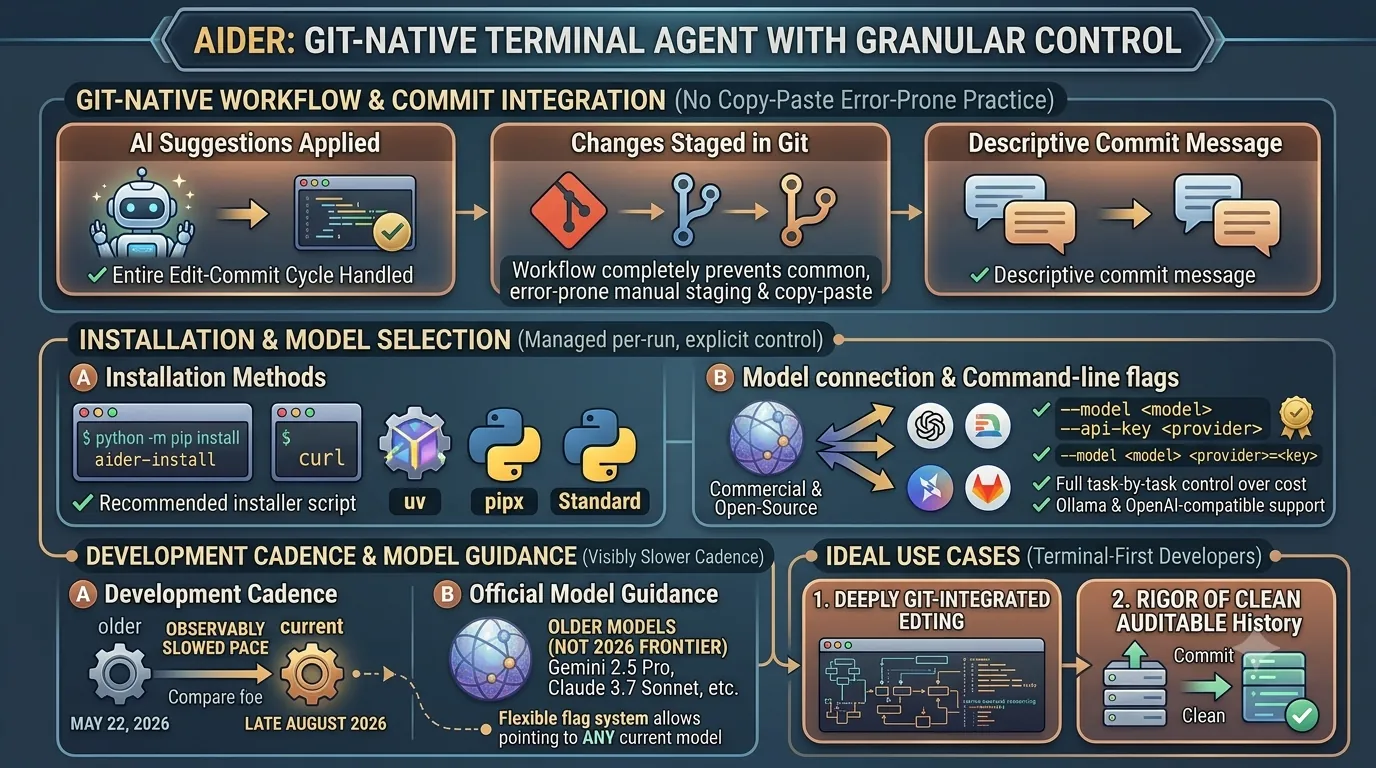
Aider operates as a Git-native terminal agent, a design choice that fundamentally shapes its entire user experience.Its most defining feature is that every change suggested and applied by the AI is automatically staged in Git with a descriptive commit message.
This workflow completely prevents the common, error-prone practice of manually copying and pasting code from a chat window into an editor or manually staging the resulting changes.
The agent handles the entire edit-commit cycle, ensuring a clean and auditable project history.
Installation and Model Selection
Aider provides a wide array of installation methods to accommodate different development environments and preferences.Users can choose the method that best fits their system's package management philosophy.
| Installation Method | Description |
|---|---|
python -m pip install aider-install |
Recommended installer script using pip. |
curl |
Direct installation via a shell script. |
uv |
Installation using the uv Python package installer. |
pipx |
Installation into an isolated environment using pipx. |
pip |
Standard installation using Python's package installer. |
Model connection is managed on a per-run basis via command-line flags, giving the user explicit control over which model is used for any given task.
For example, a user could invoke a specific Anthropic model with a command like
--model sonnet --api-key anthropic=<key>. This flexibility extends to running local models via Ollama and connecting to any OpenAI-compatible API, ensuring broad compatibility.
Development Cadence and Model Guidance
While powerful, Aider's development pace has observably slowed.As of this writing in late August 2026, the last repository push was on May 22, 2026.
This is a visibly slower cadence when compared to competitors like OpenCode and Cline, which often push updates daily.
This slowdown is also reflected in its official model guidance, which still recommends older models such as Gemini 2.5 Pro, DeepSeek R1/V3, Claude 3.7 Sonnet, o3/o4-mini, and GPT-4.1.
These are no longer considered 2026 frontier models.
However, it is important to note that because of its flexible flag-based system, users are not limited by this guidance and can still point Aider at any current model they have access to.
Best for Terminal-First Developers
Aider is best suited for terminal-native developers who want a deeply Git-integrated editing experience.Its core value proposition is for users who live in the command line and appreciate the rigor of having every AI-driven change automatically and cleanly committed.
It also appeals strongly to developers who want full control over which model they pay for on a task-by-task basis, rather than being locked into a single provider's ecosystem.
15. Kilo Code: Open-Source Extension with No-Markup Gateway Pricing
This section delves into Kilo Code, an open-source AI coding agent known for its transparent pricing and flexible access models, connecting it to our broader guide by presenting a unique option for developers who prioritize cost control and provider choice.Open-Source and No-Markup Gateway
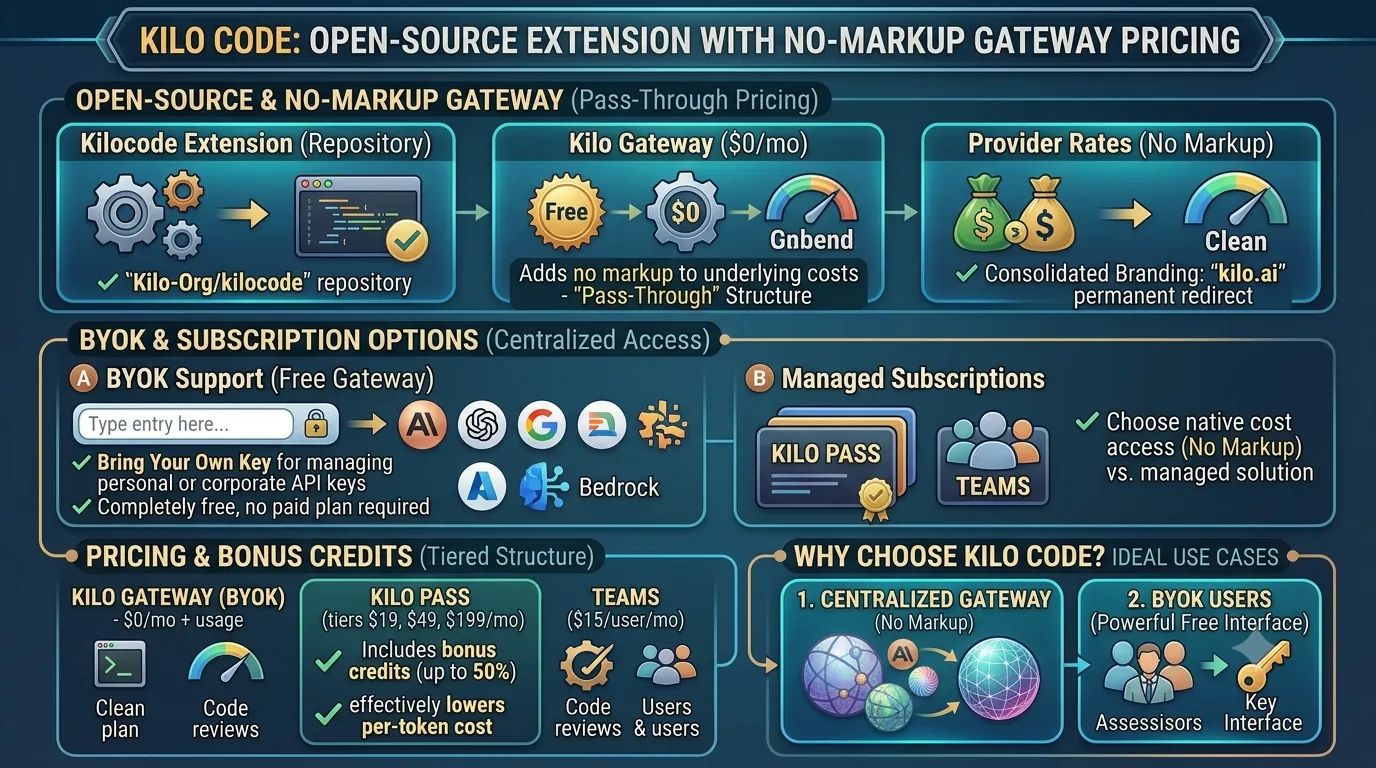
Kilo Code is a free, open-source extension, with its repository (`Kilo-Org/kilocode`).Its core offering is the Kilo Gateway, a service that operates on a distinct financial model: it charges a $0 monthly fee and provides access to various AI models at their exact provider rates.
This means Kilo Code adds no markup to the underlying costs, offering a transparent "pass-through" pricing structure.
Reflecting a branding consolidation, the project's original domain, `kilocode.ai`, now permanently redirects to `kilo.ai`.
BYOK and Subscription Options
A key feature for developers with existing API accounts is Kilo Code's "Bring Your Own Key" (BYOK) support.This functionality allows users to connect their own keys for major providers, including Anthropic, OpenAI, Google, Azure, and Bedrock, directly within the extension.
Crucially, leveraging the BYOK feature does not require any paid Kilo plan, making it a completely free gateway for managing personal or corporate API keys.
For users who prefer a managed solution, Kilo Code offers its own subscription plans through Kilo Pass and a dedicated Teams option.
Pricing and Bonus Credits
Kilo Code's pricing is structured to serve different needs, from individual developers to full teams.The Kilo Pass subscriptions are available at three tiers: $19, $49, and $199 per month.
The primary benefit of these passes is the inclusion of bonus credits, which can be as high as 50%, effectively lowering the per-token cost for users.
For collaborative environments, a Teams plan is available at a cost of $15 per user per month.
| Plan Type | Monthly Cost | Key Features |
|---|---|---|
| Kilo Gateway (BYOK) | $0/mo + usage | Bring Your Own Key for major providers; usage is billed at exact provider rates with no markup. |
| Kilo Pass | $19, $49, or $199/mo | Includes bonus credits of up to 50% on top of the subscription fee. |
| Teams | $15/user/mo | Designed for team collaboration and management. |
Why Kilo Code?
Kilo Code is best suited for developers with two primary goals.First, it appeals to those who want a centralized gateway to access multiple AI models at their native cost, completely avoiding markups.
Second, it is an excellent choice for developers who already have their own API keys (BYOK) and simply need a powerful, free, and open-source interface to use them.
The optional Kilo Pass subscriptions add value for users who can leverage the bonus credits to reduce their overall AI expenditure.
16. Kiro: Credit-Based IDE with Predictable Budgeting
As part of our comprehensive guide to AI coding agents, this section examines Kiro, a tool that distinguishes itself with a consumption-based credit system. This approach offers a predictable and transparent pricing model, which is a critical decision factor for developers and teams managing specific project budgets. We will detail its plans, features, and limitations to help you determine if Kiro's structure aligns with your needs.Credit System and Free Tier
Kiro is built as a credit-based IDE, where usage of its AI features consumes a pre-allocated number of credits.For developers looking to try the platform, the free tier provides 50 credits per month.
A significant advantage of this entry-level offering is its inclusion of high-quality models, featuring both open-weight models and Claude Sonnet 4.5, making it a powerful option even without a paid subscription.
Subscription Plans and Team Features
For users with more demanding needs, Kiro offers a straightforward upgrade path with several paid plans.The Pro plan is priced at $20/mo for 1,000 credits, the Pro+ plan at $40/mo for 2,000 credits, and the Power plan at $200/mo for 10,000 credits.
If usage exceeds the monthly allowance, overage is billed at the end of the month at a rate of $0.04 per credit.
To encourage adoption, Kiro offers new users a $20 credit that can be applied toward their first upgrade from the free tier.
| Plan Tier | Monthly Cost | Monthly Credits |
|---|---|---|
| Free | $0 | 50 |
| Pro | $20 | 1,000 |
| Pro+ | $40 | 2,000 |
| Power | $200 | 10,000 |
These include centralized billing for simplified accounting, usage analytics to monitor team-wide consumption, and Single Sign-On (SSO) capabilities through AWS IAM Identity Center for secure access management.
Limitations and GovCloud Pricing
Developers should be aware of a key policy in Kiro's credit system: unused credits do not roll over to the next billing cycle, which incentivizes users to fully leverage their monthly allowance.Additionally, for customers operating within the US public sector, the AWS GovCloud pricing has no free tier.
Pricing for these GovCloud plans is also approximately 20% higher than their standard commercial counterparts.
Predictable Budgeting with Kiro
Kiro's model is best for developers and organizations that want a predictable credit budget without the risk of unexpected, high-cost API bills.Its structure ensures costs are capped at the chosen plan level unless overages are explicitly incurred.
The platform's appeal is further enhanced by its robust free tier, which provides direct access to Claude Sonnet 4.5, making it an excellent choice for individuals and small teams who need access to a premium model without an initial financial commitment.
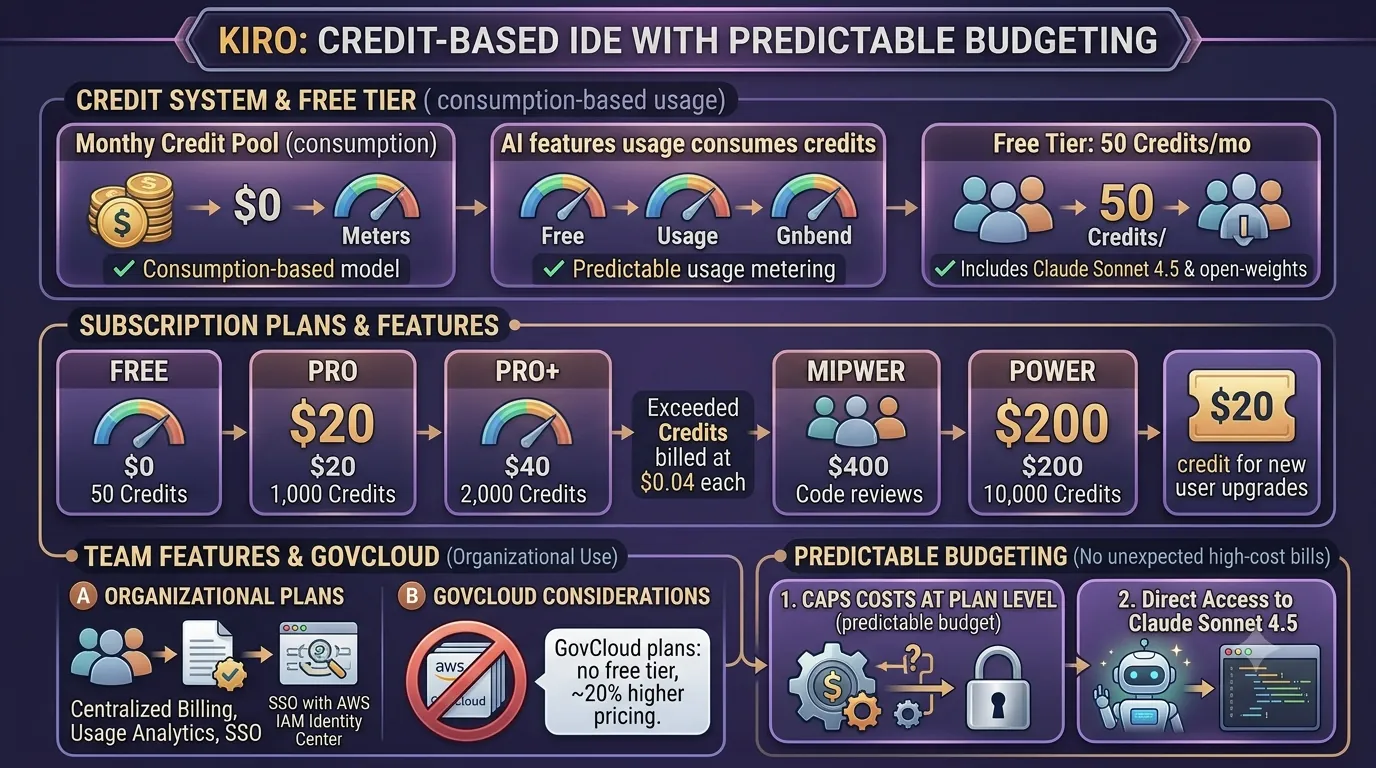
17. Google Antigravity 2.0: Parallel Agents in the Gemini Ecosystem
This section provides a deep-dive into Google's Antigravity 2.0 agent, a key option for developers deeply integrated into the Gemini ecosystem.We will analyze its unique architecture, performance benchmarks, and pricing to help you determine if its parallel processing capabilities and API-first approach align with your project's requirements, directly supporting the main article's goal of finding the best AI coding agent for your needs.
Antigravity 2.0 Features and Architecture
Announced at Google I/O on May 19, 2026, Antigravity 2.0 represents a significant architectural shift for Google's coding agent.The platform was split into a unified harness that orchestrates tasks through a completely redesigned desktop application and a new standalone Command Line Interface (CLI).
This new structure is built with security and enterprise-level control in mind, incorporating several key features.
It introduces cross-platform terminal sandboxing, ensuring that agent actions are isolated and controlled regardless of the operating system.
To protect sensitive information, the system includes built-in credential masking.
Furthermore, it enforces hardened Git policies, allowing teams to maintain strict control over code commits and repository interactions generated by the agent.
Gemini 3.1 Pro Performance
The agent's coding and terminal capabilities are powered by Google's Gemini 3.1 Pro model.In standardized tests, Antigravity 2.0 demonstrated strong performance in software engineering tasks, scoring 80.6% on SWE-bench Verified and 54.2% on SWE-bench Pro.
For command-line operations, the harness entries achieved scores between 70.3% and 70.7% on Terminal-Bench 2.1, showcasing its competence in executing complex shell commands.
Subscription Plans and API Access
Access to Antigravity 2.0 is integrated into Google AI subscription tiers.The Google AI Pro plan is priced at $19.99/mo and provides 4x the free usage limits for both the agent model and Gemini 3.1 Pro.
For more intensive use cases, the Google AI Ultra tier starts at $99.99/mo and offers up to 20 times the usage of the Pro plan.
It's worth noting that in early June 2026, Google reset all quota counters to zero for both free and paid users to resolve some post-launch issues.
For programmatic access, Google provides a Managed Agents API and an Antigravity SDK for teams that require self-hosted deployments.
| Plan | Monthly Price | Key Usage Benefit |
|---|---|---|
| Google AI Pro | $19.99 | Offers 4x free limits for the agent model and Gemini 3.1 Pro. |
| Google AI Ultra | Starts at $99.99 | Offers up to 20x the usage of the Pro plan. |
Parallel Agent Management
A standout feature of Antigravity 2.0 is its use of specialized subagents for parallel tasks.This allows the system to delegate different parts of a complex problem—such as running tests, refactoring code, and writing documentation simultaneously—to distinct agents that work in parallel, coordinated by the central harness.
This architecture makes Antigravity 2.0 best suited for developers already working within the Gemini ecosystem who require a visual interface for managing parallel agents and need the extensibility offered by the Managed Agents API.
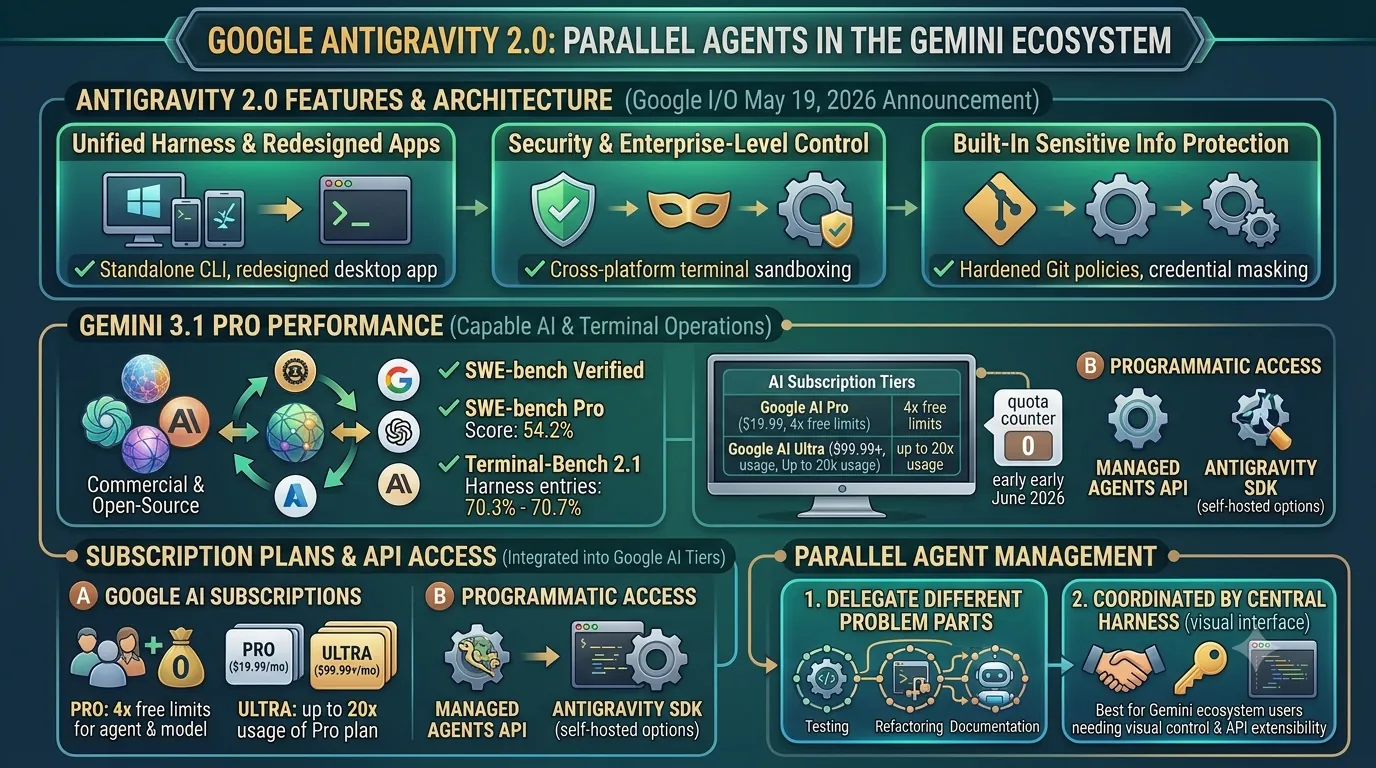
18. Optimizing Your AI Agent Stack: Integration and Best Practices
This section builds upon the individual agent reviews in the main article by exploring how to combine multiple tools into a cohesive and powerful workflow, a common practice among modern developers.Building Your Ideal Agent Stack
Instead of searching for a single "do-it-all" tool, the most effective strategy is to build a specialized stack.Our research shows that most developers now settle on a combination of two or three distinct AI agents, each chosen for a specific task in the development lifecycle.
A common and highly effective stack combines agents optimized for different scales of work, along with an option for greater flexibility.
This multi-agent approach allows developers to use the best tool for each specific job, from high-level architecture to line-by-line implementation.
A typical professional stack includes:
- A "Heavy" Agent for Complex Tasks: For significant undertakings like refactoring an entire class, generating boilerplate for a new service, or debugging complex logic, developers lean on powerful, context-aware agents.
Leading choices in this category include Codex or Claude Code. - An Inline Agent for Real-Time Assistance: For the inner loop of coding, an inline completion tool is indispensable.
These agents provide fast, context-aware suggestions directly in the editor, speeding up function writing and reducing syntax errors.
The most common choices here are Copilot or Cursor. - An Open-Source Agent for Flexibility: To round out the stack, many developers include a free, open-source agent.
Tools like OpenCode, Cline, or Aider offer tremendous model flexibility, allowing users to connect to various local or API-based models, control costs, and experiment with emerging open-source LLMs.
| Role in Development Stack | Example Agents | Primary Use Case |
|---|---|---|
| Heavy Agent Work | Codex, Claude Code | Large-scale refactoring, project scaffolding, complex problem-solving. |
| Inline Completions | Copilot, Cursor | Real-time code completion, function generation, boilerplate reduction. |
| Model Flexibility & Experimentation | OpenCode, Cline, Aider | Running local models, testing various open-source LLMs, cost control. |
Interoperability and Underlying Models
The "stack" approach is becoming increasingly seamless as agents grow more interoperable.This is largely driven by emerging standards like the Model Communication Protocol (MCP) and the Agent Communication Protocol (ACP), which allow different tools to work together more effectively within the IDE.
However, it is crucial to remember where the core intelligence, cost, and quality originate.
Ultimately, the foundational model layer underneath these agent front-ends drives most of the cost and determines the quality of the output.
Whether you are using a proprietary agent tied to a specific model or an open-source tool that lets you choose your backend, the performance of the underlying large language model is the most critical factor in your success.
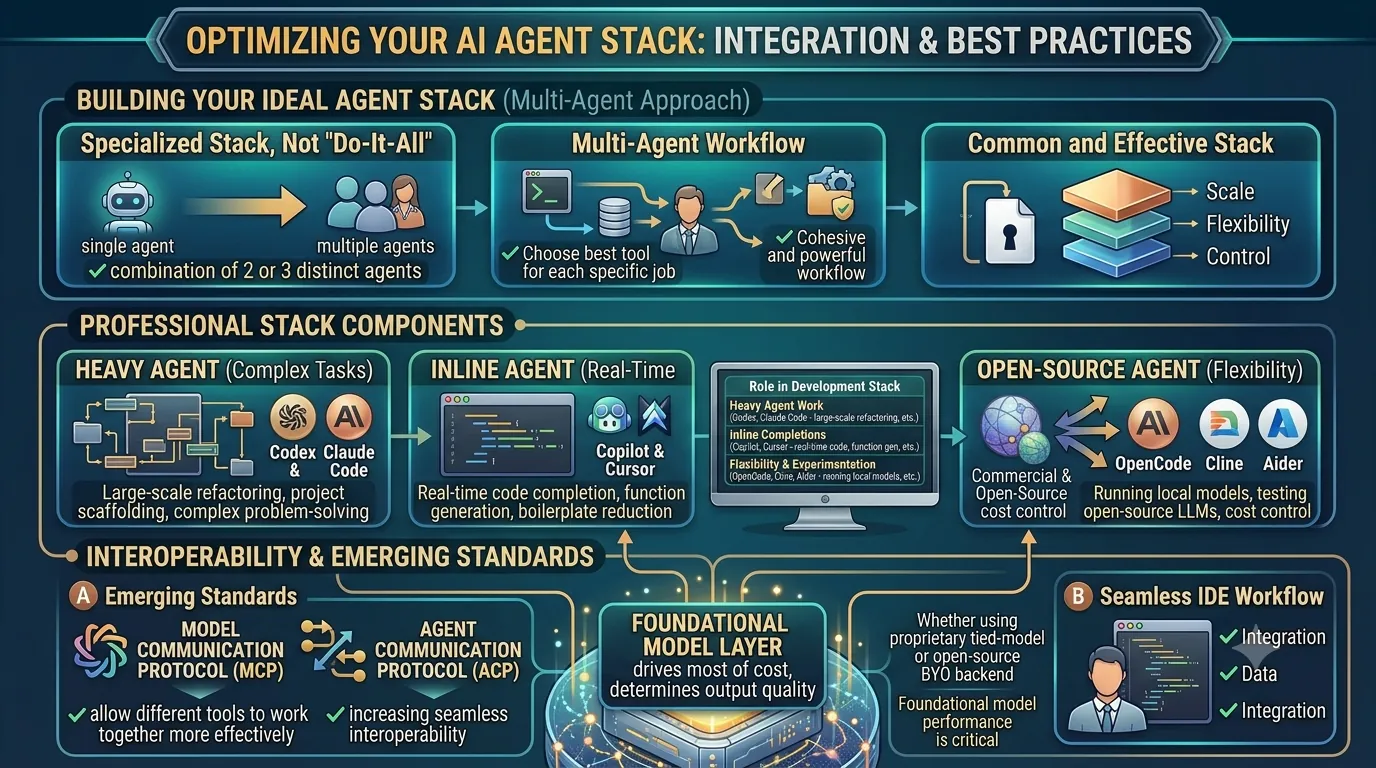
19. Boosting Productivity: Advanced Search and Code Editing Tools for Agents
Choosing the right AI coding agent is only the first step; unlocking its true potential often requires optimizing its most common operations.As this section of our guide explores, the efficiency of an agent is heavily dependent on how quickly it can perform two fundamental tasks: searching the existing codebase and applying its generated changes.
Specialized tools designed to accelerate these processes can be the difference between a sluggish workflow and a highly productive development cycle.
WarpGrep: Revolutionizing Agentic Search
The time an agent spends understanding the context of a codebase is a major performance bottleneck.In fact, research from Cognition measured that coding agents spend a staggering 60% of their time on search.
This is precisely the problem WarpGrep, a dedicated AI search sub-agent, was built to solve.
Instead of a simple, linear search, WarpGrep executes 8 parallel searches per turn across 4 turns, allowing it to rapidly scan vast codebases.
The result is a dramatic reduction in search time, with most queries completing in under 6 seconds.
Integration is seamless for modern agents, as WarpGrep runs as an MCP (Modular Component Protocol) server.
This allows it to plug directly into any MCP-compatible agent, such as Codex, Claude Code, or Cursor, acting as a specialized search engine that replaces the agent's slower, built-in capabilities.
The accessibility of this tool is a key advantage; it offers a generous free tier of 100,000 requests, with subsequent usage priced at an affordable $1 per 1 million requests.
This pricing structure makes it feasible for individual developers and large teams alike to eliminate the primary time sink in agent-driven development.
Fast Apply: Instant Code Merging
After an agent has searched the code and generated a solution, the final step is to merge that code into the project files.Waiting for this process can interrupt a developer's flow state.
Fast Apply is a utility engineered for one purpose: the instant merging of AI-generated code edits.
It operates at an exceptional speed, applying generated diffs into a codebase at a rate of 10,500 tokens per second.
This high-speed application ensures that the changes proposed by an AI agent appear in the developer's environment almost immediately, creating a fluid, real-time feedback loop between generating code and reviewing its implementation.
| Tool | Primary Function | Key Performance Metric | Pricing Detail |
|---|---|---|---|
| WarpGrep | Parallel Codebase Search | Completes searches in under 6 seconds | Free for 100,000 requests |
| WarpGrep | Parallel Codebase Search | Executes 8 parallel searches per turn | $1 per 1M requests (post-free tier) |
| Fast Apply | AI-Generated Code Merging | 10,500 tokens per second | N/A |
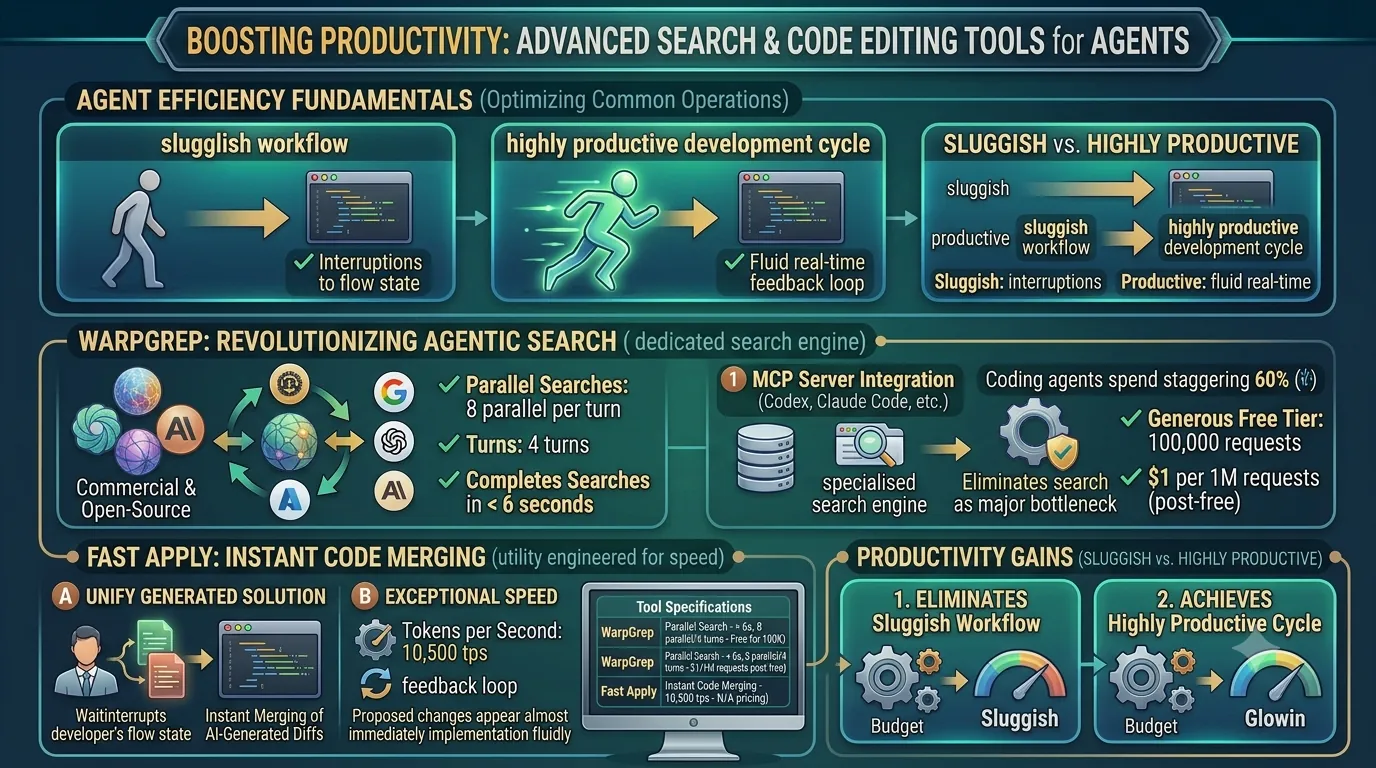
20. Open-Source AI Coding Agents: A Popularity Contest by GitHub Stars
This section focuses on the open-source landscape, offering a clear, data-driven hierarchy based on community adoption.Instead of relying on marketing claims, we use GitHub stars as a direct proxy for developer interest and real-world usage, helping readers identify the most trusted and actively supported open-source AI coding agents.
Top Open-Source Agents by Stars
When evaluating open-source tools, the number of stars on a GitHub repository is a powerful indicator of community approval and adoption.As of August 2026, the hierarchy is clear, with a few projects commanding significant developer attention.
OpenCode stands firmly at the top with a remarkable 172,198 stars, making it the most popular open-source coding agent by a wide margin.
Following it is Gemini CLI with 105,104 stars and the classic OpenAI Codex CLI with 89,991 stars, both demonstrating massive followings.
The ranking continues with Cline (62,996 stars), Goose (48,542 stars), Aider (45,945 stars), and Kilo Code (19,968 stars).
It is important to note that while the `anthropics/claude-code` repository boasts an impressive 131,380 stars, it is not included in this ranking because it is a proprietary tool and not considered open-source.
| Open-Source Agent | GitHub Stars (as of August 2026) |
|---|---|
| OpenCode | 172,198 |
| Gemini CLI | 105,104 |
| OpenAI Codex CLI | 89,991 |
| Cline | 62,996 |
| Goose | 48,542 |
| Aider | 45,945 |
| Kilo Code | 19,968 |
Why GitHub Stars Matter
In the developer community, GitHub stars are more than just a vanity metric; they serve as a crucial signal for project health and relevance.This metric is a powerful indicator because GitHub stars track real adoption better than marketing campaigns or press releases.
A high star count suggests that a large number of developers have not only discovered the tool but have also found it valuable enough to bookmark, follow, and implicitly endorse.
This grassroots validation often correlates with better documentation, a more active community for support, and a higher likelihood of long-term maintenance and development.
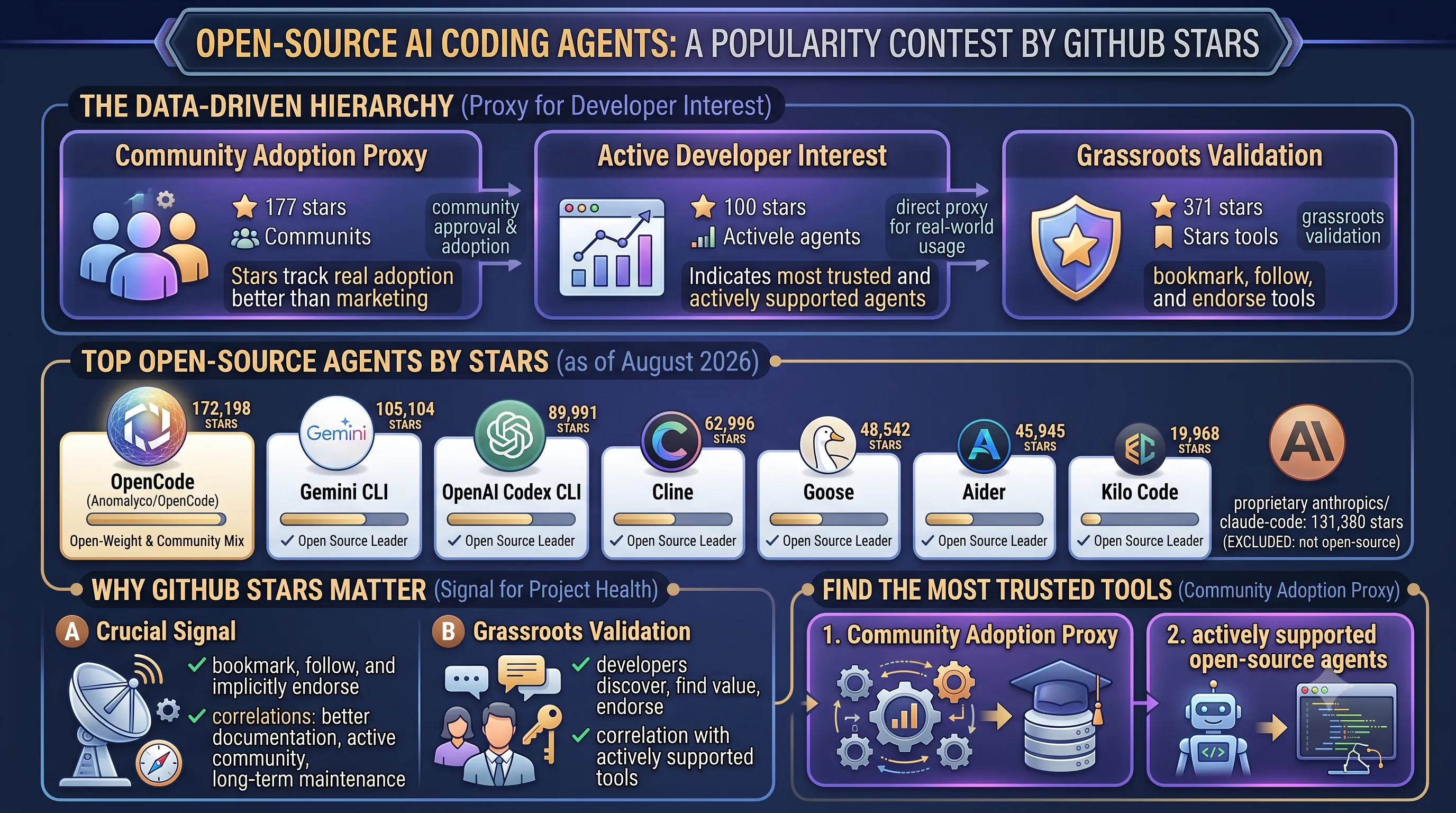
21. Accessible AI Coding: A Guide to Free Tools and Tiers
This section of our guide focuses on the entry-level options for developers.It provides a detailed look at completely free open-source tools and the free tiers offered by popular commercial products, helping you start with AI-assisted coding without any financial commitment.
Free-to-Install Open-Source Agents
A growing ecosystem of open-source AI coding agents is available for developers who prefer maximum control and transparency.Tools such as OpenCode, Cline, Goose, Aider, Kilo Code, and Gemini CLI are all free to install and run.
It is crucial to understand the cost model, however.
While the agent software itself is free, they function by making calls to powerful large language models.
This means users typically pay per token for the model's API usage, unless they have the hardware and expertise to run a capable model locally.
Free Tiers of Commercial Products
For those seeking a more integrated, out-of-the-box experience, several leading commercial products provide generous free tiers.These plans are designed to give individual developers, students, and hobbyists a chance to leverage powerful AI assistance without a subscription.
Notable free tiers include GitHub Copilot Free, the Cursor Hobby plan, and the Kiro Free plan.
Each comes with its own set of usage limits and features.
GitHub Copilot's free offering is capped at 2,000 completions per month, while Kiro provides users with a monthly allowance of 50 credits.
The Cursor Hobby plan stands out for its accessibility, as it requires no credit card to sign up, removing a common barrier for trial users.
Key Free Tier Features
The value of a free tier often lies in the specific features and allowances it provides.The Gemini CLI is particularly noteworthy for its generous limits, offering users 60 requests per minute and up to 1,000 requests per day, accessible with only a personal Google account.
This high request volume makes it a powerful option for developers who work frequently from the command line.
The Kiro Free tier also presents a compelling advantage by including access to premium models within its free credit allowance.
The 50 monthly credits can be used with various open-weight models and, significantly, with Anthropic's powerful Claude Sonnet 4.5, giving free users a taste of state-of-the-art model performance.
| Product / Tool | Free Tier Name | Key Feature or Limit |
|---|---|---|
| GitHub Copilot | Free | 2,000 completions per month |
| Cursor | Hobby | No credit card required for signup |
| Kiro | Free | 50 credits per month (includes access to Claude Sonnet 4.5) |
| Gemini CLI | Free Tier | 60 requests/min and 1,000 requests/day with a Google account |
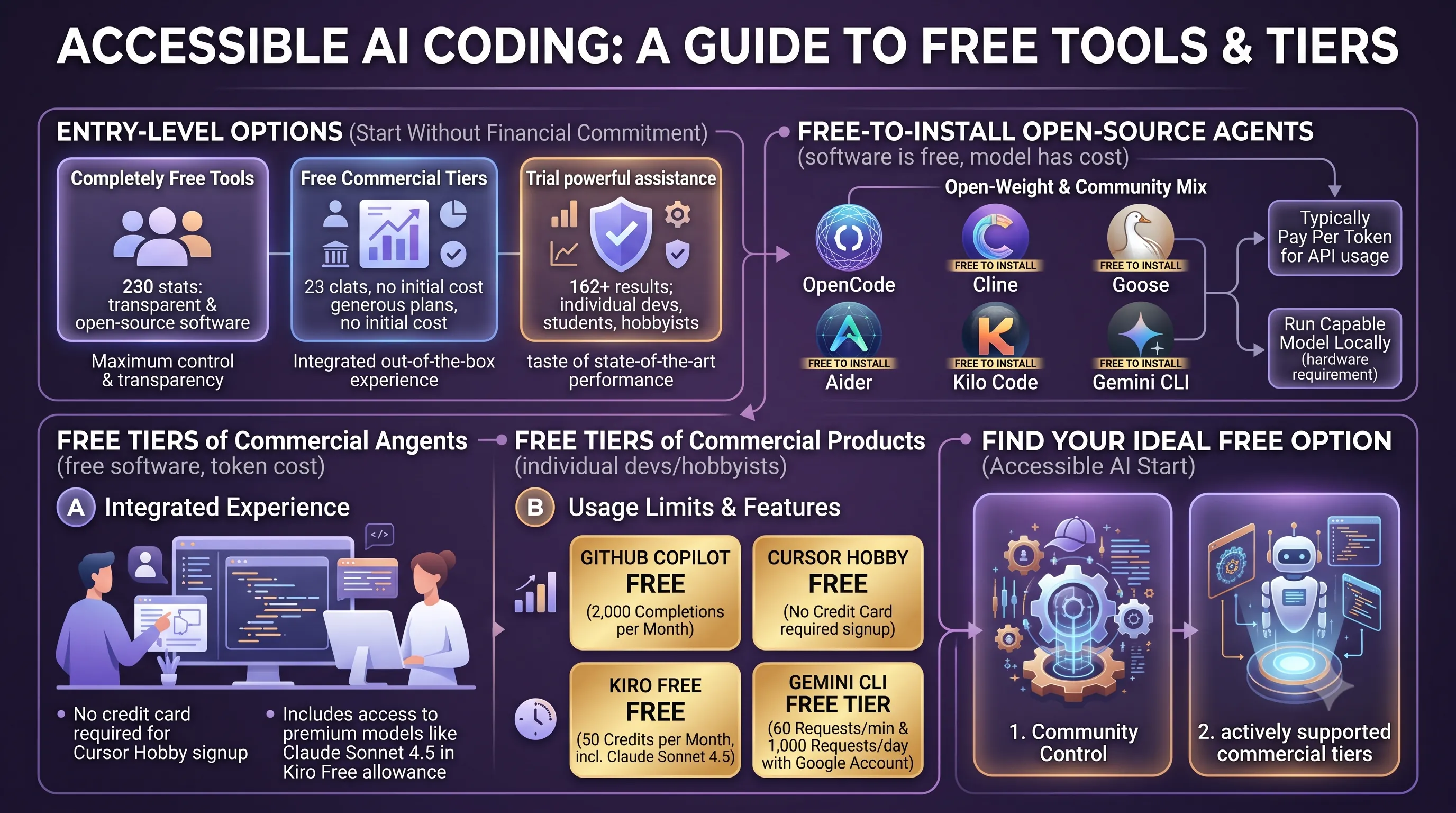
22. References
- https://www.morphllm.com/best-ai-coding-agents-2026 — User-provided
- Best AI Coding Assistants 2025: Claude vs Copilot vs Cursor (Honest … — Web search evidence
- Best AI Coding Assistants in 2025: GitHub Copilot vs Cursor vs Codeiu… — Web search evidence
- Best AI Coding Assistants 2025 - Top AI Code Completion Tools Compared — Web search evidence
- Best AI Coding Assistant in 2025: Complete Review and Comparison G… — Web search evidence
- Best AI Coding Assistants in 2025: A Comparative Review — Web search evidence
Related Posts

Microsoft Unleashes MAI: First-Party AI Family Replaces OpenAI, Powers Microsoft 365 & GitHub Copilot, Cuts Costs by 89%Microsoft officially launches its MAI (Microsoft AI) model family, marking a strategic pivot to...

July 2026 AI Transformation: GPT-5.6 Leads 'Best Fit' Era Amidst Frontier Models, Regulations & Enterprise InnovationsJuly 2026 saw AI shift to 'best fit' models. Discover OpenAI's GPT-5.6, xAI, Meta releases, new...
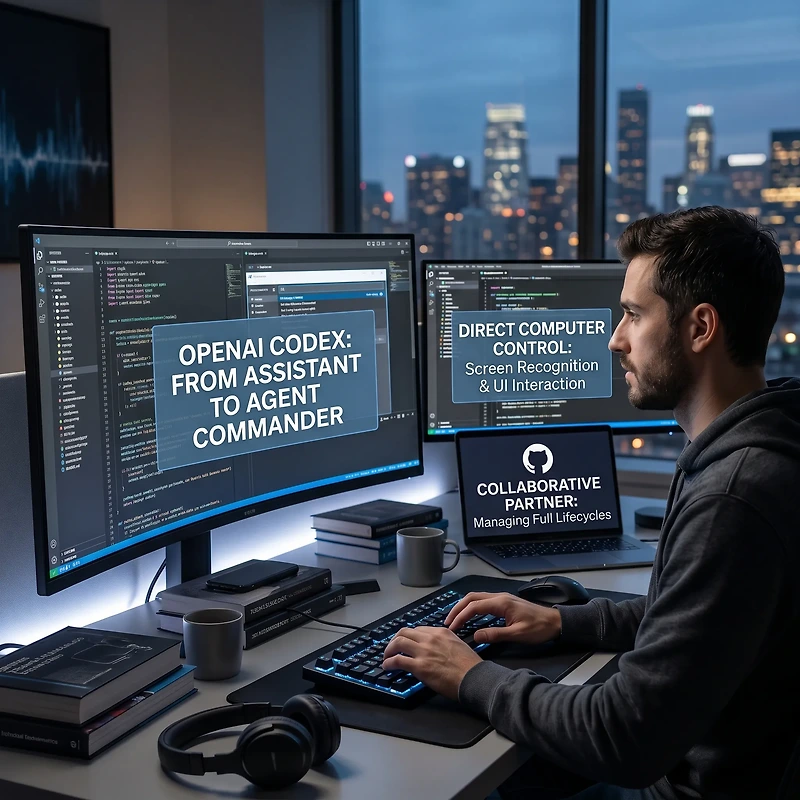
OpenAI Codex Unleashed: Autonomous AI Agents Take Direct Computer Control & Reshape Software Development with LLMs, Copilot & AIOSOpenAI Codex has undergone a major transformation, evolving into a sophisticated AI agent capable...