
Model Context Protocol (MCP): The Developer's Guide to Building Secure, Scalable AI Connectivity
🚀 Key Takeaways
- The Model Context Protocol (MCP) is an open standard that connects AI applications to external data sources and tools.
- MCP empowers LLMs by allowing them to delegate complex tasks like data retrieval and external API calls to specialized servers.
- The core architecture consists of hosts, clients, and independent servers, enabling modular and scalable AI solutions.
- MCP servers add value by exposing tools for AI-driven actions, resources for data access, and prompts for user interaction.
- Communication relies on defined stateful protocols and transport mechanisms to ensure reliable and flexible connections.
- Benefits of MCP server implementation include extensibility, modularity, interoperability, and a clear focus for AI application development.
- Implementing an MCP server requires adherence to strong security practices, including robust validation, authentication, and error handling.
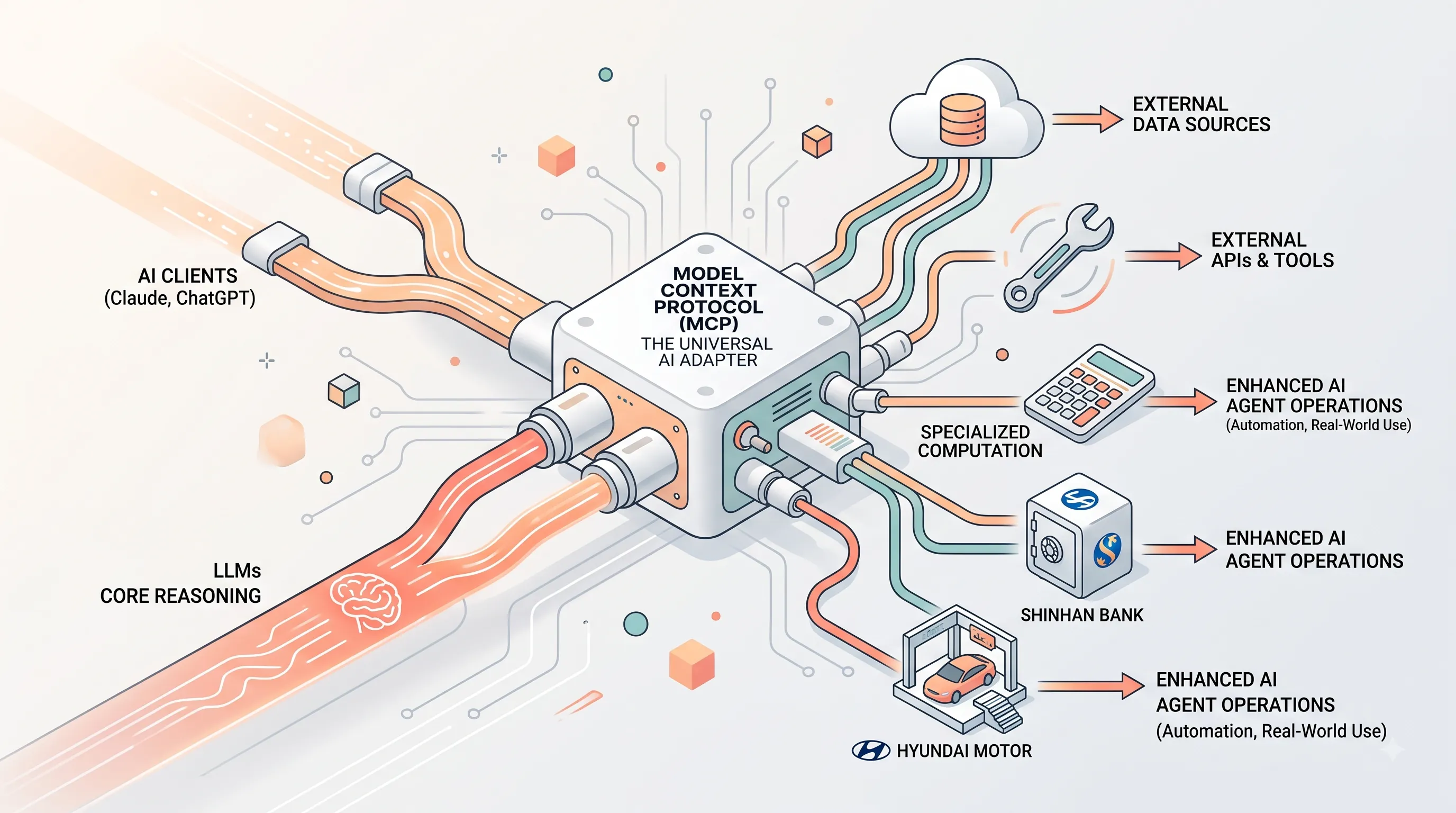
Just as USB-C revolutionized physical connectivity by standardizing how devices interact, the Model Context Protocol (MCP) is poised to do the same for artificial intelligence.
Proposed by Anthropic and adopted by major AI clients like Claude and ChatGPT, MCP is an open standard designed to seamlessly connect powerful Large Language Models (LLMs) with the vast array of external data sources and tools.
It establishes a unified language, allowing AI applications to extend their capabilities beyond their internal knowledge bases.
In today's rapidly evolving AI landscape (as of August 2026), LLMs are increasingly being tasked with complex, real-world operations that demand access to up-to-date information, external APIs, and specialized computations.
MCP addresses this critical need by enabling a clean separation of concerns: LLMs can focus on their core reasoning, while dedicated, reusable MCP servers handle the intricacies of data retrieval, tool invocation, and resource management.
This architecture fosters greater modularity, extensibility, and interoperability across AI systems, driving innovation and real-world application.
Building an MCP server means creating a secure and powerful bridge between your AI application and the external world, unlocking new possibilities for automation and intelligent interaction.
Companies like Shinhan Bank and Hyundai Motor are already leveraging MCP to integrate AI agents into their operations, demonstrating its practical value.
This guide provides the essential knowledge for developing robust, secure, and performant MCP servers, ensuring your AI can truly connect with all the data it needs.
Proposed by Anthropic and adopted by major AI clients like Claude and ChatGPT, MCP is an open standard designed to seamlessly connect powerful Large Language Models (LLMs) with the vast array of external data sources and tools.
It establishes a unified language, allowing AI applications to extend their capabilities beyond their internal knowledge bases.
In today's rapidly evolving AI landscape (as of August 2026), LLMs are increasingly being tasked with complex, real-world operations that demand access to up-to-date information, external APIs, and specialized computations.
MCP addresses this critical need by enabling a clean separation of concerns: LLMs can focus on their core reasoning, while dedicated, reusable MCP servers handle the intricacies of data retrieval, tool invocation, and resource management.
This architecture fosters greater modularity, extensibility, and interoperability across AI systems, driving innovation and real-world application.
Building an MCP server means creating a secure and powerful bridge between your AI application and the external world, unlocking new possibilities for automation and intelligent interaction.
Companies like Shinhan Bank and Hyundai Motor are already leveraging MCP to integrate AI agents into their operations, demonstrating its practical value.
This guide provides the essential knowledge for developing robust, secure, and performant MCP servers, ensuring your AI can truly connect with all the data it needs.
1. Model Context Protocol (MCP): The Universal Connector for AI
This section serves as a foundational introduction to the Model Context Protocol (MCP).Before we dive into the technical specifics of building an MCP server, it is crucial to understand what MCP is, the problems it solves, and the core architectural components that make it work.
Think of this as the "why" behind the "how" that follows in the rest of this guide.
What is MCP?
Model Context Protocol (MCP) is an open industry standard designed to unify how AI applications connect with external data sources and tools.Proposed by Anthropic, its core purpose is to standardize the interaction layer between AI models and the vast world of information and capabilities that exist outside of them.
By establishing a common communication framework, MCP functions like a universal connector, ensuring that different AI applications can reliably and consistently access disparate systems.
This standardization has led to broad support across the ecosystem, with prominent clients like Claude and ChatGPT already incorporating MCP to enhance their functionalities.
Key Benefits and Architecture
The fundamental design principle of MCP is the clean separation of concerns.It allows Large Language Model (LLM) applications to focus on their primary AI functionality by delegating complex, non-core tasks to dedicated external components.
Under this protocol, responsibilities such as data retrieval from files or databases, accessing external web APIs, or performing specialized computations are offloaded to MCP servers.
These servers act as robust bridges between the AI application and the external world.
This architectural choice yields significant benefits for developers and users, including enhanced extensibility, modularity in system design, and guaranteed interoperability between compliant components.
It also allows development teams to maintain focus on their core product and improves overall system security by isolating external interactions.
Defining Hosts, Clients, and Servers
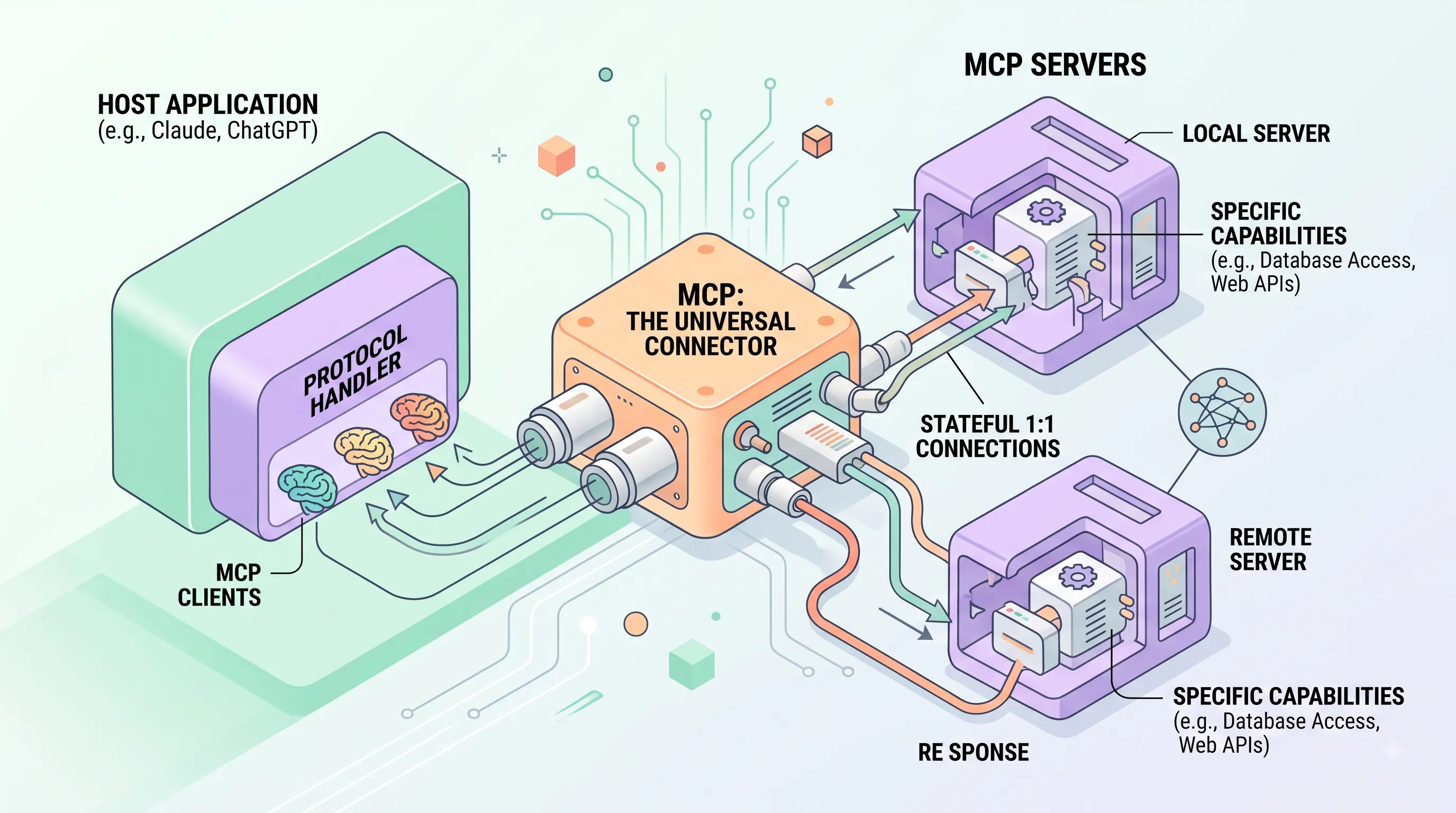
The MCP architecture is defined by three distinct roles that work in concert: hosts, clients, and servers.Hosts are the primary applications that manage the overall user or LLM interaction.
A host application is responsible for managing one or more MCP clients.
Clients are the protocol handlers that exist within a host application.
Their job is to initiate and manage stateful, one-to-one connections to MCP servers.
A single host can operate multiple clients simultaneously, allowing it to connect to several different data sources or tools at the same time.
Servers are independent processes, which can be local or remote, that listen for incoming connections from clients.
They are the components that expose specific capabilities—like accessing a database or an API—and process the requests sent by the clients.
Depending on its implementation and the transport protocol used, a single server can be designed to serve multiple clients concurrently, making the architecture both scalable and flexible.
2. Under the Hood: MCP Server Architecture and JSON-RPC Protocol
This section dissects the technical core of the Model Context Protocol, explaining the server architecture and the stateful communication protocol that enables a persistent, contextual dialogue between a client and an AI model.It provides the foundational knowledge necessary for implementing a robust MCP server, which is the central theme of our guide.
Core Architectural Components
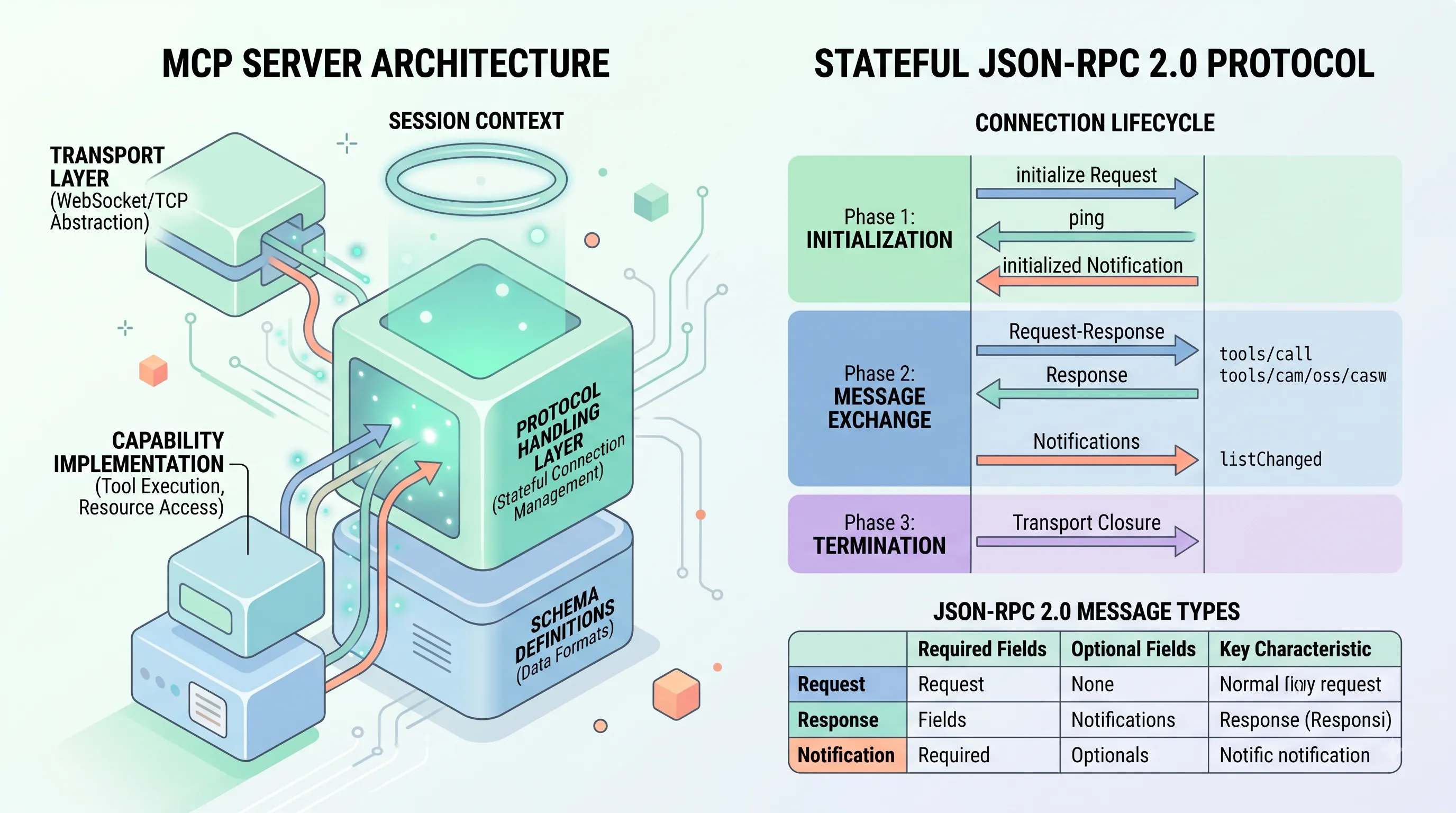
A typical MCP server implementation is not a single monolithic block but is composed of several distinct, interacting components.At its heart is the Protocol Handling layer, responsible for managing the stateful connection and interpreting incoming messages according to the MCP specification.
This works in tandem with the Transport Layer, which abstracts the underlying communication channel, such as WebSockets or TCP, allowing the protocol logic to remain transport-agnostic.
The core functionality is delivered through Capability Implementation, where the server provides the actual logic for features negotiated during initialization, like tool execution or resource access.
Finally, Schema Definitions provide the structured data formats for all capabilities, ensuring that both client and server agree on the shape of the information being exchanged.
The Stateful JSON-RPC 2.0 Foundation
All communication over an MCP connection is managed using the JSON-RPC 2.0 protocol.This choice provides a lightweight, standardized format for remote procedure calls using JSON.
Unlike stateless protocols like HTTP, MCP is fundamentally a stateful protocol.
This means the server maintains the context of the entire session—including previously negotiated capabilities, exchanged messages, and active operations—for the duration of the connection.
This statefulness is critical for enabling complex, multi-turn interactions with an AI model without needing to re-establish context with every single request.
Connection Lifecycle: Initialization to Termination
The lifecycle of an MCP connection follows a clearly defined, three-stage process to ensure both parties are synchronized.1. Initialization
The connection begins when the client sends an `initialize` request.
This initial message includes the `protocolVersion` it supports, the `capabilities` it offers (like the ability to display progress bars), and `clientInfo` such as its name and version.
The server evaluates this request and responds with its own chosen `protocolVersion`, the `capabilities` it supports, and its `serverInfo`.
Once the client receives this response and agrees to the terms, it confirms its readiness by sending a final `initialized` notification.
It is important to note that until this handshake is complete, the only messages permitted are `ping` requests to check connection health and server-side logging notifications.
2. Message Exchange
After successful initialization, the main communication phase begins.
Clients and servers exchange messages based on the capabilities they negotiated.
This phase consists of two primary interaction patterns.
The first is a standard Request-Response model for operations that require a specific result, such as `tools/call`, `resources/read`, `prompts/get`, or `sampling/createMessage`.
The second is Notifications, which are one-way messages used to provide updates without expecting a direct reply, such as `listChanged`, `progress`, `cancelled`, or `logging`.
To prevent indefinite waiting, server and client implementations should establish timeouts for any sent requests.
If a timeout occurs, the sender should issue a `$/cancelRequest` notification containing the original request ID and stop waiting for a response.
3. Termination
The connection ends when the underlying transport is closed, either by the client or the server.
Termination can also be triggered by an unrecoverable error or by explicit shutdown logic.
The MCP specification explicitly relies on the closure of the transport layer to signal the end of a session.
MCP Message Types and Structure
All MCP communication adheres to the JSON-RPC 2.0 specification, which defines three distinct message types: Requests, Responses, and Notifications.Understanding their structure is essential for building a compliant server.
Requests are messages sent from the client to the server (or vice-versa) to invoke a method.
Responses are sent by the receiver to answer a specific request.
Notifications are one-way messages that do not require a response, used for events and state updates.
| Message Type | Required Fields | Optional Fields | Key Characteristic |
|---|---|---|---|
| Request | jsonrpc: "2.0", id (unique string or number, not null), method |
params (structured or array values) |
Initiates an operation and requires a corresponding Response message with the same id. |
| Response | jsonrpc: "2.0", id (matching the request) |
None | Must contain either a result field on success or an error field on failure. |
| Notification | jsonrpc: "2.0", method |
params (structured or array values) |
Distinguished by the absence of an id field. It is a "fire-and-forget" message that must not be replied to. |
3. Flexible Connectivity: Exploring MCP Transport Options
This section directly supports the main article's theme of MCP as a universal connector, akin to USB-C.Just as USB-C defines a physical standard but allows for multiple data protocols (DisplayPort, Thunderbolt), MCP defines a core message protocol but supports different transport mechanisms to carry those messages.
This flexibility allows MCP to operate effectively in vastly different environments, from a local script running on a developer's machine to a globally distributed cloud service.
Standard I/O (stdio) for Local Servers
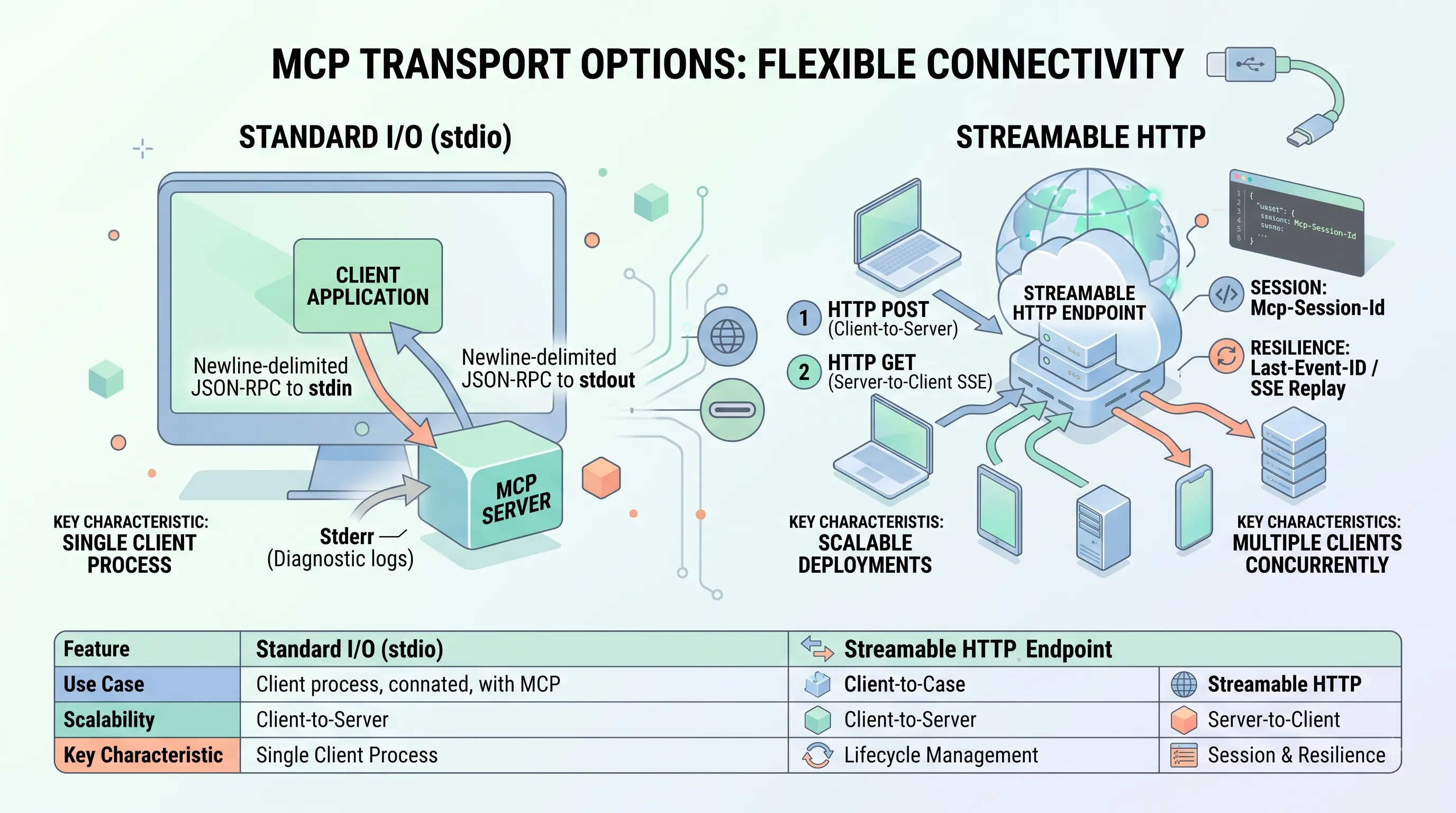
The simplest transport mechanism defined by MCP is Standard Input/Output, commonly known as stdio.This method is ideal for scenarios where the MCP server is launched as a subprocess directly by the client application on the same machine.
Operationally, the client manages the entire lifecycle of the server process, including starting and stopping it.
Communication follows a strict, straightforward pattern: the server reads JSON-RPC messages from its standard input (`stdin`) and writes its JSON-RPC responses and notifications to its standard output (`stdout`).
To ensure reliable parsing, all messages exchanged over stdio are newline-delimited.
It is critical that `stdout` is used exclusively for MCP messages; any diagnostic information or logs generated by the server must be written to standard error (`stderr`) to avoid corrupting the communication channel.
Similarly, the server should only expect to receive MCP messages on `stdin`.
Streamable HTTP for Scalable Deployments
For more complex or distributed systems, MCP specifies the Streamable HTTP transport.This approach is designed for servers that run as independent processes, which can be located on the same machine as the client or on a remote network.
A key advantage of Streamable HTTP is its ability to handle multiple clients concurrently.
The entire communication flow is managed through a single HTTP endpoint path.
Client-to-server messages are sent via an HTTP POST request containing the JSON-RPC payload.
The server can acknowledge receipt with a `202 Accepted` status code or immediately begin a response stream.
For server-to-client messages, which include server-initiated requests and notifications, the client initiates an HTTP GET request to the same endpoint.
This GET request establishes a Server-Sent Events (SSE) stream, allowing the server to push multiple, distinct JSON-RPC messages to the client over a single, long-lived HTTP connection.
It is important to note that the Streamable HTTP transport officially replaced the older HTTP+SSE transport mechanism in the protocol specification as of version 2024-11-05.
Handling Connection Resilience and Session Management
The Streamable HTTP transport includes features specifically for building robust and stateful connections.For state management across multiple requests, it supports an optional `Mcp-Session-Id` header, enabling the server to maintain context for a specific client session.
To handle network interruptions, the protocol defines a mechanism for resuming broken SSE streams.
Servers can include a unique `id` field with each SSE event they send.
If a client's SSE connection drops, it should attempt to reconnect and include the `Last-Event-ID` header with the value of the last `id` it successfully received.
A server that supports this feature can then use this ID to replay any messages the client missed during the disconnection, ensuring message delivery without requiring a full state resynchronization.
Custom Transports and Key Considerations
While stdio and Streamable HTTP are the standard options, the MCP specification allows for the implementation of custom transports.Any custom implementation must adhere to the core Transport interface and ensure it correctly serializes and deserializes JSON-RPC compliant messages.
Regardless of the transport chosen, developers must address several key operational concerns.
The transport layer is responsible for gracefully handling connection errors, message parsing errors, and timeouts.
For networked transports like Streamable HTTP, security is paramount.
This includes careful handling of CORS and `Origin` headers, binding to `localhost` for local-only servers to prevent unintended network exposure, and implementing a robust authentication mechanism to secure the server.
| Feature | Standard I/O (stdio) | Streamable HTTP |
|---|---|---|
| Use Case | Local servers launched as subprocesses by the client. | Independent local or remote servers. |
| Scalability | Single client per server process. | Can handle multiple clients simultaneously. |
| Client-to-Server | Newline-delimited JSON-RPC written to server's stdin. | HTTP POST request with JSON-RPC body to a single endpoint. |
| Server-to-Client | Newline-delimited JSON-RPC written to server's stdout. | Server-Sent Events (SSE) stream initiated by a client GET request. |
| Lifecycle Management | Client is responsible for starting and stopping the server process. | Server runs as an independent process. |
| Session & Resilience | Connection state lasts for the life of the process. | Optional `Mcp-Session-Id` header for state and resumable SSE streams using `Last-Event-ID`. |
4. Empowering AI: Defining MCP Server Capabilities (Tools, Resources, Prompts)
This section connects to the main article by detailing the core building blocks of an MCP server.While the main topic introduces the "why"—creating a universal connector for AI—this section provides the "how," explaining the three fundamental capabilities (Tools, Resources, and Prompts) that a developer implements to bring an MCP server to life.
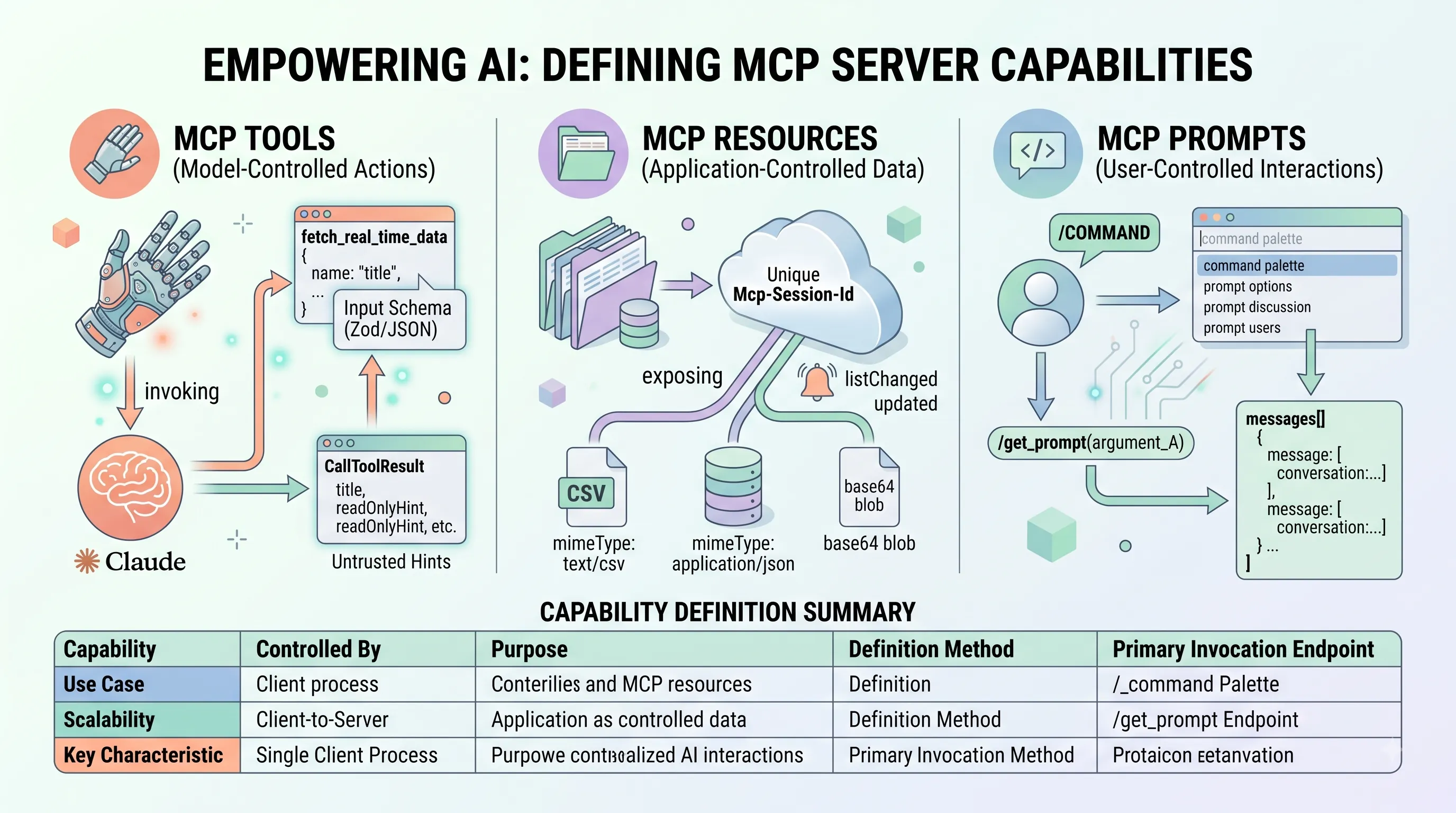
Model-Controlled Actions: MCP Tools
Tools are the primary mechanism for granting an AI model agency to perform actions in the outside world.They are fundamentally model-controlled; the Large Language Model (LLM) itself decides when and how to invoke a tool based on the user's conversational intent.
A server exposes these functions using a `server.tool()` registration method.
Each tool definition requires several key components: a unique name, a clear and comprehensive `description`, an `inputSchema` defining the required arguments, and an `async` handler function that contains the tool's logic.
The `inputSchema` is critical for reliable operation and is defined using a Zod shape, which translates directly to a JSON Schema.
A detailed schema significantly improves the LLM's ability to provide the correct arguments, reducing errors and ambiguity.
The handler function, upon execution, must return a `CallToolResult` object, which has a standard structure: `{ content: [...], isError?: boolean }`.
If the tool encounters an execution error, it should report it gracefully by setting `isError: true` and providing details within the `content` array rather than crashing.
To give the model and client additional context about a tool's behavior, developers can provide optional annotations.
The MCP specification defines a standard set of annotation keys:
- `title`: A short, human-readable string for display purposes.
- `readOnlyHint`: A boolean indicating the tool does not alter state.
- `destructiveHint`: A boolean warning that the tool may perform irreversible or destructive actions.
- `idempotentHint`: A boolean suggesting the tool can be safely called multiple times with the same input.
- `openWorldHint`: A boolean indicating the tool interacts with external, unpredictable systems (e.g., the public internet).
Clients MUST NOT rely on them to enforce security or correctness, and servers SHOULD NOT be built with the assumption that clients will strictly adhere to them.
Application-Controlled Data: MCP Resources
While tools provide actions, resources expose data.Resources are application-controlled, meaning the server application determines what data is available and when it changes.
They represent any data or content, such as a file, a database record, or a sensor reading, that the client or LLM can access.
Every resource is identified by a unique URI, for example, `file:///path/to/file.txt` or `db://users/123`.
Servers can define resources statically or dynamically through a `ResourceTemplate`.
Clients can discover available resources by sending a `resources/list` request, often filtered by a specific URI prefix or template.
To access the content of a specific resource, the client sends a `resources/read` request using the resource's unique URI.
The content itself is returned in a structured format containing either a `text` field for text-based data or a base64-encoded `blob` field for binary data.
To ensure proper handling, the response must also include the `mimeType` and `size` of the content.
To maintain data synchronization, MCP includes notification mechanisms for resources.
If the set of available resources changes (e.g., a file is added to a directory), the server can send a `notifications/resources/list_changed` message to subscribed clients.
If the content of a specific, subscribed resource is modified, the server sends a `notifications/resources/updated` notification, prompting the client to refetch the data.
User-Controlled Interactions: MCP Prompts
Prompts are pre-defined interaction templates that are explicitly user-controlled.They function like commands or slash-commands in a typical UI, providing a structured way for a user to initiate a complex interaction with the AI.
A server defines a prompt using the `server.prompt()` method, which requires a name, a detailed `description` of what the prompt does, a Zod schema for its arguments, and a handler function.
Clients first discover available prompts by making a `prompts/list` request, which allows them to populate UI elements like a command palette.
When the user chooses to execute a prompt and provides the necessary arguments, the client sends a `prompts/get` request to the server.
The server validates the incoming arguments against the prompt's Zod schema before executing the handler.
The prompt handler's role is to return a `GetPromptResult` object.
Crucially, this object's payload is a `messages` array, structured precisely like an LLM conversation history.
This allows a prompt to effectively inject a pre-packaged context or conversation starter into the AI's session, guiding it toward a specific task.
Best Practices for Capability Definition
The effectiveness of any MCP server hinges on how clearly its capabilities are defined.First, developers must provide clear and detailed `description` fields for all tools, prompts, and their respective parameters.
The LLM relies almost exclusively on these descriptions to understand what a capability does and how to use it correctly.
Vague descriptions lead to poor tool selection and incorrect argument generation.
Second, the consistent and rigorous use of JSON Schema (or libraries like Zod that generate it) is non-negotiable.
The `inputSchema` for Tools and the argument schema for Prompts form a strict contract between the server and the LLM.
Well-defined schemas prevent malformed requests and enable features like client-side form generation.
Finally, adopting a modular capability structure is a highly recommended practice for organization and maintainability.
Separating the core logic of a tool, resource, or prompt from its MCP registration code makes the server easier to test, debug, and scale as more capabilities are added over time.
| Capability | Controlled By | Purpose | Definition Method | Primary Invocation Endpoint |
|---|---|---|---|---|
| MCP Tool | Language Model | Perform actions and interact with external systems. | server.tool() |
tools/call |
| MCP Resource | Application | Expose data or content for reading. | Static URI or ResourceTemplate | resources/read |
| MCP Prompt | End User | Initiate pre-defined interaction templates. | server.prompt() |
prompts/get |
5. Beyond the Basics: Advanced MCP Server Functionality
This section explores the sophisticated features that transform a basic Model Context Protocol (MCP) server into a dynamic, interactive, and high-performance agentic tool.While the core of MCP focuses on exposing tools and resources, these advanced functionalities enable richer, more responsive interactions, directly supporting the main article's goal of creating a universally connected AI ecosystem.
Enabling Agentic Behavior: Sampling and Roots
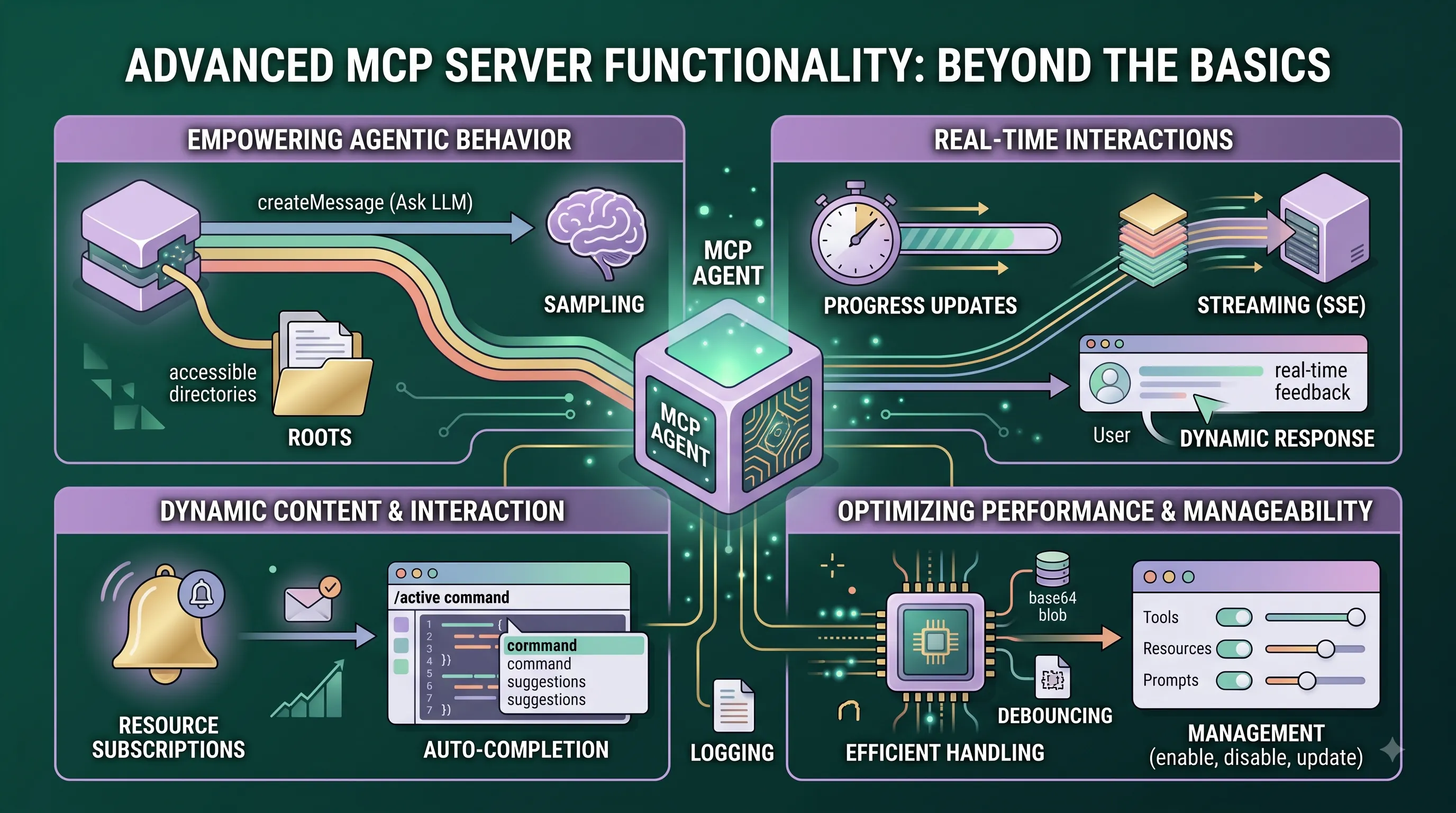
A truly intelligent server does more than just respond to client requests; it can proactively seek assistance to complete its own tasks.This agentic behavior is enabled through server-initiated sampling.
If a connected client supports the `sampling` capability, the server can send a `sampling/createMessage` request.
This effectively allows the server to ask the LLM for help, leveraging the model's reasoning capabilities to solve a problem or formulate the next step in a complex workflow.
To interact effectively with the user's environment, servers can also gain access to the client's filesystem.
Servers designed for filesystem operations should first verify that the client supports the `roots` capability.
Once confirmed, the server can use the `roots/list` request to discover which directories are accessible, allowing it to read or manipulate files as permitted by the client, making it a powerful tool for tasks involving local data processing.
Real-time Interactions: Streaming and Progress
For tasks that are not instantaneous, providing real-time feedback is crucial for a good user experience.The Streamable HTTP transport for MCP inherently supports streaming server responses by utilizing Server-Sent Events (SSE).
This mechanism is ideal for long-running tools.
Instead of making the client wait in silence, the server can send a stream of progress notifications followed by the final result.
To facilitate this, the server can dispatch `notifications/progress` messages back to the client during the operation.
This is contingent on the client including a `progressToken` within the metadata of its original request.
The server uses this token to route progress updates correctly, keeping the user informed until the final result is delivered over the same SSE stream.
Dynamic Content: Subscriptions and Auto-completion
MCP servers can provide dynamic, up-to-date information through resource subscriptions.A server signals this ability by declaring the `resources: { subscribe: true }` capability in its configuration.
Clients can then send `resources/subscribe` requests for specific resource URIs they wish to monitor.
The server becomes responsible for tracking these active subscriptions and must proactively send a `notifications/resources/updated` message whenever the content of a subscribed resource changes, ensuring the client always has the latest information.
To enhance the user's interactive experience, servers can also offer argument auto-completion for Prompts and Resource Templates.
This is achieved by implementing a handler for `completion/complete` requests.
Notably, the `completions` capability is considered an implicit capability; it is automatically enabled as soon as the server implements the logic for that method, without needing an explicit declaration.
Optimizing Performance and Manageability
A production-grade MCP server requires a focus on both performance and operational flexibility.Several optimization strategies can be employed, including caching frequently accessed data, using concurrency models like `async/await` or Worker Threads to handle multiple requests without blocking, and implementing efficient data handling with streams or base64 blobs for large payloads.
The choice of transport is also key; using `stdio` for local client-server communication can be significantly faster than HTTP.
Finally, applying debouncing and throttling to frequent events prevents system overload.
For enhanced manageability, MCP supports dynamic server capabilities.
This allows an administrator to add, remove, enable, disable, or update the server's tools, resources, and prompts *after* it has already connected to a client.
Implementations such as the reference `McpServer` class streamline this process by automatically sending `listChanged` notifications to the client whenever its management methods like `.enable()`, `.disable()`, `.update()`, or `.remove()` are called.
Furthermore, servers can provide better diagnostics by sending structured logs.
After declaring the `logging` capability, a server can use `notifications/message` to push detailed logs to the client.
For more granular control, clients have the option to send a `logging/setLevel` request to specify the minimum logging level they wish to receive.
6. Building Secure MCP Servers: Best Practices and Safeguards
This section is a critical component of our guide, "Connecting AI to all data like USB-C: Model Context Protocol (MCP) Spec and Server Building Guide".While the main article explains the 'what' and 'why' of MCP, this section provides the essential 'how' for building the server-side component with a security-first mindset.
A poorly secured MCP server can expose sensitive data, tools, and systems to significant risk, undermining the entire value proposition of the protocol.
Therefore, following these best practices is not optional; it is fundamental to a successful and responsible MCP implementation.
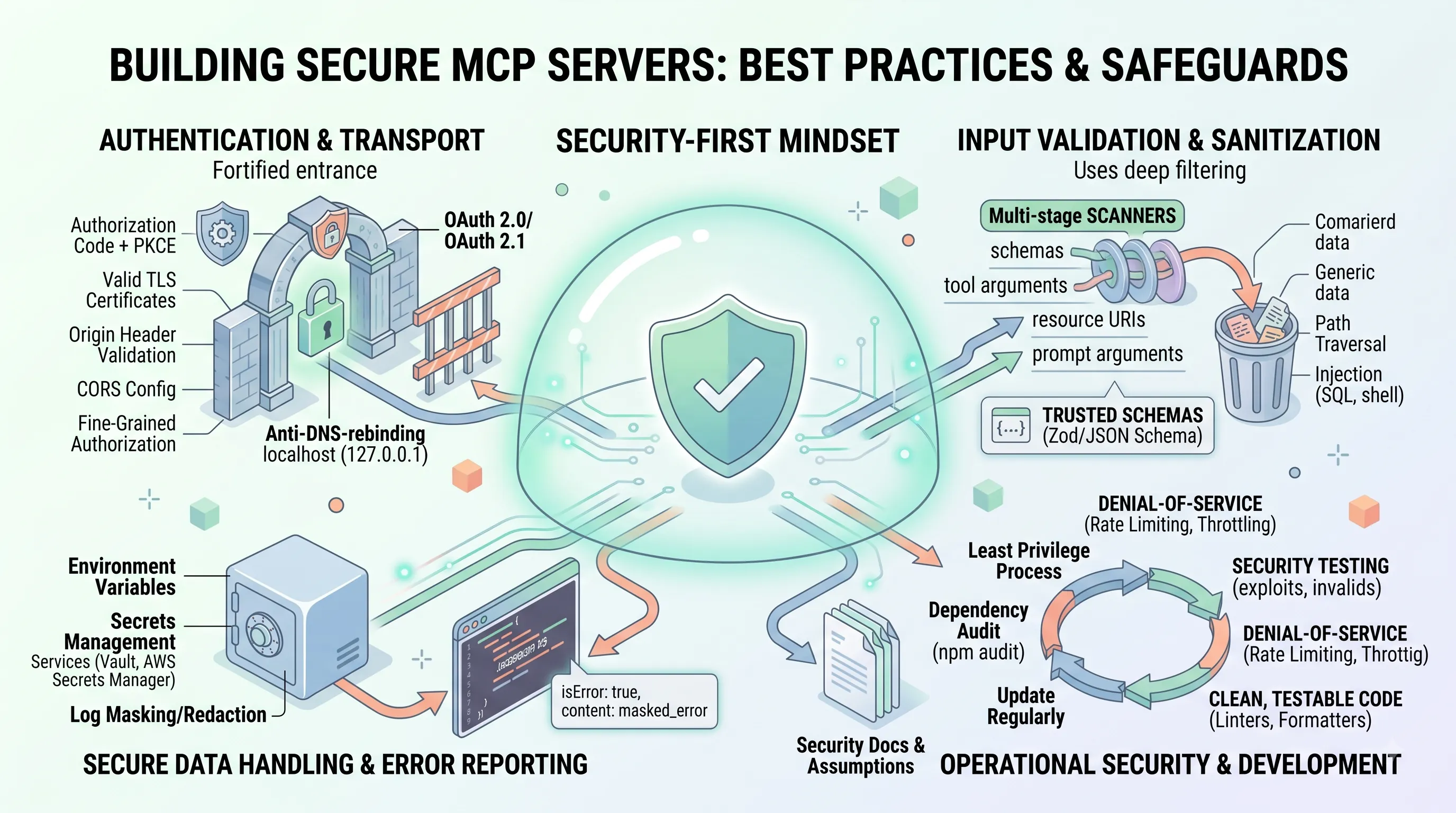
Authentication and Transport Security
Securing the connection between an AI agent and an MCP server is the first line of defense.The protocol accommodates different transport methods, each with its own security model.
For `stdio` transports, where the server is a local process, authentication implicitly relies on the security context of the process execution itself, meaning the operating system's user permissions are the primary gatekeeper.
However, for network-based `Streamable HTTP` transports, a far more robust approach is mandatory.
Secure authentication is a strict requirement, with the MCP Authentication Specification standardizing on the mature and widely adopted OAuth 2.0/2.1 framework.
Implementers should utilize secure flows like the Authorization Code with PKCE (Proof Key for Code Exchange) to prevent authorization code interception attacks.
| Transport Method | Authentication Model | Key Security Controls |
|---|---|---|
| Stdio | Relies on the security context of the process execution. | Operating system user permissions; process isolation. |
| Streamable HTTP | Mandatory secure authentication based on OAuth 2.0/2.1. | HTTPS/TLS encryption, Authorization Code with PKCE flow, strict Origin header validation, proper CORS configuration. |
All HTTP-based communication must use HTTPS to ensure the confidentiality and integrity of the data in transit.
This requires servers to be properly configured with valid TLS certificates.
To further harden the connection, servers must strictly validate `Origin` headers against an allowlist, ensuring that requests only come from trusted clients.
This, combined with correctly configured CORS headers, is crucial for preventing cross-site attacks.
For servers intended only for local access, a simple but effective measure is to bind the server exclusively to `127.0.0.1` (localhost), which helps mitigate DNS rebinding attacks.
Finally, authentication is not a one-time check at the connection level.
Fine-grained authorization checks based on the authenticated context must be implemented within each tool and resource handler to enforce access controls precisely where actions are taken.
Robust Input Validation and Sanitization
Every piece of data received from a client must be treated as untrusted.The first step is rigorous validation of all incoming MCP messages against the protocol specification to ensure they are well-formed.
Beyond protocol conformance, all inputs—including tool arguments, resource URIs, and prompt arguments—must be systematically validated and sanitized using robust schemas.
However, basic schema validation is not enough.
Servers should also implement context-aware semantic validation; for example, ensuring a numeric ID actually corresponds to an existing record or a provided file path is within a permitted directory.
This vigilance is critical for preventing a host of common vulnerabilities.
To prevent path traversal attacks, file paths provided by the client must be rigorously validated and normalized before use, ensuring they cannot escape their intended sandbox directory (e.g., by containing `../`).
Similarly, to prevent all forms of injection, any input destined for another system must be sanitized.
This includes using parameterized queries for database interactions, carefully escaping arguments for shell commands, and validating data passed to downstream API calls.
A critical reminder for developers is that tool annotations provided in the protocol are untrusted hints; clients and servers must never rely on them as the sole basis for making security decisions.
The responsibility for validation always lies with the server executing the tool.
This defensive posture extends to outputs as well; output sanitization is necessary to prevent the accidental leakage of sensitive information, internal system details, or verbose error messages back to the client.
Secure Data Handling and Error Reporting
Properly managing sensitive information is a core responsibility of any MCP server.Any credentials required by the server, such as API keys or database passwords, should never be stored in plaintext configuration files or exposed in logs.
Instead, they must be stored securely using platform-specific solutions like system keychains, environment variables, or dedicated secrets management services (e.g., HashiCorp Vault, AWS Secrets Manager).
Configuration should be loaded securely, avoiding any hardcoded sensitive values directly in the source code.
For sensitive data that the server itself handles or stores, it should be encrypted at rest.
Logging practices must also be security-conscious.
Sensitive information should be avoided in logs whenever possible.
If logging such data is unavoidable for debugging, it must be masked or redacted.
Error handling requires a careful balance between being informative and being secure.
Error responses sent to the client should be specific enough to be useful but must avoid leaking internal implementation details, stack traces, or file paths.
For detailed diagnostics, comprehensive error information, including context like request IDs, should be logged exclusively on the server-side.
When a tool itself fails during execution, the protocol provides a structured way to report this: return an object with `{ isError: true, content: [...] }`.
This clearly signals a tool-specific failure to the client without exposing raw system errors.
A final, crucial aspect of data handling is diligent resource management; system resources like file handles, network sockets, and database connections must be properly closed, especially in error-handling code paths, to prevent resource leaks.
Operational Security and Development Best Practices
A secure server is the product of a secure development lifecycle and sound operational principles.The Principle of Least Privilege is paramount: the server process should always run with the minimum set of permissions necessary for its function.
This contains the potential damage if the server is compromised.
The software supply chain must also be secured by regularly auditing dependencies for known vulnerabilities (e.g., using tools like `npm audit`) and keeping them updated.
To protect against denial-of-service, rate limiting should be implemented for resource-intensive tools or for services that generate frequent notifications.
High-quality code is inherently more secure code.
Maintaining a clean, testable codebase, enforced with linters and formatters, reduces the likelihood of security bugs.
Security must also be a first-class citizen in the testing process.
Test suites should explicitly include checks for security vulnerabilities, with test cases that attempt to exploit invalid inputs, path traversal, permission errors, and injection attacks.
Finally, security is not just about code; it's also about clarity.
Developers must provide clear documentation for the server's purpose, its capabilities, all required configuration, and, most importantly, its security considerations and assumptions.
This ensures that operators can deploy and manage the server correctly and securely.
7. Developing and Troubleshooting Your MCP Server
This section provides a practical, hands-on guide for developers ready to build their own server, moving from the conceptual framework of the Model Context Protocol to concrete implementation. We will walk through setting up a project, debugging common issues, and leveraging community resources, using the mature and widely adopted TypeScript SDK as our foundation.Setting Up Your TypeScript MCP Project
Getting a new MCP server project off the ground is a streamlined process, but it requires a specific development environment and configuration to ensure compatibility and leverage modern JavaScript features.First, your development environment must include a Long-Term Support (LTS) version of Node.js, such as 18.x or 20.x, which comes bundled with the npm package manager.
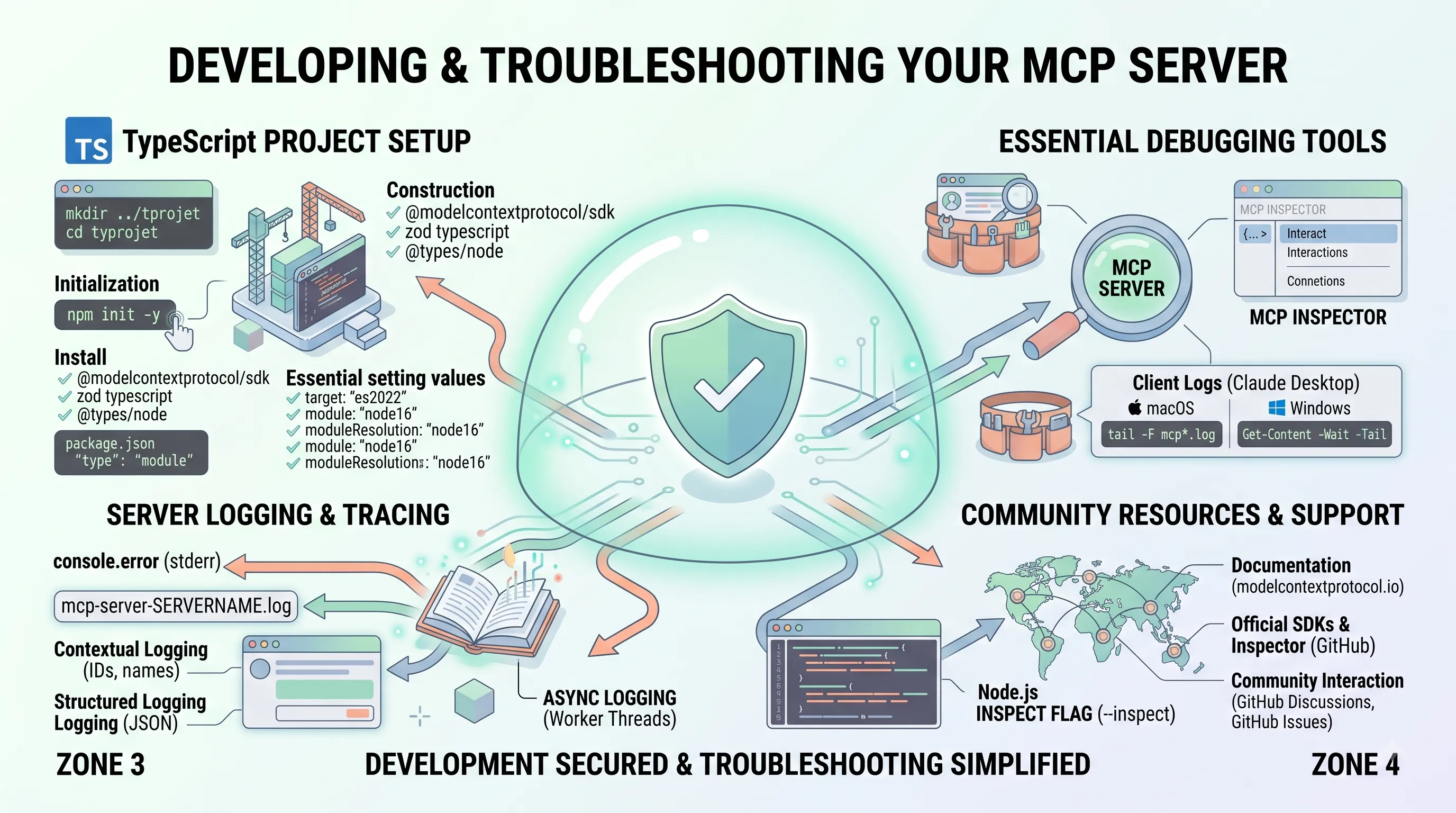
To begin, create a new project directory and initialize it with npm: bash mkdir my-mcp-server cd my-mcp-server npm init -y With the `package.json` file created, install the necessary dependencies. The core MCP functionality is provided by the `@modelcontextprotocol/sdk`, and `zod` is required for robust schema validation.
bash npm install @modelcontextprotocol/sdk zod Next, add the development dependencies required for TypeScript compilation: bash npm install -D typescript @types/node To enable modern ECMAScript module support, which the MCP SDK relies on, you must add the following line to your `package.json`: json "type": "module" You should also add build and start scripts to `package.json` for a convenient development workflow: json "scripts": { "build": "tsc", "start": "node dist/index.js" } Finally, create a `tsconfig.json` file in your project root to configure the TypeScript compiler. A robust configuration is essential for type safety and compatibility.
| Setting | Recommended Value | Purpose |
|---|---|---|
| target | "es2022" | Specifies the ECMAScript target version for the compiled JavaScript. |
| module | "node16" | Defines the module system for the output code, compatible with Node.js ES modules. |
| moduleResolution | "node16" | Sets the strategy for how TypeScript resolves module imports. |
| esModuleInterop | true | Enables compatibility between CommonJS and ES modules. |
| strict | true | Enables all strict type-checking options for higher code quality. |
| rootDir | "./src" | Specifies the root directory of your source TypeScript files. |
| outDir | "./dist" | Redirects the compiled JavaScript output to a separate directory. |
| sourceMap | true | Generates source map files to aid in debugging the compiled code. |
Essential Debugging Tools: Inspector and Client Logs
Once you begin developing your server's logic, you'll need tools to test its behavior and diagnose problems.The single most essential tool is the MCP Inspector, available from the official MCP GitHub organization. The Inspector is a standalone application that allows you to connect directly to your server and interact with its methods without needing a full-fledged client like Claude Desktop. This is invaluable for isolated testing of your server's capabilities, sending requests, and inspecting responses in a controlled environment.
When integrating with a real client, its logs become your primary source of information. For example, Claude Desktop logs provide a detailed view of the connection lifecycle, including connection errors, messages sent and received, and, critically, any standard error (`stderr`) output from your server. For stdio-based servers, this is often the only way to see `console.error` messages during development.
You can monitor these logs in real-time using the following commands:
- On macOS: Use the `tail` command to follow the log files. The `mcp.log` contains general protocol messages, while `mcp-server-SERVERNAME.log` captures the stderr stream from your specific server.
tail -n 50 -F ~/Library/Logs/Claude/mcp*.log - On Windows: Use PowerShell's `Get-Content` cmdlet with the `-Wait` and `-Tail` parameters. The log files are located in the `%APPDATA%` directory.
Get-Content -Path "$env:APPDATA\Claude\logs\mcp*.log" -Wait -Tail 50
Effective Server Logging and Tracing
While client logs are useful for observing the protocol, robust server-side logging is non-negotiable for understanding internal logic and tracking down bugs.For stdio servers, writing to standard error via `console.error` is a reliable and straightforward way to log essential operational data and error messages during development. As noted, this output is captured by the client and written to a dedicated log file (e.g., `mcp-server-SERVERNAME.log`).
For more structured logging that can be interpreted by the client, you can use the `notifications/message` method. This allows you to send log data that is potentially visible or filterable within the client application's UI, making it suitable for user-relevant status updates rather than raw debug information.
Effective logging practices involve capturing not just events but also their context. Always include relevant identifiers like request IDs, method names, session IDs, or user identifiers, along with any relevant parameters. For more complex servers, consider using structured logging libraries to output JSON, which is easier to parse and analyze. In sophisticated HTTP-based MCP servers, Node.js's `AsyncLocalStorage` can be used to create a persistent context for each request, enabling robust tracing across asynchronous operations.
For a more interactive debugging experience, the built-in Node.js Debugger is an indispensable tool. You can launch your server with the `--inspect` flag (e.g., `node --inspect dist/index.js`) and attach a debugger, such as the one integrated into VS Code. This allows you to set breakpoints, inspect variables, and step through your server code line by line to understand its exact execution flow.
Community Resources and Further Support
As you build more complex servers, you will benefit from the official documentation and the broader MCP developer community.The primary resource for all developers is the official documentation website at modelcontextprotocol.io. It contains the full protocol specification, guides, and API references.
All official code, including the SDKs, the MCP Inspector, and example servers, is hosted on the MCP GitHub organization at github.com/modelcontextprotocol. This is the best place to find working examples and examine the source code of the core tools.
For community interaction, the project utilizes two key features of GitHub:
- GitHub Discussions: This is the ideal place for general questions, sharing ideas, and seeking help from the community and maintainers.
- GitHub Issues: If you believe you have found a specific bug or want to request a new feature in one of the repositories (like the TypeScript SDK or the Inspector), filing an issue is the appropriate channel.
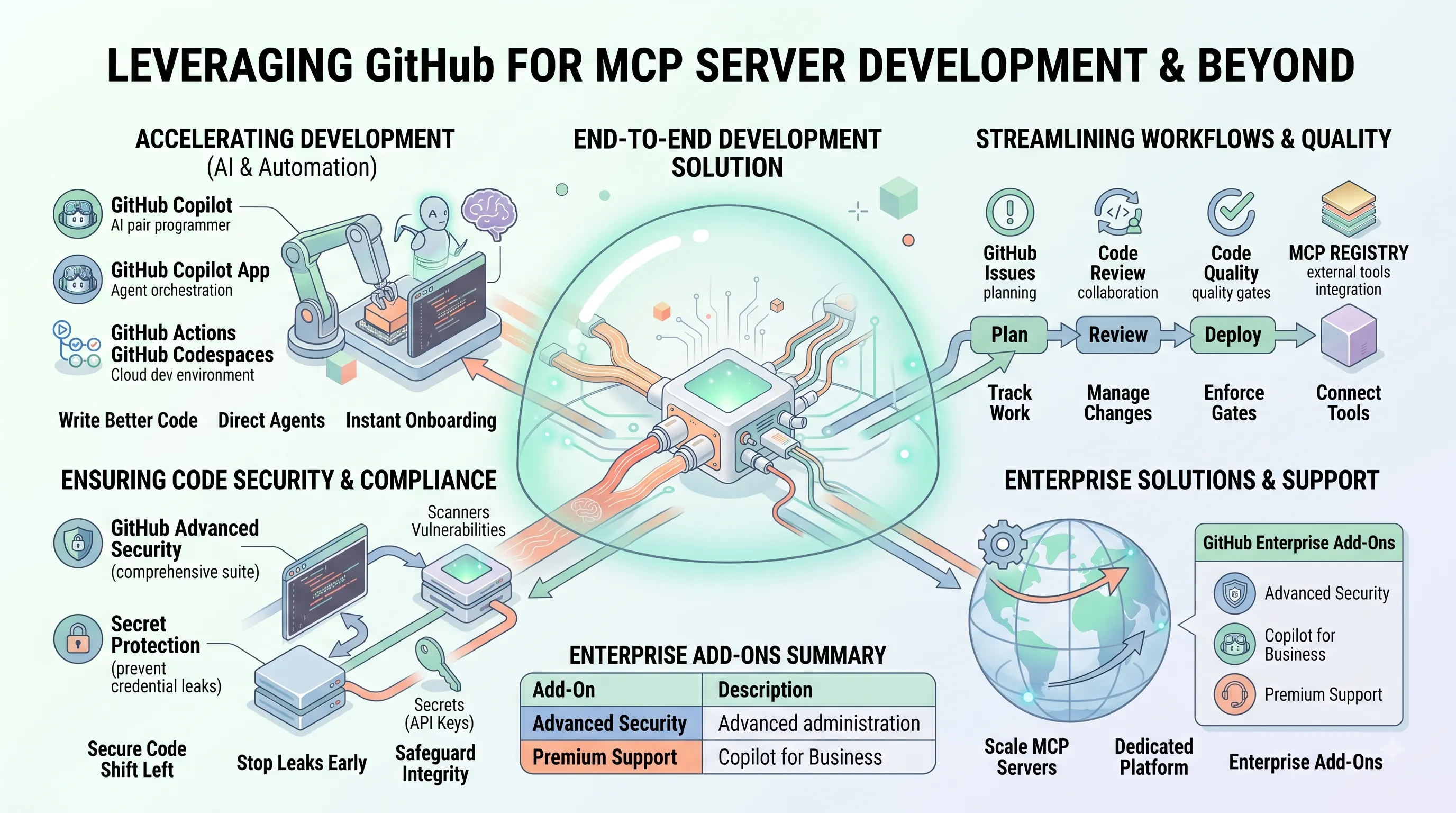
8. Leveraging GitHub for MCP Server Development and Beyond
This section details how the GitHub platform provides an end-to-end solution for the development, security, and deployment of Model Context Protocol (MCP) servers, directly supporting the construction guide outlined in this article.Accelerating Development with GitHub AI and Automation
To expedite the creation of a functional MCP server, developers can leverage GitHub's AI-driven and automated tooling.GitHub Copilot serves as an AI pair programmer, helping to write better code for the server's core logic and API endpoints.
For a more integrated experience, the GitHub Copilot app can direct agents through the entire development cycle, from the initial issue creation for a new MCP feature to the final pull request merge.
Repetitive but critical tasks, such as building, testing, and deploying the MCP server, can be fully automated using GitHub Actions, which is capable of handling any workflow.
To ensure development consistency and rapid onboarding, GitHub Codespaces provide instant, cloud-based development environments, eliminating complex local machine setups for engineers working on the MCP project.
Streamlining Workflows and Code Quality
A structured and collaborative workflow is essential for building a reliable MCP server.GitHub Issues facilitates the planning and tracking of all work, from new feature specifications to bug reports, ensuring the project stays organized.
As developers contribute code, the Code Review process allows for effective management of changes and collaborative feedback.
To maintain a high standard, the Code Quality feature can be configured to enforce specific quality gates at the point of merging code, preventing regressions and technical debt in the MCP server's codebase.
Furthermore, the MCP Registry integrates external tools directly into the workflow, allowing teams to connect specialized services and utilities to their development process.
Ensuring Code Security and Compliance
For a protocol designed to handle diverse data contexts, security is paramount.GitHub Advanced Security is a comprehensive suite designed to find and fix vulnerabilities within the MCP server's code.
Its code security capabilities work to secure the code as it is being built, shifting security practices earlier into the development lifecycle.
A critical feature is its secret protection, which actively scans for credentials and API keys to stop leaks before they can be accidentally committed to the repository, safeguarding the MCP server's integrity.
Enterprise Solutions and Support
For organizations deploying MCP servers at scale, GitHub offers dedicated enterprise-level solutions.The GitHub Enterprise platform provides a self-hosted or cloud-based environment with advanced administrative and security controls.
This is complemented by an AI-powered developer platform designed for enterprise needs.
To further enhance the platform, several add-ons are available to meet specific organizational requirements for security, AI, and support.
| Enterprise Add-On | Description |
|---|---|
| GitHub Advanced Security | Offers enterprise-grade security features. |
| Copilot for Business | Offers enterprise-grade AI features. |
| Premium Support | Offers enterprise-grade 24/7 support. |
9. The Evolving AI Landscape and MCP's Role
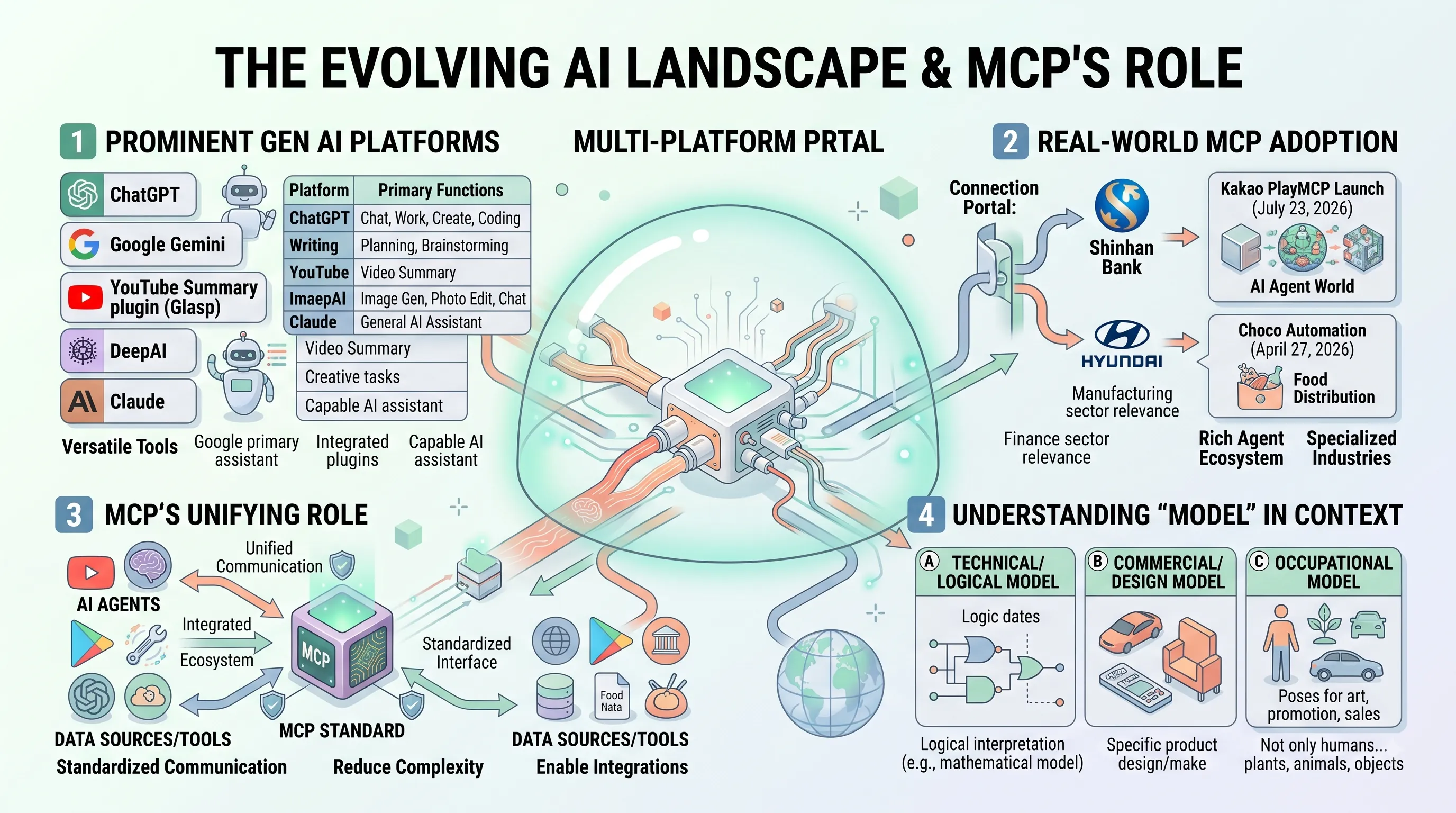
To fully grasp the significance of the Model Context Protocol (MCP) as a universal connector for AI, it's essential to first understand the diverse and rapidly expanding landscape of AI agents and platforms it aims to unify.This section provides context on the major generative AI players and highlights how MCP is already being adopted to create a more integrated ecosystem.
Prominent Generative AI Platforms
The generative AI market is populated by several powerful assistants, each offering unique capabilities.Key players like ChatGPT have established themselves as versatile tools that help users with chat, work, creation, and coding.
Similarly, Google Gemini serves as Google’s primary AI assistant, offering support for tasks like writing, planning, and brainstorming.
The ecosystem around these platforms is also growing, as seen with browser plugins like YouTube Summary with ChatGPT & Cloud (Glasp), which integrates ChatGPT's power directly into the YouTube experience.
Other platforms such as Claude function as capable AI assistants, while services like DeepAI specialize in creative tasks, allowing users to generate images, edit photos, and chat with an AI.
The reach of these platforms is often extensive; for instance, the global nature of Google accounts means they provide access not only to AI services but also to integrated platforms like YouTube and Google Play.
| AI Platform | Primary Functions |
|---|---|
| Claude | General AI assistant capabilities. |
| ChatGPT | Assists with chat, work, creation, and coding. |
| Google Gemini | Offers help with writing, planning, brainstorming, and more. |
| DeepAI | Generates images, edits photos, and provides AI chat functionality. |
Real-World MCP Adoption and Agent Innovations
As the number of AI services grows, the need for a standardized communication protocol like MCP becomes critical.Early adoption by major industry players signals a strong belief in its potential.
Prominent enterprises such as Shinhan Bank and Hyundai Motor are examples of companies that have already adopted MCP, indicating its relevance in finance and manufacturing sectors.
Beyond enterprise adoption, new platforms are being built with MCP at their core.
On July 23, 2026, Kakao launched PlayMCP, its own AI agent world, demonstrating a commitment to building a rich ecosystem around the protocol.
The practical application of AI agents is also evident in specialized industries.
For example, as of April 27, 2026, the company Choco has been using AI agents to automate food distribution, showcasing a tangible business use case.
Understanding 'Model' in AI Context
Given the protocol's name, "Model Context Protocol," it is crucial to clarify the term "model," which has multiple meanings.In a technical or logical sense, a "model" can refer to an interpretation which makes a certain sentence true.
In a commercial or design context, a "model" can refer to a particular style, design, or make of a particular product.
The term also famously refers to an occupation where a person or object poses for art, promotion, or sales.
It is worth noting that in this occupational sense, it is not only humans who can be models; animals, plants, and even inanimate objects can serve this function.
Understanding these distinctions helps clarify the specific meaning of "model" as it relates to AI systems and protocols.
Related Posts
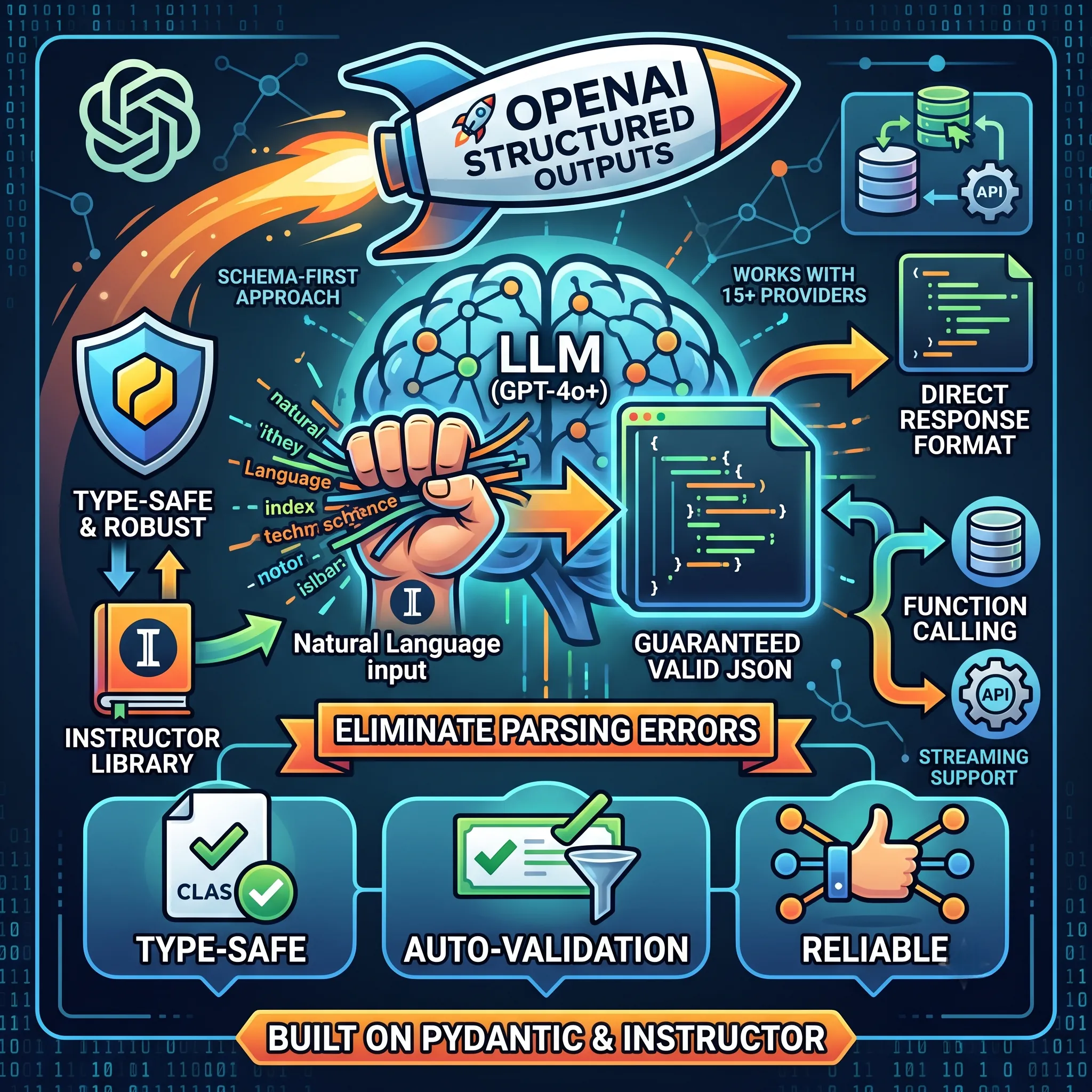
Ensuring Reliable Structured Outputs from LLMs with OpenAI and InstructorLearn how OpenAI's Structured Outputs and the Instructor library ensure reliable, schema-compliant...

Model Context Protocol (MCP): Anthropic's Open Standard for AI Integration, Claude's Capabilities, & Data EthicsExplore Anthropic's Model Context Protocol (MCP), an open standard revolutionizing AI integration,...

Analysis of Illicit Industrial-Scale Model Distillation and Chain-of-Thought Extraction CampaignsA technical report on illicit industrial-scale distillation campaigns targeting Claude, detailing...