
Build Your AI Security Control Tower: Integrate Wazuh SIEM/XDR with Claude 3.5 Haiku on AWS Bedrock for Advanced Threat Analysis
🚀 Key Takeaways
- Wazuh unifies SIEM and XDR capabilities, providing a robust open-source platform for security monitoring.
- Claude 3.5 Haiku, an Anthropic LLM, is available via AWS and designed for AI-powered tasks like code completion and content moderation.
- The integration embeds Claude Haiku as an AI chatbox directly into the Wazuh dashboard for interactive security queries.
- Deployment requires an Ubuntu 24.04 Wazuh setup and an AWS environment with access to the Claude 3.5 Haiku model.
- Key configuration steps include enabling the Claude 3.5 Haiku model and setting up specific IAM policies within AWS.
- The Wazuh dashboard must be configured with OpenSearch Assistant plugins and specific DevTools settings to deploy the LLM connector and agent.
- All responses generated by the Claude 3.5 Haiku LLM for security insights must be critically reviewed for accuracy and verified through official documentation.
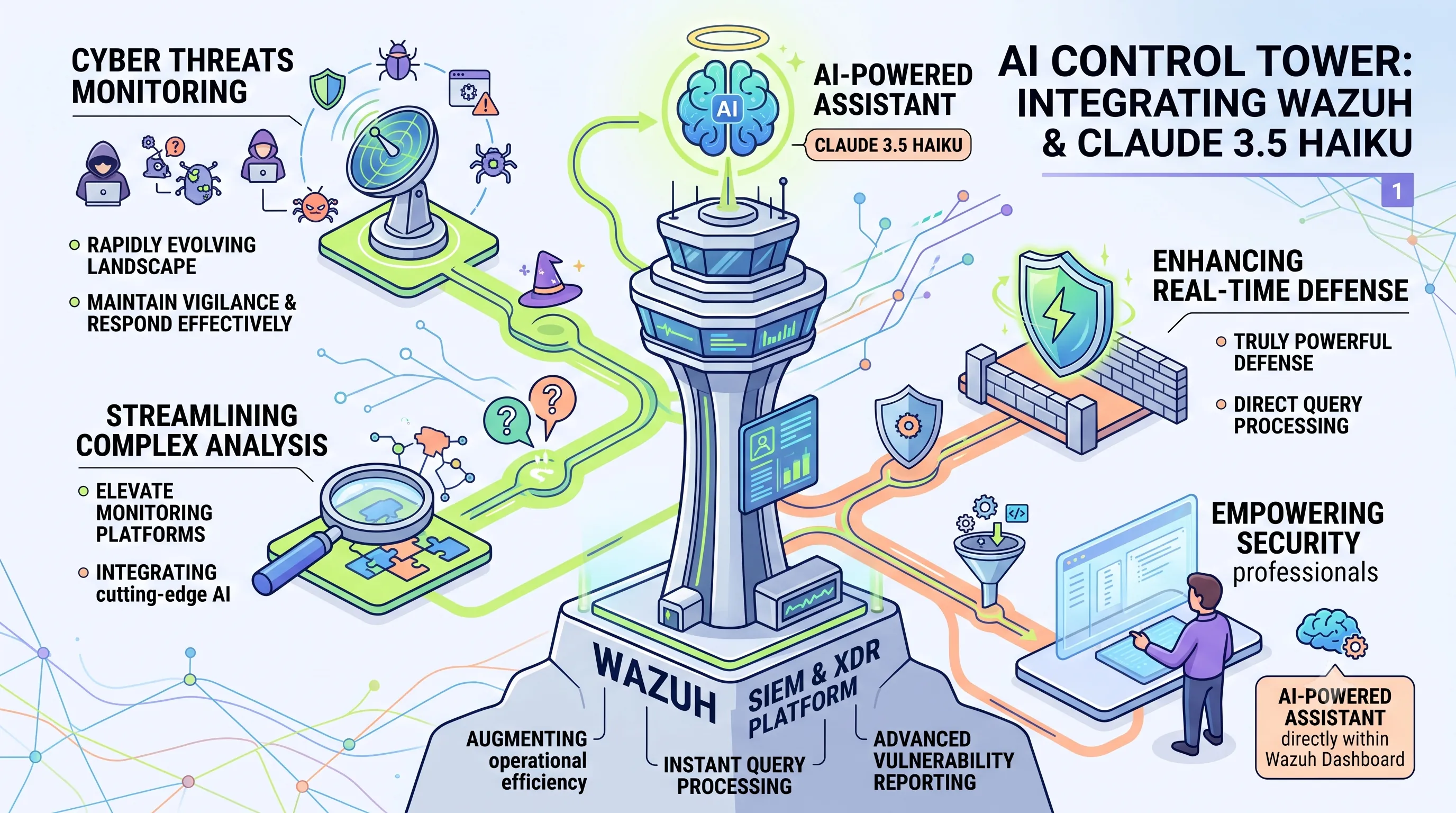
The rapidly evolving landscape of cyber threats demands that security operators, especially those managing individual infrastructures, leverage every available tool to maintain vigilance and respond effectively.
Integrating cutting-edge Artificial Intelligence directly into security monitoring platforms offers a transformative approach, streamlining complex analysis and enhancing real-time defense capabilities.
This article unveils how to establish an "AI Control Tower" by seamlessly integrating Wazuh, a comprehensive open-source SIEM and XDR platform, with Claude 3.5 Haiku, Anthropic's powerful Large Language Model.
This innovative setup empowers security professionals with an AI-powered assistant directly within the Wazuh dashboard, enabling instant query processing for security-related questions and advanced vulnerability reporting, thereby augmenting operational efficiency.
Integrating cutting-edge Artificial Intelligence directly into security monitoring platforms offers a transformative approach, streamlining complex analysis and enhancing real-time defense capabilities.
This article unveils how to establish an "AI Control Tower" by seamlessly integrating Wazuh, a comprehensive open-source SIEM and XDR platform, with Claude 3.5 Haiku, Anthropic's powerful Large Language Model.
This innovative setup empowers security professionals with an AI-powered assistant directly within the Wazuh dashboard, enabling instant query processing for security-related questions and advanced vulnerability reporting, thereby augmenting operational efficiency.
1. Demystifying Claude 3.5 Haiku: Anthropic's Lightweight LLM
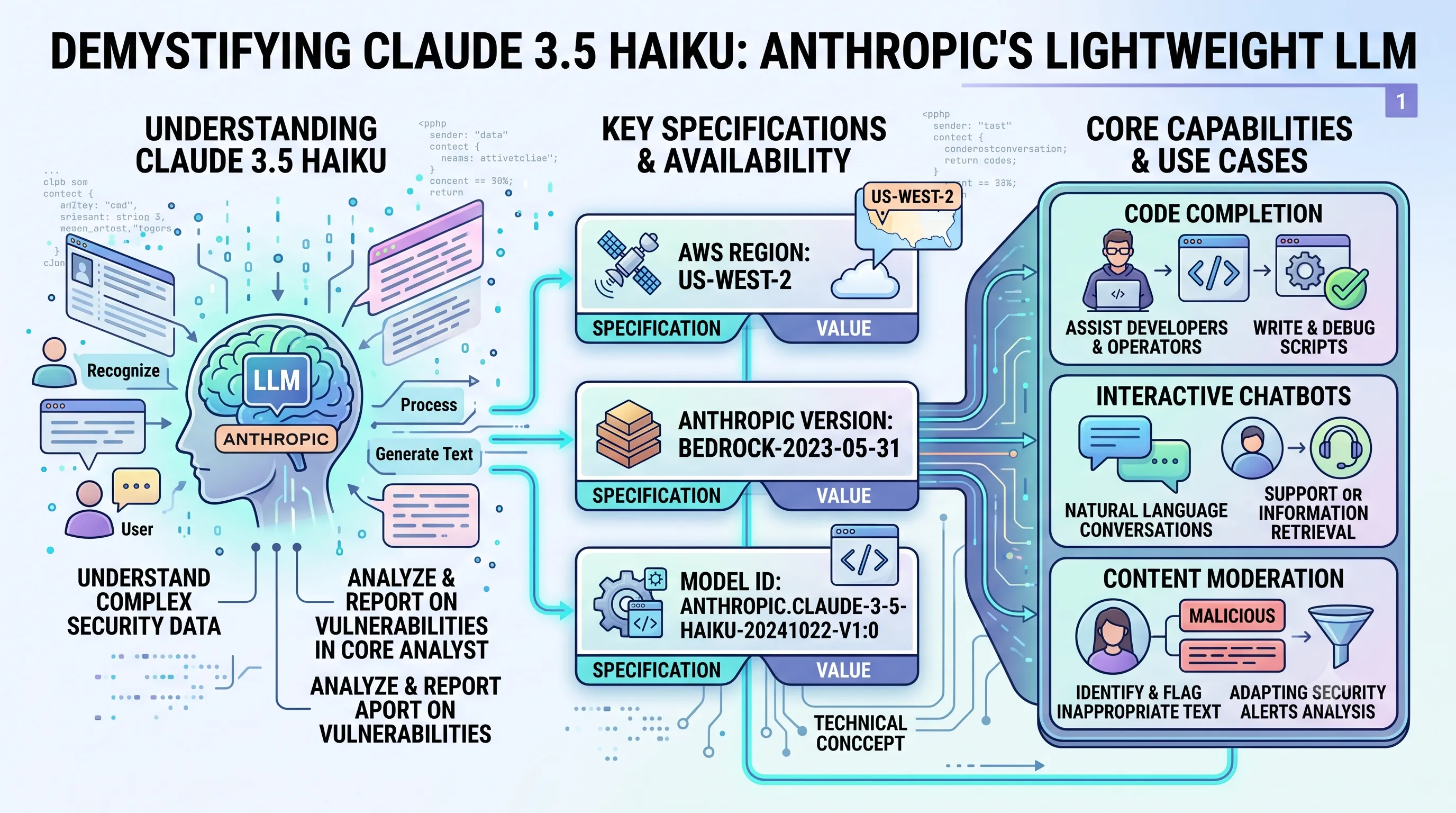
This section provides a foundational overview of the Claude 3.5 Haiku model, which serves as the core intelligence for the AI Analyst in our Wazuh integration.Understanding its capabilities, specifications, and how to access it is the first critical step before we can connect it to our security infrastructure to analyze and report on vulnerabilities.
Understanding Claude 3.5 Haiku
At its core, Claude 3.5 Haiku is a Large Language Model (LLM) designed by the AI company Anthropic.An LLM is a sophisticated type of Artificial Intelligence (AI) program specifically engineered to recognize, process, and generate text that is remarkably human-like in its structure and content.
This capability is what allows it to function as an "analyst" by interpreting complex security data.
Key Specifications and Availability
To integrate Claude 3.5 Haiku into any system, particularly within an AWS environment, you need to use its specific identifiers and know its regional availability.The model is currently available in the us-west-2 AWS region.
The precise technical identifiers are crucial for API calls and are detailed below.
| Specification | Value |
|---|---|
| AWS Region | us-west-2 |
| Anthropic Version | bedrock-2023-05-31 |
| Model ID | anthropic.claude-3-5-haiku-20241022-v1:0 |
Core Capabilities and Use Cases
Claude 3.5 Haiku is a versatile model with a range of applications that are highly relevant for IT and security operations.Its primary functions include code completion, which can assist developers and operators in writing and debugging scripts.
It also excels at powering interactive chatbots, enabling natural language conversations for support or information retrieval.
Furthermore, the model is capable of performing content moderation, a key task for identifying and flagging inappropriate or malicious text, which can be adapted for analyzing security alerts.
2. Wazuh at a Glance: Unified Security Monitoring Platform
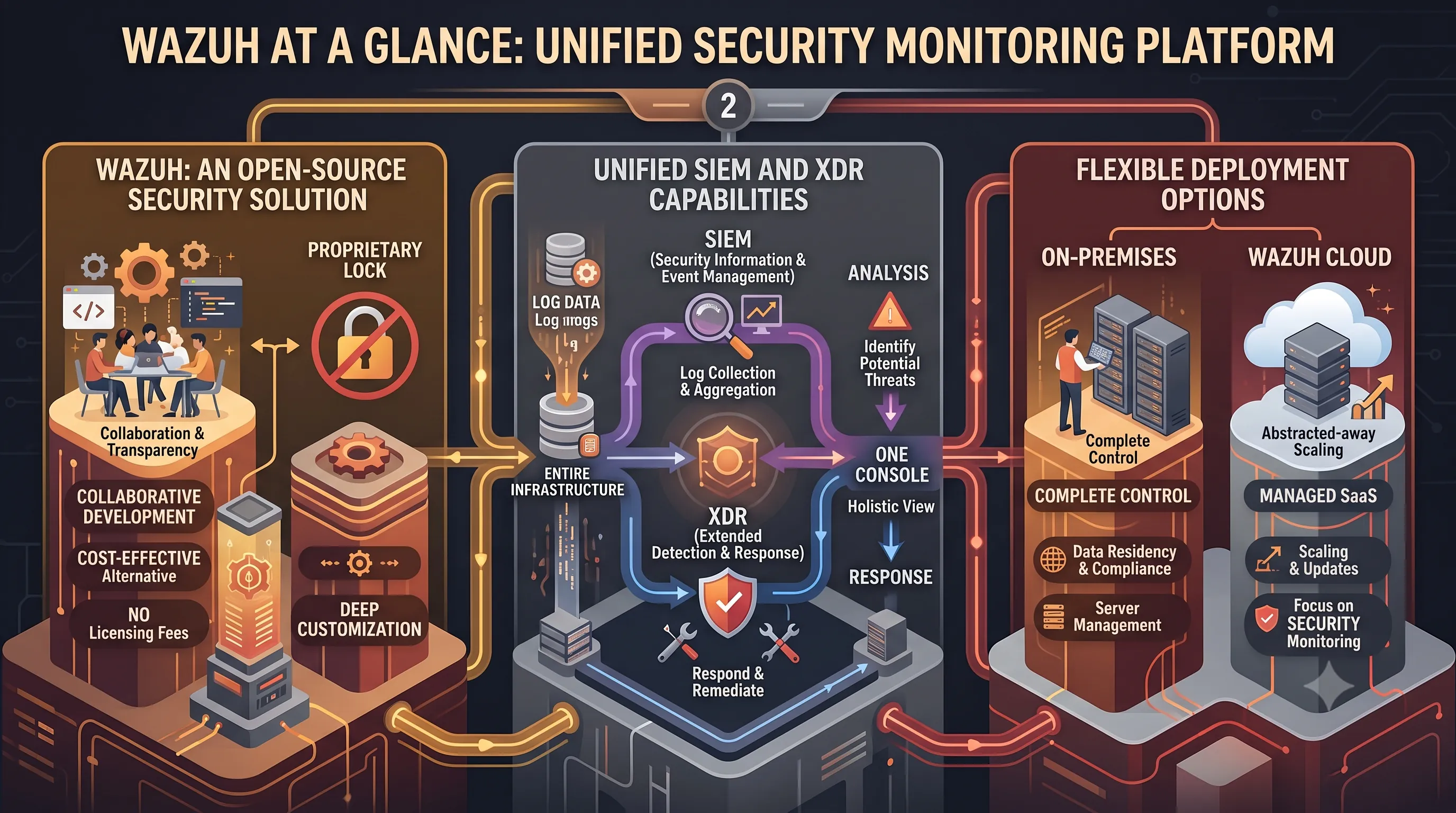
This section provides a foundational overview of the Wazuh platform, which is the core component of our AI-powered control tower.Understanding its fundamental capabilities as a unified security monitoring solution is essential before we proceed with the advanced configuration of the AI Analyst and vulnerability reporting integration discussed later in this article.
Wazuh: An Open-Source Security Solution
Wazuh stands out as a powerful, open-source security monitoring platform.Its open-source nature means it is developed collaboratively and transparently, offering a cost-effective yet robust alternative to proprietary security solutions.
For solo operators or small teams, this provides access to enterprise-grade security capabilities without the high licensing fees, while also allowing for deep customization to fit specific environmental needs.
Unified SIEM and XDR Capabilities
A key strength of the platform is that Wazuh unifies SIEM and XDR capabilities into a single, cohesive system.It performs the functions of a Security Information and Event Management (SIEM) tool by collecting, aggregating, and analyzing log data from across your entire infrastructure to identify potential threats.
Simultaneously, it delivers Extended Detection and Response (XDR) features, providing the tools needed to not only detect security incidents but also to actively respond and remediate them, all from one console.
This integration streamlines security operations, offering a holistic view of an organization's security posture.
Flexible Deployment Options
Wazuh accommodates diverse infrastructure and management preferences through its flexible deployment models.The platform is deployed and managed on-premises or on Wazuh cloud.
An on-premises installation gives an administrator complete control over their security data and the underlying infrastructure, which can be crucial for meeting strict data residency or compliance requirements.
Alternatively, the Wazuh Cloud option offers a managed Software-as-a-Service (SaaS) solution, abstracting away the complexities of server maintenance, scaling, and updates, thereby allowing an operator to focus exclusively on security monitoring and incident response.
3. Bridging AI and Security: The Wazuh-Claude Haiku Integration Vision
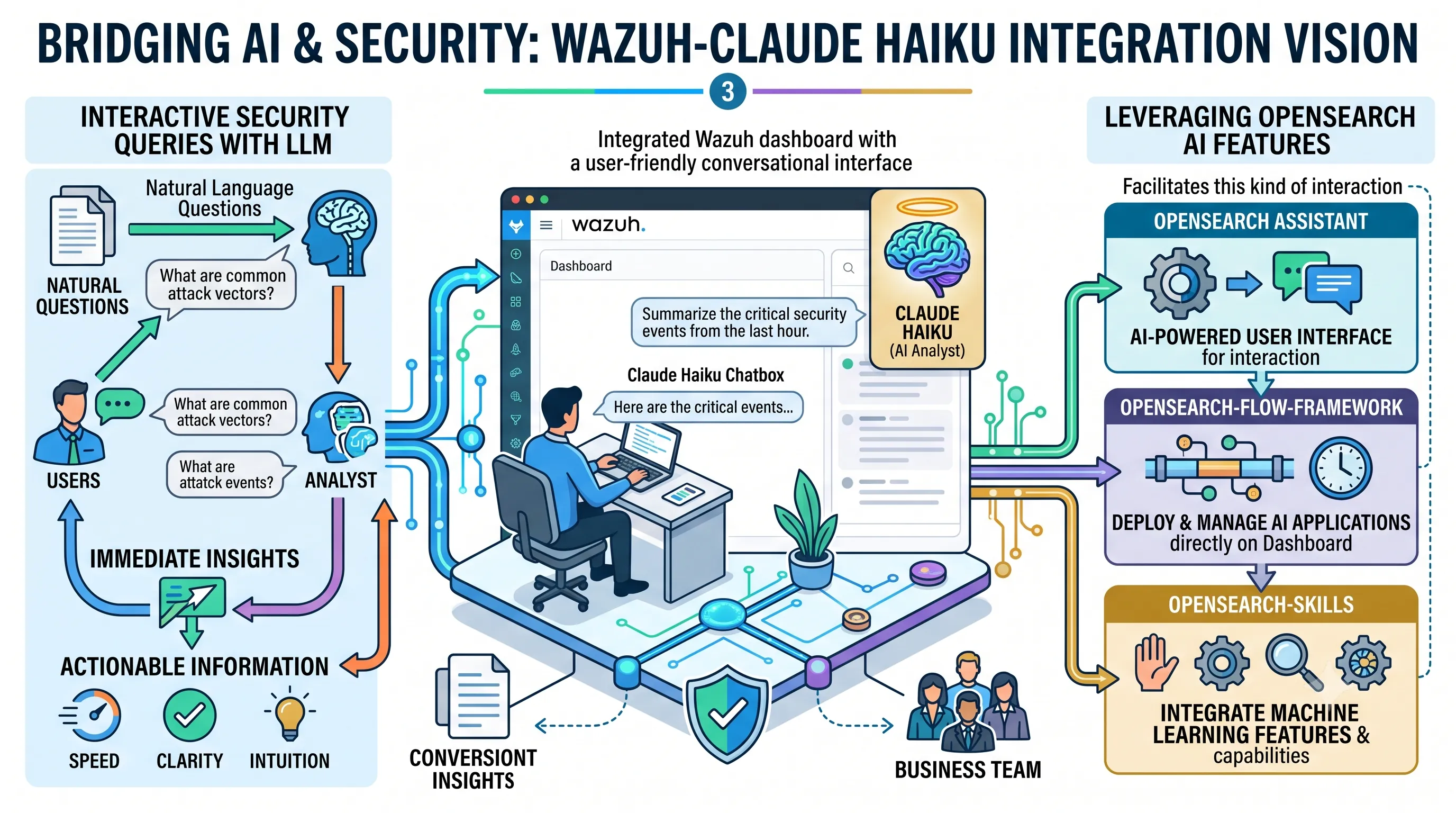
This section introduces the foundational concept of our AI control tower, envisioning how a powerful Large Language Model (LLM) like Claude Haiku can be embedded directly into the Wazuh security platform to create an interactive, intelligent assistant for the solo operator.Introducing the Claude Haiku Chatbox in Wazuh
The core of this vision is the integration of the Claude Haiku model as a chatbox feature directly within the Wazuh dashboard.Instead of a separate tool or browser window, this functionality embeds a conversational AI right into the security analyst's primary workspace.
This approach transforms the dashboard from a passive data visualization tool into an active, collaborative environment where the operator can directly engage with an AI analyst for immediate insights.
Interactive Security Queries with LLM
This integration provides a dedicated interface within the Wazuh dashboard specifically for user interaction.An operator can simply type security-related questions in natural language and query the Claude Haiku model for answers.
For example, instead of manually building complex search queries to investigate a specific alert, the user could ask, "What are the common attack vectors associated with this type of alert?" or "Summarize the critical security events from the last hour."
This method dramatically lowers the barrier to entry for deep security analysis, making it faster and more intuitive to get actionable information from the vast amount of data collected by Wazuh.
Leveraging OpenSearch AI Features
The technical foundation for this AI-powered experience is built upon the capabilities of OpenSearch, the data platform underlying Wazuh.Specifically, OpenSearch Assistant serves as the AI-powered user interface that facilitates this kind of interaction.
This assistant is not a standalone feature; it is enabled by a pair of powerful plugins.
The opensearch-flow-framework and opensearch-skills plugins are the key components that allow the use of AI applications and machine learning features directly on the Wazuh dashboard.
Together, these technologies create the pipeline necessary to connect the user's query in the dashboard to the analytical power of the external Claude Haiku model.
| Component | Role in the AI Integration |
|---|---|
| OpenSearch Assistant | Provides the core AI-powered user interface for interaction. |
| opensearch-flow-framework | Enables the deployment and management of AI applications within the dashboard. |
| opensearch-skills | Allows for the integration of specific machine learning features and capabilities. |
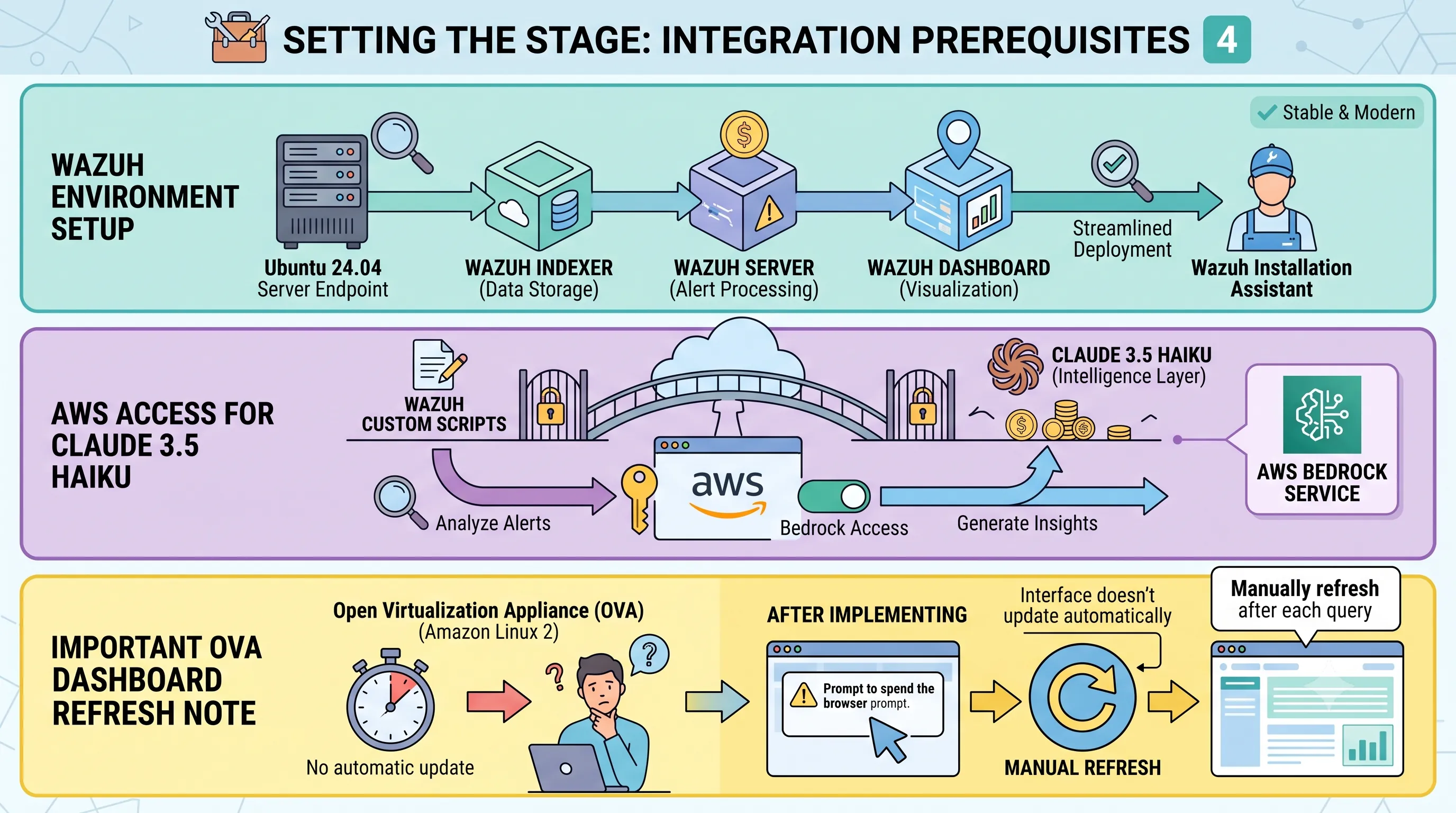
4. Setting the Stage: Prerequisites for Wazuh-Claude Haiku Integration
Before we can construct our AI-powered control tower, we must first lay a solid technical foundation.This section outlines the specific software, cloud services, and environmental configurations required to ensure a smooth integration between the Wazuh security platform and the Claude 3.5 Haiku language model.
Adhering to these prerequisites is the critical first step in transforming raw security alerts into actionable, AI-driven insights for the solo operator.
Wazuh Environment Setup
The demonstration environment for this integration is built upon a modern and stable Linux distribution.Specifically, a server endpoint running Ubuntu 24.04 is required.
On this host, the Wazuh central components must be installed.
This includes the Wazuh server for alert processing, the Wazuh indexer for data storage and retrieval, and the Wazuh dashboard for visualization and interaction.
To streamline this process for our solo operator focus, we recommend using the official Wazuh installation assistant, which handles the deployment of these interconnected services.
AWS Access for Claude 3.5 Haiku
The intelligence layer of our system relies on a powerful large language model accessible via the cloud.Consequently, a properly configured AWS environment is a mandatory prerequisite.
This environment must have the necessary permissions and service access to utilize Anthropic's Claude 3.5 Haiku model, typically through the Amazon Bedrock service.
Without this access, the custom scripts designed to analyze Wazuh alerts will be unable to communicate with the AI and generate insights.
Important Dashboard Refresh Note for OVA
A specific operational quirk must be noted for users deploying Wazuh via the official Open Virtualization Appliance (OVA).The Wazuh OVA is based on Amazon Linux 2, and in this particular environment, an issue with dynamic updates has been observed after implementing the integration.
Following each AI-driven query initiated from the dashboard, the interface does not automatically update to display the new analysis.
Therefore, it is necessary to manually refresh the Wazuh dashboard in your browser after each query to view the results from Claude Haiku.
5. AWS Essentials: Preparing Bedrock and IAM for Claude Haiku Access
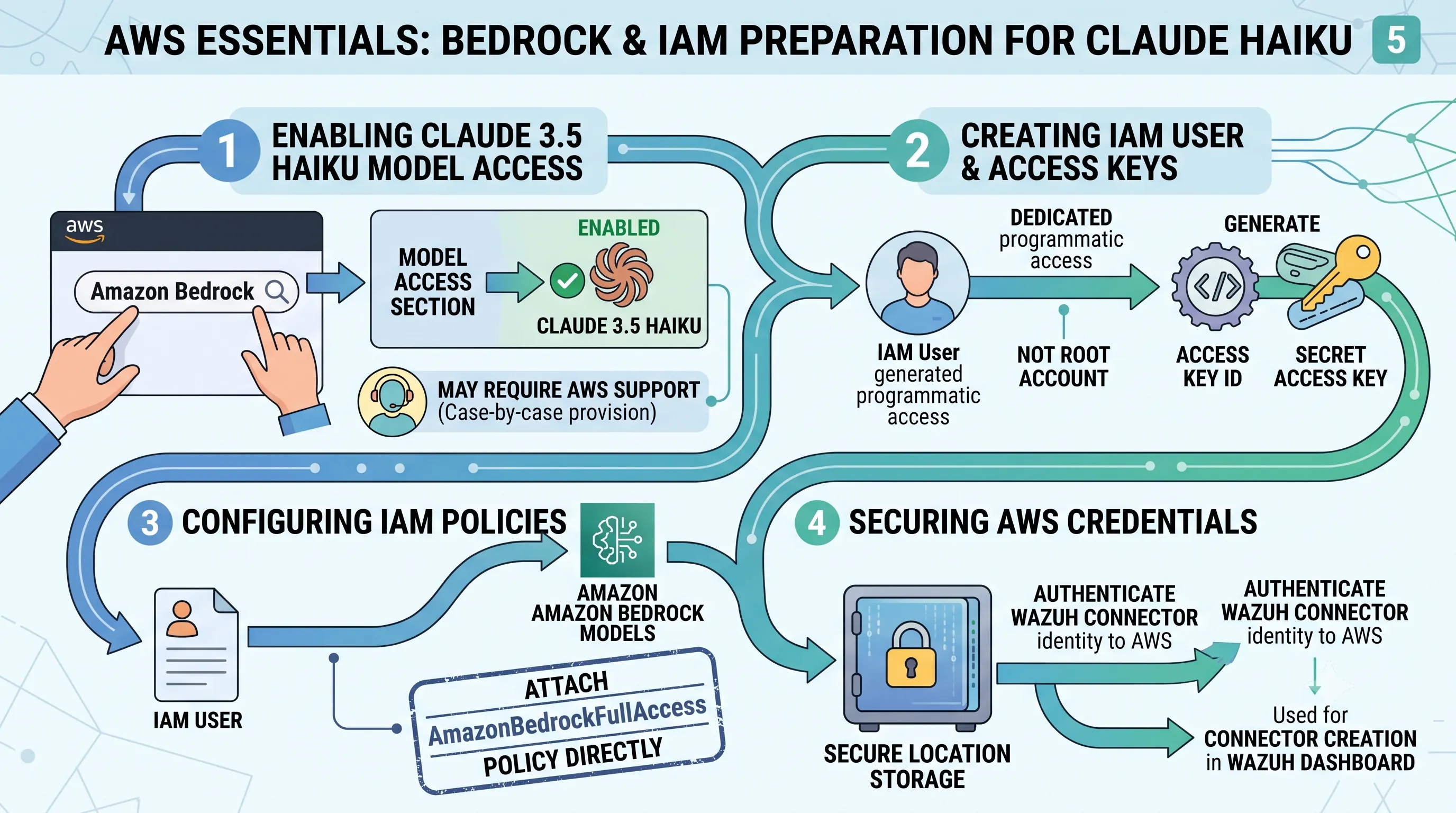
This section serves as the foundational step for the entire project.Before Wazuh can leverage the analytical power of Claude 3.5 Haiku, we must first establish a secure and permissioned communication channel through AWS.
The following procedures detail the configuration of Amazon Bedrock to enable the model and the setup of an IAM user with the precise policies needed for the Wazuh connector to access it.
Completing these AWS prerequisites is mandatory for the integration to function.
Enabling Claude 3.5 Haiku Model Access in Bedrock
The first step is to activate the specific large language model within your AWS account.You can begin this process by searching for "Amazon Bedrock" in the AWS console.
Once inside the Bedrock service, navigate to the "Model access" section to manage available models.
From here, you must explicitly enable the Claude 3.5 Haiku model to make it available for API calls.
It is important to note that, in some cases, enabling the Claude 3.5 Haiku model may not be instantaneous and could require you to contact AWS support to have it provisioned for your account.
Creating IAM Users and Access Keys
To ensure secure, programmatic access for the Wazuh integration, we will create a dedicated user with specific permissions rather than using root account credentials.In the AWS console, search for "IAM" and select "Users" to begin this process.
Proceed with creating a new IAM user designated for this purpose.
During the user creation workflow, you will be prompted to create access keys.
It is critical to generate and securely save the Access Key ID and the Secret Access Key, as they will be needed for the final connection.
Configuring Amazon Bedrock Policies
With a user created, you must now grant it the necessary permissions to interact with the Bedrock service.This is handled within the IAM service by configuring and attaching policies.
A policy must be established to explicitly allow access to Amazon Bedrock models and enable the IAM user to assume the necessary role for Bedrock operations.
For this integration, the `AmazonBedrockFullAccess` AWS-managed policy must be attached directly to the IAM user you created in the previous step.
This policy grants the permissions required to invoke models like Claude 3.5 Haiku.
Securing AWS Credentials
The final and most critical step in the AWS preparation is the proper handling of the credentials you generated.The saved access key and secret access key are the authentication tokens that prove your Wazuh connector's identity to AWS.
These credentials must be stored in a secure location.
They will be used later in the process for creating the connector to the Claude Haiku model directly from within the Wazuh dashboard, completing the link between your security monitoring platform and the AI analyst.
6. Wazuh Dashboard Server Setup: Integrating OpenSearch AI Plugins
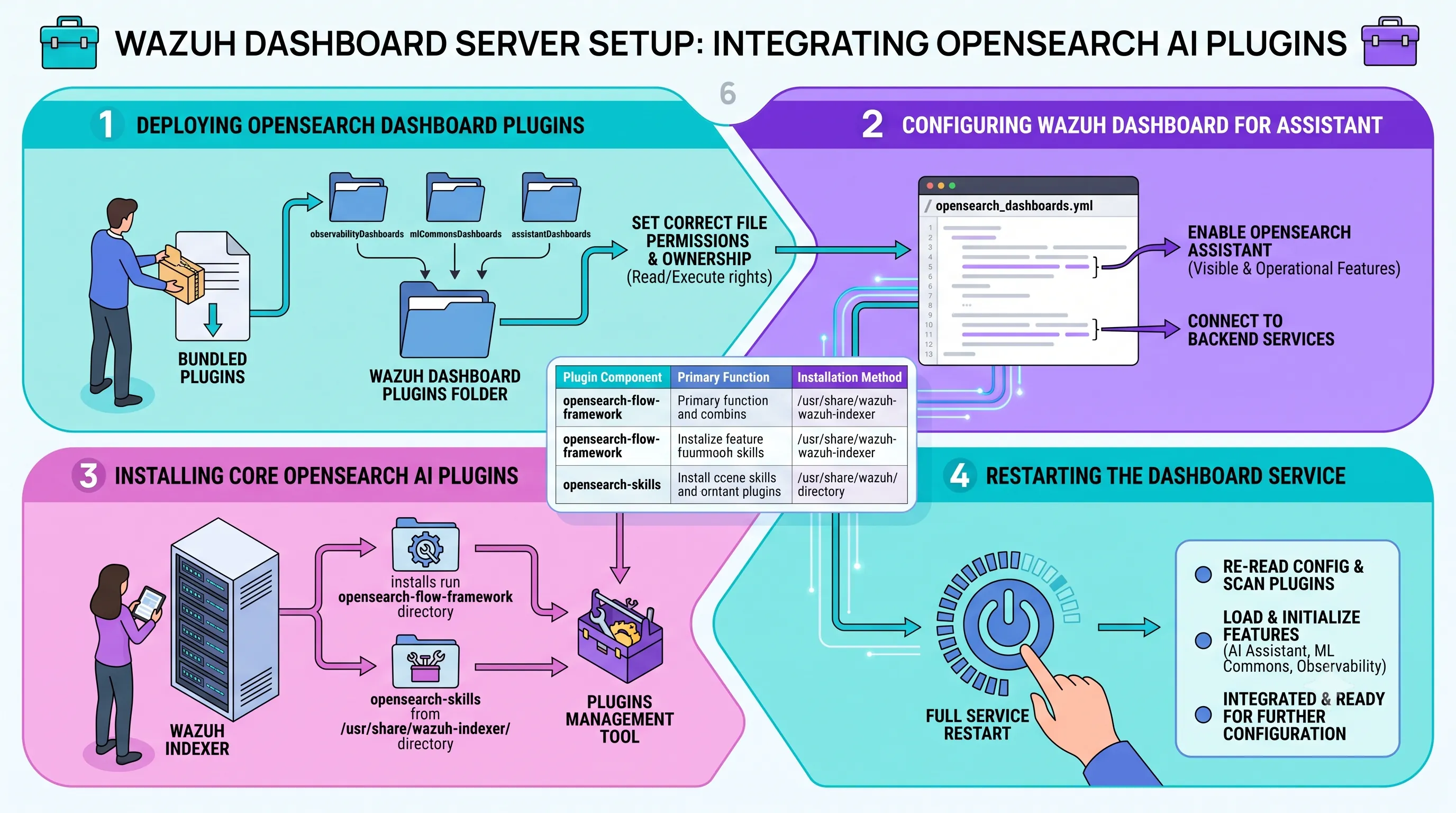
This section details the critical server-side preparations required to build our AI-powered control tower.By installing and configuring the necessary OpenSearch AI plugins directly within the Wazuh Dashboard environment, we lay the essential technical groundwork for the "AI Analyst" functionality.
Completing these steps is a mandatory prerequisite for transforming the standard Wazuh interface into an intelligent analysis platform.
Deploying OpenSearch Dashboard Plugins
The initial phase involves manually placing the user-facing AI components into the dashboard.The process begins with downloading the official OpenSearch Dashboard plugins file, which contains a bundle of extensions.
Once downloaded, this file must be decompressed to access the individual plugin folders within.
From the extracted contents, three specific plugin directories—observabilityDashboards, mlCommonsDashboards, and assistantDashboards—must be copied directly into the Wazuh dashboard's plugins folder.
Following the copy operation, it is crucial to set the correct file permissions and ownerships for these new plugin directories.
This ensures the Wazuh dashboard service user has the necessary rights to read and execute the plugin files, preventing access-denied errors during startup.
Configuring Wazuh Dashboard for Assistant
With the plugin files in place, the next step is to instruct the Wazuh Dashboard to activate them.This is accomplished by editing the primary configuration file located at /etc/wazuh-dashboard/opensearch_dashboards.yml.
Specific configuration settings must be appended to the end of this YAML file.
These additions formally enable the OpenSearch Assistant, making its features visible and operational within the dashboard's user interface and connecting it to the backend services.
| Plugin Component | Primary Function | Installation Method |
|---|---|---|
| observabilityDashboards | Provides foundational UI elements for observability. | Manual copy to Wazuh dashboard plugins folder. |
| mlCommonsDashboards | UI for interacting with machine learning models and features. | Manual copy to Wazuh dashboard plugins folder. |
| assistantDashboards | The user interface for the AI Assistant and chat functionality. | Manual copy to Wazuh dashboard plugins folder. |
| opensearch-flow-framework | Backend service for orchestrating complex AI workflows. | Installation from the /usr/share/wazuh-indexer/ directory. |
| opensearch-skills | Backend service for defining and managing AI capabilities (e.g., connecting to LLMs). | Installation from the /usr/share/wazuh-indexer/ directory. |
Installing Core OpenSearch AI Plugins
While the previous steps configured the user-facing dashboard, the backend AI engine resides within the Wazuh Indexer (based on OpenSearch).We must install the core plugins that provide the AI logic.
These plugins, specifically opensearch-flow-framework and opensearch-skills, are installed using the OpenSearch plugin management tools.
The source for this installation is a local directory, /usr/share/wazuh-indexer/, where the necessary plugin files are pre-packaged with the Wazuh Indexer installation.
These two components work together to create, manage, and execute the AI workflows that the dashboard assistant will leverage.
Restarting the Dashboard Service
The final and most straightforward step is to apply all the preceding changes.A full restart of the Wazuh dashboard service is required.
This action forces the service to re-read its configuration file and scan the plugins directory, thereby loading and initializing the newly added AI Assistant, ML Commons, and Observability features.
Once the service is back online, the AI capabilities will be integrated and ready for further configuration.
7. Activating AI: Configuring Claude Haiku Integration via Wazuh DevTools
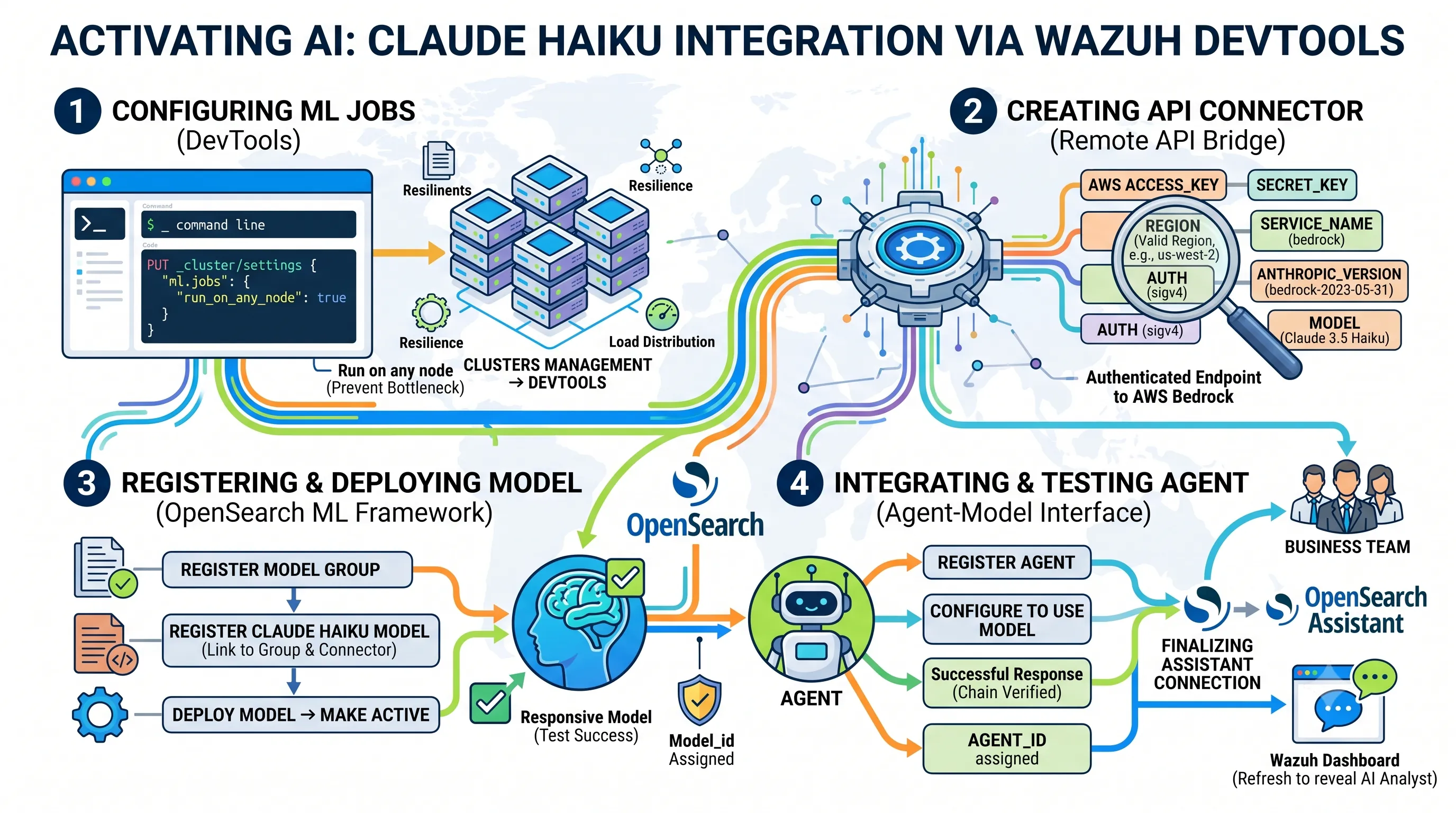
This section provides the core technical steps for integrating a powerful AI analyst directly into your Wazuh environment, forming the foundation of the AI Control Tower discussed in our main article.By leveraging the Wazuh Dashboard's DevTools, we will establish a direct connection to the Claude 3.5 Haiku Large Language Model (LLM) hosted on AWS, deploy it, and make it available for security analysis tasks.
Configuring ML Jobs in DevTools
The first preparatory step involves ensuring that the OpenSearch machine learning infrastructure is properly configured to handle the AI workload.Within the Wazuh dashboard, you must navigate to Indexer management > DevTools.
From here, a command is executed to set the machine learning jobs to run on any available node within the cluster.
This adjustment is critical for ensuring resilience and proper load distribution, preventing the AI analysis tasks from being bottlenecked on a single node.
Creating the Claude Haiku API Connector
With the cluster prepared, the next step is to create a secure bridge between your Wazuh instance and the Claude 3.5 Haiku model.This is achieved by creating a remote API connector, which acts as an authenticated endpoint for sending analysis requests to the AI.
This connector must be configured with precise parameters to successfully authenticate with the AWS Bedrock service hosting the model.
A critical operational note is that the specified AWS region must support the Claude 3.5 Haiku model; if your default region does not, it must be changed to one that does to proceed.
The required parameters for the API connector are detailed below:
| Parameter | Description |
|---|---|
| access_key | Your AWS IAM access key for authenticating API requests. |
| secret_key | The corresponding secret key for your AWS IAM access key. |
| region | The AWS region where the Claude 3.5 Haiku model is available and running. |
| service_name | The specific AWS service being accessed, typically 'bedrock' for this integration. |
| auth | The authentication mechanism being used, such as 'sigv4' for AWS services. |
| anthropic_version | The specific version of the Anthropic API schema to be used, e.g., 'bedrock-2023-05-31'. |
| model | The exact identifier for the model, which for this integration is Claude 3.5 Haiku. |
Registering and Deploying the AI Model
Once the connector is successfully created, you can register the AI model within OpenSearch's machine learning framework.The process begins by first registering a new model group, which serves as a logical container for your AI models.
Following the group's creation, you register the Claude 3.5 Haiku model itself, explicitly linking it to the new group using the model_group_id and to the AWS endpoint using the connector_id from the previous step.
After registration, the model is deployed, making it active and ready to receive requests.
You can perform an initial validation test by sending a request directly to the model using its newly assigned model_id to confirm it is responsive.
Integrating and Testing the AI Agent
With the model deployed, the next layer of abstraction is to create an "agent".This agent acts as a conversational interface to the underlying Claude 3.5 Haiku model, making it easier to interact with for analysis tasks.
An agent is registered and configured to use the newly deployed model as its engine.
Similar to the model test, you can verify the agent's functionality by sending a test request directly to it using its unique agent_id.
A successful response confirms that the entire chain, from agent to model to the AWS service, is working correctly.
Finalizing OpenSearch Assistant Connection
The final configuration step bridges the gap between the backend AI agent and the user-facing tools in the Wazuh dashboard.The newly created and tested agent must be formally connected to the OpenSearch Assistant feature.
This connection makes the agent's analytical capabilities accessible through the Assistant's chat and query interface, effectively embedding your AI analyst into the dashboard.
To complete the integration, the Wazuh dashboard must be refreshed.
This action ensures that all the backend changes are loaded into the user interface, revealing the newly available AI-powered assistant for immediate use in security operations.
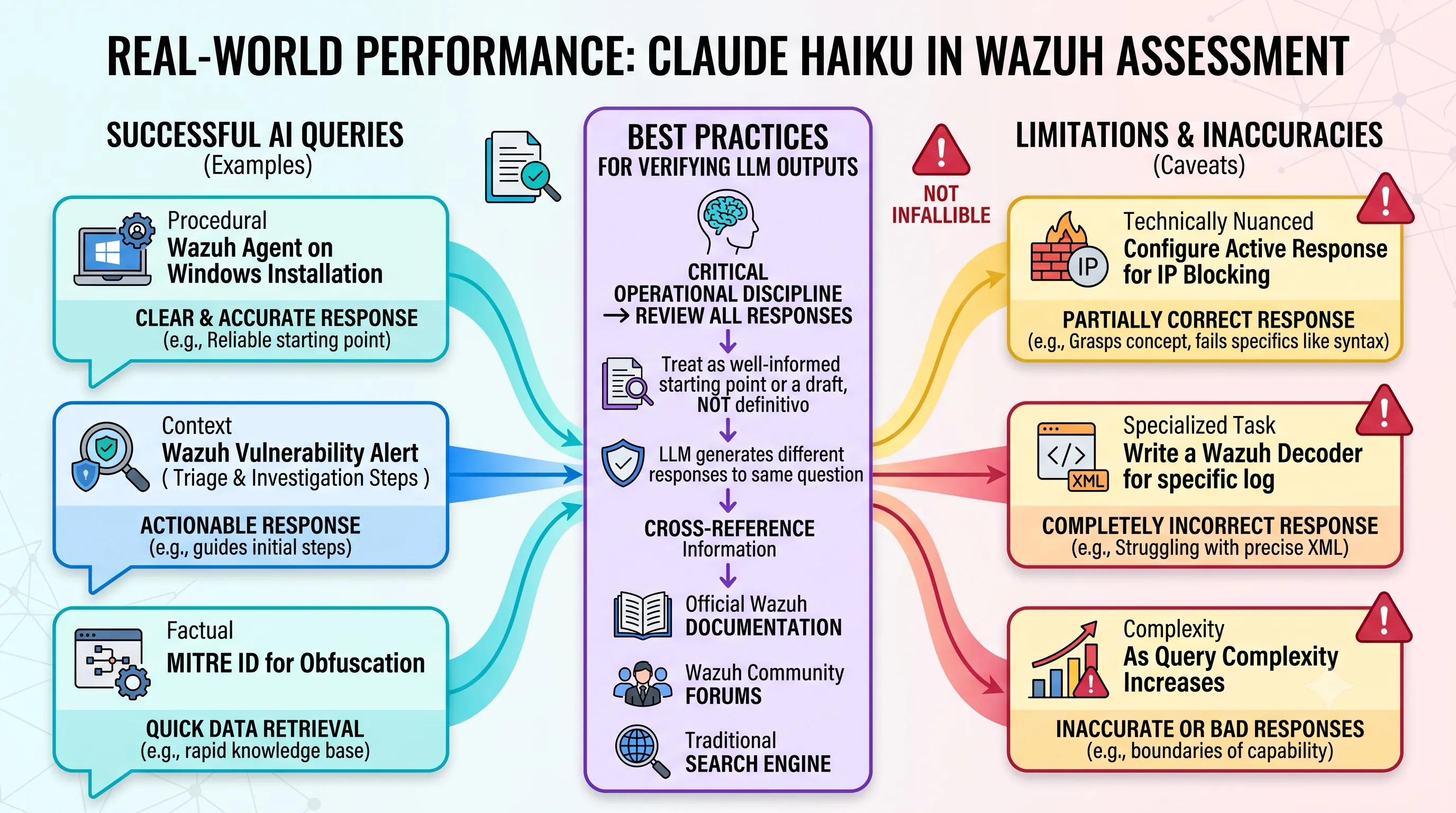
8. Real-World Performance: Assessing Claude Haiku's Utility and Caveats in Wazuh
This section provides a practical assessment of the AI Analyst's performance, directly evaluating the real-world effectiveness and limitations of the Claude 3.5 Haiku integration discussed throughout this guide.Examples of Successful AI Queries
In practice, the integrated Claude 3.5 Haiku model serves as a highly effective first-line assistant for a range of common operational queries.For instance, when tasked with procedural questions, its performance is strong.
It generated a clear and accurate response for the query, 'How do I install a Wazuh agent on a Windows endpoint?', providing a reliable starting point for a common administrative task.
The model also excels at providing context and recommended actions for security events.
When asked, 'What do I do when I see a Wazuh vulnerability alert?', the AI provided a good, actionable response that can guide an operator through the initial triage and investigation steps.
Furthermore, its ability to quickly retrieve specific, factual data points was demonstrated when it correctly answered, 'What is the MITRE ID for obfuscation?', proving its utility as a rapid knowledge base for security frameworks.
Addressing Limitations and Inaccuracies
While the AI assistant is useful, it is not infallible, and its limitations become apparent with more complex, technically nuanced requests.A key example of this is its handling of configuration tasks.
When prompted with, 'How can I configure the Wazuh active response module to block an IP address after multiple failed SSH authentication attempts?', the LLM generated only a partially correct response.
It might grasp the general concept but fail on specific syntax or file paths, which could lead to misconfigurations if not carefully validated.
The model's limitations are even more pronounced when dealing with highly specialized tasks.
For example, a request to write a Wazuh decoder for a specific log sample resulted in a completely incorrect response.
This highlights a critical boundary; the AI struggles with generating the precise, structured XML required for custom decoders, a task that demands deep, domain-specific knowledge of Wazuh's inner workings.
These examples underscore that the LLM can, and sometimes does, provide inaccurate or simply bad responses, especially as query complexity increases.
Best Practices for Verifying LLM Outputs
Given the potential for inaccuracies, it is a critical operational discipline that all responses generated by the Claude 3.5 Haiku LLM must be reviewed before being acted upon.Operators should treat the AI's output as a well-informed starting point or a draft, not as a definitive, production-ready command or configuration.
It is also important to note that the LLM can generate different responses to the exact same question, meaning a useful answer one moment might be followed by a less accurate one later.
To mitigate these risks, users should always cross-reference the information provided by the AI.
For any Wazuh-related questions, the recommended best practice is to verify LLM responses by consulting the official Wazuh documentation, asking for input in the Wazuh community forums, or using a traditional search engine to find established solutions and expert guidance.
This multi-layered verification process ensures that the speed and convenience of the AI do not come at the cost of security and stability.
Related Posts

Model Context Protocol (MCP): Anthropic's Open Standard for AI Integration, Claude's Capabilities, & Data EthicsExplore Anthropic's Model Context Protocol (MCP), an open standard revolutionizing AI integration,...

Analysis of Illicit Industrial-Scale Model Distillation and Chain-of-Thought Extraction CampaignsA technical report on illicit industrial-scale distillation campaigns targeting Claude, detailing...

A Guide to Building Sovereign AI Infrastructure with Mistral Self-Hosted StacksLearn how to build sovereign, air-gapped AI infrastructure using Mistral's self-hosted enterprise...